Cloud native models using containerized software in a continuous delivery approach could benefit from serverless computing where the cloud vendor generates the exact amount of resources required to run a workload on the fly. While the major cloud vendors have recognized this and are already creating products to abstract away the infrastructure, it may not work for every situation in spite of the benefits.
Cloud native put simply involves using containerized applications and Kubernetes to deliver software in small packages called microservices. This enables developers to build and deliver software faster and more efficiently in a continuous delivery model. In the cloud native world, you should be able to develop code once and run it anywhere, on prem or any public cloud, or at least that is the ideal.
Serverless is actually a bit of a misnomer. There are servers underlying the model, but instead of dedicated virtual machines, the cloud vendor delivers exactly the right number of resources to run a particular workload for the right amount of time and no more.
Nothing is perfect
Such an arrangement would seem to be perfectly suited to a continuous delivery model, and while vendors have recognized the beauty of such an approach, as one engineer pointed out, there is never a free lunch in processes that are this complex, and it won’t be a perfect solution for every situation.
Arpana Sinha, director of product management at Google says the Kubernetes community has really embraced the serveless idea, but she says that it is limited in its current implementation, delivered in the form of functions with products like AWS Lambda, Google Cloud Functions and Azure Functions.
“Actually, I think the functions concept is a limited concept. It is unfortunate that that is the only thing that people associate with serverless,” she said.
She says that Google has tried to be more expansive in its definition “It’s basically a concept for developers where you are able to seamlessly go from writing code to deployment and the infrastructure takes care of all of the rest, making sure your code is deployed in the appropriate way across the appropriate, most resilient parts of the infrastructure, scaling it as your app needs additional resources, scaling it down as your traffic goes down, and charging you only for what you’re consuming,” she explained
But Matt Whittington, senior engineer on the Kubernetes Team at Atlassian says, while it sounds good in theory, in practice fully automated infrastructure could be unrealistic in some instances. “Serverless could be promising for certain workloads because it really allows developers to focus on the code, but it’s not a perfect solution. There is still some underlying tuning.”
He says you may not be able to leave it completely up to the vendor unless there is a way to specify the requirements for each container such as instructing them you need a minimum container load time, a certain container kill time or perhaps you need to deliver it a specific location. He says in reality it won’t be fully automated, at least while developers fiddle with the settings to make sure they are getting the resources they need without over-provisioning and paying for more than they need.
Vendors bringing solutions
The vendors are putting in their two cents trying to create tools that bring this ideal together. For instance, Google announced a service called Google Cloud Run at Google Cloud Next last month. It’s based on the open source Knative project, and in essence combines the goodness of serverless for developers running containers. Other similar services include AWS Fargate and Azure Container Instances, both of which are attempting to bring together these two technologies in a similar package.
In fact, Gabe Monroy, partner program manager at Microsoft, says Azure Container Instances is designed to solve this problem without being dependent on a functions-driven programming approach. “What Azure Container Instances does is it allows you to run containers directly on the Azure compute fabric, no virtual machines, hypervisor isolated, pay-per-second billing. We call it serverless containers,” he said.
While serverless and containers might seem like a good fit, as Monroy points there isn’t a one size fits all approach to cloud native technologies, whatever the approach may be. Some people will continue to use a function-driven serverless approach like AWS Lambda or Azure Functions and others will shift to containers and look for other ways to bring these technologies together. Whatever happens, as developer needs change, it is clear the open source community and vendors will respond with tools to help them. Bringing serverless and containers is together is just one example of that.
Are you thinking about building your first PC, but you’re not sure where to start? Or are you worried about whether you’ll choose the right components to create a balanced and functional build?
In that case, using the website PC Part Picker can help. The site gives you tons of information about PC components so you can make the right choices for your first build.
Why PC Component Compatibility Matters and How to Check It
It used to be the case that you’d have to do a lot of research to find out which parts were compatible. Even then, you’d sometimes buy several components only to find that they didn’t all fit in the case you’d chosen.
Fortunately it’s now easy to check part compatibility before you buy any hardware. Sites like PC Part Picker allow you to add your chosen hardware to a list and will warn you if there are any incompatibilities.
How to Check Part Compatibility Using PC Part Picker
To check part compatibility of the hardware you’re thinking of purchasing, go to the PC Part Picker website. Then select System Builder from the menu at the top. Here you’ll see a list of components like CPU, Motherboard, and Memory.
To add a component, for example a CPU, hit the blue button which says Choose a CPU. Add all of the different components you are thinking about buying for your build.
Now look at the colored bar under the link for your build. If everything is compatible, the bar will be green and labelled “Compatibility: see notes below.” The notes will advise you if there are any compatibility issues that can’t be checked (for example, some coolers only fit into cases with particular configurations). But generally, if the bar is green then you are good to go.
If there are compatibility issues, such as the motherboard not supporting the processor you’ve chosen, the compatibility bar will be red and will say “Compatibility: Warning! These parts have potential issues or incompatibilities”. If you click on details you can see exactly which parts are incompatible.
How to Budget the Cost of Your Selected Components
As anyone who has a built a PC knows, the costs of all the different components can quickly add up. As well as the basic components like CPU, motherboard, RAM, power supply, graphics card, and storage, there are other costs to consider.
Perhaps you want an after-market cooler, or maybe you’d like an expensive case to show off your build. You also need to remember to budget for extras like fans, case lighting, or a sound card. Not to mention the cost of shipping if you’re buying your components online. All these little costs can add up.
That’s why it’s useful to keep a running total of the budget for your build. As a rough guide, spending less than $1,000 total would be considered a budget build. Spending $1,000 to $2,000 would be mid-range. And spending more than $2,000 would be a high-end build.
To check your budget on PC Part Picker, scroll to the bottom of the System Builder page. There you’ll see a total cost, with a base total for just the cost of the components you have selected so far, along with additions for shipping and subtractions for rebates.
How to Select the Components You Need
If you’re not sure exactly which components to choose, then PC Part Picker can help you with this too. If you go to Browse Products, you can select component types such as Power Supply. Then you can see a list of available power supplies.
This list shows you key information like features, price, and form factor. There’s also a Compatibility Filter option which will show you only parts which are compatible with the components you’ve already selected.
Most useful of all, you can see the prices for components from different online retailers. Click on the name of a component and you can see how much it costs at different websites, as well as a graph showing how much it has cost historically. You can also check reviews on this page to see if other people were satisfied with their purchase.
How to Check the Total Wattage of Your Build
Another useful feature of the site is that it will tell you the total power requirements of your system. Many people end up buying power supplies with a much higher wattage than they need because they overestimate their power requirements.
When you’ve put a build together on the site, at the top of the page it will show you your estimated wattage for the system in a blue box. You can use that information to choose an appropriate power supply.
Considerations When Choosing a Power Supply
Remember that you don’t want to underpower your system, so do give yourself some wiggle room in your wattage when choosing a power supply.
Also, just because you don’t need high wattage doesn’t mean you should buy the cheapest power supply you can find. The power supply is an important component and can damage other components if it goes wrong, so buy one which is reliable and from a reputable brand, even if it is low wattage.
If you’re new to building PCs, it’s a good idea to get feedback or advice on your component selection before spending a lot of money. Once you’ve selected your components you can share your build with friends or on forums to get advice from experienced PC builders.
To share your build, you can use the link at the top of the System Builder page. In the light yellow box, next to the link icon, you’ll find a link in a form like http://bit.ly/2WiS4iF.
You can copy this link and send it to other people to let them view your build and send you feedback.
PC Part Picker Makes Building Your First PC Easy
Using a site like PC Part Picker can help you build your own PC for a better price by getting you good deals and making sure you don’t buy any incompatible parts.
The popular video game genres, such as platformers and shooters, are self-explanatory. But there are lots of video game genres that aren’t so well-known.
In this article we look at some of the more niche video game genres, explaining what they are and recommending the best games in each genre.
1. Visual Novel
The visual novel genre blurs the line between literature and video game. These works of interactive fiction are text-heavy and don’t feature much action at all. Typically, they’re played from a first-person perspective, and present you with a deep story and memorable characters.
Unlike many video games, the “gameplay” elements in a visual novel are pretty minimal. Most of the time, your interaction with the game is limited to advancing through text boxes, making dialog choices, and occasionally solving light puzzles. This genre focuses more on building an interesting world than revolutionary gameplay. Often, your choices in conversations have direct effects on the story.
Visual novels are wildly popular in Japan, so anime-style art is common in these games. They’ve recently become more popular outside of Japan thanks to a few key series, many of which you can enjoy right now.
A fantastic visual novel to get you started is the Ace Attorney series. In it, you play as Phoenix Wright and other lawyers who must defend their unjustly accused clients. Beyond that, we’ve looked at some other visual novels you should play, such as the Zero Escape series.
2. 4X
4X refers to a type of strategy game where you have four goals: to explore, expand, exploit, and exterminate. Unlike some of the relatively simple gameplay offered by other genres on this list, 4X games are incredibly deep and often take a long time to play.
In a 4X title, you oversee an empire and must manage important aspects like battles with neighboring kingdoms, claiming new territories, and controlling resources. If you like complex gameplay, you’ll love what 4X games have to offer. You’ll have to take into account the cultural and political consequences of your choices—what happens if your government doesn’t like that you declare war on your neighboring region?
The classic example of a 4X title is the Civilization series. If you’re looking for something a bit more accessible, try these 4X strategy games for Android.
3. Walking Simulator
While “walking simulator” is sometimes used as a derogatory term, it’s generally accepted as the name for a particular genre of adventure title. It refers to a narrative game that has few elements of gameplay aside from walking around and interacting with objects.
Typically, walking simulators drop you into a world and let you discover details about it through audio logs, documents, and similar items that you find. Because there’s no combat and minimal puzzle solving, the story is the focus.
You’ll like walking simulators if you enjoy the mystery of discovering a story through in-game data instead of cutscenes. Do walking simulators count as video games? It depends on how interactive you feel games should be, but many people enjoy them regardless.
If you want to give a walking simulator a try, The Stanley Parable is a fun example of this genre, as it’s quite meta. Firewatch is another popular walking simulator, where you play as a fire lookout in a forest.
4. Metroidvania
The term “Metroidvania” is a combination of two game series: Metroid and Castlevania. Since 1997’s Castlevania: Symphony of the Night, both series have featured similar gameplay styles, giving birth to this genre.
A Metroidvania game features a large, complex map that you can’t access all from the start. Instead, you must explore and find upgrades that provide access to new areas. While new abilities let you access more of the map, they also serve as buffs for combat.
Many Metroidvania games feature epic boss battles, which often protect the upgrades. You can also find secret rooms that provide even more optional goodies. Thanks to the non-linear world design, there’s often backtracking to earlier areas to discover new paths you couldn’t reach earlier.
Most Metroidvania games are 2D, though not all are. While both series are of course a great place to experience the genre, Metroidvania is also a popular genre for modern indie titles. Hollow Knight is a great example because it doesn’t hold your hand while exploring. For something less intense, Ori and the Blind Forest serves as an excellent introduction to the genre.
5. MOBA
MOBA stands for “multiplayer online battle arena.” It’s a combination of real-time strategy and action where two teams compete in a small arena, each trying to destroy the other’s base. Most MOBA maps feature three “lanes” that allow teams to travel between bases.
In a MOBA, each player typically selects one hero for the whole match. These heroes are broken up into classes based on their purpose, while each one also has various unique skills. During the course of a match in a MOBA, players defeat computer-controlled weak characters known as “creeps” to gain experience and make their characters more powerful.
Two well-known MOBAs are League of Legends and Dota 2 (Defense of the Ancients). Both are free-to-play and feature tons of characters to try out. Read our introduction to League of Legends to help you get started.
6. Clicker/Idle Game
A clicker game (also known as an idle or incremental game) refers to a title where the gameplay is limited to extremely basic interactions, such as clicking on the screen. Typically, you earn points each time you click. As you continue clicking, the game provides upgrades that let you earn more points more quickly.
After some time, these upgrades will begin to rack up points for you, even if you’re not actively “playing” them. This is where the “idle” term comes from. Many of them have no ending, though they include milestones you can work to achieve.
Cookie Clicker is one of the best-known free games you can win by clicking. Each click earns you a cookie, and you can eventually purchases factories and grandmas to bake even more cookies. AdVenture Capitalist is another clicker game where you start with a lemonade stand and work to earn as much money as possible.
7. Roguelike
This subgenre of RPGs gets its name from the classic 1980 computer game Rogue. One of its hallmarks is dungeon-crawling through procedurally generated areas, meaning the game is different every time you play. In addition, they feature permadeath, a mechanic which completely resets your progress once you die. “True” roguelikes also use tile-based movement and prioritize resource management.
Classic roguelikes are turn-based, but not all modern instances of the genre follow this rule. One close example is Darkest Dungeon, which is a procedurally generated turn-based RPG where character management is essential.
A subdivision of this genre is the roguelite. This terms refers to games that have some aspects of a roguelike, but lack others. One well-known and accessible roguelite is The Binding of Isaac. It features permadeath, but you can earn some upgrades that persist through playthroughs. The game is also not turn-based.
8. Tower Defense
Another subdivision of the strategy genre, tower defense games focus on you protecting a base or territory. Typically in these types of games, you strategically place defenses and obstructions, and must survive waves of incoming enemies.
As you’d expect from the name, what sets these apart from other real-time strategy games is that you’re always on the defensive. If the enemy destroys your base, you lose.
Plants vs. Zombies is an example of a fairly casual tower defense game. Kingdom Rush is another popular title in the genre.
What Video Game Genre Will You Play Next?
We’ve taken a look at many video game genres you might not know much about. Perhaps you’ve previously heard the names, but didn’t know what each genre entailed. Now that you do, you should play each one to expand your gaming horizons.
The only way to beat laziness is with guilt, and so that’s what Future sells. It assigns you an actual human trainer who builds personalized workout plans and message you throughout the day to make sure you’re doing them. It even gives you an Apple Watch to track your activity and ensure you’re not lying. Future actually got me to the gym where my coach kicked my ass remotely with a 30 minute lifting routine I’d never have stuck to by myself.
The catch? It’s probably the most expensive app you’ve ever seen, charging $150 per month.
Future officially launches today, touting some stunning stats from its beta tests. 95% of users stuck with it for 3 months, and 85% kept training for 6 months. Luckily it comes with a 1-month money-back guarantee that CEO Rishi Mandal says has only been redeemed once.
The remarkable retention and Future’s potential to become a gateway for your fitness and nutrition spending have roped in some big name investors. Today it’s announcing an $8.5 million Series A led by Kleiner Perkins, building on its $3 million seed. Other backers include Instagram co-founder Mike Krieger, Khosla Ventures, Founders Fund, and Caffeinated Capital. Athletes are betting on Future’s promise of democratizing the personal training they get, including Golden State Warrior Sean Livingston, and NFL stars Ndamukong Suh and Kelvin Beachum.
“Future manages to be both deeply personalized (and personable!) while being super convenient” says Krieger of one of his first investments since leaving Instagram. Future’s Mandal previously built local experience app Sosh while sitting next to Krieger at incubator Dogpatch Labs where Instagram got its start. “The always available nature of it means travel or a shifting schedule is no longer an excuse to not work out.”
How Future Works (Out)
Throughout the onboarding, Future flexes the money you spend to give what feels like a luxury app experience.
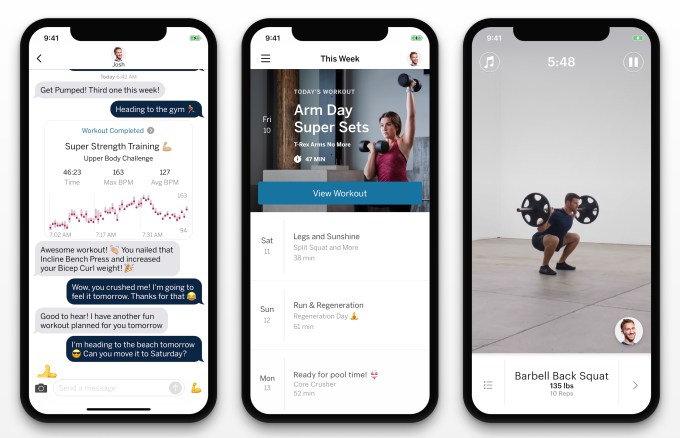
Upon signup, you’ll answer some questions about your goals like slimming down or beefing up, and pick from a few expert trainers who specialize in your needs. You’ll do a 15-minute video chat with your trainer to get friendly, describe your schedule, and hammer out details of your workout plan. After you get your welcome kit with some swag and an Apple Watch, your trainer delivers your week’s worth of personalized daily routines that come with video instructions for each exercise. The Future app provides audio cues to guide you through the workout while your trainer chimes in with personalized pointers and motivation via pre-recorded voice clips.
But what’s unique about Future is that your trainer proactively checks in with you throughout your day to make sure you’re actually getting to the gym or doing those pushups. Since you don’t switch between trainers with each workout like some apps, and since they have your activity and heart rate data from the Apple Watch, they can spot patterns of procrastination or flaking out. And you’re prompted to give feedback after each sweat session that the trainer uses to tweak your plan. That personalization and prodding go a long way to making sure Future always fits your day and actually stays part of it.
For example, I wanted to burn a few pounds without burning too much time by adding a gym day or two plus some warmup strength training before my home Peloton rides. My trainer Renee, a former University Of Wisconsin Director of Sports Performance for basketball, designed a 30-minute weight lifting circuit and some 10-minute bodyweight exercise plans for me. When I messaged her that I was doing an a more intense spin class today, she remixed my warmup exercises to avoid legs so I wouldn’t be tired during my ride. So far she’s always responded within a few minutes, and been cheerful yet forceful “I know your days are slammed, just wanted to check in and see if you were able to get to that spin class?” she messaged me at 6:30pm. That’s something even most in-person trainers don’t do.
The constant communication and sense of trust users develop with their coaches could give Future potential beyond subscription fitness. The app becomes a hub for your healthy behavior. Future already offers an in-app Shop where it recommends workout clothes, headphones, and water bottles. It’s easy to imagine it partnering with fitness equipment makers, health food lines, or other brands to score a cut of referred sales.
Still, the biggest hurdle is convincing people to pay over 10X their Netflix fee for a personal trainer they don’t see in person. Compared to the $1 apps we’re used to, Future can induce sticker shock. But compared to unused gym memberships, pricey private coaching, and potential health problems, Future could look affordable if well-to-do professionals squint right. And if it works. Humans are sluggish. Most heathy habits lapse. But Future is building the closest thing to “press button, pay money, get fitter” — which in the end looks like getting someone to enthusiastically shame us from afar.
Valve has launched a dedicated Steam Chat app for mobile. Available on Android and iOS, the Steam Chat app brings most of the features from the desktop client to your smartphone. Allowing you to chat anywhere and everywhere.
In July 2018, Valve updated Steam and upgraded Steam Chat in the process. This was an attempt to compete with Discord, the dedicated chat app beloved by gamers. The new Steam Chat boasted a number of new features, and now it even has its own mobile app.
The Key Features of the Steam Chat App
The Steam Chat app was unveiled on the Steam Blog. The company calls it “a modernized Steam chat experience available for free on iOS and Android platforms.” With the tagline of “Take your Steam friends, groups, and conversations with you wherever you go.”
The new Steam Chat mobile app looks exactly as you would expect. Which should make it feel familiar to anyone used to using Steam Chat on the desktop client. It also means you can carry on chatting to people across platforms, whether they’re on desktop or mobile.
The key features making the move across from Steam Chat on the desktop client include:
Friends List – Allowing you to see who’s in game or online at a glance.
Rich Chat – High fidelity links, videos, tweets, GIFs, emoticons, and more.
Invite Links – Allowing you to add new friends on Steam with a link.
Customizable Notifications – Meaning you’ll never miss a message or invite again.
Group Chats – Making it easier to stay in touch with your communities.
Valve is keen to hear your opinion of the Steam Chat app. It’s also already working on improvements, including voice chat. And because Steam Chat now has its own dedicated app, the main Steam Mobile app is set to get significant upgrades in the future.
The Steam Chat for mobile app is a solid entry into a crowded market. However, it isn’t doing anything particularly different. People who already use Steam Chat on the desktop client will lap it up, but we can’t see people abandoning other chat apps for it.
Steam Chat comes hot on the heels of the Steam Link app which lets you play PC games on your iPhone or iPad. While Steam Link has been available on Android since May 2018, it took Valve another 12 months to convince Apple to approve the app.
The Tor Project has released Tor Browser 8.5. And this is the first stable release for Android. In a nutshell this means you can now download the Tor Browser from Google Play and start browsing the internet anonymously. Or visit the deep and dark web.
Tor Browser 8.5 brings with it several improvements and bug fixes. But the headline here is that Tor Browser 8.5 is the first stable release for Android. Which means you can download the Tor Browser for Android from Google Play as well as from The Tor Project.
The Tor Browser for Android isn’t perfect. There are a list of bugs and missing features The Tor Project is working to overcome. However, Tor Browser 8.5 is considered the first stable release, which means it’s ready to be used by the general public.
We've got big news.
After months of work, Tor Browser is now stable on Android.
The Tor Project launched Tor Browser for Android in alpha in September 2018. At the time the organization listed its ability to “block trackers,” “defend against surveillance,” “resist fingerprinting,” offer “multi-layered encryption,” and enable users to “browse freely”.
In case you’re wondering, no, there’s no official Tor Browser for iOS, and no plans to release one. The Tor Project claims this is “due to restrictions by Apple”. However, it recommends iOS users keen to browse anonymously use the Onion Browser instead.
It’s important to remember that while using Tor makes it more difficult for authorities to track you, it doesn’t guarantee you anonymity and security. Tor also doesn’t change the legality of certain behaviors, so breaking the law is still breaking the law.
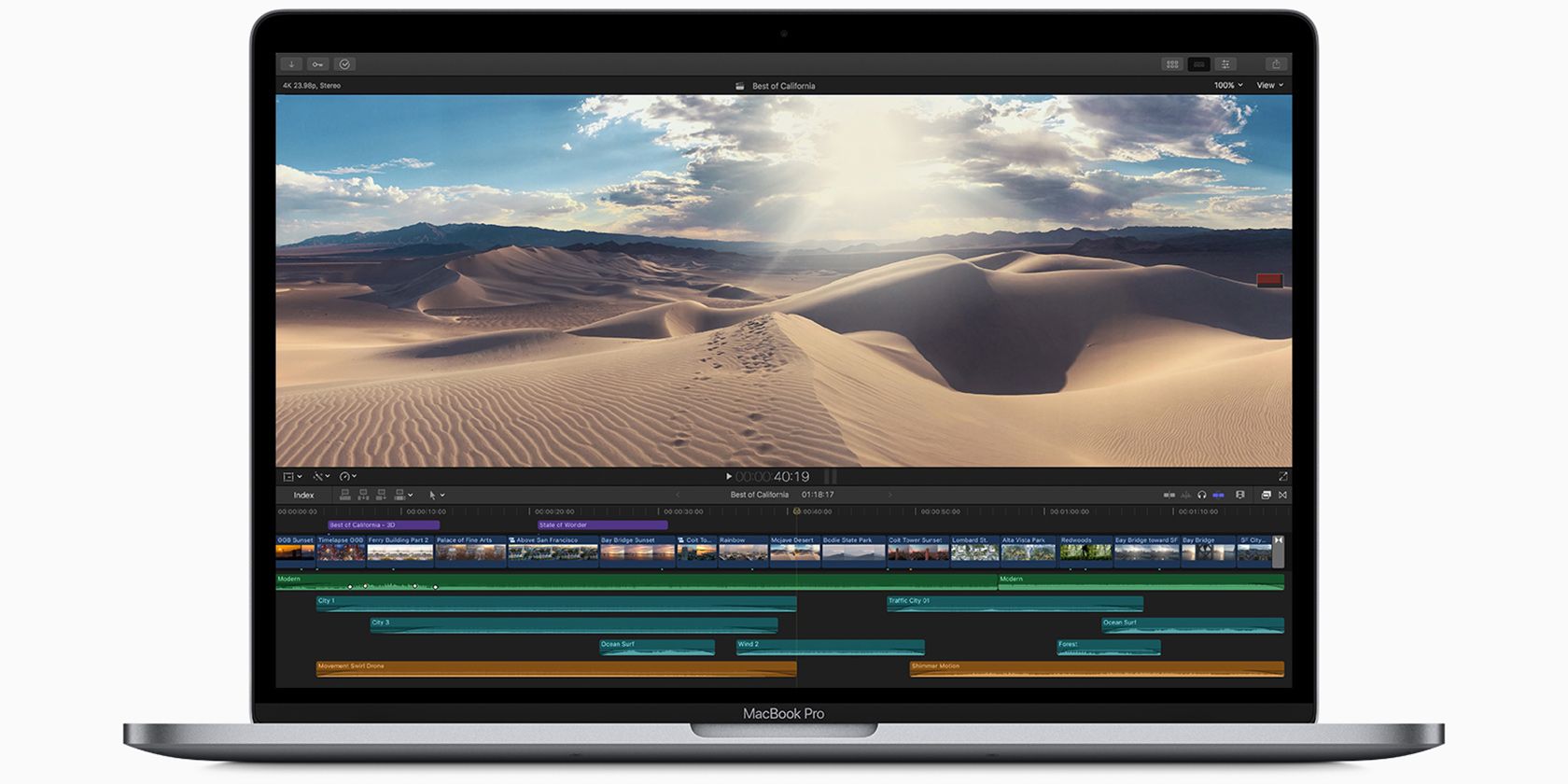
Apple has decided to forego all the pomp and circumstance of the upcoming WWDC event to announce a refresh to its MacBook Pro models. The company has made some pretty compelling changes to the devices that could help convince anyone who’s been on the fence about purchasing Apple’s higher-end laptop.
New MacBook Pro Upgrades
The first major update to the MacBook Pro comes to the processor. The 13-inch MacBook Pro with Touch Bar is getting a new quad-core processor with Turbo Boost speeds up to 4.7GHz. The larger (and more expensive) 15-inch models get six and eight-core processors with Turbo Boost speeds up to 5.0GHz. Apple says that compared to the fastest quad-core processor, the new eight-core model is up to twice as fast.
Interestingly, Apple also made some changes to the keyboard on the MacBook Pro. Apple told The Wall Street Journal that it changed the material used in the keyboard mechanism. Apparently, it’ll help with the double keyboard presses that some users were reporting.
The 13-inch starts with 8BG RAM and a 256GB SSD for storage. For the 15-inch, both the six-core and eight-core model features 16GB RAM, but the eight-core model comes with a 512GB SSD, while the six-core variant features a 256GB SSD.
New MacBook Pro Availability
Both the 13 and 15-inch MacBook Pro models are available now. The 13-inch model goes for $1,799. For the 15-inch, the six-core model sells for $2,399 and the eight-core model goes for $2,799. Interested buyers can snag either one from anywhere Macs are normally sold.
Apple Expands Keyboard Warranty
Additionally, Apple announced some changes to the warranty offered on its laptop keyboards. The company announced that all laptops with butterfly keyboards are eligible for the new repair program, including the new 2019 models.
Apple has a full list of models covered on its support website with a detailed breakdown of what is covered and what isn’t. Basically, anyone with an eligible device can get their keyboard repaired free of charge as long as it’s having buttons repeat unexpectedly, letters or characters not appearing, or keys feeling sticky.
You can Like and Dislike videos on YouTube. However, people use the Dislike button in a number of different ways. Oftentimes it’s not a commentary on the content itself, but issues surrounding it.
Regardless, if a video has a high number of dislikes it’s a good indication that the public shares a common view on it. Here are the most disliked YouTube videos of all time.
The Most Disliked Video on YouTube
YouTube Rewind 2018: Everyone Controls Rewind, by YouTube | 16.5 million Dislikes
It’s ironic that the most-disliked video on YouTube is by YouTube itself. The platform makes its own end-of-the-year wrap-up video, talking about the high and low points of the year as well as the biggest trends. The 2018 version quickly racked up a lot of Dislikes, to the point where we asked, why does everyone hate YouTube Rewind 2018?
The video was criticized because it showed how disconnected YouTube has become from its creators and fans. It ignored prominent YouTubers like PewDiePie (and his rivalry with T-Series), didn’t pay homage to celebrity deaths like Stephen Hawking, and was generally out of touch with reality.
Earlier in 2018, YouTube had also faced heavy backlash from its creator community after changing its monetization rules, which excluded several small creators. When the YouTube Rewind 2018 video ignored that as well, the community naturally protested in the format they know best.
The reaction had a rollback effect too, as angry fans went and disliked the previous year’s video. Now YouTube Rewind 2017 is also among the most disliked videos of all time.
The Most Hated Music Video of All Time
Baby, by Justin Bieber | 10.6 million Dislikes
Justin Bieber was one of the first big talents to be discovered through YouTube, landing a record deal after a producer saw a video of him singing. Who would have thought that he would one day have the notoriety of being responsible for the most hated YouTube music video of all time, for his song Baby.
Love him or loathe him, Bieber has legions of “Beliebers” across the world, but the internet loves to hate Justin Bieber, with reasons ranging from his celebrity meltdowns to a perceived lack of talent. With Baby, it’s almost like YouTube rallied together to target this one video and show their distaste for him. Despite his fans’ best efforts, the haters have won. Baby has over 1.3 billion (yes, billion) views, and the Dislikes outnumber the Likes by over 2 million.
Justin Bieber also features several more times in the list of the most disliked YouTube videos of all time. Which leads us to label him the most disliked YouTube star of all time.
YouTube Giveth and YouTube Taketh Away
It’s Everyday Bro, by Jake Paul feat. Team 10 | 4.3 million Dislikes
At first glance, it’s flabbergasting why this little video has so many Dislikes. But if you deep-dive into the YouTube community and its inner workings, it slowly becomes clear.
Before the video went live, Jake Paul, a prominent YouTube personality, was already getting a lot of negative reactions due to certain videos by him and his brother, Logan. The video has Paul rapping about his success, while commenting about other YouTubers and his ex-girlfriend.
The community saw it unnecessarily antagonistic, and made their opinion known with the Dislike button. The video isn’t really worth watching, but the comments are a treasure trove of creative insults.
Dislikes Don’t Actually Matter, and Here’s Proof
Can This Video Get 1 million Dislikes?, by PewDiePie | 4 million Dislikes
YouTube megastar PewDiePie actually created a video to court Dislikes rather than Likes. His reasoning? Apparently, after talking to Google, he realized that the Like and Dislike buttons has no substantial effect on the revenue generated.
So he made a video to prove his point. And it’s an atrocious video, with highlights including PewDiePie simulating a phone call with Google, drinking vodka and trying to drown his friend, riding a stuffed octopus in the streets while shirtless, and other shenanigans.
Save yourself the trouble of watching this. He made his point, you don’t need to know more.
It was so successful that another popular YouTuber, Ricegum, created a similar video titled “How Many Dislikes Can This Video Get?” He made it to 1.4 million Dislikes.
Don’t Mess With Gamers
The Call of Duty: Infinite Warfare Reveal Trailer | 2.6 million Dislikes
The Call of Duty (CoD) franchise is one of the greatest video game franchises of all time, but it seems like developer Activision needs to reconnect with its fans. The trailer for Call of Duty: Infinite Warfare did not go down well with gamers who relentlessly hammered the Dislike button to make it the second most disliked video ever.
Why do fans hate it so much? Activision CEO Eric Hirshberg said that gamers aren’t happy with the direction CoD is going in, as it takes a futuristic war scenario by sending soldiers into battles in space or using drones, which takes the player away from the gritty realism that the franchise was once loved for.
Psy and the Love-Hate Relationship
Gangnam Style, by Psy | 1.5 million Dislikes
Korean pop star Psy went viral in 2012 with the music video for Gangnam Style, complete with its iconic dance. And the internet has a weird love-hate relationship with him. Gangnam Style is one of the most disliked video on YouTube, but also sits at the top of the lists of most liked videos and most watched videos on YouTube. Seriously, it literally broke YouTube, with the result being that engineers had to upgrade the number of views allowed for a video.
So why does it have such a high number of Dislikes? It’s hard to say. But as we discovered when we looked at the most annoying music videos on YouTube, a surprising number of people genuinely despise Gangnam Style. Maybe it’s the silly dance, maybe it’s the over-the-top production, or maybe it’s just because the song is not sung in English (for the most part).
What Comes Before Saturday?
Friday, by Rebecca Black | 2.1 million Dislikes
You knew you couldn’t escape this one, right? Rebecca Black shot to fame for all the wrong reasons, as her song Friday became a viral hit, and one of the most hated videos on YouTube.
Black was apparently hurt by the Dislikes and nasty comments, but refused to take the video down since it would be playing into the hands of the haters. The rapidly rising view count and subsequent ad dollars must have helped ease her pain.
OK, so Friday uses autotune and the lyrics are bad and the video looks amateurish, but you know what the most annoying part is? It’s a weirdly catchy tune that gets stuck in your head.
Eventually, everyone moved on and Black released another single called My Moment. And it “only” got 735k thumbs-downs, which was a marked improvement.
Kids vs. Parents
Baby Shark Dance, by Pinkfong | 2.5 million Dislikes
Baby Shark is an old children’s folk song about a family of sharks, which has been adapted several times. Korean kids educational channel Pinkfong turned it into a music video, complete with a Baby Shark “dance” and an animation.
The song went viral and kids across the world wanted to do the Baby Shark dance. They requested, nay demanded, that the video be played over and over, as they danced again and again. And irked parents at the end of their patience hit that Dislike button for unleashing this monster.
Baby Shark Dance also courted some other controversies, as the lyrics were deemed to be sexist and reinforce patriarchy. Pinkfong was also taken to court by a musician who claimed a children-friendly version of the song was originally his idea. And while those topics will rack up the Dislike count, the most clicks still come from frustrated parents who never want to hear it again.
Men and Mentality
We Believe: The Best Men Can Be, by Gillette | 1.5 million Dislikes
Gillette, primarily a men’s shaving brand, made a commercial to address negative behaviors among some men, such as bullying, sexism, toxic masculinity, and sexual misconduct. But the internet pushed back, labelling the video as misandrist and virtue signalling.
The reaction wasn’t entirely unexpected, as YouTube has a history of pushing against such videos by large corporations. Some people even went as far as calling the video the result of radical feminism.
Some commenters were more nuanced in their reasons to dislike the video, stating it was the holier-than-thou stand that Gillette takes in the ad.
Stop The Music!
Wrecking Ball, by Miley Cyrus | 1.2 million Dislikes
In the history of music videos, popularity doesn’t always mean quality. This is clearly evident with the most disliked list, as the majority are music videos. Leaving aside Justin Bieber, Psy, and Rebecca Black—all of whom are YouTube sensations first and pop stars second.
Among the established musicians, Miley Cyrus tops the list with Wrecking Ball, which was also her “coming of age” video. It was quite risque and a move away from her wholesome image up to that point, so it’s no surprise that the Dislikes flowed in.
Other notable music videos that are high in the list are Luis Fonsi’s Despacito (4.1 million Dislikes), Jacob Sartorius’s Sweatshirt (2.1 million Dislikes), Miley Cyrus’s We Can’t Stop (1.3 million Dislikes), Nicki Minaj’s Anaconda (1.5 million Dislikes), Lil Pump’s Gucci Gang (1.4 million Dislikes), and Taylor Swift’s Look What You Made Me Do (1.2 million Dislikes).
Forget the Haters
Watching the most disliked videos on YouTube seems like a good way to waste some time and laugh at people, but wouldn’t you rather be spending time watching something you enjoy?
Perhaps, instead of looking for hate, we should all focus on the things that make us feel good. The internet has enough negativity already, and a dose of positivity is always better. So, with that in mind consider checking out these classic YouTube videos worth watching again.
The solid-state drive that came in your MacBook is a double-edged sword. SSDs make computers incredibly fast. But because flash storage is expensive, most MacBooks still ship with a tiny 128 GB SSD by default. And upgrading to a bigger SSD costs hundreds of dollars.
If you’re stuck with with limited storage space, you’ll need to be proactive. Take a look at these steps you can take (and later automate) to free up valuable storage space on your Mac. This way, your Mac won’t throw up the scary Your disk is almost full banner next time you’re downloading a big file.
1. Empty the Trash
Did you know that macOS doesn’t automatically delete items from the Trash? There’s a chance that you’ve got a few gigabytes of data just sitting in it.
On your Dock, right-click on the Trash icon and select Empty Trash. Once the data is deleted, you won’t be able to access it again (though there are specialized apps for recovering data on Mac).
2. Uninstall Apps You Don’t Use
If you’re the kind of person who reads technology websites, you might like trying new Mac apps just to see what they’re about. But it’s easy to forget to delete them when you’re done testing.
Start by taking stock of what’s on your machine. You’ll need to download an app called AppCleaner (yes, it’s ironic that you need to download an app for this, but trust me, it’s worth it). AppCleaner is the best way to uninstall apps on Mac because it automatically deletes all junk files related to the app.
Open AppCleaner, browse through the list, click on an app you don’t need, and press the Remove button.
If you’re on macOS Sierra and higher, you’ll be glad to know that macOS has a built-in storage management feature (which we’ll refer to multiple times in this guide).
Click on the Apple icon from the menu bar, select About This Mac, and go to the Storage section. From here, click on Manage.
You’ll see a couple of options. The first action you should take is to turn on the feature that automatically empties the Trash after 30 days.
Next, click on the Applications button. You’ll see a list of all apps, sorted by how much space they take up. Select one or multiple apps you want to uninstall and click on Delete.
The app and app data will be sent to the Trash. Empty the Trash, and you’ve just gained a significant chunk of space back.
3. Find and Delete Large Files
From the same Storage Management window, click on the Documents option from the sidebar. Here you’ll see a list of all your files, sorted from biggest to smallest.
The best way to reclaim a big chunk of storage space is to remove a couple of huge files. Weeding through hundreds of small files takes a lot longer. Take a look at the files at the top of the list and see if you can live without them. To delete a file, click on it and press the Delete button.
If you have space in your Dropbox or Google Drive account, you can move the file to your cloud storage to free up local storage.
Once the big files are out of the way, it’s time to drill down. A 1.5GB folder filled with photos you no longer need takes up just as much space as a 1.5GB video, but is much harder to find.
macOS makes this easier. On top of the Documents view, you’ll see two more options for sorting through files: Downloads and File Browser.
The Downloads section gives you a breakdown of files and folders that are older than three months, six months, or one year. So you can go through files that you haven’t accessed in a long time, and decide if you want to get rid of them.
The File Browser section is basically a Finder view in the storage management tool. You can browse through your entire file storage system and find files or folders that you want to delete.
4. Delete iTunes Files and iOS Backups
If you back up your iPhone or iPad to your Mac, the backups could take up gigabytes of storage space. In the Storage Management window, click on the iOS Files section. Once you’re sure you want to delete your iOS device backup, click on it and press the Delete button.
In a similar fashion, you can delete data from the iTunes app from the iTunes section. Movies, TV shows, and audiobooks will show up here.
5. Take a Look at Cloud Storage Apps
If you’re using the Dropbox or Google Drive app to sync your Mac files to the cloud, take a look at what exactly is stored on the cloud, and what’s on your Mac. By default, the cloud syncing services have a tendency to download all data to your Mac.
If you’re using Dropbox, switch to the Selective Sync feature. It lets you choose which folders to download onto your Mac’s drive.
Go to Preferences > Sync and click on the Choose Folders to Sync button. Go through this list and remove any folders that you don’t absolutely need. Remember, you can always access your Dropbox data from the website or mobile app.
6. Optimize Storage in the Photos App
If you pay for a 50GB or 200GB iCloud Drive tier, considering using the Optimize Storage feature for the Photos app.
Optimize Storage feature in Photos works exactly as it does on iPhone. Instead of keeping your entire iCloud Photo Library on the device, it will only keep the most recent photos, along with low-resolution thumbnails of older photos.
When needed, your computer will download photos from iCloud. This little feature can help reduce your Photos library from tens of gigabytes to just a couple.
Open the Photos app, go to Preferences > iCloud > iCloud Photos, and select the Optimize Storage option to turn it on.
7. Store Desktop and Documents in iCloud
The Store in iCloud feature automatically backs up all the data from your Desktop and Documents folders, and only stores the most recent files locally. When needed, you can download the old files with the press of a button.
While this feature is neat, it’s not the most reliable option. If your important work files are stored in your Documents folder, we would recommend you don’t use this feature. But for most users, enabling this feature can free up a good amount of storage space.
To enable it, open the Storage Management screen, and click on Store in iCloud button from the Recommendations section.
8. Automate Using CleanMyMac X and Gemini 2
The manual cleanup method is effective (I was able to delete more than 30GB using the steps outlined above), but doing it repeatedly becomes time-consuming. And if you’re a Mac power user, you may need to do so every month.
Thankfully, certain apps can help simplify some of these steps and automate Mac maintenance. CleanMyMac X is an all-in-one utility that helps you delete cache files, temporary files, and applications. It has an intelligent file browser that will help you get rid of old and unused files as well.
CleanMyMac X’s sister app, Gemini 2, specializes in finding duplicates. There’s a fair chance that you have two copies of the same photos (or three similar-looking photos), documents, or videos. Gemini 2 finds duplicate files on your Mac and helps you get rid of them. Both apps are available as part of the Setapp subscription service.
Download: CleanMyMac X ($35 per year | $90 one-time purchase) Download: Gemini 2 ($20 per year | $45 one-time purchase)
Make Everyday Life on Your Mac Easier
Now that you’ve freed up some storage space, you can start using your Mac to get work done. Follow these steps once in a while, and you shouldn’t have to worry about low disk space any more.
There are more little changes you can make to improve your everyday experience of using a Mac. Find out how to put the Dock on the right edge, use Stacks to organize your desktop, and start using Spaces for a more organized desktop space.
Tired of your smartphone games, and don’t want to take the Switch with you on the train today? Panic, renowned creator of useful Mac apps and more recently publisher of interesting games, has created a tiny handheld console that goes anywhere and receives a regular trickle of new games. It’s called Playdate.
One has to admire the gumption of jumping into a space that has been so thoroughly dominated by Nintendo and smartphones over the last decade that hardly anyone has even attempted to break in. But Panic isn’t trying to build an empire — just do something interesting and new.
“Nothing’s surprising anymore and surprises are great!” reads the Playdate’s FAQ. “Panic saw an opportunity for something truly different in the world of video games. Something small-scale that could deliver a dose of fun and delight to video game players who have otherwise seen it all.”
It’s different, all right. Bright yellow with a black and white screen and with no spot for removable media like cartridges, the Playdate is more or less self-contained, except of course for the charger and wireless connection. And it’s over the wireless connection that the games come: 12 of them, exclusives created by well-known developers like Keita Takahashi (Katamari Damacy), Bennett Foddy (Getting Over It), and Zach Gage (Ridiculous Fishing).
They appear one at a time, weekly; the first title is Crankin’s Time Travel Adventure, from Takahashi. Oh, right — did I mention it has a crank?
Yes, the gadget has the usual d-pad and two buttons, but on the side is a little crank that you’ll be using in all these weird little games. In the first one, for instance, you use it to advance and reverse time. Perhaps you’ll be reeling in fish, charging a flashlight, grinding stones for crafting, or any number of other tasks. It’s not necessary for every game, though, so don’t worry if it seems too weird. (The crank was the inspired choice of Teenage Engineering, Panic’s hardware design partner.)
In case you didn’t notice, the games are also black and white. The 2.7-inch, 400×240 screen has no backlight, but it isn’t e-paper but rather just an LCD without color filters. I’ve been saying we should do this for years! It should make for improved battery life and change the way you play a bit — in bed by the light of a lamp instead of on the couch looking at a bright screen.
“We thought Playdate needed to be a different experience than the one you get from your phone, or from a TV-based console,” said Panic’s Director of Special Projects, Greg Maletic, in an email. “This bizarre 1-bit reflective screen was a big part of that: you just won’t see a lot of devices go this route, and for us, that was part of the attraction. And it’s worked out really well: developers have felt energized designing for this weird but cool screen.”
When the 12 titles have all been delivered, there’s the possibility that more will come, but that depends on lots of things, the company said. But they were careful to make the platform easily hackable.
“Most hardware platforms nowadays have tight restrictions, so it was important to us that Playdate be open enough to allow experimentation,” said Maletic. “That’s the kind of platform that we, as developers, were personally craving. So we’ve made sure that people will be able to develop their own games and easily share them with their friends, without having to worry about plagues of mobile development like code signing and provisioning profiles.”
You’ll be able to preorder a Playdate for $149 later in the year. Yeah, it isn’t cheap — but it’s weird and fun and for now one of a kind. That has to count for something in the increasingly genericized world of gaming hardware.
When Google launched Duplex with a demo at I/O last year, the audience was left wondering how much of the call was staged. The AI-based reservation booking service seemed almost too impressive to be a machine. Now that it’s been used for real-world reservations, Google has revealed that it frequently isn’t.
The company recently told The New York Times that Duplex calls are often still made by human operators at call centers. Roughly a quarter of calls start with a live human voice. Of the calls that start with machines, 15 percent require a human to intervene.
Google told us during a demo last year that humans would be monitoring the system, ready to take over if something went haywire. That’s to be expected, of course. This sort of real world testing run into some snags as the company works to iron out the kinks, now that the product is available for both iOS and Android devices. But the 25 percent initiated by people seems a little high for the advanced AI-based system.
Along with initial test driving, Google is very much in a period of data collection for the service. While Duplex is extremely impressive in fits and starts (I’ve tried it, and it’s capable of fooling the listener for a quick reservation, if all goes well), the neural network requires a tremendous amount of data to improve, even though its essentially limited to a single task
Like many of you, I’m assuming, my desk was purchased at Ikea and is the center of my life. Such as it is, the desk is littered with bits of crackers, memory cards, branded Moleskin notebooks and countless coffee cups. I’m not a slob. I just live here. The desk is clean enough.
Then Dyson sent me its new task light to try out. My desk suddenly felt dirty. After assembling the light, I looked around and took inventory of my life and choices. If I was going to have something as lovely as this on my desk, I would have to have a cleaner space. I cleaned up my desk.
The Dyson Lightcycle is, well, a light. It makes the room brighter. And because it’s made by Dyson, it’s over-engineered and expensive. The Lightcycle is $600 and I’m not going to attempt to justify it’s price. I can’t. This is a product that costs countless times over its utility.
First the good.
The light works. Hit a button on the top and it turns on. Slide your finger across the top and the light’s brightness and color temperature changes.
The light is constructed with an insane attention to detail. It’s perfectly balanced. As the light slides up and down its main poll, a counterweight ensures an effortless motion. Likewise the light arm slides back and forth on three large wheels. All awhile, its seemingly wireless with all the connections and wires hidden throughout the mechanisms.
The Dyson Task light is beautiful. It’s impossible to look at the light and not be impressed by the construction. The function of the design is perfect for my desk. I placed it in the center of my workspace and the long arms allows it to reach where ever it’s needed.
The light works great and thanks to adjustable color temperatures, works in every situation. There are two touch-sensitive bars on top of the unit. Just slide a fingertip across the bars to make the light brighter or change the color temp. Dyson took the light temperatures option to the next level. The owner can connect the lamp to a smartphone app through Bluetooth, and when the light is connected, it will sync the color temp to the idea setting to match the owner’s location on Earth. It’s a clever function and is said to have a host of mental and physical benefits.
According to Dyson, this lamp’s LED unit is good for 60 years thanks to a heat pipe system. It’s said to pull the excess heat generated by the LED away from the unit, ensuring it lasts as long as possible.
And now the bad.
This lamp costs $600. That’s a hard sell. There are countless minimalist task lamps on the market. None have all the features found on the Dyson Lightcycle but one could argue that a person doesn’t need all of the features.
I found the light produced by the Lightcycle adequate. The intensity is adjustable and there’s even a supercharged mode that turns the intensity up to 11 — but that’s only accessible through the smartphone companion app. To me, when you need extra light, you need it immediately and not after the 30 seconds needed to use an app.
The Lightcycle’s main selling point is the automatic adjustable color temperature. It’s a lovely feature and my eyes feel after using this lamp. Just to be clear, there are a lot of products on the market for much less than the Lightcycle that can replicate the ideal color temperature. Get one. They’re a great gadget to have around in the winter months.
Bottom line
I can’t recommend a person spends $600 on a light. That said, the Dyson Lightcycle is a lovely object, should last a lifetime, and works as advertised.
Bars lose 20 percent of their alcohol to overpours and “free” drinks for friends. That amounts to $50 billion per year in booze that mysteriously disappears, making life tough for every pub and restaurant. Nectar wants to solve that mystery with its ultrasound depth sensing bottle caps that measure how much liquid is left in a bottle by measuring how long it takes a sonar pulse to bounce back. And now it’s bringing real-time pour tracking to beer with its gyroscopic taps. The result is that bar managers can find out who’s pouring too much or giving away drink, which promotions are working, when to reorder bottles without keeping too much stock on hand, and avoid wasting hours weighing or eyeballing the liquor level of their inventory.
Nectar’s solution to alcohol shrinkage has now attracted a $10 million Series A led by DragonCapital.vc and joined by former Campari chairman Gerry Ruvo who will join the board. “Not a lot of technology has come to the bottle” Nectar CEO Aayush Phumbhra says of ill-equipped bars and restaurants. “Liquor is their highest margin and highest cost item. If you don’t manage it efficiently, you go out of business.” Other solutions can look ugly to customers, forcibly restrict bartenders, or take time and money to install and maintain. In contrast, Phunumbhra tells me “I care about solving deep problems by building a solution that doesn’t change behavior.”
Investors were eager to back the CEO, since he previously co-founded text book rental giant Chegg — another startup disrupting an aged market with tech. “I come from a pretty entrepreneurial family. No one in my family has ever worked for anyone else before” Phunumbhra says with a laugh. He saw an opportunity in the stunning revelation that the half-trillion dollar on-premises alcohol business was plagued by missing booze and inconsistent ways to track it.
Typically at the end of a week or month, a bar manager will have staff painstakingly look at each bottle, try to guess what percent remains, and mark it on a clipboard to be loaded into a spreadsheet later. While a little quicker, that’s very subjective and in-accurate More advanced systems see every bottled weighed to see exactly how much is left. If they’re lucky, the scale connects to a computer, but they still have to punch in what brand of booze they’re sizing up. But the process can take many hours, which amounts to costly labor and infrequent data. None of these methods eliminate the manual measurement process or give real-time pour info.
So with $6 million in funding, Nectar launched in 2017 with its sonar bottle caps that look and operate like old-school pourers. When bars order them, they come pre-synced and labeled for certain bottle shapes like Petron or Jack Daniels. Their Bluetooth batteries last a year and connect wirelessly to a base hub in the bar. With each pour, the sonar pulse determines how much is in the bottle and subtracts it from the previous measurement to record how much was doled out. And the startup’s new gyroscopic beer system is calibrated to deduce pour volume from the angle and time the tap is depressed without the need for a sensor to be installed (and repaired) inside the beer hose.
Bar managers can keep any eye on everything throughout the night with desktop, iOS, and Android apps. They could instantly tell if a martini special is working based on how much gin across brands is being poured, ask bartenders to slow their pours if they’re creeping upwards in volume, or give the green light to strong pours on weeknights to reward regular customers. “Some bars encourage overpours to get people to keep coming back” says local San Francisco celebrity bartender Broke-Ass Stuart, who tells me pre-measured pourers can save owners money but cost servers tips.
Nectar now sells self-serve subscriptions to its hardware and software, with a 20 cap package costing $99 per month billed annually with free yearly replacements. It’s also got a free 2 tap trial package, or a $399 per month enterprise subscription for 100 taps. Nectar is designed to complement bar point of sale systems. And if a bar just wants the software, Nectar just launched its PrecisionAudit app where staff tap the current liquid level on a photo of each different bottle for more accurate eyeballing. It’s giving a discount rate of $29.99 per month on the first 1000 orders.
After 2 million pours measured, the business is growing 200 percent quarter-over-quarter as bowling alley chains and stadiums sign up for pilots. The potential to change the booze business seduced investors like Tinder co-founders Sean Rad and Justin Mateen, Palantir co-founder Joe Lonsdale, and the founding family of the Modelo beer company. Next, Nectar is trying to invent a system for wine. That’s trickier since its taps would need to be able to suck the air out of the bottles each night.
The big challenge will be convincing bars to change after tracking inventory the same way for decades. No one wants to deal with technical difficulties in a jam-packed bar. That’s partly why Nectar’s subscription doesn’t force owners to buy its hardware up front.
fIf Nectar can nail not only the tech but the bartender experience, it could pave a smoother path to hospitality entrepreneurship. Alcohol shrinkage is one factor leading to the rapid demise of many bars and restaurants. Plus, it could liberate bartenders from measuring bottles into the wee hours. Phunumbhra “They’re coming in on weekends and working late. We want them to spend that time with their families and on customer service.”
Tech ethics can mean a lot of different things, but surely one of the most critical, unavoidable, and yet somehow still controversial propositions in the emerging field of ethics in technology is that tech should promote gender equality. But does it? And to the extent it does not, what (and who) needs to change?
In this second of a two-part interview “On The Internet of Women,” Harvard fellow and Logic magazine founder and editor Moira Weigel and I discuss the future of capitalism and its relationship to sex and tech; the place of ambivalence in feminist ethics; and Moira’s personal experiences with #MeToo.
Greg E.: There’s a relationship between technology and feminism, and technology and sexism for that matter. Then there’s a relationship between all of those things and capitalism. One of the underlying themes in your essay “The Internet of Women,” that I thought made it such a kind of, I’d call it a seminal essay, but that would be a silly term to use in this case…
Moira W.: I’ll take it.
Greg E.: One of the reasons I thought your essay should be required reading basic reading in tech ethics is that you argue we need to examine the degree to which sexism is a part of capitalism.
Moira W.: Yes.
Greg E.: Talk about that.
Moira W.: This is a big topic! Where to begin?
Capitalism, the social and economic system that emerged in Europe around the sixteenth century and that we still live under, has a profound relationship to histories of sexism and racism. It’s really important to recognize that sexism and racism themselves are historical phenomena.
They don’t exist in the same way in all places. They take on different forms at different times. I find that very hopeful to recognize, because it means they can change.
It’s really important not to get too pulled into the view that men have always hated women there will always be this war of the sexes that, best case scenario, gets temporarily resolved in the depressing truce of conventional heterosexuality. The conditions we live under are not the only possible conditions—they are not inevitable.
A fundamental Marxist insight is that capitalism necessarily involves exploitation. In order to grow, a company needs to pay people less for their work than that work is worth. Race and gender help make this process of exploitation seem natural.
Image via Getty Images / gremlin
Certain people are naturally inclined to do certain kinds of lower status and lower waged work, and why should anyone be paid much to do what comes naturally? And it just so happens that the kinds of work we value less are seen as more naturally “female.” This isn’t just about caring professions that have been coded female—nursing and teaching and so on, although it does include those.
In fact, the history of computer programming provides one of the best examples. In the early decades, when writing software was seen as rote work and lower status, it was mostly done by women. As Mar Hicks and other historians have shown, as the profession became more prestigious and more lucrative, women were very actively pushed out.
You even see this with specific coding languages. As more women learn, say, Javascript, it becomes seen as feminized—seen as less impressive or valuable than Python, a “softer” skill. This perception, that women have certain natural capacities that should be free or cheap, has a long history that overlaps with the history of capitalism. At some level, it is a byproduct of the rise of wage labor.
To a medieval farmer it would have made no sense to say that when his wife had their children who worked their farm, gave birth to them in labor, killed the chickens and cooked them, or did work around the house, that that wasn’t “work,” [but when he] took the chickens to the market to sell them, that was. Right?
A long line of feminist thinkers has drawn attention to this in different ways. One slogan from the 70s was, ‘whose work produces the worker?’ Women, but neither companies nor the state, who profit from this process, expect to pay for it.
Why am I saying all this? My point is: race and gender have been very useful historically for getting capitalism things for free—and for justifying that process. Of course, they’re also very useful for dividing exploited people against one another. So that a white male worker hates his black coworker, or his leeching wife, rather than his boss.
Greg E.: I want to ask more about this topic and technology; you are a publisher of Logic magazine which is one of the most interesting publications about technology that has come on the scene in the last few years.






















 Typically at the end of a week or month, a bar manager will have staff painstakingly look at each bottle, try to guess what percent remains, and mark it on a clipboard to be loaded into a spreadsheet later. While a little quicker, that’s very subjective and in-accurate More advanced systems see every bottled weighed to see exactly how much is left. If they’re lucky, the scale connects to a computer, but they still have to punch in what brand of booze they’re sizing up. But the process can take many hours, which amounts to costly labor and infrequent data. None of these methods eliminate the manual measurement process or give real-time pour info.