18 April 2019

The 20 Best Free Roku Channels You Shouldn’t Miss


best-free-roku-channels

Once you have set up your Roku device for the first time, it’s time to start installing some channels. Which are the Roku equivalent of apps.

The channels on Roku are divided into two categories: Public and Private. If you want to install a private channel, you’ll need to enter the unique code on Roku’s online portal. The public channels are available in the Channel Store on your device.

We have previously looked at the best private Roku channels, so now we’re going to focus on the public channels. Here are the best Roku channels you really shouldn’t miss, all of which are free to install and do not require monthly subscriptions.

Movies and TV

1. The Roku Channel

best free roku channels roku channel

The Roku Channel is an official release from Roku that lets you watch movies for free.

It offers hundreds of Hollywood movies across many categories thanks to content from several major studios, including Lionsgate, Metro-Goldwyn-Mayer, Sony Pictures, and Warner Bros.

You don’t need an account to watch the content, but be warned that you will have to sit through some ads.

Download: The Roku Channel

2. FilmRise

FilmRise has more than 10,000 free movies. You won’t find the same number of recent releases as on The Roku Channel, but it’s a great place to watch B-movies and classic films.

Again, no registration is required. You just need to install the channel to get started.

Download: FilmRise

3. Pluto TV

best free roku channels pluto tv

Pluto TV is a completely legal way to watch live TV.

The company has partnerships with NBC News, MSNBC, Sky News, and Bloomberg to bring you 24/7 coverage of the world’s current affairs. The channel also offers lots of minor channels, including Crime Network, Funny AF, IGN, Pro Wrestling, and All-Day Anime.

You can also enjoy a small library of 1,000 on-demand TV shows.

Download: Pluto TV

4. PBS

The PBS channel delivers everything you’d expect, offering thousands of on-demand TV shows.

You’ll find classics like Masterpiece, Frontline, and NOVA, as well as cutting-edge documentaries and even some original web content.

Download: PBS

5. Sony Crackle

best free roku channels crackle

Crackle is well-known to cord cutters. It offers free TV, some old movies, and even some original content. The exact shows you can enjoy varies between countries.

Because Crackle works on multiple platforms (including Android, iOS, Apple TV, PlayStation, and Xbox), your recommendations list and watch history will sync up regardless of which device you’re using.

Download: Sony Crackle

6. The CW

The CW channel is the official Roku app from the American television network of the same name. It’s entirely free to use, so no cable subscription is needed.

It offers the last five episodes of a given series on-demand. Shows are generally available 24 hours after they air on TV.

Download: The CW

7. Popcornflix

best free roku channels popcornflix

Despite the name, Popcornflix is in no way related to the thoroughly illegal Popcorn Time P2P app. This service is entirely above board.

The app features full-length movies and TV shows. Movies are organized by common categories, though you’ll occasionally see special categories for holiday seasons and other events.

Download: Popcornflix

News

8. CBS News

If you’re a cord-cutter in need of news, you can’t go far wrong with the official CBS app. It offers 24/7 live streaming of its news channel, along with on-demand segments such as CBS Evening News, CBS This Morning, 60 Minutes, 48 Hours, Sunday Morning, and Face the Nation.

Download: CBS News

9. Reuters TV

best free roku channels reuters tv

The Reuters app doesn’t offer 24/7 streaming, but it does provide live feeds when there’s significant breaking news.

The app aims to give you a customized news experience, offering a summary of snippets based on your interests. The snippets can be anything between five minutes and 30 minutes long.

Download: Reuters TV

10. NewsON

If you’re more interested in local news than global affairs, this is the channel for you. It offers more than 170 live local news channels from across the United States, and you can watch reruns from the previous 48 hours.

Unlike some other local news apps in the Channel Store, NewsON does not require a cable subscription to operate.

Download: NewsON

Kids

11. Hasbro Studios Free

best free roku channels newson

Hasbro Studios Free is an excellent app for fans of classic cartoons. If you want to entertain your kids or rekindle your own youth, it’s a must-have channel.

You can sit down as a family for evening entertainment with GI Joe, Transformers, and more.

Download: Hasbro Studios Free

12. PBS Kids

The number of shows on PBS Kids isn’t vast, but it’s more than enough to amuse young children for hours.

You’ll find classics such as Sesame Street and Curious George, as well as modern releases like Daniel Tiger’s Neighborhood, Dinosaur Train, Super Why, and Wild Kratts.

Download: PBS Kids

13. HappyKids.tv

best free roku channels happykids tv

HappyKids.tv is an educational channel primarily aimed at toddlers and infants. It offers music, stories, guides, and games. The material covers topics such as the alphabet, counting, colors, and animal sounds.

If you run out of things to watch, check out its sister channel, HappyKids.tv 2.

Download: HappyKids.tv

Audio

14. TuneIn Radio

Unsurprisingly, the ubiquitous internet radio app has a Roku channel. It offers more than 100,000 radio stations to all users, covering everything from music and sports to politics and chat shows.

The app is free to download and use, but subscribers can enjoy an additional 4 million on-demand programs. A subscription costs $7.99/month.

Download: TuneIn Radio

15. Pandora

best free roku channels pandora

Pandora is another well-known audio app. The free tier has some limited features, but it still delivers on the core premise of learning your musical tastes over time and playing tracks you’ll enjoy. It’s perfect for background music at an event.

You can subscribe to Pandora Plus for $4.99/month.

Download: Pandora

16. Spotify Music

Spotify needs no introduction. It is the most popular music streaming app in the world. More than 35 million songs are available, its music discovery tools are the envy of the industry, and its 200 million users means Spotify boasts a never-ending supply of playlists for you to listen to.

Download: Spotify Music

Gaming

17. Text Twist

best free roku channels text twist

We have covered some of the best Roku games elsewhere on the site, but Text Twist deserves a special shoutout.

It’s great for family fun. The app gives you either six or seven random letters, and you face a race against time to make as many words as possible before the clock runs out. If you can work out the top answer, you can move onto the next level.

Download: Text Twist

18. Twitch

If watching other people play video games is your thing, you should install the official Twitch app. Some people think Twitch has changed gaming forever.

Like the smartphone app, you can use it to follow your favorite gamers, watch eSports events, and tune in to a live stream of almost any title you can think of.

To maximize your enjoyment, create a free account for personalized recommendations.

Download: Twitch

Apps

19. Firefox

best free roku channels firefox

If you’re a cord cutter, you’ll almost certainly be aware of the Google Chromecast. It allows you to cast almost any video content from the Chrome web browser (on desktop or mobile) straight to your television.

Firefox offers similar functionality. Just install the Firefox browser on your smartphone, and this app will let you cast videos to your Roku device.

Download: Firefox

20. Web Browser X

Web Browser X is the only web browser on the Roku platform. It isn’t perfect; the interface isn’t inspiring, and it’s not always smooth. Nevertheless, if you just want to browse the news or flick through Reddit, it’s more than adequate.

Note: We can’t vouch for the channel’s privacy, so we recommend you don’t use Web Browser X for online banking or other sensitive tasks.

Download: Web Browser X

What Are Your Favorite Free Roku Channels?

We have introduced you to our pick of the best free Roku channels. We have tried to offer a little something for everyone, offering you a wealth of content across a huge range of categories and genres.

However, given the fact that the Channel Store includes more than 5,000 apps, we have barely scratched the surface here. To be honest, we could give you 100 channels and still not do justice to the breadth of content available to Roku owners.

If you’d like to learn about more content, be sure to take a look at these ways to watch local channels on Roku for free and read our list of the best private Roku channels.

Read the full article: The 20 Best Free Roku Channels You Shouldn’t Miss


Read Full Article

The 6 Best Microcontroller Boards for All Levels

Dip Your Toes Into a Smart Home, with Stitch from MonoPrice Starter Kit (Giveaway!)

Worse Than Phishing: What Is a Whaling Cyberattack?

6 Essential Apps for Photographers on Android and iOS

The Best IPTV Set Top Boxes in 2019

What Is a Domain Name? 5 Straightforward Examples


domain-name

Every time you use your web browser, you enter domain names of sites you want to visit into your browser’s address bar. But what’s the technology behind these names, and how do they help you get to the places you want to visit?

Let’s break down what a domain name is, and why we use them.

What Is a Domain Name?

Domain names are unique names given to websites to help humans remember them. Computers don’t use the domain name at all; it’s designed to make internet browsing easier for human beings.

The best way to imagine domain names is like a phone book. If you opened your phone book and saw a wall of different phone numbers, you’d have little idea about which number was whose. How do you solve this? Easy; you write the contact’s name next to each number to remind you who’s who.

A domain name works similarly. Ideally, a computer wants to handle websites using IP addresses; that’s the language it “speaks.” Unfortunately, humans are bad at remembering IP addresses, as they’re often four decimal numbers seemingly selected at random.

That’s where domain names come in; they’re the name associated with the number to help humans remember them. The computer passes these names to a Domain Name System (DNS) server, which then matches the name to an IP address. The computer then uses this IP to access the website.

Components of a Domain Name

To understand domain names, let’s break down a name and see what each part is. What better domain name to break apart than our own?

Let’s look at this site’s domain name: //www.makeuseof.com/.

The Top-Level Domain

The top-level domain is an extension to the domain name. In our URL, this is the .com part of the name. This part is usually the URL’s “flair” that tells the user a little extra information on the subject matter of the website.

For MakeUseOf’s top-level domain, we’re a site that caters to countries all over the world, so a simple .com extension suffices. If we were a business based in the UK, we could go with .co.uk instead to reflect that. If we were a political site, we could use .gov to let visitors know. Should we decide to focus on humor, we could have .fun or .lol as our extension instead.

There’s no authority over which websites get which extension. It’s entirely possible for a website in the US to register a UK domain, for instance. We also can’t set our custom extension; we have to pick one from a pre-set list. The top-level domain is just a handy signaller that lets the user know what to expect when visiting the site.

The Mid-Level Domain

The mid-level domain is the area where users have the most control. In our domain name, the mid-level section is makeuseof. As you can tell, this is the part of the domain name where people can define the name of their site.

This part is what people refer to when mentioning a website. If I say that I use Google, you instinctively know that I’m talking about www.google.com, of which “Google” is the mid-level domain.

Further Components of a URL

Now that we’ve analyzed the top and middle domains, we’ve technically covered all there is to a domain name. makeuseof.com is the domain name for this website; but of course, if you look at what’s in your address bar, you’ll see there’s a lot more to it than that!

The rest of the address outside of “makeuseof.com” is called the Uniform Resource Locator (URL). It’s not part of the domain name, but it’s used to modify and build upon it to create a functioning website. As such, it’s good to know the additional parts of a URL and how they alter the domain name to bring you the page you want to visit.

The Subdomain

The subdomain contains additional details on what part of the domain you’re accessing. In our URL, this is the part that says www. It denotes what part of makeuseof we’re visiting.

www is the “default” subdomain of a domain name, used for general webpages. It’s so general that you don’t even need “www” to access a website! If you typed makeuseof.com instead, you’d still arrive on the site. The www part is a relic from olden times when it was needed.

Where it does help, however, is when you’re segmenting a site into different areas. If we decided to have an area of the site dedicated to videos, we could host it under the domain videos.makeuseof.com. As such, even though www has been antiquated, subdomains still have a use for separating the website into different categories.

The Protocol

The protocol defines what kind of connection you’re establishing. In our URL, it’s the part that says https://.

Usually, one of the three protocols is used: HTTP, HTTPS, and FTP.

  • HTTP stands for “Hypertext Transfer Protocol,” and is the standard fare for browsing the internet.
  • HTTPS is the same as HTTP but adds “Secure” to the end to show your connection is encrypted. We use HTTPS because we care about our readers’ privacies!
  • Finally, FTP stands for “file transfer protocol,” which comes into play for downloading and uploading files.

The Path

Of course, the URL you see in your address bar right now isn’t just //www.makeuseof.com/. It has a lot of stuff at the end which contains words related to this article.

This “stuff” is called the path, and this helps separate each page on this site from one another. The path you see in the address bar right now points to this article.

If you wanted to read the article “How to Peek at Shortened URLs Without Clicking on Them,” for instance, you’d see its path is peek-shortened-urls-without-clicking. This path is the article’s unique “home” on MakeUseOf and is different from the path to this article.

Getting a Domain Name

Getting a domain name is relatively simple. If you’re building a website using something like WordPress, it’ll come with the option to make your own domain name. If you’re using a service such as InMotion Hosting, they’ll give you a domain name for your site.

You may even have the option to set up an email account with your domain name for a very professional-looking address. Even if you can’t, you may have the option to redirect mail to an email provider instead.

How Companies Fight Impostor Sites

As we mentioned above, the top-level domain (.com, .co.uk, etc) is customisable. Unfortunately, if you get a domain name that ends in .com, it doesn’t automatically mean that .co.uk, .net, and other top-level domains are under your control.

If you own a business called Purple Cat Pottery, and you registered www.purplecatpottery.com as your site, it doesn’t automatically “reserve” http://bit.ly/2V7tUad. Someone in the UK could make their own company with the same name and register their site under .co.uk, and it’ll go to their website instead of yours.

People can exploit this to harm users. Let’s say your pottery starts taking off, but you only own the .com domain. Someone could register http://bit.ly/2KN48nJ and create a fake clone of your site. They can use this to distribute malware or set up phony buy orders for your pottery to visitors who arrive at the wrong website.

Businesses tend to register multiple top-level domains which redirect back to the main website to combat this. You can try it on this site; try going to //www.makeuseof.co.uk and watch what happens to the address as it loads.

Some Domain Name Examples

https://www.google.com is a straightforward domain name. We can tell the name of the site (Google) and that it’s an international site (from its .com top-level domain).

https://maps.google.com is a little different, however. Here, we can see the subdomain has been swapped out from www to maps. As you can tell from this URL, it will direct you to the maps section of Google.

https://en.wikipedia.org/wiki/Main_Page tells us a lot from its URL. Its subdomain says en, which relates to the fact we’re browsing the English version of Wikipedia. It’s an organization, so they chose the .org top-level domain to represent this. The path indicates that this URL will take you to the main page of Wikipedia.

https://www.amazon.com/ will take you to the US version of Amazon, but what if you want to shop in a different country? You can change the top-level domain to a different country and see the storefront in that currency. For example, https://amzn.to/1jmQ4L9 for the UK.

So, what happens when companies use the same mid-level domain name, but different top-level domains? If you visit https://ohanafilms.com/, you’ll find a video production company in Hawaii. http://bit.ly/2KQe3ZR, on the other hand, directs you to a wedding video producer in the UK. This example shows why companies tend to register as many top-level domains as possible.

Understanding Domain Names

Domain names give humans an alternative to entering IP addresses. As you’ve learned, these names have intricate details to them which help us navigate the internet.

Want a domain name for yourself? Why not get one for free?

Read the full article: What Is a Domain Name? 5 Straightforward Examples


Read Full Article

The New Microsoft Edge Insider Channels: All You Need to Know


ms-edge-insider-channels

The Microsoft Edge browser hasn’t lived up to expectations. As the browser meant to herald Microsoft stepping into the 21st century, its relation to the antiquated and oft-outright dangerous Internet Explorer was too much to bear.

So much so that Microsoft has moved Edge development to open source Chromium, complete with support for Chrome extensions.

And the best part? You can try it now using Microsoft Edge Insider Channels. So let’s take a look at what Edge Insider Channels are, how you can sign up, and if they’re right for you.

What Are Microsoft Edge Insider Channels?

Microsoft Insider Channels

Microsoft Edge Insider Channels are preview channels for the new Microsoft Edge Chromium-based browser. Since Microsoft is moving Edge to the open source Chromium development framework to help it cope better with the modern world, the new Chromium-based browser needs testing.

At the current time, there are two Microsoft Edge Insider Channels available:

  1. Dev
  2. Canary

In the future, Microsoft will introduce the Beta channel, followed by the Stable channel.

Microsoft Edge Insider Channels: Dev or Canary?

The Microsoft Edge development team produce a new build of the browser every night. If the build passes the automated testing process, it will release to the Canary channel. The Canary channel is at the forefront of Microsoft Edge development.

As such, expect bugs and other issues as you use the browser. However, you get to help with active development by reporting and detailing those bugs and advising on how features work as they hit the browser.

If that doesn’t sound like your cup of tea, you should opt for the Dev channel.

The Dev channel receives a single weekly update: the best build of the week from the Canary channel. The development team takes all of the feedback and data scooped up during each night’s Canary build, analyzes it, and then pushes the best Microsoft Edge build from that week out on the Dev channel.

The Dev channel is for those who want to use the developmental Microsoft Edge Chromium browser as their daily driver, but don’t want to deal with so many bugs or other issues.

When the Beta channel arrives, it will receive updates every six weeks. Preview builds for other platforms are also expected soon.

How Do I Install Microsoft Edge Chromium?

Installing Microsoft Edge Chromium works just the same as any other software installation. You can install the builds alongside the old Edge as well as each other. Check out the step-by-step guide below for more information.

Before downloading and attempting to install, please check your operating system. The Microsoft Edge Chromium Insider builds are only available for 64-bit Windows 10 installations. (Learn the difference between 32-bit and 64-bit Windows!)

  1. Head to Microsoft Edge Insider. No sign-up is required.
  2. Choose either the Dev Channel or Canary Channel (see above for the differences between the two).
  3. When the download completes, run the Microsoft Edge Chromium Insider build installer.
  4. Wait for the installer to complete; when it finishes, Microsoft Edge Chromium will open automatically.

That’s it! Here’s how the MakeUseOf homepage looks in the shiny new Microsoft Edge Chromium Insider Dev build:

microsoft edge chromium browser makeuseof webpage

After the installation completes, you have a few options. For instance, you can choose whether to import your existing Chrome bookmarks, extensions, and other browser information. If you agree to the import, Microsoft Edge Chromium immediately populates the information, which is a nice change from the original Microsoft Edge.

microsoft edge chromium browser import data

Current Microsoft Edge Chromium Issues

Given the early stage of Microsoft Edge Chromium testing, users should expect bugs and other issues. You are, in part, signing up to help Microsoft spot and work through those issues, similar to the Windows 10 Insider Preview testing scheme.

Microsoft Edge Chromium issues will change over time, too, so do not take this list as given. (It is a beta period, after all, and Microsoft is fixing issues as they arise.)

  1. Performance. Some users are reporting that the Microsoft Edge Chromium browser is slower than regular Chrome, as well as the original Microsoft Edge.
  2. Difficulty changing default search engine. Several users report that you cannot change the default search engine. I could edit the setting to change the default search, but searching via the address bar using an alternative engine wouldn’t work. It looks like it is Bing in the address bar for now.
  3. There are numerous reports of Microsoft Edge Chromium-induced full system crashes, as well as browser-only crashes, too.

As I said, the issues will change as Microsoft addresses any bugs.

Microsoft Strips Back Chrome to Suit Windows Requirements

Microsoft Edge Chromium isn’t a like-for-like swap for regular Google Chrome. Your bookmarks, passwords, and extensions will transition easily to Microsoft’s new browser. But Microsoft has replaced or turned off a massive range of Google Chrome services:

microsoft edge chromium browser services removed

Many of these services come as standard in Chromium builds. Notably, Microsoft has removed Google Ad blocking, Google DNS, Google Cloud Messaging, and Android app password sync.

That doesn’t mean these features will cease to work. Microsoft may replace them with their own services or allow you to add them back into the browser after its final release. It is, however, something to keep an eye on throughout the development process.

Should You Start Using Microsoft Edge Chromium Insider Builds?

Yes, start using them.

But do not start using the Microsoft Edge Chromium Insider builds as your daily internet browser. For me, the performance was fine. But for others, the latest Microsoft Edge Chromium builds freeze, crash, and are unstable.

The advent of a Chromium-based Microsoft Edge browser is a step towards the light for Microsoft, but a significant departure from the independent development of Internet Explorer and Microsoft Edge.

Microsoft notes that “building Edge on Chromium was a relatively smooth process,” and users will hope that the easy process begets an easy to use, up-to-date Microsoft developed browser.

Are you looking for a Chrome alternative? Here are Chromium-based browsers that beat Google Chrome at its own game.

Read the full article: The New Microsoft Edge Insider Channels: All You Need to Know


Read Full Article

HipChat founders launch Swoot, a social podcast app


Pete Curley and Garret Heaton, who previously co-founded team chat app HipChat and sold it to Atlassian, are officially launching their new product Swoot today. The app makes it easy for users to recommend podcasts and see what their friends are listening to.

This might seem like a big leap from selling enterprise software — and indeed, Curley said the company was initially focused to creating another set of team collaboration tools.

What they realized, however, was that HipChat is “actually a consumer product that the company just happens to pay for because the employees demand it” — and he said they weren’t terribly interested in trying to build a business around a more traditional “top-down sales process.”

Meanwhile, Curley said he’d injured his back while lowering one of his children into a crib, which meant that for months, his only form of exercise was walking. He recalled walking around for hours each day and, for the first time, listening to podcasts.

“I was actually way behind the times,” he said. “I didn’t know this, that everyone else was listening to them … This is like the dark web of content.”

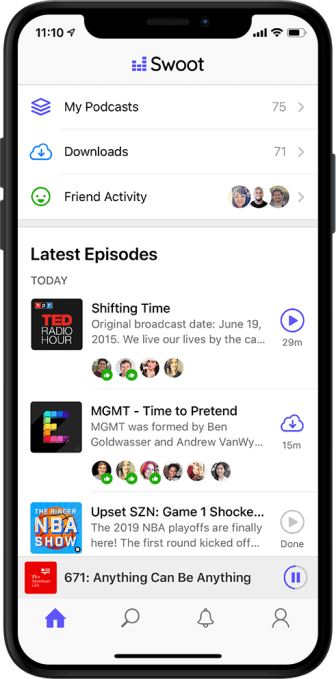
Swoot Screenshot 1

The startup has already raised a $3 million seed funding round led by True Ventures.

“Pete and Garret both have incredible product and entrepreneurial experience, plus they have built successful businesses together in the past,” said True Ventures co-founder Jon Callaghan in a statement. “Their focus of solving the disjointed podcast listening experience through Swoot’s elegant design fills a clear gap in media discovery.”

Discovery — namely, finding new podcasts beyond the handful that you already subscribe to — is one of the biggest issues in podcasting right now. It’s something a number of companies are trying to solve, but in Curley’s view, the key is to make the listening experience more social.

He noted that social sharing features are getting added to “literally everything,” including your bathroom scale, except “the one thing that I actually wanted it for.”

Curley also contrasted the podcast listening experience with YouTube: “We don’t realize how big [podcasting] is because there is no social thing where you see that Gangnam Style has 8 billion views, and you realize that the entire world is watching. There’s no view count, no anything that tells you what’s popular.”

So he’s trying to provide that view with Swoot. Instead of focusing on overall view counts (which might not be that impressive in a new app), Swoot gives you two main ways to track what’s popular among your friends.

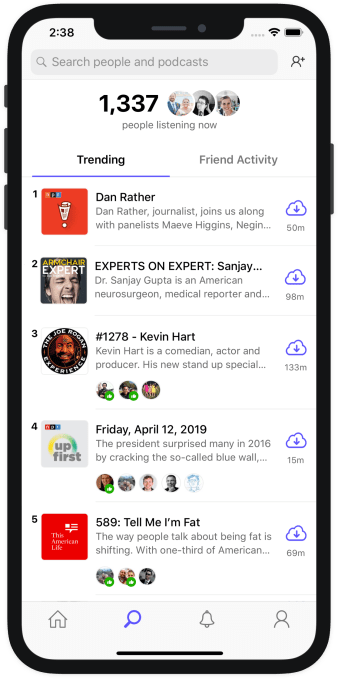
Swoot Screenshot 2

There’s a feed that shows you everything that your friends are listening to or recommending, plus a list of episodes that are currently trending, with little icons showing you the friends who have listened to at least 20 percent of an episode.

Curley said the team has been beta testing the app by simply releasing it on the App Store and telling friends about it, then letting it spread by word of mouth until it was in the hands of around 1,000 users. During that test, it found that 25 percent of the podcasts that users listened to were coming from friends.

Curley also noted that this approach is “episode-centric” and rather than “show-centric.” In other words, it’s not just helping you find the next podcast that you want to subscribe to and listen to for years — it also helps surface the specific episode that everyone’s listening to right now.

“In the 700,000 shows that exist, if you’re the 690,000 worst-ranked show, but you have one great episode that should be able to go viral, that’s basically impossible to do right now, because audio is crazy hard to share,” Curley said.

In the course of our conversation, I brought up my experience with Spotify — I like seeing what’s popular, but when a friend recently mentioned specific songs that they could see I’d been listening to on the service, I was a bit creeped out.

“It’s funny, I actually thought, how ironic that Spotify is getting into podcasting now [through the acquisitions of Gimlet and Anchor],” Curley replied. “They actually had this correct mechanism applied to the wrong thing. Music is a deeply personal thing.”

Which isn’t to say that podcast listening isn’t personal, but there’s more of an opportunity to discover overlapping interests, say the fact that you and your friends all listen to true crime podcasts.

Curley also said that the app is deliberately to ensure that “the service does not get worse because a ton of people follow you” — so they see what you listen to, but they can’t comment on it or tell you that you’re an idiot for listening.

At the same time, he also said the team will be adding a mode to only share podcasts you actively recommend, rather than posting everything you listen to.

As for making money, Curley suggested that he’s interested in exploring a variety of opportunities, whether that’s integrating with other subscription or tipping services, or in creating ad opportunities around promoting different podcasts.

“My actual answer is, there are a bunch fo people trying to monetize right now, but I don’t think there’s a platform even close to mature enough to even try to monetize podcasting yet, other than podcasters doing their own advertising,” he said. “I think the endgame, where the real money is made in podcasting, actually hasn’t been come up with yet.”


Read Full Article

Next iPhone could feature an ultra-wide lens


A new report from Apple analyst Ming-Chi Kuo obtained by 9to5mac details the cameras in the next-generation iPhones. The report confirms previous rumors — the successors of the iPhone XS and XS Max will have three camera sensors on the back of the device.

In addition to the main camera and the 2x camera, Apple could add an ultra-wide 12-megapixel lens. Many Android phones already feature an ultra-wide lens, so it makes sense that Apple is giving you more flexibility by adding a third camera.

Kuo thinks Apple will use a special coating on the camera bump to hide the lenses. It’s true that pointing three cameras at someone is starting to look suspicious.

OnLeaks and Digit shared the following render (without any special coating) a few months ago:

The iPhone XR update will feature two cameras instead of one. I bet Apple will add a 2x camera.

On the front of the device, Apple could be planning a big upgrade for the selfie camera. The company could swap the existing camera sensor with 4 layers of glass with a camera sensor that has 5 layers of glass.

Apple could also be giving the camera a resolution bump, jumping from 7 megapixels to 12 megapixels. All three models should get the new selfie camera.


Read Full Article

The consumer version of BBM is shutting down on May 31


It might be time to move on from BBM. The consumer version of the BlackBerry Messenger will shut down on May 31. Emtek, the Indonesia-based company that partnered with BlackBerry in 2016, just announced the closure. It’s important to note, BBM will still exist and BlackBerry today revealed a plan to open its enterprise-version of BBM to general consumers.

Starting today, BBM Enterprise will be available through the Google Play Store and eventually from the Apple App Store. The service will be free for the one year and after that, $2.49 for six months of service. This version of the software, like the consumer version, still features group chats, voice and video calls, and the ability to edit and retract messages.

As explained by BlackBerry, BBMe features end-to-end encryption.

BBMe can be downloaded on any device that uses Android, iOS, Windows or MAC operating systems. The sender and recipient each have unique public/private encryption and signing keys. These keys are generated on the device by a FIPS 140-2 certified cryptographic library and are not controlled by BlackBerry. Each message uses a new symmetric key for message encryption. Additionally, TLS encryption between the device and BlackBerry’s infrastructure protects BBMe messages from eavesdropping or manipulation.

BBM is one of the oldest smartphone messaging services. Research in Motion, BlackBerry’s original name, released the messenger in 2005. It quickly became a selling point for BlackBerry devices. BBM wasn’t perfect and occasionally crashed, but it was a robust, feature-filled messaging app when most of the world was still using SMS. Eventually with the downfall of RIM and eventually BlackBerry, BBM fell behind iMessage, WhatsApp, and other independent messaging platforms. Emtek’s partnership with BlackBerry was supposed to bring the service into the current age, but some say the consumer version ended up bloated with games, channels and ads. BlackBerry’s BBMe lacks a lot of those extra features so consumers might find it a better platform for communicating.


Read Full Article

Google & Amazon reach an agreement to bring their streaming apps to each others’ platforms


Google and Amazon are burying the hatchet to better serve users of their respective streaming video platforms, the companies announced this morning. In the months ahead, the official YouTube app will come to Amazon Fire TV devices and Fire TV Edition smart TVs, while the Prime Video app will come to Chromecast and other devices with Chromecast built-in.

Prime Video will also become broadly available across the Android TV partner ecosystem, and YouTube’s sister apps — YouTube TV and YouTube Kids — will come to Fire TV later in the year.

Google says YouTube users on Fire TV will be able to sign in, have full access to their library, and play videos in 4K HDR at 60 fps on supported devices.

Prime Video app users, meanwhile, will be able to stream from the Prime Video catalog, including Amazon’s original programming, 4K videos, and access their Prime Video Channel subscriptions. They can also use Amazon’s X-Ray feature in the app.

The truce follows several years of bad relations between the two tech giants, who compete across a number verticals — including their streaming TV platforms and services and, more recently, smart speakers like Echo and Google Home.


Chromecast devices and other Google hardware has been off and on banned from Amazon’s retail site, as a result of their disagreements.

The companies in 2017 entered another feud — this time over Amazon’s implementation of a YouTube player on its Echo Show, which Google said it did without consultation. It pulled Amazon’s access from YouTube, then Amazon worked around the problem by sending Echo users to the YouTube homepage instead.

Today, many of Google’s hardware devices are still unavailable for sale on Amazon, including its smart speakers and other smart home devices, which are direct competitors with Amazon products, like Echo. (A search for “google home mini,” for example, displays Sponsored Listings and Best Seller recommendations for Amazon’s Echo Dot instead.)

None of this is good for consumers, of course — especially because the two customer bases overlap. Someone who has a Chromecast may want to watch videos on Prime Video, for example, or shop Google products on Amazon.com. And everyone watches YouTube.

The new agreement will only focus on streaming services, we understand. It won’t impact Amazon.com’s assortment or other concerns around hardware. 

Amazon has a history of anti-competitive behavior when it comes to dealing with rivals.

The retailer, for years, was at odds with Apple until finally coming to an agreement in 2017 to allow the Prime Video app on Apple TV and the Apple TV to return to Amazon.

In the end, these back-and-forth battles backfired on all involved. Roku emerged as the dominant streaming platform in the U.S., as it played a neutral role and supported all apps and services equally. Amazon has only begun to catch up, thanks to price cuts on Fire TV hardware and fairly popular underground community focused on using its “firesticks” for piracy.

“We are excited to work with Amazon to launch the official YouTube apps on Fire TV devices worldwide,” said Heather Rivera, Global Head of Product Partnerships at YouTube, in a statement. “Bringing our flagship YouTube experience to Amazon Fire TV gives our users even more ways to watch the videos and creators they love.”

“We’re excited to bring the Prime Video app to Chromecast and Android TV devices, and to give our customers convenient access to the shows and movies they love,” added Andrew Bennett, Head of Worldwide Business Development for Prime Video. “Whether watching the latest season of The Marvelous Mrs. Maisel, catching teams go head-to-head on Thursday Night Football or renting a new-release movie, customers will have even more ways to stream what they want, whenever they want, no matter where they are.”


Read Full Article

Optimize Your Wi-Fi Network With NetSpot Home: Now 72% off


In every home, there are a few corners that Wi-Fi cannot touch. Moving your router and changing the settings can make a difference — but making adjustments is usually a matter of trial and error. NetSpot Home for Mac and Windows makes the process much easier by creating a heatmap of signal strength throughout your home or office. You can get this useful app now for $19 via MakeUseOf Deals.

Signal Survey

It’s easy to forget that Wi-Fi uses radio waves. Just like your standard FM tuner, Wi-Fi signals struggle to pass through solid objects. In addition, your router may be drowned out by interference from other local networks.

NetSpot Home helps you find and fix these problems in minutes. The desktop app provides a unique set of diagnostic tools, and it’s really easy to use.

If you install NetSpot Home on a laptop, you can use your device as a surveying tool. As you walk around your home, the software tests the signal strength of your network and builds a heatmap.

In addition, NetSpot Home lets you analyze the networks around you. You can sort by SSID, channel, vendor, security, and more. This data helps you optimize the settings on your own router, such as changing the channel to avoid interference.

Lifetime License for $19

Order now for $19 to get NetSpot Home on Mac or Windows, with lifetime updates included (worth $68).

Read the full article: Optimize Your Wi-Fi Network With NetSpot Home: Now 72% off


Read Full Article

Assassin’s Creed Unity Is Free on PC (Temporarily)


Ubisoft is giving away Assassin’s Creed Unity on PC for one week from today (April 17). While this is good news for gamers, it’s happening because of a tragedy. Namely, the damage dealt out to Notre-Dame de Paris last week.

The Assassin’s Creed/Notre-Dame Connection

As you’re probably already aware, Notre-Dame de Paris, the medieval Catholic cathedral in the heart of Paris, France, has been badly damaged by fire. While the core structure of the building remains intact, the spire and most of the roof has collapsed in on itself.

Notre-Dame features heavily in Assassin’s Creed Unity, a game set during the French Revolution. With a major set-piece taking place inside the cathedral, Ubisoft Montreal recreated Notre-Dame in precise detail. And that has led Ubisoft to respond to the fire.

Ubisoft Loves Notre-Dame de Paris

In a post on Inside Ubisoft, the company has announced two things. First, Ubisoft will be “donating €500,000 to help with the restoration and reconstruction of the Cathedral”. And secondly, it will be “giving Assassin’s Creed Unity away free on PC”.

This achieves two things. For one, it should help raise awareness of the fire, and the need to raise money to restore Notre-Dame back to its full glory. It also gives everyone “the chance to experience the majesty and beauty of Notre-Dame”.

So, for one week from today, you can download Assassin’s Creed Unity for Uplay PC for free. And while the whole game is well worth playing, you should pay particularly close attention to the part that takes place inside Notre-Dame.

Assassin’s Creed Unity Lets You Pay Homage

Donations towards the reconstruction of Notre-Dame already top $1 billion, so it’s safe to say it will be restored. However, playing Assassin’s Creed Unity will give you the chance to experience Ubisoft’s “virtual homage to this monumental piece of architecture”.

If you’re new to the Assassin’s Creed series but want to play Unity because of the Notre-Dame connection, check out the history of Assassin’s Creed. Fittingly, it was written just after Unity was released in 2014, so remains unsullied by the games released since.

Read the full article: Assassin’s Creed Unity Is Free on PC (Temporarily)


Read Full Article

Wonderloop’s networking app lets you swipe left on video profiles instead of pictures


There isn’t much left to be done in online networking apps. We are all familiar with professional (LinkedIn), social (Facebook), realtime (Twitter), and dating (Tinder, Bummble etc). But profile photos of the people you’re interacting with only get you so far. And we’ve all known that person who looked smart in the photo and turned out to be not so amazing in real life. Photos don’t communicate a person’s energy, body language or their voice.

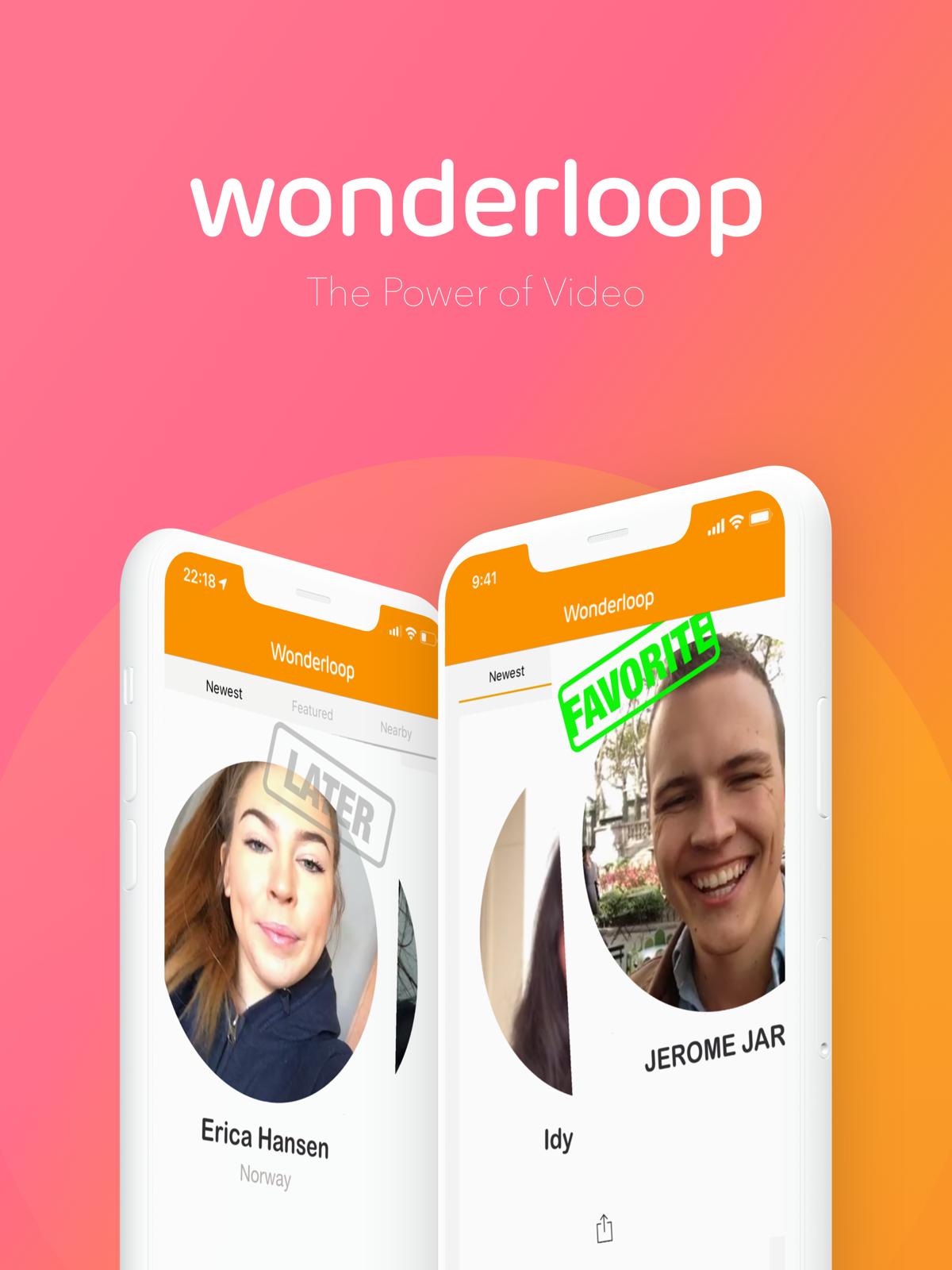
An app called Wonderloop hopes to solve this problem, with video profiles, like this one.

It’s now added swiping people, Tinder-style. Left for “later and right for “favorite”. In addition, you can see who’s “Nearby” with a location feature, making it more likely you may even bump into this person. How’s that for making your day more… interesting?

Founder Hanna Aase says Wonderloop is not so much “LinkedIn with video” as much as it is “About.me with video”. Why? Well, because it also has a web-platform, allowing you to share your video profile outside the app, as well as message inside it.

I must admit, it’s fair to say that the impression you get from a person from watching them for 10 seconds on a video is pretty persuasive.

Aase says Wonderloop could end up being your personal “video ID” providing each user with their unique video profile. She says Wonderloop’s aim is to create a search engine out of people on video.

“To see people on video creates trust. Wonderloop’s goal is that every person in the world should have a video identity. We want to help users get seen in this world. You use Wonderloop for the first step of turning a stranger into a potentially cool person in your life,” she added.

She thinks the app will be used by people to make new friends, connect influencers with fans, connect entrepreneurs, connect freelancers and travelers and of course a bit of dating here and there.

She’s also hoping the app will appeal to Millennials and Generation-Z who, as frequent travelers, are often into meeting people “nearby.” “We did research and were surprised to the extent the age group 16-20 wish to find new friends,” she says. For instance, apps like Jodel are used by young people to reach out to chat to complete strangers nearby (although with no names attached).

Right now the app is invite-only, but users can apply inside the app. Aase says: “We hope to do it in stages as the company grows and in a way where users feel the community is a place they feel safe and can share who they are on video. But being invite-only also makes us differentiated to all other services.”


Read Full Article

Duolingo Helps You Learn How to Speak High Valyrian


With the final season of Game of Thrones currently airing on TV, there has never been a better time to learn how to speak High Valyrian. And thanks to Duolingo, you can do just that. Which may prove useful if Daenerys Targaryen ends up on the Iron Throne.

High Valyrian is the language spoken by the nobility of Essos and Westeros. As with so much in Game of Thrones there’s a real-life equivalent, with the nobility of Europe speaking Latin in the Middle Ages. Latin may be dead, but High Valyrian is alive and well.

Learn to Speak High Valyrian Using Duolingo

Duolingo first launched its High Valyrian course in 2017. This was made possible by David J. Peterson, the linguist who invented the language for the TV show. He worked with Duolingo to create the course, which has grown more popular along with the show.

Now, to coincide with Game of Thrones Season 8, Duolingo has updated the High Valyrian course. The latest version adds new words and phrases and, for the first time, voice recordings which let you hear High Valyrian being spoken out loud.

Peterson himself recorded the audio, which means you’re hearing High Valyrian being spoken by the person who invented the language. George R.R. Martin only created a few words and phrases for the books, with Peterson creating the rest for the HBO show.

At the time of writing, 1.2 million people are learning how to speak High Valyrian. In the UK alone 100,000 people are keen to learn this fictional language. Which, according to Duolingo, means more people can speak High Valyrian than can speak Gaelic.

Star Trek Fans Can Learn Klingon Instead

It may seem odd to learn a fictional language rather than a language people speak in the real world. But it’s just a way for Game of Thrones fans to up their geeky credentials. And if you’re more Star Trek than Game of Thrones, Duolingo lets you learn Klingon as well.

Read the full article: Duolingo Helps You Learn How to Speak High Valyrian


Read Full Article

The 8 Smallest Linux Distros That Need Almost No Space


tiny-linux-distros

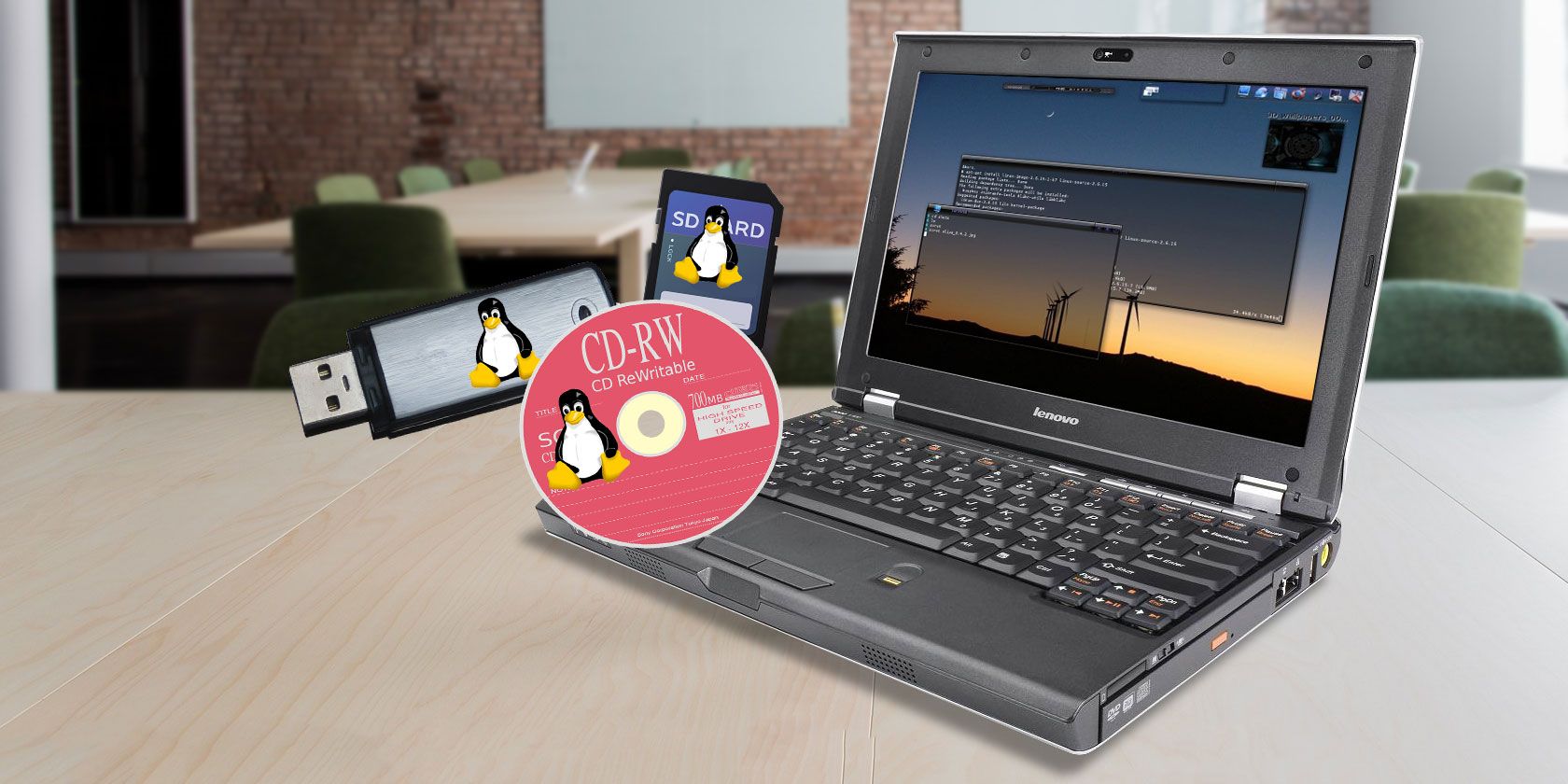
Do you have an old PC lying around gathering dust? Would you like to make use of the old small-capacity USB flash drive sitting in your draw? You can reuse your old computer and a USB flash drive by installing a super small Linux operating system (also known as a “distribution” or “distro”) on them.

Unlock the "Essential Linux Commands" cheat sheet now!

This will sign you up to our newsletter

Enter your Email

There are Linux distros specifically for the Intel Atom Processor. Others will give your old PC a new lease of life. The vast majority install direct to your USB flash drive, too.

Here are eight of the smallest Linux distros that need almost no space!

Before You Start: How to Create Bootable USB Flash Drives

The first thing you need is a tool to create bootable USB flash drives. There are numerous tools you can use to create a bootable USB flash drive. However, I would suggest Windows users try Rufus, while Linux and macOS users should try Etcher.

Rufus

Rufus is one of the fastest, smallest, and easiest USB burning tools available to Windows users. It has decent customization options and can automatically detect your USB flash drive. Furthermore, Rufus can detect the type of ISO you are attempting to burn and apply a common setup.

Download: Rufus for Windows (Free)

Etcher

Linux and macOS users should use Etcher, an open source USB burning tool. Like Rufus, Etcher is tiny, very fast, and comes with a great GUI that makes the tool incredibly simple to use. Etcher doesn’t have many settings, but it does work well the overwhelming majority of the time. Windows users who find Rufus confusing can also use Etcher.

Download: Etcher for macOS, Linux, and Windows

Now, onto the tiny Linux distros, all of which are free (unless otherwise stated)!

1. ArchBang

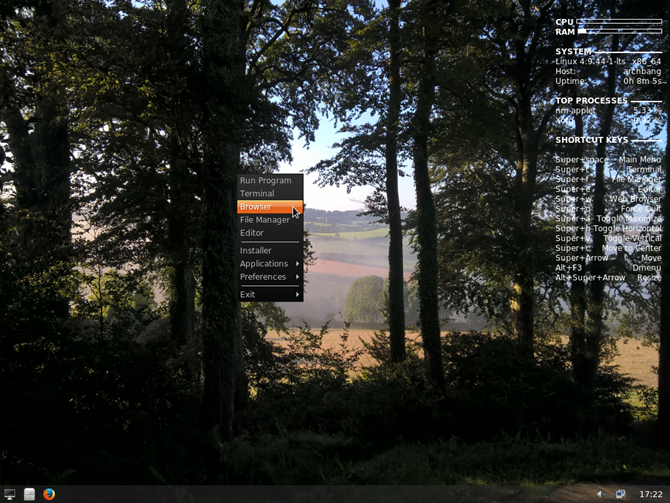
archbang linux operating systemArchBang is based on Arch Linux and inspired by CrunchBang, which was another small Linux distro. ArchBang is essentially Arch Linux made easier and reduced in size. It includes the power and flexibility of Arch Linux without the complex setup and installation. (Here’s 10 reasons why you should consider switching to an Arch Linux distro.)

ArchBang works on i686 or X86_64 compatible machines, uses 700MB of disk space, and requires just 256MB of memory.

You can use ArchBang as a fully featured desktop operating system or as a portable live OS. It is fast, stable, and always up to date.

Download: ArchBang for i686 | x86_64

2. Tiny Core Linux

tiny core linux home page

Tiny Core Linux is an extremely small Linux distro developed by Robert Shingledecker, lead developer for former-distro, Damn Small Linux. (The Damn Small Linux site is now dead, but you can find active ISOs online.)

The Tiny Core Linux “TinyCore” installation is a minute 16MB, including the base distro and a decent GUI. The base installation requires at least 46MB RAM to run, but you will need a little more if you want to run additional applications and other software. Note you’ll need to use an Ethernet cable to get online with TinyCore as there is no out of box wireless support.

The best option for most people is the “CorePlus” installation, which comes in at 106MB. CorePlus has wireless support, support for non-US keyboards, plus installation tools for alternative window managers, and other handy setup tools.

Download: Tiny Core Linux “TinyCore” for x86 | Tiny Core Linux “CorePlus” for x86

3. Elive

elive linux operating system
Elive is a lightweight Linux distro with a custom desktop environment. Based on Debian, Elive comes pre-installed with a bunch of handy apps, plus a few games, too.

“Elive is not made for newbies. Elive is not made for experienced people. Elive is not made for enterprises or personal user. Elive is art. It is simply for the people who appreciate it and want to use it. Feel free to try Elive, because only you decide what you want in this world!”

It is quite the statement from the Elive development team.

The Elive desktop environment is a highly customized version of Enlightenment, offering a light and beautiful experience. (Check out the 12 best Linux desktop environments to rival Enlightenment.) It works well, even on very old hardware. The minimum requirements for Elive are a CPU speed of 500MHz and 198MB RAM, plus 700MB hard drive space.

You cannot direct download Elive. The developer understandably asks for a small donation to keep the project alive for an instant download. Otherwise, you must head to the site, enter your email address, and wait for four hours.

Windows users must use Elive’s USBWriter to create a bootable USB flash drive. The Elive developer states that other programs make unintended changes to the ISO during the burn process. macOS and Linux users can continue using Etcher.

Download: Elive USBWriter for Windows (Donationware/free)

4. Porteus

porteus linux operating system

Porteus is a lightweight, but complete, Linux distro that is optimized to run from a USB flash drive. Don’t have one? Don’t worry! Porteus will also work on an SD card, CD, DVD, hard drive, or other bootable storage media. It’s small and insanely fast, allowing you to boot and get online while other operating systems are still thinking about booting.

Porteus runs on any Intel, AMD, or VIA x86/64 processor, requiring only 512MB of disk space and 256MB of memory. No hard disk is required, as it can run from removable storage media. If you use Porteus on a removable storage media device, you can take advantage of its “Persistent” mode, which saves data directly on the storage device.

It is available in both 32-bit (perfect for older PCs) and 64-bit. A kiosk edition is also available, which is a minimal system that is locked down for use by the public on web terminals. You can choose to download the Cinnamon, KDE, MATE, or Xfce version of Porteus.

Download: Porteous 32-bit | 64-bit

5. Puppy Linux

puppy linux operating system

Puppy Linux is a very lightweight Linux distro that you should only install on and run directly from a USB flash drive, SD card, CD, DVD, or other bootable storage media. You can install Puppy Linux on your hardware if you want. But there isn’t really a need if you have your bootable USB flash drive with you.

It is also worth noting that Puppy Linux isn’t a single distribution, nor is it a Linux distribution with numerous “flavors” (for instance, Ubuntu variants include Kubuntu, Xubuntu, Lubuntu, and so on). Rather, Puppy Linux is a collection of Linux distributions built using the same shared principle, using the same tools, using a specific set of “puppy” applications.

Check out the below image to see the various Puppy Linux paths, in the official Puppy Linux family tree.

puppy linux timeline#

At the time of writing, there are four official Puppy Linux distributions. All require 300MB or less hard drive space but do have varying CPU and RAM requirements.

To find out more, and choose the right version for you, head to the official Puppy Linux distribution download page.

6. SliTaz

slitaz linux operating systemSliTaz, or Simple Light Incredible Temporary Autonomous Zone, is a lightweight, fully-featured graphical Linux distro. Simply put, SliTaz is small, fast, stable, and easy to use.

SliTaz’s minimum requirements include an i486 or x86 Intel-compatible processor, at least 80MB disk space, and 192MB RAM (however, this can drop as low as 16MB RAM depending on the version of SliTaz you use).

One cool feature of SliTaz is that it runs largely in your system memory. Once you boot SliTaz up, you can remove your bootable USB flash drive for other tasks. SliTaz also has a “persistent” feature that allows you to store your data and personal settings to the removable media, ready to use on your next boot. (You have to keep your media in the machine for this feature to work, mind).

Download: SliTaz Universal Version (Free)

7. wattOS

wattos linux operating systemwattOS is a fantastic tiny Linux distro based on Ubuntu. You can run wattOS from a USB flash drive, CD, DVD, or other bootable media. Furthermore, wattOS has a kiosk mode, or you can install it directly to your hard drive.
The minimum hardware requirements include an Intel or AMD processor, 700MB disk space, and 192MB for the “Microwatt” edition of wattOS. The wattOS LXDE version uses slightly more RAM, but has considerably more customization options and is suitable as a daily desktop environment.

The Microwatt edition is extremely lightweight, however. It is based upon the i3 tiling window manager, offering low resource requirements and a simplistic design.

Download: wattOS Microwatt edition 32-bit | 64-bit

Download: wattOS LXDE edition 32-bit | 64-bit

8. Bodhi Linux

bodhi linux desktop environment

Your final tiny Linux distro to check out is Bodhi Linux. Bodhi Linux is an Ubuntu LTS-based fully-featured Linux distro that uses the Moksha Desktop. Furthermore, Bodhi Linux comes in three flavors: the Standard edition, the AppPack edition, the Legacy edition.

The Standard edition comes with a limited range of options and applications, whereas the AppPack edition offers more features, applications, and options out of the box. Of the three, the Legacy edition is the smallest, designed to work with older, less powerful hardware.

Bodhi Linux’s minimum specifications require a 500MHz processor, at least 128MB RAM, and 4GB disk space.

Download: Bodhi Linux Standard for x86_64 | Bodhi Linux AppPack for x86_64 | Bodhi Linux Legacy for x86_64

Revive Your Old Hardware With a Tiny Linux Distro

You can bring your old PC or other hardware back to life with any of these super small Linux distros. These lightweight Linux distros are a great way to provide a single computer for a relative who doesn’t need the bloat of a more complex operating system.

  1. ArchBang
  2. Tiny Core Linux
  3. Elive
  4. Porteus
  5. Puppy Linux
  6. SliTaz
  7. WattOS
  8. Bodhi Linux

Furthermore, these Linux distros will allow them to surf the web, watch and listen to media, check email, and create simple documents.

If you are preparing a machine for someone new to Linux, you should take a look at the MakeUseOf Linux FAQ. Also, why not check out the changes Windows users need to accept when moving to Linux. It certainly makes switching easier!

Read the full article: The 8 Smallest Linux Distros That Need Almost No Space


Read Full Article

5 Ways to Play Civilization on Android and iPhone


Do you love Civilization games? Are you sad when it’s time to save your game and logoff for the day? Then why not take this epic game with you!

If you have an Android device or an iPhone/iPad, there are several ways to carry a game of Civ around in your pocket. In this article we look at five ways you can play games from Sid Meier’s Civilization series on your smartphone or tablet.

Why Civilization?

In 1991, I accidentally bought the original Civilization for my Amiga. I say “accidentally” because I’d intended to buy Sim City after playing it on my uncle’s PC several months earlier. Somehow, I found myself reading the box and walking, somnambulist-like, to the counter and paying. It was as if I was remotely hypnotized by Sid Meier himself.

Original Sid Meier's Civilization

Ever since then, I’ve been addicted to the game. I love Civ so much, that I like to take it with me everywhere I go.

For a time, there was only one way to play Civilization on mobile. These days, however, Civ fans are spoiled for choice.

1. Play Civilization VI on iPhone and iPad

Civilization VI was originally launched for desktop computers in 2016. A few months later, in December 2017, the same game was released on iOS.

Compatible with iOS 11 running on iPhone 7 or 7 Plus, iPhone 8 or 8 Plus, iPhone X, iPad Air 2, iPad 2017, or any iPad Pro, Civilization VI is indistinguishable from the desktop version.

Featuring a choice of 20 historical leaders and dynamic diplomacy, this version of the game even includes a local multiplayer mode. To entice you further, Civilization VI for iPhone and iPad is free to install. It comes with a 60-turn trial, which is more than enough to help you decide if the game is worth paying for via an in-app purchase.

You can only appreciate the convenience of having Civ in your pocket once you’ve experienced it for yourself. It certainly makes waiting in line for the bus far more interesting.

And if you find yourself struggling with it, try these tips and tricks for Civilization VI.

Download: Civilization VI for iOS (Free, with $19.99 in-app purchase to unlock full game)

2. Play Civilization Revolution 2 on Android and iOS

Sadly, while Civilization VI is available on iOS, it isn’t yet an option for Android. This may not surprise you. After all, there was a time, pre-2014, when there were no Sid Meier games available for Android. Given that tabletop versions of Civilization were available, this seemed slightly odd.

However, there is one official Civilization option available for Android users: Civilization Revolution 2.

As fun to play as the desktop original, Civilization Revolution 2 has all the elements that Civ fans love. You’ll find the tech tree and barbarians, and rival leaders with distinct personalities. Meanwhile, cities are easy to manage via your mobile display.

If you’re familiar with the desktop versions of Civilization, you’ll probably know that maps can be random, or generated. The game also offers scenarios, and all of these features are included with Civilization Revolution 2. It even includes a scenario generator.

So, you could start from 4,000 B.C. with your civilization, or play a game set in an endless war. You could set up a colony on a new world, or one overrun by barbarians. With so many options for a unique game available, you could be playing Civilization Revolution 2 on your phone for a long time to come.

While there is no way of transferring your current Civilization Revolution 2 game to the desktop incarnation, it remains an engaging gaming experience.

As fun as the game is, it may seem jarring for those looking for a more visually authentic mobile experience. In short, Civilization Revolution 2 continues the console-esque, cartoony graphics of its predecessor. So, what can you do if you’re looking for a more traditional Civilization experience on your smartphone or tablet?

Download: Civilization Revolution 2 for Android ($9.99) | iOS ($8.99)

3. Play FreeCiv on Android

FreeCiv for Android

Perhaps the most accessible Civilization option for Android users is FreeCiv.

Using an isometric view similar to early versions of Civilization, FreeCiv offers virtually all of the game’s concepts and marries them with great graphics. I haven’t played this version of the game long enough to know if the Fundamentalist government type is the best to play with in the later stages. But with a choice of game rules based on Civilization or Civilization II, FreeCiv has much to recommend.

Mindful of the size of some displays, the developers have made some of the buttons quite chunky. This can prove distracting at first, but FreeCiv for Android soon redeems itself. On balance it probably plays better on a tablet than on a smartphone, so try playing FreeCiv on both to see which you prefer.

Download: FreeCiv for Android

FreeCiv is available for Windows and Linux desktop devices, too. If you want to sync games across devices, check out the Dropbox-based service at www.civsync.com.

4. Play World of Empires for Android and iOS

Beginning life as a Civilization clone called “MyCiv,” World of Empires is a free alternative to Civ that really looks the part. While aping the graphic style of later Civ games (specifically Civilization V and VI), World of Empires is surprisingly playable.

Bundling a map editor, multiplayer, chat, 26 distinct civilizations, network saves, and an optional pay-what-you-want model, World of Empires offers an impressive gaming experience.

It feels enough like civilization to make you want to play more, while being different enough to keep you interested.

Can’t run Civilization VI on your iOS device? Don’t like Civilization Revolution 2 or FreeCiv on Android? Then World of Empires is your best option.

Download: World of Empires for Android (Free) | iOS (Free)

5. Use DosBox and Emulators

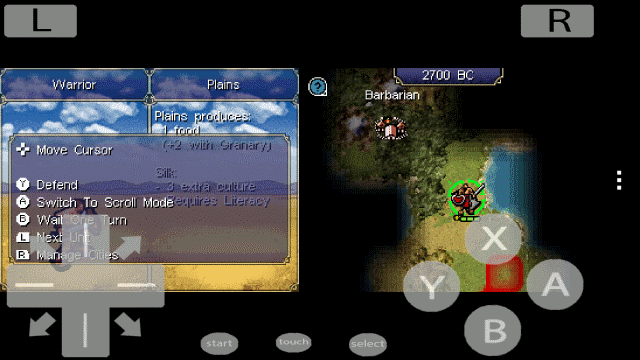
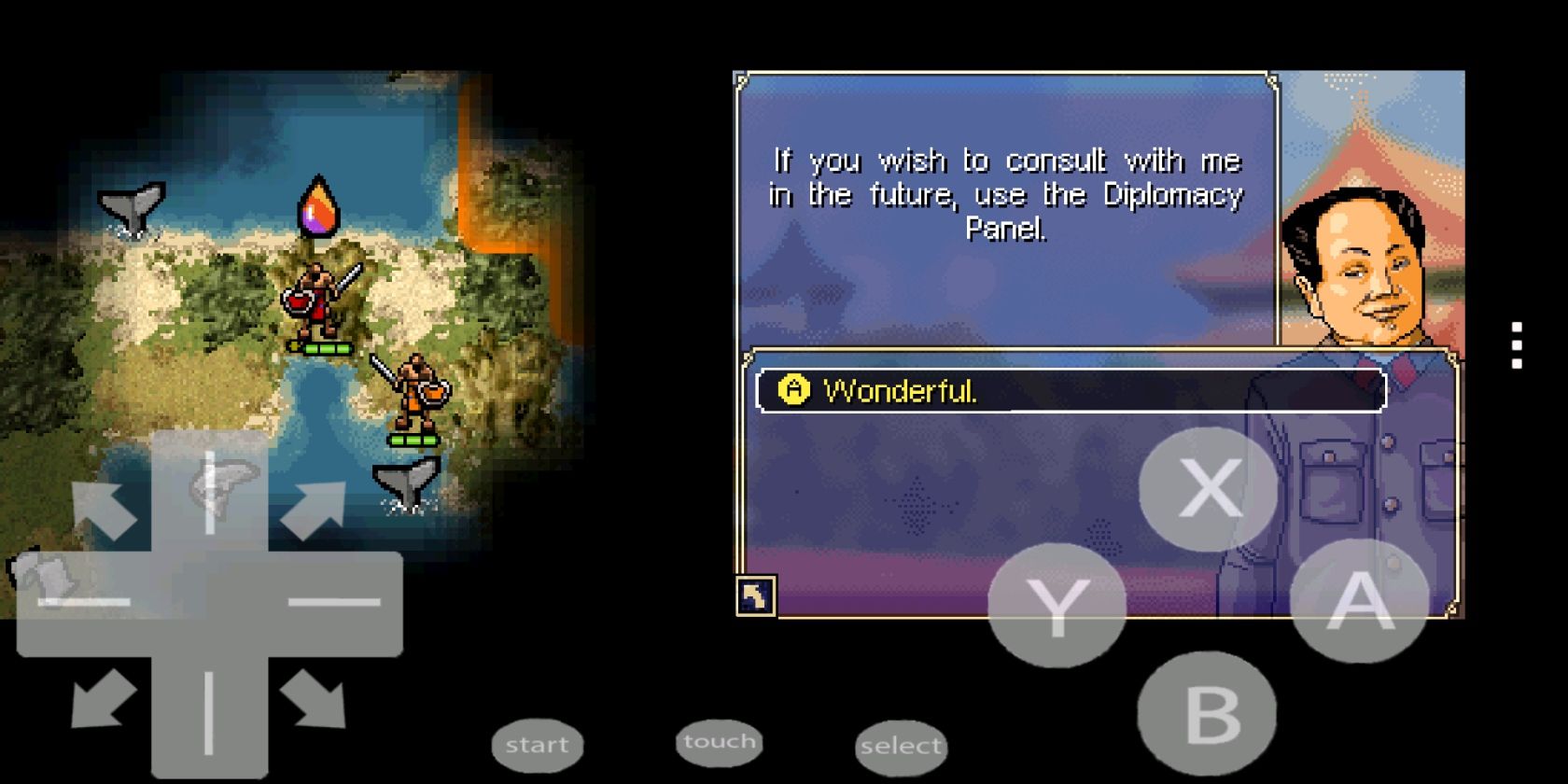
Run Civilization Revolution for DS on your Android device

If the retro-joy of FreeCiv doesn’t fulfil your Civilization pangs, you always have the option of emulation.

Android users might install DosBox Turbo and then find a ROM of Civilization or Civilization II. (At the time of writing, DOSBox options for iOS are limited.)

Meanwhile, if you prefer to play the original Civilization Revolution try a Nintendo DS emulator (such as Android’s free nds4droid). These will enable you to play the Nintendo DS version of Civilization Revolution.

This is a good option, and the game plays as well as it does on other mobile platforms. As you can see from the screenshot, however, it lacks the polish of a standard mobile game. This is thanks to the overlaid interface and dual-screen setup.

Remember, however, that when using emulators, you cannot legally use a ROM unless you own the original version on its original disk.

What’s the Best Civilization Game for Mobile?

Back when Android and iOS had no Civilization games available, Civ-like games were the only option. Initially, even this selection was modest, but over the years more have been released.

There are now a handful of ways to play Civilization on your smartphone, and it’s up to you to decide which is best. Feel free to let us know in the comments below.

Civilization’s appeal lies in the 4X dynamic: explore, expand, exploit, and exterminate. Do you want to learn more? Then read our guide to every version of Civilization released so far.

Read the full article: 5 Ways to Play Civilization on Android and iPhone


Read Full Article