17 April 2019

How-to video maker Jumprope launches to leapfrog YouTube


Sick of pausing and rewinding YouTube tutorials to replay that tricky part? Jumprope is a new instructional social network offering a powerful how-to video slideshow creation tool. Jumprope helps people make step-by-step guides to cooking, beauty, crafts, parenting and more using voice-overed looping GIFs for each phase. And creators can export their whole lesson for sharing on Instagram, YouTube, or wherever.

Jumprope officially launches its iOS app today with plenty of how-tos for making chocolate chip bars, Easter eggs, flower boxes, or fierce eyebrows. “By switching from free-form linear video to something much more structured, we can make it much easier for people to share their knowledge and hacks” says Jumprope co-founder and CEO Jake Poses.

The rise of Snapchat Stories and Pinterest have made people comfortable jumping on camera and showing off their niche interests. By building a new medium, Jumprope could become the home for rapid-fire learning. And since viewers will have tons of purchase intent for the makeup, art supplies, or equipment they’ll need to follow along, Jumprope could make serious cash off of ads or affiliate commerce.

The opportunity to bring instruction manuals into the mobile video era has attracted a $4.5 million seed round led by Lightspeed Venture Partners and joined by strategic angels like Adobe Chief Product Officer Scott Belsky and Thumbtack co-founders Marco Zappacosta and Jonathan Swanson. People are already devouring casual education content on HGTV and the Food Network, but Jumprope democratizes its creation.

Jumprope co-founders (from left): CTO Travis Johnson and CEO Jake Poses

The idea came from a deeply personal place for Poses. “My brother has pretty severe learning differences, and so growing up with him gave me this appreciation for figuring out how to break things down and explain them to people” Poses reveals. “I think that attached me to this problem of ‘how do you organize information so its simple and easy to understand?’. Lots and lots of people have this information trapped in their heads because there isn’t an a way to easily share that.”

Poses was formerly the VP of product at Thumbtack where he helped grow the company from 8 to 500 people and a $1.25 billion valuation. He teamed up with AppNexus’ VP of engineering Travis Johnson, who’d been leading a 50-person team of coders. “The product takes people who have knowledge and passion but not the skill to make video [and gives them] guard rails that make it easy to communicate” Poses explains.

Disrupting incumbents like YouTube’s grip on viewers might take years, but Jumprope sees its guide creation and export tool as a way to infiltrate and steal their users. That strategy mirrors how TikTok’s watermarked exports colonized the web

How To Make A Jumprope.

Jumprope lays out everything you’ll need to upload, including a cover image, introduction video, supplies list, and all your steps. For each, you’ll record a video that you can then enhance with voice over, increased speed, music, and filters.

Creators are free to suggest their own products or enter affiliate links to monetize their videos. Once it has enough viewers, Jumprope plans to introduce advertising, but it could also add tipping, subscriptions, paid how-tos, or brand sponsorship options down the line. Creators can export their lessons with five different border themes and seven different aspect ratios for posting to Instagram’s feed, IGTV, Snapchat Stories, YouTube, or embedding on their blog.

“Like with Stories, you basically tap through at your own pace” Poses says of the viewing experience. Jumprope offers some rudimentary discovery through categories, themed collections, or what’s new and popular. The startup has done extensive legwork to sign up featured creators in all its top categories. That means Jumprope’s catalog is already extensive, with food guides ranging from cinnabuns to pot roasts to how to perfectly chop an onion. 

“You’re not constantly dealing with the frustration of cooking something and trying to start and stop the video with greasy hands. And if you don’t want all the details, you can tap through it much faster” than trying to skim a YouTube video or blog post, Poses tells me. Next the company wants to build a commenting feature where you can leave notes, substitution suggestions, and more on each step of a guide.

Poses claims there’s no one building a direct competitor to its mobile video how-to editor. But he admits it will be an uphill climb to displace viewership on Instagram and YouTube. One challenge facing Jumprope is that most people aren’t hunting down how-to videos every day. The app will have to work to remind users it exists and that they shouldn’t just go with the lazy default of letting Google recommend the videos it hosts.

The internet has gathered communities around every conceivable interest. But greater access to creation and consumption necessitates better tools for production and curation. As we move from a material to an experiential culture, people crave skills that will help them forge memories and contribute to the world around them. Jumprope makes it a lot less work to leap into the life of a guru.


Read Full Article

Wanna See the Code?


Wanna See the Code?

Meet the first judges for The Europas Awards (27 June) and enter your startup now!


I’m excited to announce that The Europas Awards for European Tech Startups is really shaping up! The awards will be held on 27 June 2019, in London, UK on the front lawn of the Geffrye Museum in Hoxton, London — creating a fantastic and fun, garden party atmosphere in the heart of London’s tech startup scene.

TechCrunch is once more the exclusive media sponsor of the awards and conference, alongside new ‘tech, culture & society’ event creator The Pathfounder.

Here’s how to enter and be considered for the awards.

You can nominate a startup, accelerator or venture investor which you think deserves to be recognized for their achievements in the last 12 months.

*** The deadline for nominations is 1 May 2019. ***

For the 2019 awards, we’ve overhauled the categories to a set that we believe better reflects the range of innovation, diversity and ambition we see in the European startups being built and launched today. There are now 20 categories including new additions to cover AgTech / FoodTech, SpaceTech, GovTech and Mobility Tech.

Attendees, nominees and winners will get discounts to TechCrunch Disrupt in Berlin, later this year.

The Europas “Diversity Pass”

We’d like to encourage more diversity in tech! That’s why, for the upcoming invitation-only “Pathfounder” event held on the afternoon before The Europas Awards, we’ve reserved a tranche of free tickets to ensure that we include more women and people of colour who are “pre-seed” or “seed stage” tech startup founders to join us. If you are a woman or a person of colour, apply here for a chance to be considered for one of the limited free diversity passes to the event.

The Pathfounder event will feature premium content and invitees, designed be a ‘fast download’ into the London tech scene for European founders looking to raise money or re-locate to London.

The Europas Awards

The Europas Awards results are based on voting by expert judges and the industry itself.

But key to it is that there are no “off-limits areas” at The Europas, so attendees can mingle easily with VIPs.

The complete list of categories is here:

  1. AgTech / FoodTech
  2. CleanTech
  3. Cyber
  4. EdTech
  5. FashTech
  6. FinTech
  7. Public, Civic and GovTech
  8. HealthTech
  9. MadTech (AdTech / MarTech)
  10. Mobility Tech
  11. PropTech
  12. RetailTech
  13. Saas/Enterprise or B2B
  14. SpaceTech
  15. Tech for Good
  16. Hottest Blockchain Project
  17. Hottest Blockchain Investor
  18. Hottest VC Fund
  19. Hottest Seed Fund
  20. Grand Prix
    Timeline of The Europas Awards deadlines:

* 6 March 2019 – Submissions open
* 1 May 2019 – Submissions close
* 10 May 2019 – Public voting begins
* 18 June 2019 – Public voting ends
* 27 June 2019 – Awards Bash

Amazing networking

We’re also shaking up the awards dinner itself. Instead of a sit-down gala dinner, we’ve taken on your feedback for more opportunities to network. Our awards ceremony this year will be in the setting of a garden lawn party where you’ll be able to meet and mingle more easily with free-flowing drinks and a wide-selection of street food (including vegetarian/vegan). The ceremony itself will last approximately 75 minutes, with the rest of the time dedicated to networking. If you’d like to talk about sponsoring or exhibiting, please contact dianne@thepathfounder.com

Instead of thousands and thousands of people, think of a great summer event with the most interesting and useful people in the industry, including key investors and leading entrepreneurs.

The Europas Awards have been going for the last ten years and we’re the only independent and editorially driven event to recognise the European tech startup scene. The winners have been featured in Reuters, Bloomberg, VentureBeat, Forbes, Tech.eu, The Memo, Smart Company, Cnet, many others and of course, TechCrunch.

• No secret VIP rooms, which means you get to interact with the Speakers

• Key Founders and investors attending

• Journalists from major tech titles, newspapers and business broadcasters

Meet the first set of our 20 judges:


Brent Hoberman
Executive Chairman and Co-Founder
Founders Factory


Videesha Böckle
Founding Partner
signals Venture Capital


Bindi Karia
Innovation Expert + Advisor, Investor
Bindi Ventures


Christian Hernandez
Christian Hernandez Gallardo
Co-Founder and Venture Partner at White Star Capital


Read Full Article

Meet the first judges for The Europas Awards (27 June) and enter your startup now!


I’m excited to announce that The Europas Awards for European Tech Startups is really shaping up! The awards will be held on 27 June 2019, in London, UK on the front lawn of the Geffrye Museum in Hoxton, London — creating a fantastic and fun, garden party atmosphere in the heart of London’s tech startup scene.

TechCrunch is once more the exclusive media sponsor of the awards and conference, alongside new ‘tech, culture & society’ event creator The Pathfounder.

Here’s how to enter and be considered for the awards.

You can nominate a startup, accelerator or venture investor which you think deserves to be recognized for their achievements in the last 12 months.

*** The deadline for nominations is 1 May 2019. ***

For the 2019 awards, we’ve overhauled the categories to a set that we believe better reflects the range of innovation, diversity and ambition we see in the European startups being built and launched today. There are now 20 categories including new additions to cover AgTech / FoodTech, SpaceTech, GovTech and Mobility Tech.

Attendees, nominees and winners will get discounts to TechCrunch Disrupt in Berlin, later this year.

The Europas “Diversity Pass”

We’d like to encourage more diversity in tech! That’s why, for the upcoming invitation-only “Pathfounder” event held on the afternoon before The Europas Awards, we’ve reserved a tranche of free tickets to ensure that we include more women and people of colour who are “pre-seed” or “seed stage” tech startup founders to join us. If you are a woman or a person of colour, apply here for a chance to be considered for one of the limited free diversity passes to the event.

The Pathfounder event will feature premium content and invitees, designed be a ‘fast download’ into the London tech scene for European founders looking to raise money or re-locate to London.

The Europas Awards

The Europas Awards results are based on voting by expert judges and the industry itself.

But key to it is that there are no “off-limits areas” at The Europas, so attendees can mingle easily with VIPs.

The complete list of categories is here:

  1. AgTech / FoodTech
  2. CleanTech
  3. Cyber
  4. EdTech
  5. FashTech
  6. FinTech
  7. Public, Civic and GovTech
  8. HealthTech
  9. MadTech (AdTech / MarTech)
  10. Mobility Tech
  11. PropTech
  12. RetailTech
  13. Saas/Enterprise or B2B
  14. SpaceTech
  15. Tech for Good
  16. Hottest Blockchain Project
  17. Hottest Blockchain Investor
  18. Hottest VC Fund
  19. Hottest Seed Fund
  20. Grand Prix
    Timeline of The Europas Awards deadlines:

* 6 March 2019 – Submissions open
* 1 May 2019 – Submissions close
* 10 May 2019 – Public voting begins
* 18 June 2019 – Public voting ends
* 27 June 2019 – Awards Bash

Amazing networking

We’re also shaking up the awards dinner itself. Instead of a sit-down gala dinner, we’ve taken on your feedback for more opportunities to network. Our awards ceremony this year will be in the setting of a garden lawn party where you’ll be able to meet and mingle more easily with free-flowing drinks and a wide-selection of street food (including vegetarian/vegan). The ceremony itself will last approximately 75 minutes, with the rest of the time dedicated to networking. If you’d like to talk about sponsoring or exhibiting, please contact dianne@thepathfounder.com

Instead of thousands and thousands of people, think of a great summer event with the most interesting and useful people in the industry, including key investors and leading entrepreneurs.

The Europas Awards have been going for the last ten years and we’re the only independent and editorially driven event to recognise the European tech startup scene. The winners have been featured in Reuters, Bloomberg, VentureBeat, Forbes, Tech.eu, The Memo, Smart Company, Cnet, many others and of course, TechCrunch.

• No secret VIP rooms, which means you get to interact with the Speakers

• Key Founders and investors attending

• Journalists from major tech titles, newspapers and business broadcasters

Meet the first set of our 20 judges:


Brent Hoberman
Executive Chairman and Co-Founder
Founders Factory


Videesha Böckle
Founding Partner
signals Venture Capital


Bindi Karia
Innovation Expert + Advisor, Investor
Bindi Ventures


Christian Hernandez
Christian Hernandez Gallardo
Co-Founder and Venture Partner at White Star Capital


Read Full Article

Meet the first judges for The Europas Awards (27 June) and enter your startup now!


I’m excited to announce that The Europas Awards for European Tech Startups is really shaping up! The awards will be held on 27 June 2019, in London, UK on the front lawn of the Geffrye Museum in Hoxton, London — creating a fantastic and fun, garden party atmosphere in the heart of London’s tech startup scene.

TechCrunch is once more the exclusive media sponsor of the awards and conference, alongside new ‘tech, culture & society’ event creator The Pathfounder.

Here’s how to enter and be considered for the awards.

You can nominate a startup, accelerator or venture investor which you think deserves to be recognized for their achievements in the last 12 months.

*** The deadline for nominations is 1 May 2019. ***

For the 2019 awards, we’ve overhauled the categories to a set that we believe better reflects the range of innovation, diversity and ambition we see in the European startups being built and launched today. There are now 20 categories including new additions to cover AgTech / FoodTech, SpaceTech, GovTech and Mobility Tech.

Attendees, nominees and winners will get discounts to TechCrunch Disrupt in Berlin, later this year.

The Europas “Diversity Pass”

We’d like to encourage more diversity in tech! That’s why, for the upcoming invitation-only “Pathfounder” event held on the afternoon before The Europas Awards, we’ve reserved a tranche of free tickets to ensure that we include more women and people of colour who are “pre-seed” or “seed stage” tech startup founders to join us. If you are a woman or a person of colour, apply here for a chance to be considered for one of the limited free diversity passes to the event.

The Pathfounder event will feature premium content and invitees, designed be a ‘fast download’ into the London tech scene for European founders looking to raise money or re-locate to London.

The Europas Awards

The Europas Awards results are based on voting by expert judges and the industry itself.

But key to it is that there are no “off-limits areas” at The Europas, so attendees can mingle easily with VIPs.

The complete list of categories is here:

  1. AgTech / FoodTech
  2. CleanTech
  3. Cyber
  4. EdTech
  5. FashTech
  6. FinTech
  7. Public, Civic and GovTech
  8. HealthTech
  9. MadTech (AdTech / MarTech)
  10. Mobility Tech
  11. PropTech
  12. RetailTech
  13. Saas/Enterprise or B2B
  14. SpaceTech
  15. Tech for Good
  16. Hottest Blockchain Project
  17. Hottest Blockchain Investor
  18. Hottest VC Fund
  19. Hottest Seed Fund
  20. Grand Prix
    Timeline of The Europas Awards deadlines:

* 6 March 2019 – Submissions open
* 1 May 2019 – Submissions close
* 10 May 2019 – Public voting begins
* 18 June 2019 – Public voting ends
* 27 June 2019 – Awards Bash

Amazing networking

We’re also shaking up the awards dinner itself. Instead of a sit-down gala dinner, we’ve taken on your feedback for more opportunities to network. Our awards ceremony this year will be in the setting of a garden lawn party where you’ll be able to meet and mingle more easily with free-flowing drinks and a wide-selection of street food (including vegetarian/vegan). The ceremony itself will last approximately 75 minutes, with the rest of the time dedicated to networking. If you’d like to talk about sponsoring or exhibiting, please contact dianne@thepathfounder.com

Instead of thousands and thousands of people, think of a great summer event with the most interesting and useful people in the industry, including key investors and leading entrepreneurs.

The Europas Awards have been going for the last ten years and we’re the only independent and editorially driven event to recognise the European tech startup scene. The winners have been featured in Reuters, Bloomberg, VentureBeat, Forbes, Tech.eu, The Memo, Smart Company, Cnet, many others and of course, TechCrunch.

• No secret VIP rooms, which means you get to interact with the Speakers

• Key Founders and investors attending

• Journalists from major tech titles, newspapers and business broadcasters

Meet the first set of our 20 judges:


Brent Hoberman
Executive Chairman and Co-Founder
Founders Factory


Videesha Böckle
Founding Partner
signals Venture Capital


Bindi Karia
Innovation Expert + Advisor, Investor
Bindi Ventures


Christian Hernandez
Christian Hernandez Gallardo
Co-Founder and Venture Partner at White Star Capital


Read Full Article

Is the iMac Pro Right for You? The Most Powerful Macs Compared


most-powerful-macs

The iMac Pro is a sleek and desirable machine. With 256GB of memory and an optional upgrade to not just 10, but 18 cores, it’s a powerful beast. Even that exclusive Space Gray hue screams class. But do you really need it?

We’ll take you through the spectrum of specs, then put them in a head-to-head matchup with the iMac and Macbook Pro to find out which is the right device for you.

The Baseline iMac Pro and Maxed-Out Model

The absolute cheapest iMac Pro you can get costs $4,999. But if you’re opting for the iMac Pro, you’re probably not going to go with the base model.

On the other end of the spectrum, the fully maxed-out iMac Pro costs a whopping $15,848. For 10 grand extra, you get one of the most powerful machines on the market in a compact, all-in-one package that looks as good as it runs.

iMac Pro looking sleek

Processors

The baseline iMac Pro comes with an Intel Xeon W 8-core processor. What do multiple CPU cores do? They allow you to multi-task. You can render video with one core while working with After Effects on another. The more cores, the more tasks your computer can do at once without slowing down.

Most entry-level Macs have two CPU cores. The mid-level Macbook Pros have four. Eight is already a lot, but the iMac Pro can be upgraded to a processor with a whopping 18 cores! No other Mac, not even the Mac Pro, offers that much power.

Memory

Memory determines how many programs you can have open and running at once. If you keep a million browser tabs open at once, memory is your friend.

The iMac Pro baselines at 32GB, which is a lot of memory even in the professional world. In comparison, most Macs come standard with 8 or 16GB, and the Macbook Pro 15-inch maxes out at 32.

However, the iMac Pro maxes out at a whopping 256GB. That’s a lot of open browser tabs.

Graphics Cards

A dedicated graphics card is essential for any professional graphics work.

The Radeon Pro Vega 56 is the latest generation, and 8GB of video memory is nothing to sneeze at. The iMac Pro can be upgraded to a Radeon Pro Vega 64X with 16GB of video memory, which is definitely a boosy, but probably not essential for most use cases.

Storage

All iMac Pro storage options are SSDs. This differentiates them from standard iMacs, which still have hard disk drive (HDD) or Fusion drive options. 1TB is the baseline standard, which is upgradeable to 4TB of storage.

At almost $2,500 extra for a 4TB SSD, that upgrade is probably not worth it. A 2TB drive is more reasonable at $600 extra.

Matchup 1: Cheapest iMac Pro or Priciest iMac?

iMac on desk

You can customize an iMac so that it approaches the specs of the baseline iMac Pro and only costs $4,249.

They both have the same beautiful 5K Retina display. So what does that extra $750 buy you in the iMac Pro?

  1. A 10Gb Ethernet port vs 1Gb. Essential if you’re working with assets stored in the cloud or on a server.
  2. Two additional Thunderbolt 3 ports, bringing the total to four.
  3. A next-gen graphics card (Radeon Pro Vega 56 vs. Radeon Pro Vega 48).
  4. A next-gen processor (3.2GHz 8-core Intel Xeon W vs. 3.6GHz 8-core Intel Core i9).
  5. That exclusive dark gray finish.

If any of those options appeal to you, then go with the iMac Pro. However, if you’re a pro freelancer who works at home or is on a budget, you might want the standard iMac.

Just keep in mind that two Thunderbolt 3 ports means you might have to choose between a third display and some extra storage or speed in the future.

Matchup 2: iMac Pro or Macbook Pro and Display?

Macbook_Pro_13

Here’s where the comparison gets trickier. Despite the similar names, the iMac Pro and the Macbook Pro are quite different animals. Does the portability of the Macbook Pro make up for its reduced power compared to the iMac Pro? Are the benefits of the iMac Pro worth the price? Let’s take a look.

A maxed out 15-inch Macbook Pro (except for the storage space, which after 2TB isn’t really financially worth upgrading) is $4,849. Pick up a 4K monitor and you’ll add another $1,000 to that, give or take. For $5,849, you get a powerful laptop.

But even at its most specced-out, the Macbook Pro is not as powerful as the iMac Pro in any category. Is it still worth getting?

The Macbook Pro is the perfect balance of power and portability. This makes it ideal if you are a freelancer or photographer someone who has to do quick graphics work onsite, but still needs a powerful machine at home. It’s also ideal as a second computer for its portability.

However, even the baseline model of the iMac Pro has better specs in every category than the fully specced MacBook Pro. It is still the machine to beat if you work heavily with 3D graphics or film editing.

Matchup 3: Maxed-Out iMac Pro or Mac Pro?

Fully Loaded iMac Pro

Our final comparison is between a fully specced iMac Pro and a top-of-the-line Mac Pro. Both machines are meant for power users, can be heavily upgraded, and come at a high cost. What are their differences?

  1. The Mac Pro, at this time, has six Thunderbolt ports compared to the iMac Pro’s four. However, they are all Thunderbolt 2 ports. Thunderbolt 2 is marketed as being as fast as PCI, which means peripherals using it will operate at a speed comparable to an internal component. However, it is still an outdated standard.
  2. Also, the Mac Pro has two Gigabit Ethernet ports, versus the iMac Pro’s one 10 Gigabit port.
  3. Notably, the Mac Pro doesn’t ship with a display, which can be a pro or a con. It gives you the flexibility of adding your own and means you don’t have to pay for one up front. However, nothing can really beat the Retina 5K in an iMac Pro, especially for graphics work.
  4. The best Mac Pro processor is not as good as the best iMac Pro’s. However, the Intel Xeon E5 processors in the Mac Pro are a little better for servers, since that’s what they were designed for.

The Mac Pro is for a very specific type of professional. If you need your machine turned on all the time, as a web server or a render farm, and you don’t need a top-of-the-line display, you may find more value in the compact Mac Pro. The multiple Thunderbolt ports means that you can upgrade it with added peripherals as much as you like.

But overall, the iMac Pro is a better, more powerful machine. It comes with everything you need right out of the box.

Find the Right Mac Notebook for You

Whether you’re looking for a second machine to complement your iMac Pro on the go, or you just don’t need the power, there are a lot of different options when it comes to MacBooks. No matter your budget or profession, there’s a MacBook out there that’s right for you.

Read the full article: Is the iMac Pro Right for You? The Most Powerful Macs Compared


Read Full Article

The 6 Best Sites to Download Microsoft OneNote Templates


onenote-templates

Microsoft OneNote 2016 has a large variety of built-in templates. They offer different preset layout, styles, formatting tools, and more to give your notes a consistent appearance. You can start taking notes without worrying about the structure.

OneNote offers you a complete suite of tools to create templates. But you can save time by getting ready-made templates from the web. Let’s go to some of the best sites to download OneNote template for your use in different projects.

How to Install Templates in OneNote 2016

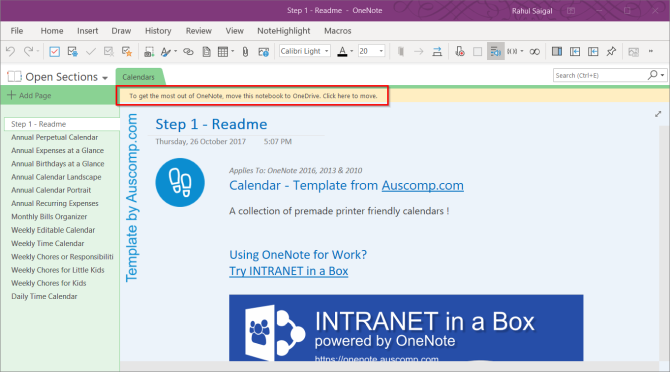
Download the template file with .one extension. Double-click the file to open it with Microsoft OneNote 2016. You’ll see a message in the yellow bar “To get the most out of OneNote, move this notebook to OneDrive. Click here to move.”

move the OneNote template to Onedrive

Step 1: Open the Templates pane. To do this, go to Insert > Page Templates and choose the Page Templates command.

Step 2: Click Save current page as a template.

save current page as a template

Step 3: Type a unique name for the new template file.

Step 4: Optionally, if you want all new pages to use the new design, click Set as default template for new pages in the current section.

Step 5: Click Save. OneNote adds this new template to the list of available templates found in the My Templates category.

1. Auscomp

Auscomp for OneNote features the biggest collection of templates designed to help make your life simpler and more productive. The 12 free OneNote templates include—Kanban, GTD, Estate Planner, Family Tree, Diary/Journal, Travel/Vacation Organizer, Cooking Recipes, and much more.

Auscomp lets you import these templates even if you don’t own a Windows device. Go to OneNote Notebook Importer and click Import. Navigate to the location of your notebook folder and then click Open to import it.

You can preview all the templates before you decide to download them.

If you decide to buy the PRO version, you get to precisely customize the template to make it work according to your needs. Here is the list of free and PRO version of the templates.

2. Notegram

instantly save templates with notegram

Notegram is a companion web app that offers you a simplistic approach to install templates. Just sign in with your Microsoft account and click the Save button. Templates get automatically saved to your default notebook section—usually Quick Notes.

Since Notegram is completely platform independent, you can save templates to OneNote from any device. The monthly calendar template lets you create a calendar for any month and year. You’ll also find various planner templates like a day planner, weekly planner, and trip planner.

For those who like to maintain a journal, there is a simple template for writing a journal, maintaining an accounting journal, document annotation for note-taking, and more.

3. OneNote Gem

OneNote gem template collection

OneNote Gem is a specialized site that offers you add-ins and apps to enhance the functionality of OneNote. The template section has a collection of 15+ templates for various personal projects like weekly assignments, appointments, time management, and a GTD template.

For students, you’ll find homework assignments, Cornell notes, and daily schedule template invaluable for managing day-to-day class activities. There are 5+ ready-made notebook templates with all sections and placeholder text pre-filled. You’ll find notebooks for work, students, managing personal projects, and more.

Gem for OneNote also offers you a Cornel Note-Taking Template with Fields. All you have to do is select this template and apply the template styles. It saves you time and comes with all the formatting options. This add-in is available for $33.

4. Onetastic

monthly calendar with task list

Onetastic is a multipurpose add-in for OneNote 2016. It uses macros to increase the functionality of OneNote. With the help of macros, you can perform simple repetitive tasks quickly. But these macros are powerful enough to create some basic templates for everyday use.

Insert Monthly Calendar macro inserts a calendar in a OneNote page. Then just select a month, year, and the first day of the month. Monthly Calendar With Task List macro goes even further.

It makes a blank cell (there is no limit to the number of cells) in each day of your column. You can put a tag with checkbox and manage a running to-do list right from this calendar.

The Weekly Planner macro lets you insert a simple weekly planner. Select your starting day of the week, layout, and decide the number of weeks you want to use in a planner. The Weekly Planner With Task List macro lets you create a task list for that week or more with to-do tags.

5. Awesome Planner

If you want a full-fledged planner for OneNote, then this template comes with a lot of options. This planner is set up with the year at the top level. Each month is a separate section and the weeks are pages within each section.

The planner also includes some unique pages like lined blank pages, dot grid pages for bullet journal, graph pages, and undated horizontal or vertical pages. This planner comes as a ZIP file. When you buy the template, you’ll receive a download link and the instruction PDF.

Download: Awesome Planner ($20)

6. Simplify Days

Free OneNote template from Simplify Days

Simplify Days features a collection of organization-based templates. It includes a work order template to store and manage all the client details. A capsule wardrobe template based on embracing a minimalist kind of wardrobe lifestyle. And a nice party guide template to keep all the details of the party in a single place.

The templates are beautiful. They use custom fonts and background images to give a professional look to a template. To get them, type in your name and email address. Within a few moments, you’ll get a download link to all the templates in a ZIP file.

Use OneNote Templates to Organize Your Life

A well-made template can help you improve note-taking, forgetfulness, and keeping life organized. If you have already integrated OneNote into your workflow, then the templates discussed in this article will help you earn great rewards in the long term.

Spending time in creating a template is also fun and a great learning experience. You can use OneNote to create your own templates for any personal or work needs. If this interests you, read how to use OneNote templates to be more organized.

Read the full article: The 6 Best Sites to Download Microsoft OneNote Templates


Read Full Article

How to Play Retro Games on Your PC, Legally!


play-retro-games-legally

Modern video games are great, but they don’t always have the charm of the classics. So if you have the urge to play a game of Zombies Ate My Neighbors, unless you happen to have your old SNES plugged into a CRT TV, this can be tricky.

Thankfully, you can play old games on your computer very easily, but not every method is going to be completely legal. This article is for those who want to play retro games on a PC but keep everything completely above board.

Looking at the Legal Issues

Emulation isn’t illegal. You can have any number of emulators installed on your computer. Using an emulator to play a ROM of a classic game isn’t illegal either.

Legal issues arise from how you obtained that ROM and whether you actually own the game. So, every method we outline here is entirely legal, letting you play your games guilt-free.

1. Replay Your Old PC Games

You have a PC, and you’ve got some old PC games. It should be easy to play them right? Unfortunately, it’s anything but.

Some more recent games may work on Windows 10 running in Compatibility Mode, but for older DOS games, you’ll need something else.

Say Hello to DOSBox

DOSBox is DOS emulation software that lets you run a wide range of DOS-based software, not just games. As long as you have your old disks, there’s a good chance that you can get them running in DOSBox. That said, you may need a USB floppy disk drive or CD ROM drive to get this working.

DOSBox running a game

Getting up and running with DOSBox is fairly simple but beyond the scope of this article. Fortunately, we already have a guide to playing retro games with DOSBox.

2. Buy Old Games Anew

If you don’t already have a closet full of games, buying old games from modern digital storefronts is your best option. This option also presents zero legal issues.

PC Games

There was a time when buying old PC games meant shopping at second-hand stores and scouring yard sales. Since then, multiple options for buying old games on new platforms have popped up.

The most popular place to buy older PC games is Steam, which shouldn’t come as a surprise. It’s not the only option, though. GOG, formerly known as Good Old Games, is another great place to buy retro PC games.

The GOG storefront

Older games on GOG often come with extras like maps and scans of the original manuals, which you won’t usually find on Steam. GOG also takes care to make sure older games are playable on modern systems.

We have listed the old PC games still worth playing to help you sort the wheat from the chaff.

Other Games

When it comes to console games, your pickings are a little slimmer. You still have a choice of retailers, but you’ll generally have to rely on collections of retro games.

If you’re a Sega fan, the SEGA Mega Drive and Genesis Classics collection is a great one, with 59 games included for a list price of $29.99. For arcade fans, a number of SNK NeoGeo classics are available for individual purchase from GOG.

Additionally, the NeoGeo Classic Complete Collection is available on the Humble Bundle Store, collecting more than 20 games for $39.99.

3. Rip ROMs From Old Cartridges

If you’re a Nintendo fan, you’re out of luck when it comes to buying older games to play on your PC. However, if you happen to have your old SNES cartridges, you can get them working on your PC totally legally. It just takes a little work.

How to Rip Your Old Game Cartridges

First off, you’ll need the right hardware. The most popular option is the Retrode 2.

The Retrode 2 with SNES and Genesis cartridges

Out of the box, the Retrode 2 can rip SNES / Super Famicom and Genesis / Mega Drive games. DragonBox also sells Plugin modules. These let you rip Nintendo 64, Sega Master System, and Game Boy games.

When you rip the games, you don’t just get the game ROM. Unless the cartridge’s internal battery has died (which is entirely possible), you can dump your old save games too. This is very handy if you never finished Chrono Trigger, for example.

Play Those Old Console Games Using Emulators

Once you’ve got your games on your PC, you’ll need an emulator or emulators to play them. One of the easiest ways is to install a front end that can manage multiple emulators for you.

If you’re using Windows, your best bet is RetroArch. This lets you run emulators for nearly any retro system you can imagine and tacks on modern features. For example, you can play two-player games over the internet, which is great if you don’t have anyone to play against.

On a Mac, OpenEmu is a fantastic option. It also supports a ton of different systems and has a great-looking user interface.

OpenEmu in action

4. Other Sources for Playing Retro Games

If you don’t have a box of old cartridges and still want to scratch your retro gaming itch without spending a dime, you’ve got a few other options available to you. Some creators of older games have made their games available free of charge, so they’re entirely legal to have and use.

There is a collection of free ROMs available on the MAME website. Star Fire and Top Gunner probably don’t ring a bell, but you could still have a blast playing them.

The Internet Archive offers up The Internet Arcade, which is not only fully legal but also lets you play games over the internet. Since everything happens in your browser, you don’t even need to install an emulator.

The Internet Arcade on the Internet Archive

You’ll find a number of well-known games like Outrun, Defender, Joust, and Paperboy. If you’re looking to kill an afternoon without putting in much work, this is the option for you.

Looking to Play Your Old Games on the Go?

You’re now all set up to play old games on your PC, but what about playing old games on the go?

Technically, your laptop counts, but hauling it out on the bus for a quick round of Smash TV isn’t ideal. Fortunately, there are DIY projects to make portable retro gaming easier.

If you like to build things yourself, the ClockworkPI GameShell might be just what you’re looking for. It’s not perfect, but it’s an interesting piece of hardware that will cost you less than a new handheld. For more information, check out our review of the ClockworkPI GameShell.

Read the full article: How to Play Retro Games on Your PC, Legally!


Read Full Article

Disney+, Is IPTV Legal, and Office Alternatives for macOS


iptv-legal

Join Christian Cawley and Gavin Phillips as Disney+ is given a launch date and YouTube TV increases its subscription again. So it makes sense to talk about IPTV’s legality… or otherwise.

There’s also time to tell you about Microsoft Office alternatives for macOS, how to transfer photos and text messages from Android to your PC, and how to easily uninstall software on Windows.

Really Useful Podcast Season 2 Episode 11 Shownotes

As ever, we provide you with the links to the topics we discuss in this week’s Really Useful Podcast:

This week’s Really Useful Podcast is hosted by Christian Cawley and Gavin Phillips, who you can follow on Twitter:

Share our podcast with anyone you know who could benefit with having otherwise complicated technology matters clearly explained.

Enjoy the show? Subscribe to the Really Useful Podcast on:

Subscribing means you won’t miss next week’s tech podcast for technophobes, in which we take a look at Facebook’s recent privacy issues.

Read the full article: Disney+, Is IPTV Legal, and Office Alternatives for macOS


Read Full Article

Sony Reveals Information About Its Next-Gen PlayStation 5


The next generation of video game consoles is almost upon us. Well, sort of.

Sony’s Mark Cerny recently sat down for an interview with Wired where he provided some key information about what we can expect from the company’s next-generation console, which we presume will be called the PlayStation 5 (the name of the device wasn’t officially confirmed in the interview).

What We Know About the PS5

The interview is a rather interesting way for Sony to drop hints about its upcoming console, as these sorts of announcements are typically made at some sort of press event with lots of pomp and circumstance. Still, Cerny did reveal some critical information that provides us with a taste of what we can expect when the next-generation of video games becomes available.

One of the most important things to note is that this won’t be like the PlayStation 4 Pro, where it’s an iteration on the previous console. Instead, this will be a more traditional leap like the PlayStation 3 to the PlayStation 4.

However, for PS4 fans, Cerny did reveal that the next console would be based on the same architecture as the PS4, which means it’ll be backward compatible with games from the previous platform.

As for the graphics, Sony says that its next console will have a custom version of Radeon’s Navi line. This means it’ll have support for ray tracing, which is just starting to make waves in the world of PC gaming and movies. The console will also be able to output graphics in 8K, though that will require televisions and displays with support for the higher resolution to catch up.

For the processor, Sony will arm the device with an AMD chip based on the third-generation Ryzen processor. It will feature eight cores of the seven-nanometer Zen 2 chip.

There will be 3D audio thanks to the power offered by the AMD chip. This, along with the graphical horsepower, should help game developers create more immersive experiences than we’ve ever seen before.

Cerny wouldn’t go into details about its plans for VR on its next console, but he did say that “VR is very important to us and that the current PSVR headset is compatible with the new console.”

One of the biggest changes to the new generation and one that PC gamers have been enjoying for quite some time is the inclusion of an SSD, which will greatly speed up loading times. In fact, Cerny demonstrated the loading times on a development kit of the new console with Spider-Man on the PS4. The PS4 took about 15 seconds to load while the new console with its SSD took about 0.8 seconds.

Here’s a quick rundown:

  • Backward compatible with PS4 and PSVR
  • Support for discs
  • Radeon Navi line GPU with support for 8K and ray tracing
  • AMD processor based on third-generation Ryzen with eight cores
  • 3D Audio support
  • Solid state drive

When Can You Buy The PlayStation 5?

Unfortunately, there’s quite a bit of information we don’t know about the next PlayStation console, and one of those is the exact release window for it. Cerny did say that it won’t be out this year, though, so gamers will need to be patient.

Another thing Sony didn’t reveal was anything about the console’s services or other features, as this initial reveal was meant to give us a taste of the hardware.

Obviously, the company didn’t announce any pricing information for its next-generation console yet, as it’s far too early for that.

Sony isn’t holding a press conference at E3 in June this year, so it’s not clear when we’ll get to hear more about just what the company has up its sleeve for the next console generation.

Read the full article: Sony Reveals Information About Its Next-Gen PlayStation 5


Read Full Article

Google starts rolling out better AMP URLs


Publishers don’t always love Google’s AMP pages, but readers surely appreciate their speed, and while publishers are loath to give Google more power, virtually every major site now supports this format. One AMP quirk that publisher’s definitely never liked is about to go away, though. Starting today, when you use Google Search and click on an AMP link, the browser will display the publisher’s real URLs instead of an “http//google.com/amp” link.

This move has been in the making for well over a year. Last January, the company announced that it was embarking on a multi-month effort to load AMP pages from the Google AMP cache without displaying the Google URL.

At the core of this effort was the new Web Packaging standard, which uses signed exchanges with digital signatures to let the browser trust a document as if it belongs to a publisher’s origin. By default, a browser should reject scripts in a web page that try to access data that doesn’t come from the same origin. Publishers will have to do a bit of extra work, and publish both signed and un-signed versions of their stories.


Quite a few publishers already do this, given that Google started alerting publishers of this change in November 2018. For now, though, only Chrome supports the core features behind this service, but other browsers will likely add support soon, too.

For publishers, this is a pretty big deal, given that their domain name is a core part of their brand identity. Using their own URL also makes it easier to get analytics, and the standard grey bar that sits on top of AMP pages and shows the site you are on now isn’t necessary anymore because the name will be in the URL bar.

To launch this new feature, Google also partnered with Cloudflare, which launched its AMP Real URL feature today. It’ll take a bit before it will roll out to all users, who can then enable it with a single click. With this, the company will automatically sign every AMP page it sends to the Google AMP cache. For the time being, that makes Cloudflare the only CDN that supports this feature, though others will surely follow.

“AMP has been a great solution to improve the performance of the internet and we were eager to work with the AMP Project to help eliminate one of AMP’s biggest issues — that it wasn’t served from a publisher’s perspective,” said Matthew Prince, co-founder and CEO of Cloudflare. “As the only provider currently enabling this new solution, our global scale will allow publishers everywhere to benefit from a faster and more brand-aware mobile experience for their content.”


Read Full Article