19 February 2019

Slack off. Send videos instead with $11M-funded Loom


If a picture is worth a thousand words, how many emails can you replace with a video? As offices fragment into remote teams, work becomes more visual, and social media makes us more comfortable on camera, it’s time for collaboration to go beyond text. That’s the idea behind Loom, a fast-rising startup that equips enterprises with instant video messaging tools. In a click, you can film yourself or narrate a screenshare to get an idea across in a more vivid, personal way. Instead of scheduling a video call, employees can asynchronously discuss projects or give ‘stand-up’ updates without massive disruptions to their workflow.

In the 2.5 years since launch, Loom has signed up 1.1 million users from 18,000 companies. And that was just as a Chrome extension. Today Loom launches its PC and Mac apps that give it a dedicated presence in your digital workspace. Whether you’re communicating across the room or across the globe, “Loom is the next best thing to being there” co-founder Shahed Khan tells me.
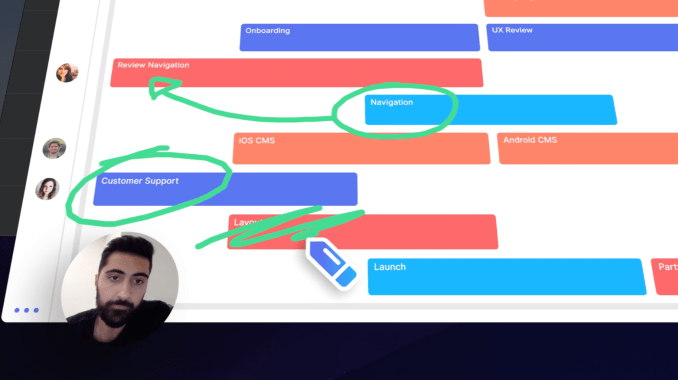
Now Loom is ready to spin up bigger sales and product teams thanks to an $11 million Series A led by Kleiner Perkins. The firm’s partner Ilya Fushman, formally Dropbox’s head of business and corporate development, will join Loom’s board. He’ll shepherd Loom through today’s launch of its $10 per month per user Pro version that offers HD recording, calls-to-action at the end of videos, clip editing, live annotation drawings, and analytics to see who actually watched like they’re supposed to.

“We’re ditching the suits and ties and bringing our whole selves to work. We’re emailing and messaging like never before. but though we may be more connected, we’re further apart” Khan tells me. “We want to make it very easy to bring the humanity back in.”

Loom co-founder Shahed Khan

But back in 2016, Loom was just trying to survive. Khan had worked at Upfront Ventures after a stint as a product designer at website builder Weebly. Him and two close friends, Joe Thomas and Vinay Hiremath, started Opentest to let app makers get usabilty feedback from experts via video. But after six months and going through the NFX accelerator, they were running out of bootstrapped money. That’s when they realized it was the video messaging that could be a business as teams sought to keep in touch with members working from home or remotely.

Together they launched Loom in mid-2016, raising a pre-seed and seed round amounting to $4 million. Part of its secret sauce is that Loom immediately starts uploading bytes of your video while you’re still recording so it’s ready to send the moment you’re finished. That makes sharing your face, voice and screen feel as seamless as firing off a Slack message, but with more emotion and nuance.

“Sales teams use it to close more deals by sending personalized messages to leads. Marketing teams use Loom to walk through internal presentations and social posts. Product teams use Loom to capture bugs, stand ups, etc” Khan explains.

Loom has grown to a 16-person team that will expand thanks to the new $11 million Series A from Kleiner, Slack, Cue founder Daniel Gross, and actor Jared Leto that brings it to $15 million in funding. They predict the new desktop apps that open Loom to a larger market will see it spread from team to team for both internal collaboration and external discussions from focus groups to customer service.

Loom will have to hope that after becoming popular at a company, managers will pay for the Pro version that shows exactly how long each viewer watched for. That could clue them in that they need to be more concise, or that someone is cutting corners on training and cooperation. It’s also a great way to onboard new employees. ‘Just watch this collection of videos and let us know what you don’t understand.’
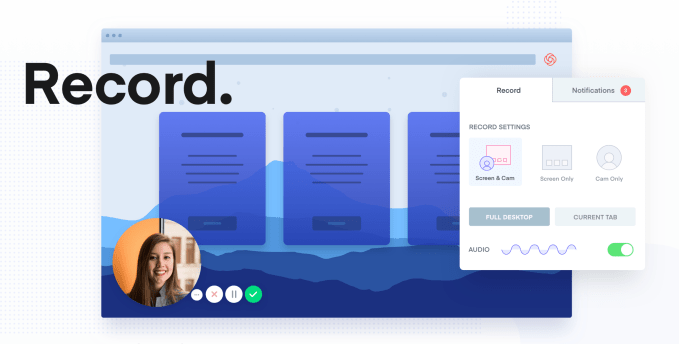
Next Loom will have to figure out a mobile strategy — something that’s surprisingly absent. Khan imagines users being able to record quick clips from their phones to relay updates from travel and client meetings. Loom also plans to build out voice transcription to add automatic subtitles to videos and even divide clips into thematic sections you can fast-forward between. Loom will have to stay ahead of competitors like Vidyard’s GoVideo and Wistia’s Soapbox that have cropped up since its launch. But Khan says Loom looms largest in the space thanks to customers at Uber, Dropbox, Airbnb, Red Bull, and 1100 employees at Hubspot.

“The overall space of collaboration tools is becoming deeper than just email + docs” says Fushman, citing Slack, Zoom, Dropbox Paper, Coda, Notion, Intercom, Productboard, and Figma. To get things done the fastest, businesses are cobbling together B2B software so they can skip building it in-house and focus on their own product.

No piece of enterprise software has to solve everything. But Loom is dependent on apps like Slack, Google Docs, Convo, and Asana. Since it lacks a social or identity layer, you’ll need to send the links to your videos through another service. Loom should really build its own video messaging system into its desktop app. But at least Slack is an investor, and Khan says “they’re trying to be the hub of text-based communication” and the soon-to-be-public unicorn tells him anything it does in video will focus on real-time interaction.

Still, the biggest threat to Loom is apathy. People already feel overwhelmed with Slack and email, and if recording videos comes off as more of a chore than an efficiency, workers will stick to text. But Khan thinks the ubiquity of Instagram Stories is making it seem natural to jump on camera briefly. And the advantage is that you don’t need a bunch of time-wasting pleasantries to ensure no one misinterprets your message as sarcastic or pissed off.

Khan concludes “We believe instantly sharable video can foster more authentic communication between people at work, and convey complex scenarios and ideas with empathy.”


Read Full Article

Twitter names first international markets to get checks on political advertisers


Twitter has announced it’s expanding checks on political advertisers outside the U.S. to also cover Australia, India and all the member states of the European Union.

This means anyone wanting to run political ads on its platform in those regions will first need to go through its certification process to prove their identity and certify a local location via a verification letter process.

Enforcement of the policies will kick in in the three regions on March 11, Twitter said today in a blog post. “Political advertisers must apply now for certification and go through the every step of the process,” it warns.

The company’s ad guidelines, which were updated last year, are intended to make it harder for foreign entities to target elections by adding a requirement that political advertisers self-identify and certify they’re locally based.

A Twitter spokeswoman told us that advertiser identity requirements include providing a copy of a national ID, and for candidates and political parties specifically it requires an official copy of their registration and national election authority.

The company’s blog post does not explain why it’s selected the three international regions it has named for its first expansion of political checks outside the U.S. But they do all have elections upcoming in the next months.

Elections to the EU parliament take play in May, while India’s general elections are expected to take place in April and May. Australia is also due to hold a federal election by May 2019.

Twitter has been working on ad transparency since 2017, announcing the launch of a self-styled Advertising Transparency Center back in fall that year, following political scrutiny over the role social media platforms in spreading Kremlin-backed disinformation during the 2016 US presidential election. It went on to launch the center in June 2018.

It also announced updated guidelines for political advertisers in May 2018 which also came into effect last summer, ahead of the U.S. midterms.

The ad transparency hub lets anyone (not just Twitter users) see all ads running on its platform, including the content/creative; how long ads have been running; and any ads specifically targeted at them if they are a user. Ads can also be reported to Twitter as inappropriate via the Center.

Political/electioneering ads get a special section that also includes information on who’s paying for the ad, how much they’ve spent, impressions per tweet and demographic targeting.

Though initially the political transparency layer only covered U.S. ads.

Now, more than half a year on, Twitter is preparing to expand the same system of checks to its first international regions.

In countries where it has implemented the checks, organizations buying political ads on its platform are also required to comply with a stricter set of rules for how they present their profiles to enforce a consistent look vis-a-vis how they present themselves online elsewhere — to try to avoid political advertisers trying to pass themselves off as something they’re not.

These consistency rules will apply to those wanting to run political ads in Europe, India and Australia from March. Twitter will also require political advertisers in the regions include a link to a website with valid contact info in their Twitter bio.

While those political advertisers with Twitter handles not related to their certified entity must also include a disclaimer in their bio stating the handle is “owned by”  the certified entity name.

The company’s move to expand political ad checks outside the U.S. is certainly welcome but it does highlight how piecemeal such policies remain with many more international regions with upcoming elections still lacking such checks — nor even a timeline to get them.

Including countries with very fragile democracies where political disinformation could be a hugely potent weapon.

Indonesia, which is a major market for Twitter, is due to hold a general election in April, for instance. The Philippines is also due to hold a general election in May. While Thailand has an election next month.

We asked Twitter whether it has any plans to roll out political ad checks in these three markets ahead of their key votes but the company declined to make a statement on why it had focused on the EU, Australia and India first.

A spokeswoman did tell us that it will be expanding the policy and enforcement globally in the future, though she would not provide a timeline for any further international expansion. 


Read Full Article
GN acquires Altia Systems for $125M to add video to its advanced audio solutions


Some interesting M&A is afoot in the world of hardware and software that’s aiming to improve the quality of audio and video communications over digital networks.

GN Group — the Danish company that broke new ground in mobile when it inked deals first with Apple and then Google to stream audio from their phones directly to smart, connected hearing aids — is expanding from audio to video, and from Europe to Silicon Valley.

Today, the company announced that it would acquire Altia Systems, a startup out of Cupertino that makes a “surround” videoconferencing device and software called the PanaCast (we reviewed it oncedesigned to replicate the panoramic, immersive experience of vision that we have as humans

GN is paying $125 million for the startup. For some context, this price represents a decent return: according to PitchBook, Altia was last valued at around $78 million with investors including Intel Capital and others.

Intel’s investment was one of several strategic partnerships that Altia had inked over the years. (Another was with Zoom to provide a new video solution for Uber.)

The Intel partnership, for one, will continue post-acquisition. “Intel invested in Altia Systems to bring an industry leading immersive, Panoramic-4K camera experience to business video collaboration,” said Dave Flanagan, Vice President of Intel Corporation and Senior Managing Director of Intel Capital, in a statement. “Over the past few years, Altia Systems has collaborated with Intel to use AI and to deliver more intelligent conference rooms and business meetings. This helps customers make better decisions, automate workflows and improve business efficiency. We are excited to work with GN to further scale this technology on a global basis.”

We have seen a lot of applications of AI in just about every area of technology, but one of the less talked about, but very interesting, areas has been in how it’s being used to enhance audio in digital network. Pindrop, as one example, is creating and tracking “audio fingerprints” for security applications, specifically fraud prevention (to authenticate users and to help weed out imposters based not just on the actual voice but on all the other aural cues we may not pick up as humans but can help build a picture of a caller’s location and so on).

GN, meanwhile, has been building AI-based algorithms to help those who cannot hear as well, or who simply needs to hear better, be able to listen to calls on digital networks and make out what’s being said. This not only requires technology to optimise the audio quality, but also algorithms that can help tailor that quality to the specific person’s own unique hearing needs.

One of the more obvious applications of services like these are for those who are hard of hearing and use hearing aids (which can be awful or impossible to use with mobile phones), another is in call centers, and this appears to be the area where GN is hoping to address with the Altia acquisition.

GN already offers two products for call centre workers, Jabra and BlueParrot — headsets and speakerphones with their own proprietary software that it claims makes workers more efficient and productive just by making it easier to understand what callers are saying.

Altia will be integrated into that solution to expand it to include videoconferencing around unified communications solutions, creating more natural experiences for those who are not actually in physical rooms together.

“Combining GN Audio’s sound expertise, partner eco-system and global channel access with the video technology from Altia Systems, we will take the experience of conference calls to a completely new level,” said RenĂ© Svendsen-Tune, President and CEO of GN Audio, in a statement.

What’s notable is that GN is a vertically-integrated company, building not just hardware but software to run on it. The AI engine underpinning some of its software development will be getting a vast new trove of data fed into it now by way of the PanaCast solution: not jut in terms of video, but the large amount of audio that will naturally come along with it.

“Combining PanaCast’s immersive, intelligent video with GN Audio’s intelligent audio solutions will enable us to deliver a whole new class of collaboration products for our customers,” said Aurangzeb Khan, President and CEO of Altia Systems, in a statement. “PanaCast’s solutions enable companies to improve meeting participants’ experience, automate workflows, and enhance business efficiency and real estate utilization with data lakes of valid information.”

Given GN’s work with Android and iOS devices, it will be interesting to see how and if these video solutions make their way to those platforms as well, either by way of solutions that work on their phones or perhaps more native integrations down the line.

Regardless of how that develops, what’s clear is that there remains a market not just for basic tools to get work done, but technology to improve the quality of those tools, and that’s where GN hopes it will resonate with this deal.


Read Full Article
Litho is a finger-worn controller for augmented reality, IoT and other ‘spatial’ interactions


I first encountered the founders of Litho, a new hardware and software startup developing a new finger-worn controller, at London’s Pitch@Palace last April. The event sees startups pitch in front of the British royal family and other esteemed guests, and naturally the company’s young founders, 24-year-old Nat Martin (CEO) and 25-year-old Charlie Bruce (CTO), were a little overawed by the occasion, just like many of the other founders pitching that day. However, perhaps unbeknown to them, Litho was also one of the more notable companies, not least because, as the saying goes, hardware is hard.

Fast forward to today and the young company is ready to show the world the first publicly available iteration of what it has been building: an innovative finger-worn device that provides control over various “spatial interactions” and should find applications ranging from AR and VR to the smart home and the control of other IoT devices. The next stage for Litho is to offer the controller and access to its SDK to developers who join the startup’s beta programme for $199/£179.

“Computing is increasingly structured around the real world rather than the desktop,” says Litho’s Nat Martin. “With the advent of smart devices such as lights, thermostats, and door locks, physical things are becoming digitally connected. Equally, with the advent of AR, digital things are becoming physically anchored in the real world. These are two sides of the same coin — digital interactions are entering physical space”.

However, the status quo is for the smartphone to be the primary interface for these spatial interactions, but smartphones were designed to interact with 2D content on screens and are therefore struggling to make the leap. “Trying to interact with objects in the real world through a smartphone is like trying to do heart surgery with a spork,” says Martin. “More often than not our phones end up being a frustrating barrier to the digital world, rather than a tool to enable interactions with it”.

To solve this problem requires a combination of hardware and software, while the Litho device itself is described as an unobtrusive finger-worn controller that connects via Bluetooth Low Energy to a smartphone or AR headset. The controller has a capacitive touch surface on the underside, which allows for precise 2D input, scrolling and tapping. But, more significantly, it also has an array of motion sensors and provides haptic feedback.

The Litho SDK uses the popular 3D game development platform Unity, and Martin says developers will be able to make apps that can not only identify the direction (/vector) in which the wearer is pointing, but what they are pointing at in the real world. It also provides an interaction framework of off-the-shelf solutions for core interactions, including templates for tools such as object creation, movement and deletion, making it easier for developers to quickly build “delightful and intuitive experiences”.

“Having an input device designed from the ground up for 3D interaction opens a whole new paradigm of mobile interactions,” he adds. “Instead of an awkward and frustrating interface, developers can create precise yet effortless interactions in 3D space. This opens up a whole new range of use cases — architects and designers can create precise 3D models in the context of the real world, and gamers can create a virtual theme park in their back garden simply by pointing and drawing. At home, instead of opening up a smartphone app, searching for the right bulb, and operating a virtual dimmer, you can simply point and swipe to dim your lights”.

Meanwhile, Litho has already picked up a number of notable investors. The burgeoning startup has raised an undisclosed amount of seed funding from U.S. venture firm Greycroft, Paul Heydon (an early investor in Unity and Supercell), and Chris Albinson (who co-led investments in DocuSign, Pinterest and Turo), along with several other unnamed angel investors.


Read Full Article

How to Build Twitter, Instagram, and Reddit Bots Using Python


build-bots-python

It’s 2019. You’ve heard of bots. There are chat bots, email bots, web scraping bots, and, social media bots. Have you created a bot yet? It’s surprisingly easy. Probably why they’re all over the place. Embrace our bot overlords by joining their rank.

In this article, I’ll show you how you can leverage Python to interact with your Twitter, Reddit, and Instagram accounts automatically.

Working With Python

This walk-through uses Python as its language of choice. Python’s ease-of-use advantages outweigh any speed deficiencies it has compared to other languages. You can download Python for almost any OS. Use the editor of your choice.

Python distributions come associated with the utility called pip. At the time of writing, there are over 168,000 libraries available for download using pip. For the bots you will create today, only three are needed.

From the command line, you can install the libraries needed using these three lines.

pip install --upgrade InstagramAPI
pip install --upgrade tweepy pip install --upgrade praw

Now you’ll be able to import these libraries where needed.

Getting Application Keys and Secrets

A wise philosopher once said “Secrets, secrets are no fun. Secrets, secrets hurt someone.” Respectfully, the bots need secrets. The next step in setting up your bots is to allow them access to the API of each site. To do this, you’ll need an application key or secret.

As you collect keys, secrets, tokens, and more (sounds like a fun game!), put them all into a single file called “credentials.py.” This file would look something like this:

# keys

twitter_consumer_key = ''
twitter_consumer_secret = ''
twitter_access_token = ''
twitter_access_token_secret = ''

reddit_client_id = ''
reddit_client_secret = ''
reddit_user_agent = ''

instagram_client_id = ''
instagram_client_secret = ''

Very important privacy suggestion: do not commit this file any source control (e.g. Git). You do not want anyone else to have these keys and secrets. They are called secrets for a reason.

Setting Up Twitter Access

Check out our guide to setting up a Twitter bot with Node.js will show you how to create your Twitter app. Note that Twitter will take some time to verify your account and ensure you’re not creating a spam account.

After following those steps, copy the consumer key, consumer secret, access token, and access token secret into your credentials.py file.

Setting Up Reddit Access

Getting your Reddit client ID and secret is very similar to Twitter. You’ll need to register an app as a Reddit User Agent. After doing this, you should absolutely put “Reddit User Agent” on your resume.

Sign in to the Reddit account of your choosing. Navigate to the apps preferences page and Click create another app. Name your user agent something useful. Select script for the purpose of your app. The about URL can be left blank. Fill in any address for the redirect box.

Reddit App Bot Python

After you Press create app, the following screen will be presented to you with a list of your apps. The digits under your application name represent the client ID and the client secret is located below that. Copy these values to your credentials.py file.

Reddit App API Secret Python

Setting Up Instagram Access

Instagram access differs from Twitter and Reddit. Instead of registering an app, you use your username and password. I suggest creating a separate public account and using those details for your bot.

Accessing Reddit With Praw

Using praw is a two-step process. First, setting up the access is a single function call to the Reddit method of praw. Then, using the initialized object, searching a subreddit is done using the new() method.

import praw
from credentials import *

my_reddit = praw.Reddit(client_id=reddit_client_id, client_secret=reddit_client_secret, user_agent=reddit_user_agent)

sub_name = 'technology'
max_posts = 10

for submission in my_reddit.subreddit(sub_name).new(limit=max_posts):
        print(submission.title)

Change the sub_name variable to get posts from different subreddits. Instead of new(), other methods such as hot() are available to get posts.

Searching Instagram Hashtags Via InstagramAPI

The first step in using the Instagram API is setting up an object with the client ID and secret. Directly after that, call the login() method to complete set up.

from InstagramAPI import InstagramAPI
from credentials import instagram_client_id, instagram_client_secret

my_insta_api = InstagramAPI(instagram_client_id,instagram_client_secret)
my_insta_api.login()

Using the API is a little more complicated than its Reddit counterpart. In this example, the script uses getHashtagFeed to get a very large JSON response object from Instagram.

Searching through the response, the script looks for caption text and then prints out to the screen to view it.

get_hashtag = my_insta_api.getHashtagFeed(hashtag)

if get_hashtag != False:
 for item in my_insta_api.LastJson['items']:
 if 'caption' in item.keys() and 'text' in item['caption'].keys():
         caption = item['caption']['text']
 print(caption)

Add Images To Social Media

Moving forward, you may want your script to get the images in this hashtag feed. To do this, loop through the JSON response and find the media associated with each post. Here’s an implementation for extracting the information from the JSON response:

def get_images_from_hashtag(hashtag, num_images):
        images = []
        get_hashtag = my_insta_api.getHashtagFeed(hashtag)

        if get_hashtag == False:
                return images

        for item in my_insta_api.LastJson['items']:
                if item['media_type'] == 1 and 'image_versions2' in item.keys():
                        candidate = get_largest_image(item['image_versions2']['candidates'])
                        # get image 
                        filename = self.save_image_from_candidate(candidate['url'])
                        if filename != '':
                                # get status, save as tuple
                                caption = get_caption(item)
                                images.append((filename, caption))
                        if len(images) >= num_images:
                                break
 return images

There are two helper functions used in this function. Instagram sends a list of image “candidates” in the JSON response. Choose the largest of these images so that the media is displayed in its highest resolution.

def get_largest_image(candidates):
        candidate = {}
        pixels = 0
        for cand in candidates:
                # pick the highest resolution one
                res = cand['height']*cand['width']
                if res > pixels:
                        pixels = res
                        candidate = cand
        return candidate

Secondly, once the link to image is found, you can save the image locally by writing the content to a file. Using the requests library makes this straightforward.

def save_image_from_candidate(url):
 filename = ''
 response = requests.get(url)
 # check the response status code, 200 means good
 if response.status_code == 200: 
        filename = url.split("/")[-1].split('?')[0]
        with open(filename, 'wb') as f:
                f.write(response.content)
 return filename

Tweeting Out Media With Tweepy

First, you’ll need to set up Twitter access using your secrets and keys.

import tweepy
from credentials import *

tw_auth = tweepy.OAuthHandler(twitter_consumer_key, twitter_consumer_secret)
tw_auth.set_access_token(twitter_access_token, twitter_access_token_secret)
tw_api = tweepy.API(tw_auth)

Creating a generic retweet bot is done in just a few lines.

for tweet in tweepy.Cursor(tw_api.search,q='MakeUseOf').items(10):
        try:
                tweet.favorite()
                tweet.retweet()
                time.sleep(2)
        except tweepy.TweepError as e:
                print(e.reason)
        except StopIteration:
                break

Many other things can be done with this library. To conclude this walk-through, you can use the get_images_from_hashtag function from the Instagram bot made earlier to tweet out images and captions.

Additionally, your Twitter bot can search Reddit for new posts and tweet those out as well. To put both of these functionalities together looks like this:

# use r/<hashtag> for reddit search
# and #<hashtag> for instagram search
hashtag = 'technology'
num_posts = 5

# tweet reddit info
reddit_posts = my_reddit.subreddit(hashtag).new(limit=num_posts)
for submission in reddit_posts:
        title = submission.title
        url = 'www.reddit.com{}'.format(submission.permalink)
        tweet_str = f'Reddit r/{sub} update:\n\n{title} #{sub} {url}'
        tweet_str = trim_to_280(tweet_str)
        tw_api.update(tweet_str)

# tweet instagram media
media_info = get_images_from_hashtag(hashtag, num_posts)
for (filename, message) in media_info:
        try:
                tweet_str = trim_to_280(message)
                tw_api.update_with_media(filename, status=tweet_str)
        except tweepy.TweepError as e:
                print(e.reason)
        except StopIteration:
                break

Your Python-Powered Social Media Bot Is Ready!

So, now you’ve got a bunch of code that pulls media from one site and posts to another. You can mix and match, too. Pull tweets and post to Reddit. Collect Instagram images for posting to subreddits. Make a bot and be a part of the real internet.

Lastly, to fully automate this process, you will want your bots to run in a loop on a server. This could be on your own computer with a time scheduler. Or, dust off that old Raspberry Pi that has been in your closet, and check out these sweet Twitter bot projects for the Pi.

Read the full article: How to Build Twitter, Instagram, and Reddit Bots Using Python


Read Full Article

Become a Certified Project Manager with this Six Sigma and Minitab Training


Most well-paid jobs come with a list of entry requirements. But you don’t need a degree or any technical knowledge to become a project manager. What’s more, the demand for new talent has never been greater. The Comprehensive Six Sigma Certification Collection helps you learn the methods of modern management, with 10 courses and over 32 hours of video training. You can get it now for only $45 at MakeUseOf Deals.

Six Sigma and Minitab

Project management is more about process than leadership. To keep delivering on time and under budget, you need to work within a solid framework.

This bundle helps you master one of the most popular systems around. Created by a GE engineer, Six Sigma is used by hundreds of top firms, including Amazon and BAE Systems. Through concise video tutorials, you learn how to deploy Six Sigma in any work environment.

Along the way, you discover how to reduce waste, control your budget, and identify areas for improvement. The training also looks at specialist skills, such as data analysis with Minitab, Quality Function Deployment (QFD) and Voice of Customer (VOC) techniques.

Just as importantly, you earn a certificate with each course you complete.

32 Hours of Training for $45

These courses are worth $1,649 in total, but you can get the bundle now for only $45. The deal includes lifetime 24/7 access to all 10 courses,.

Read the full article: Become a Certified Project Manager with this Six Sigma and Minitab Training


Read Full Article

5 Google Drive Tools For Better Docs, Spreadsheets, Slides, and More


Google Drive Tools

Today, you can do just about anything with Google Drive. Storage and collaborating on documents in the cloud are old-fangled. Think more creatively and you can find a way to do it on Google Drive or tap into the huge habitat of third-party Drive apps that have flourished around it.

Here are five such tools if you want to start thinking beyond simple documents, spreadsheets, and slides.

You Need a Wiki: Create a Personal Wiki From Google Docs

Create a Wiki from Google Docs

Google Drive can turn into a haphazard dump of your important files. A wiki can be a powerful information management system. But how do you go from one to the other? You Need a Wiki is a web service that connects to your Google Docs and uses the file and folder trees there to create a neat wiki.

You can use this wiki to create your own knowledge base, manage a home project, or a larger team project. It supports private team pages. Wikis are adaptable to any situation. YNAW is free for one user and there are paid plans if you want to scale up.

Searching for an alternative? You can use Microsoft OneNote to create your own wiki for free too.

Glide: Build Mobile Apps From a Google Sheet (No Coding)

Build a mobile app with Glide

Do you think that building mobile apps is too hard? Glide doesn’t want you to think so. It also doesn’t want to spend big bucks on expensive development teams. Enter Glide, a no-coding app design tool that combines the data inside Google spreadsheets with a custom app you can build yourself in five minutes or less.

Pick a sheet from Google Drive and Glide imports the data. You can then create a simple app and customize it to your liking. You can even share the app with your friends or publish it on the Google Play Store or Apple Store.

The best things in life aren’t free. But Glide does offer a free version that comes with Glide branding. The Pro and Business App plans offer subscriptions.

Tall Tweets: Share Google Slides as GIFs on Twitter

Google Slides is the little brother to Docs and Sheets. But when it comes to visuals, the presentation tool gets the job done without a bother. Just turning it into a GIF is something you might not have considered yet. Tall Tweets is a simple web app that can convert any presentation into an animated GIF and share it on Twitter. 

Instead of the entire slide deck, you can also tweet selected slides of a deck. A high-resolution image of the slide will be embedded in your tweet.

Tip: Use it as a “trailer” to boost your Google Slides presentation before the event itself.

Lightbox: Remove the Bloat From Google Drive Photos

Use Google Drive as a Photo Hosting Service

Think of Lightbox as an uncluttered photo browser. The web app presents a streamlined interface to showcase all your photos from a special Google Drive folder. The minimalist interface removes all clutter and presents your photos as they should be seen on all devices.

The photos are stored in a “Lightbox” folder in your Google Drive. Creating an album is as easy as making a new folder and putting your photos in it. You can take advantage of Google Drive’s generous space to build entire collections. The web app follows the folder and file hierarchy of your photos and makes it easy to manage your photo albums.

Google Drive to Slack: Get Notified on Slack

Integrate Google Drive with Slack

Slack has other team communication tools beat. And this web app is a must if you use both Slack and Google Drive for collaboration. Whenever you work on a Google Drive folder or file, the service will post a notification on Slack. You need to authorize both Slack and Google Drive to work together.

The Google Drive to Slack integration can remove the need to send separate messages whenever a document is worked on. You will receive notifications when new documents are created, or existing ones are shared with you, modified or deleted.

Do note that this is a third-party service and isn’t created by, affiliated with, or supported by Slack or Google.

Work Better With Google Drive

Our mobile productivity depends on how many tasks we can shift to the cloud. Google Drive has quite a few bells and whistles that make mundane tasks a breeze. You only need a reliable bandwidth to finish your job. But the world of third party Google Drive apps and services is exciting in itself. Every day a new tool comes along that makes our dependence on bloated installed software lesser.

So keep looking for the best Google Drive add-on or web app that helps you stay on the cloud. Here are a few more we had put together.

Read the full article: 5 Google Drive Tools For Better Docs, Spreadsheets, Slides, and More


Read Full Article

TCL leaks foretell a weird future for foldable phones


Foldables are going to get weird. And I’m here for it. Just check out these leaked TCL renders from CNET. All manner of strange and wonderful folding devices — two tablets and three smartphones, including one that flips all the way around into a Futurama-style bracelet. There are renders for tablets and phones that fold both in and out.

Granted, few if any will actually come to fruition, but if this first wave of foldables opens up smartphone design in new and interesting ways like these, the industry will be all the better for it. Of course, we’re still in the early stages of all of this — and the first wave of foldable have yet to prove themselves of interest to the smartphone buying audience beyond simple novelties.

We’ll be seeing a fair bit more of the space week at Mobile World Congress, along with Wednesday’s Samsung event, which is expected to give us another peek at the upcoming Galaxy foldable. For now, however, the Royale FlexPai is the only device that’s actually come to market, and that one still feels like little more than a developer product.

However, while TCL’s not a household name here in the space, the Chinese company certainly has experience in the display department, both through its TV business of the same name and smartphone brands like Alcatel, Palm and BlackBerry.

These sorts of renders are probably pretty standard for all companies currently experimenting with a flexible form factor. If there’s one thing all of the announced devices have proven, it’s that the industry is still a ways away from settling on a consistent design language for these devices. And it’s certainly possible that the industry will never settle on a consistent form factor


Read Full Article
Instagram’s fundraiser stickers could lure credit card numbers


Mark Zuckerberg recently revealed that commerce is a huge part of the 2019 roadmap for Facebook’s family of apps. But before people can easily buy things from Instagram etc, Facebook needs their credit card info on file. That’s a potentially lucrative side effect of Instagram’s plan to launch a Fundraiser sticker in 2019. Facebook’s own Donate buttons have raised $1 billion, and bringing them to Instagram’s 1 billion users could do a lot of good while furthering Facebook’s commerce strategy.

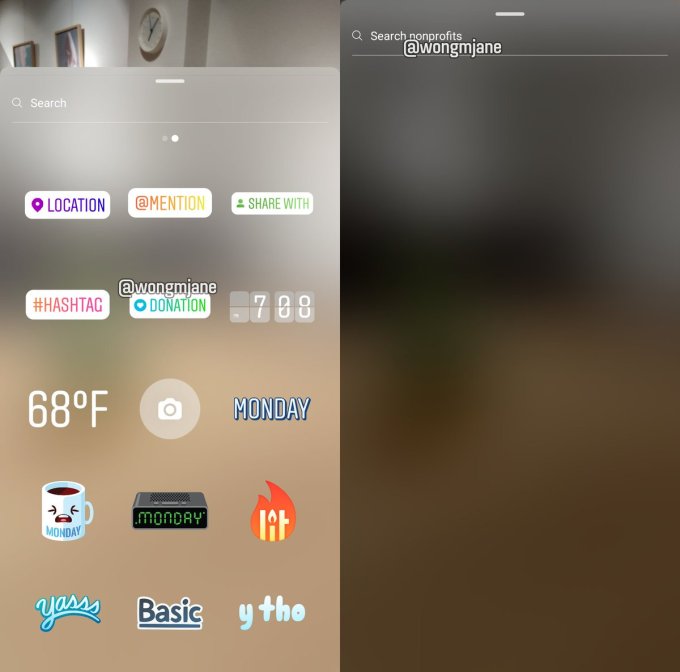
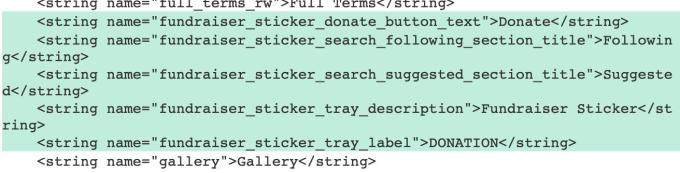
New code and imagery dug out of Instagram’s Android app reveals how the Fundraiser stickers will allow you to search for non-profits and add a Donate button for them to your Instagram Story. After you’ve donated to something once, Instagram could offer instant checkout on stuff you want to buy using the same payment details.

Back in 2013 when Facebook launched its Donate button, I suggested that it could add a “remove credit card after checkout” option to its fundraisers if it wanted to make it clear that the feature was purely altruistic. Facebook never did that. You still need to go into your payment settings or click through the See Receipt option after donating and then edit your account settings to remove your credit card. We’ll see if Instagram is any different. We’ve also asked whether Instagrammers will be able to raise money for personal causes, which would make it more of a competitor to GoFundMe — which has sadly become the social safety net for many facing healthcare crises.

Facebook mentioned at its Communities Summit earlier this month that it’d be building Instagram Fundraiser stickers, but the announcement was largely overshadowed by the company’s reveal of new Groups features. This week, TechCrunch tipster Ishan Agarwal found code in the Instagram Android app detailing how users will be able search for non-profits or browse collections of Suggested charities and ones they follow. They can then overlay a Donate button sticker on their Instagram Story that their followers can click through to contribute.

We then asked reverse engineering specialist Jane Manchun Wong to take a look, and she was able to generate the screenshots seen above that show a green heart icon for the Fundraiser sticker plus the non-profit search engine. A Facebook’s spokespeople tell me that “We are in early stages and working hard to bring this experience to our community . . . Instagram is all about bringing you closer to the people and things you love, and a big part of that is showing support for and bringing awareness to meaningful communities and causes. Later this year, people will be able to raise money and help support nonprofits that are important to them through a donation sticker in Instagram Stories. We’re excited to bring this experience to our community and will share more updates in the coming months.”

Zuckerbeg said during the Q4 2018 earnings call last month that “In Instagram, one of the areas I’m most excited about this year is commerce and shopping . . . there’s also a very big opportunity in basically enabling the transactions and making it so that the buying experience is good”. Streamlining those transactions through saved payment details means more people will complete their purchase rather than abandoning their cart. Facebook CFO David Wehner noted on the call that “Continuing to build good advertising products for our e-commerce clients on the advertising side will be a more important contributor to revenue in the foreseeable future”. Even though Facebook isn’t charging a fee on transactions, powering higher commerce conversion rates convinces merchants to buy more ads on the platform.

With all the talk of envy spiraling, phone addiction, bullying, and political propaganda, enabling donations is at least one way Instagram can prove it’s beneficial to the world. Snapchat lacks formal charity features, and Twitter appears to have ended its experiment allowing non-profits to tweet donate buttons. Despite all the flack Facebook rightfully takes, the company has shown a strong track record with philanthropy that mirrors Zuckerberg’s own $47 billion commitment through the Chan Zuckerberg Initiative. And if having some relatively benign secondary business benefit speeds companies towards assisting non-profits, that’s a trade-off we should be willing to embrace.


Read Full Article

Instagram’s fundraiser stickers could lure credit card numbers


Mark Zuckerberg recently revealed that commerce is a huge part of the 2019 roadmap for Facebook’s family of apps. But before people can easily buy things from Instagram etc, Facebook needs their credit card info on file. That’s a potentially lucrative side effect of Instagram’s plan to launch a Fundraiser sticker in 2019. Facebook’s own Donate buttons have raised $1 billion, and bringing them to Instagram’s 1 billion users could do a lot of good while furthering Facebook’s commerce strategy.

New code and imagery dug out of Instagram’s Android app reveals how the Fundraiser stickers will allow you to search for non-profits and add a Donate button for them to your Instagram Story. After you’ve donated to something once, Instagram could offer instant checkout on stuff you want to buy using the same payment details.

I suggested back in 2013 that Facebook could add a “remove credit card after checkout” option to its fundraisers back in 2013 if it wanted to make it clear that the feature was purely altruistic. Facebook never did that. You still need to go into your payment settings or click through the See Receipt option after donating and then edit your account settings to remove your credit card. We’ll see if Instagram is any different.

Facebook mentioned at its Communities Summit earlier this month that it’d be building Instagram Fundraiser stickers, but the announcement was largely overshadowed by the company’s reveal of new Groups features. This week, TechCrunch tipster Ishan Agarwal found code in the Instagram Android app detailing how users will be able search for non-profits or browse collections of Suggested charities and ones they follow. They can then overlay a Donate button sticker on their Instagram Story that their followers can click through to contribute.

We then asked reverse engineering specialist Jane Manchun Wong to take a look, and she was able to generate the screenshots seen above that show a green heart icon for the Fundraiser sticker plus the non-profit search engine. A Facebook’s spokespeople tell me that “We are in early stages and working hard to bring this experience to our community . . . Instagram is all about bringing you closer to the people and things you love, and a big part of that is showing support for and bringing awareness to meaningful communities and causes. Later this year, people will be able to raise money and help support nonprofits that are important to them through a donation sticker in Instagram Stories. We’re excited to bring this experience to our community and will share more updates in the coming months.”

Zuckerbeg said during the Q4 2018 earnings call this month that “In Instagram, one of the areas I’m most excited about this year is commerce and shopping . . . there’s also a very big opportunity in basically enabling the transactions and making it so that the buying experience is good”. Streamlining those transactions through saved payment details means more people will complete their purchase. Facebook CFO David Wehner noted on the call that “Continuing to build good advertising products for our e-commerce clients on the advertising side will be a more important contributor to revenue in the foreseeable future”. Even though Facebook isn’t charging a fee on transactions, powering higher commerce conversion rates convinces merchants to buy more ads on the platform.

With all the talk of envy spiraling, phone addiction, bullying, and political propaganda, enabling donations is at least one way Instagram can prove it’s beneficial to the world. Snapchat lacks formal charity features, and Twitter appears to have ended its experiment allowing non-profits to tweet donate buttons. Despite all the flack Facebook rightfully takes, the company has shown a strong track record with philanthropy that mirrors Zuckerberg’s own $47 billion commitment through the Chan Zuckerberg Initiative. And if having some relatively benging secondary business benefit speeds companies towards assisting non-profits, that’s a trade-off we should be willing to embrace.


Read Full Article

Netflix Has Canceled All of Its Marvel Shows


marvel-netflix-series

Netflix has canceled The Punisher and Jessica Jones, its last remaining Marvel TV shows. This effectively brings the Marvel Netflix Universe to an end. However, a statement from Marvel itself suggests this won’t be the last time we see these characters on TV.

The Rise and Fall of The Marvel Netflix Universe

Comic book characters now dominate the cinematic box office, so it was only a matter of time before they burst onto our TV screens too. Which is why it was exciting to see Netflix building its own mini Marvel universe based around The Defenders.

The individual shows—Daredevil, Iron Fist, Luke Cage, Jessica Jones, and The Defenders—garnered mixed responses. So much so that we reviewed and ranked Marvel’s Netflix shows, branding Daredevil the best of the bunch. But now they’ve all been canceled.

Netflix Cancels The Punisher and Jessica Jones

Netflix canceled Iron Fist and Luke Cage in October 2018 after two seasons apiece. That was quickly followed by Daredevil, which was canceled in November 2018 after three seasons. The Defenders only ran for one season, leaving just two shows still airing.

Now, as first reported by Deadline, Netflix has canceled The Punisher and Jessica Jones. The Punisher is being knocked out after just two seasons, while Jessica Jones will be retired after her third season airs. Which signals the end for the Marvel Netflix partnership.

Netflix issued a statement saying:

“Marvel’s The Punisher will not return for a third season on Netflix. In addition […] the upcoming third season will also be the final season for Marvel’s Jessica Jones. We are grateful to Marvel for five years of our fruitful partnership and thank the passionate fans who have followed these series from the beginning.”

Marvel also issued a letter to the fans, with Jeph Loeb saying:

“Our Network partner may have decided they no longer want to continue telling the tales of these great characters… but you know Marvel better than that. As Matthew Murdock’s Dad once said, ‘The measure of a man is not how he gets knocked to the mat, it’s how he gets back up.’ To be continued…!”

Loeb’s statement strongly suggests that Daredevil and co. will be back in some form or another. Whether that’s on the big screen or the small screen, and together or apart, remains to be seen. But lest we forget that Disney is launching Disney+ in late 2019.

What to Watch on Netflix After The Defenders

For now, we’ll just have to bid a fond farewell to Daredevil, Iron Fist, Luke Cage, The Punisher, and The Defenders. But don’t despair. If you have watched all of Marvel’s Netflix shows, here are the shows to watch after you finish The Defenders.

Read the full article: Netflix Has Canceled All of Its Marvel Shows


Read Full Article

How to Transfer Files From Android to PC: 7 Methods

How to See Which Sites Embedded Your YouTube Videos (And More)


video-embed

Did you know that if you have your own YouTube channel, you can view all sorts of analytical data about your content? YouTube’s Analytics feature in the YouTube Creator Studio lets you see what videos are popular, how people find them, and more.

This is vital information if you create YouTube videos for a living, but it’s fun to check out even if you’re just a casual uploader.

How to Access YouTube Analytics

To open YouTube’s analytics page, first make sure you’re signed into YouTube. If you don’t have a YouTube channel or haven’t uploaded any videos, you won’t be able to do anything with statistics yet. Follow our guide to uploading videos to YouTube and come back once your videos get some traffic.

Once you’re logged in, on any YouTube page, click your profile picture in the top-right and choose YouTube Studio (beta).

Note that if you’re using YouTube’s classic theme, shown below, you’ll see a button for Creator Studio instead. YouTube is slowly migrating everyone to the new Studio interface, so that’s what we’ll use for this guide. Click Try Studio Beta on the left sidebar to swap to the new look if you’re still on the old one.

YouTube Studio Classic

Once you’re in the modern YouTube Studio, just click Analytics on the left sidebar. Then you’ll be ready to start diving into video data.

YouTube Studio Modern

How to See Which Sites Have Embedded Your Videos

One of the most interesting points of data you can glean from YouTube analytics is where people are watching your videos. Because it’s so easy to embed a YouTube video on a website, you might see a surge in traffic if someone featured your content.

To see YouTube analytics on embedded videos, click the Reach Viewers tab at the top of YouTube Studio. From here, scroll down and expand the Traffic source: External box.

YouTube External Traffic

You’ll then see a graph, with a list of video sources below it. Each entry on that list is a website where someone has watched your videos. You can see a breakdown of many different factors, like the average view duration, total watch time, and more.

Note that by default, YouTube’s analytics shows data from the last 28 days. If you’d like to see a different period, click the date range in the top-right corner at any time. You can choose from presets like Last 365 days, January, or Lifetime. If you prefer, select Custom to define your own range.

YouTube Analytics Timeframe

In my case, you can see that people have watched my videos on MakeUseOf (I uploaded a few clips of gameplay for video game reviews I did years ago) and right from the Google search page.

Check Stats for a Specific Video

You’ll note that the above steps show stats for every video on your channel. If you’d rather get information about a specific video, click the name of your channel in the top-left corner. Here you can select a video, search for one, or even create a custom group of videos for analysis.

Once you’ve done this, you can use the tabs along the top to view all kinds of stats for just that video. To find which sites have embedded the video, choose the Traffic Source option. Then in the list below the graph, click the External source and you’ll see all sites that have shared it.

YouTube Single Video Embedded Stats

Overviews in YouTube Analytics

You probably noticed from the above steps that YouTube offers a ton of data about your videos. If you’re overwhelmed and not totally sure what to look into, don’t worry. The Analytics homepage has some handy graphs to show you vital statistics at a glance.

On the Overview tab, you’ll see numbers (and corresponding graphs) or your watch time, views, and new subscribers over the selected period. The smaller charts below show your top videos in that same period, plus activity in the last 48 hours.

YouTube Analytics Overview

Check the Reach Viewers tab to see numbers and charts on impressions and the click-through rate on those impressions. Below, you’ll see which the videos on which yours appeared as a suggestion, plus how impressions lead to watch time.

Move to Interest Viewers and you’ll see your watch time and average view duration plotted out. Below, you can check out your top playlists, cards, and end screens.

Finally, check Build an Audience to see breakdowns of your views by country, gender, age, and more.

YouTube Build an Audience

Dive Deeper Into YouTube Analytics

Those who enjoy data could spend hours in YouTube Analytics. If you didn’t find the exact statistic you’re looking for above, you should play around with it for a bit to see what else you can dig up.

The best way to explore is by using the tabs along the top of the analytics page. Many of them are self-explanatory:

  • Use Geography to see what regions your views come from.
  • Subscription status will give you an idea of how many views come from followers and how many are newcomers.
  • Playlist shows information on how popular your public playlists are.
  • Check Device Type to see viewer breakdown by mobile phone, computer, game console, and more.
  • Make sure to expand the More tab to the right of these headers for a few additional options. These include Operating System, Sharing Service, and more.

YouTube Device Type and Categories Breakdown

YouTube Analytics Is Tons of Fun

No matter how big your YouTube channel is, you can glean something interesting from analytics. Whether you want to figure out where a big spike in views came from, use the information to reach new audiences, or just have some fun with the numbers, there’s value in taking a look.

If you’re not happy with what you saw, check out the key ingredients of a successful YouTube channel to give yours a boost.

Read the full article: How to See Which Sites Embedded Your YouTube Videos (And More)


Read Full Article

The 7 Best Screen Sharing and Remote Access Software


Do you want to share your Windows screen with a friend or colleague so they can troubleshoot technical issues? Perhaps you want to access your Windows desktop from your tablet to watch a movie in bed?

It’s easier than ever to get remote access to your machine, with many free remote access tools available. Here are the best screen sharing and remote access tools for Windows.

1. TeamViewer

TeamViewer is perhaps the most well-known of all the third-party tools available. It’s over 10 years old and has a loyal base of users.

It doesn’t just specialize in screen-sharing and remote-access. The software also lets users transfer files between connected PCs, conduct web conferences, and make online presentations.

By default, you need to enter a PIN code to connect to someone else’s machine. However, if you regularly connect to the same group of computers you can create a group within your account, thus allowing one-click access.

Unlike some of its competitors, the software also allows group sessions. When in a group session, you can easily pass control of a machine between users, rather than only allowing a one-way session.

Download: TeamViewer (Free)

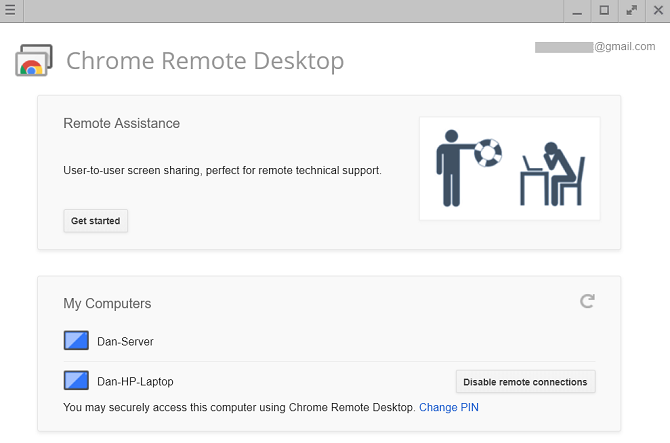
2. Chrome Remote Desktop

google remote desktop list of machines

Chrome Remote Desktop has one glaring drawback—both computers need to have the Chrome browser installed. If you use an alternative browser, you should look elsewhere.

However, if you use Chrome and you’re looking for an easy-to-set-up, no-frills remote access tool, you would struggle to find a better option.

Install the extension from the Chrome Web Store, connect the two PCs using the automatically-generated access code, and you’ll be up and running in seconds. You can permanently link together two computers if you need regular access.

Google has aimed the software at home users who need to share computer screens for some quick troubleshooting or file access; it lacks the advanced features of some of the other options on this list.

A beta version of Chrome Remote Desktop is available as a web app.

Download: Chrome Remote Desktop (Free)

3. Microsoft Remote Desktop

windows remote desktop main screen

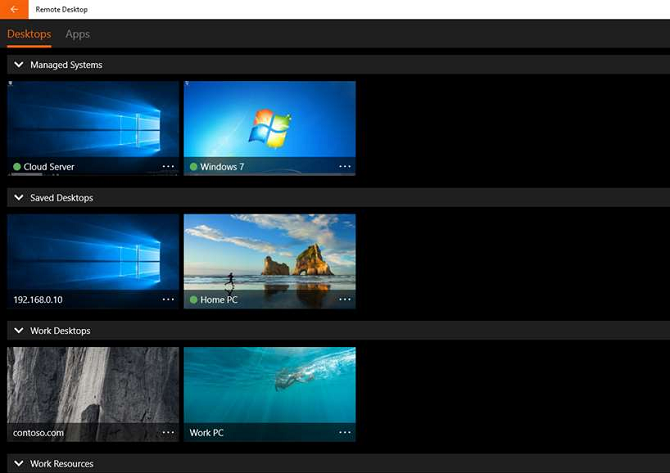
Microsoft Remote Desktop is Windows’ native screen-sharing solution. It uses the propriety Remote Desktop Protocol (RDP) technology.

Even though Microsoft has built it into the OS, it’s not the easiest (or best) option for screen sharing on Windows. Its biggest problem is that RDP servers are only available on Windows Professional and above; you won’t be able to connect to anyone who is running the Home version of the operating system.

Beginners might find the app difficult to set up. If you want to connect to machines outside your home network, you need to know the IP address of the person you want to connect to and configure their router to accept incoming remote desktop connections.

Ultimately, it’s important to understand Microsoft Remote Desktop is designed for office use, not home use. If you want to troubleshoot a family member’s PC, look elsewhere.

Download: Microsoft Remote Desktop (Free)

4. AeroAdmin

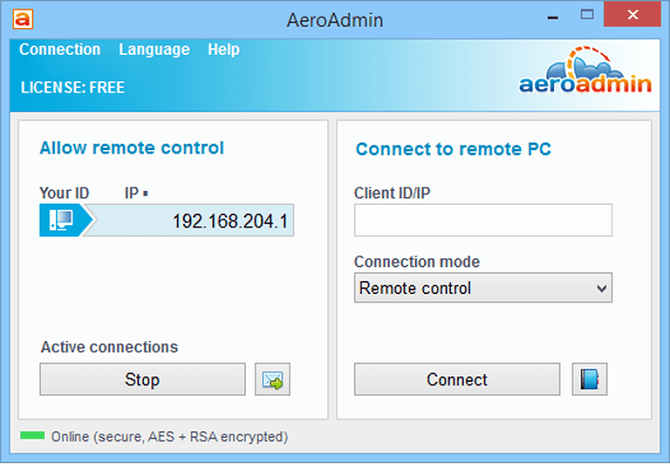
aeroadmin connect screen

The development team behind AeroAdmin clearly took inspiration from TeamViewer; the way the app works and the on-screen visuals are strikingly similar.

Unlike TeamViewer, however, it does not require any installation. You just need to run the 2 MB EXE file and follow the on-screen instructions. It means you can keep a copy on your USB flash drive and instantly provide remote access to any machine you are sat in front of. You can make a connection using your computer’s IP address or by sharing the automatically-generated passcode.

You can also configure the app to run before any user logs on. As such, this tool can give you unattended access to your machine.

Download: AeroAdmin (Free)

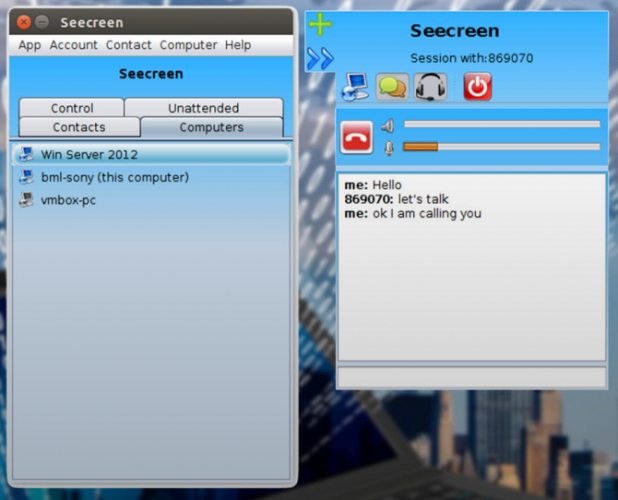
5. Seecreen

seecreen sharing app

Seecreen is AeroAdmin’s direct competitor. It’s written in Java and does not require any installation or configuration; just download the 500 KB EXE file and you’ll have remote screen sharing in seconds.

Its feature list is almost identical to AeroAdmin; you can chat and have VOIP calls with fellow users, transfer files between connected machines, manage multiple user accounts, configure the app for unattended access, and maintain contact and computer lists.

The only real difference is the way the app looks on-screen. Seecreen is arguably the less-polished of the two. If you need an instant screen-sharing solution, try them both and see which you prefer. Make sure you let us know in the comments!

Download: Seecreen (Free)

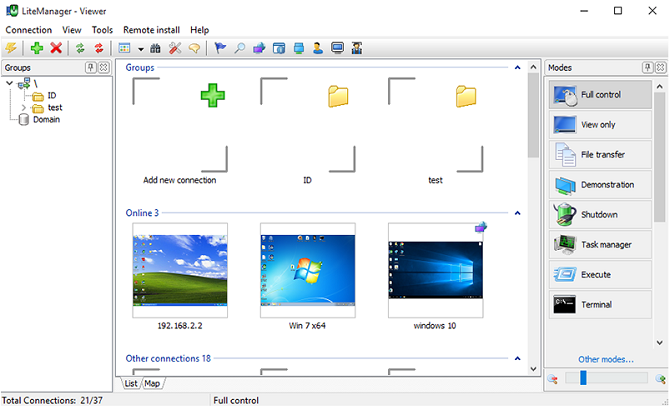
6. Lite Manager

LiteManager

Lite Manager is an under-appreciated program that offers many of the same features as some of the expensive paid tools.

Of course, the basics like file transfer and text chat are covered—but here are some of the coolest advanced features:

  • RDP integration
  • Screen recorder
  • Remote installation of screen-sharing software
  • Network mapping
  • IP filtering
  • Registry editor
  • Cascade connections
  • 30 connected computers

A paid version is available ($10 per license), but for most people it’s unnecessary.

Download: Lite Manager (Download)

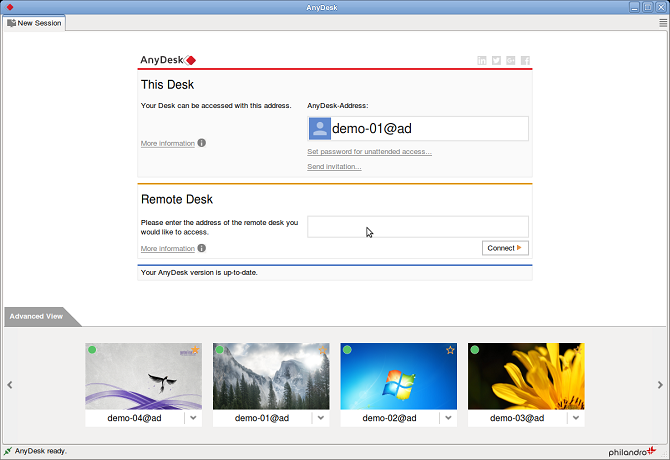
7. AnyDesk

anydesk app

AnyDesk can be run as either a portable program or a desktop app. Connecting the two apps is simple; the client just needs the host’s AnyDesk address or alias.

There’s also an option to set up unattended access. It’s great for if you want to access your files remotely without a person’s physically using your other machine.

Other features include an adjustable slider that balances connection quality with connection speed, clipboard syncing, remote session recording, and cross-computer keyboard shortcuts.

Download: AnyDesk (Free)

A Warning When Using Remote Access Software

Firstly, hackers often use these types of apps in tech support scams. Someone will call your house and encourage you to install their app of choice. As soon as you do, they have complete access to everything on your machine. As such, make sure you only give access to people you know and implicitly trust.

Secondly, if you use an account to log into the app, it is hackable. TeamViewer was a victim of such a hack in mid-2016. Thousands of users reported that hackers had penetrated their machines, with some even claiming they lost money from their bank accounts.

Read the full article: The 7 Best Screen Sharing and Remote Access Software


Read Full Article

6 Terrible Android Flaws That Desperately Need to Be Addressed

YouTube under fire for recommending videos of kids with inappropriate comments


More than a year on from a child safety content moderation scandal on YouTube and it takes just a few clicks for the platform’s recommendation algorithms to redirect a search for “bikini haul” videos of adult women towards clips of scantily clad minors engaged in body contorting gymnastics or taking an icebath or ice lolly sucking “challenge”.

A YouTube creator called Matt Watson flagged the issue in a critical Reddit post, saying he found scores of videos of kids where YouTube users are trading inappropriate comments and timestamps below the fold, denouncing the company for failing to prevent what he describes as a “soft-core pedophilia ring” from operating in plain sight on its platform.

He has also posted a YouTube video demonstrating how the platform’s recommendation algorithm pushes users into what he dubs a pedophilia “wormhole”, accusing the company of facilitating and monetizing the sexual exploitation of children.

We were easily able to replicate the YouTube algorithm’s behavior that Watson describes in a history-cleared private browser session which, after clicking on two videos of adult women in bikinis, suggested we watch a video called “sweet sixteen pool party”.

Clicking on that led YouTube’s side-bar to serve up multiple videos of prepubescent girls in its ‘up next’ section where the algorithm tees-up related content to encourage users to keep clicking.

Videos we got recommended in this side-bar included thumbnails showing young girls demonstrating gymnastics poses, showing off their “morning routines”, or licking popsicles or ice lollies.

Watson said it was easy for him to find videos containing inappropriate/predatory comments, including sexually suggestive emoji and timestamps that appear intended to highlight, shortcut and share the most compromising positions and/or moments in the videos of the minors.

We also found multiple examples of timestamps and inappropriate comments on videos of children that YouTube’s algorithm recommended we watch.

Some comments by other YouTube users denounced those making sexually suggestive remarks about the children in the videos.

Back in November 2017 several major advertisers froze spending on YouTube’s platform after an investigation by the BBC and the Times discovered similarly obscene comments on videos of children.

Earlier the same month YouTube was also criticized over low quality content targeting kids as viewers on its platform.

The company went on to announce a number of policy changes related to kid-focused video, including saying it would aggressively police comments on videos of kids and that videos found to have inappropriate comments about the kids in them would have comments turned off altogether.

Some of the videos of young girls that YouTube recommended we watch had already had comments disabled — which suggests its AI had previously identified a large number of inappropriate comments being shared (on account of its policy of switching off comments on clips containing kids when comments are deemed “inappropriate”) — yet the videos themselves were still being suggested for viewing in a test search that originated with the phrase “bikini haul”.

Watson also says he found ads being displayed on some videos of kids containing inappropriate comments, and claims that he found links to child pornography being shared in YouTube comments too.

We were unable to verify those findings in our brief tests.

We asked YouTube why its algorithms skew towards recommending videos of minors, even when the viewer starts by watching videos of adult women, and why inappropriate comments remain a problem on videos of minors more than a year after the same issue was highlighted via investigative journalism.

The company sent us the following statement in response to our questions:

Any content — including comments — that endangers minors is abhorrent and we have clear policies prohibiting this on YouTube. We enforce these policies aggressively, reporting it to the relevant authorities, removing it from our platform and terminating accounts. We continue to invest heavily in technology, teams and partnerships with charities to tackle this issue. We have strict policies that govern where we allow ads to appear and we enforce these policies vigorously. When we find content that is in violation of our policies, we immediately stop serving ads or remove it altogether.

A spokesman for YouTube also told us it’s reviewing its policies in light of what Watson has highlighted, adding that it’s in the process of reviewing the specific videos and comments featured in his video — specifying also that some content has been taken down as a result of the review.

Although the spokesman emphasized that the majority of the videos flagged by Watson are innocent recordings of children doing everyday things. (Though of course the problem is that innocent content is being repurposed and time-sliced for abusive gratification and exploitation.)

The spokesman added that YouTube works with the National Center for Missing and Exploited Children to report accounts found making inappropriate comments about kids to law enforcement.

In wider discussion about the issue the spokesman told us that determining context remains a challenge for its AI moderation systems.

On the human moderation front he said the platform now has around 10,000 human reviewers tasked with assessing content flagged for review.

The volume of video content uploaded to YouTube is around 400 hours per minute, he added.

There is still very clearly a massive asymmetry around content moderation on user generated content platforms, with AI poorly suited to plug the gap given ongoing weakness in understanding context, even as platforms’ human moderation teams remain hopelessly under-resourced and outgunned vs the scale of the task.

Another key point which YouTube failed to mention is the clear tension between advertising-based business models that monetize content based on viewer engagement (such as its own), and content safety issues that need to carefully consider the substance of the content and the context it’s been consumed in.

It’s certainly not the first time YouTube’s recommendation algorithms have been called out for negative impacts. In recent years the platform has been accused of automating radicalization by pushing viewers towards extremist and even terrorist content — which led YouTube to announce another policy change in 2017 related to how it handles content created by known extremists.

The wider societal impact of algorithmic suggestions that inflate conspiracy theories and/or promote bogus, anti-factual health or scientific content have also been repeatedly raised as a concern — including on YouTube.

And only last month YouTube said it would reduce recommendations of what it dubbed “borderline content” and content that “could misinform users in harmful ways”, citing examples such as videos promoting a fake miracle cure for a serious illness, or claiming the earth is flat, or making “blatantly false claims” about historic events such as the 9/11 terrorist attack in New York.

“While this shift will apply to less than one percent of the content on YouTube, we believe that limiting the recommendation of these types of videos will mean a better experience for the YouTube community,” it wrote then. “As always, people can still access all videos that comply with our Community Guidelines and, when relevant, these videos may appear in recommendations for channel subscribers and in search results. We think this change strikes a balance between maintaining a platform for free speech and living up to our responsibility to users.”

YouTube said that change of algorithmic recommendations around conspiracy videos would be gradual, and only initially affect recommendations on a small set of videos in the US.

It also noted that implementing the tweak to its recommendation engine would involve both machine learning tech and human evaluators and experts helping to train the AI systems.

“Over time, as our systems become more accurate, we’ll roll this change out to more countries. It’s just another step in an ongoing process, but it reflects our commitment and sense of responsibility to improve the recommendations experience on YouTube,” it added.

It remains to be seen whether YouTube will expand that policy shift and decide it must exercise greater responsibility in how its platform recommends and serves up videos of children for remote consumption in the future.

Political pressure may be one motivating force, with momentum building for regulation of online platforms — including calls for Internet companies to face clear legal liabilities and even a legal duty care towards users vis-a-vis the content they distribute and monetize.

For example UK regulators have made legislating on Internet and social media safety a policy priority — with the government due to publish a White Paper setting out its plans for ruling platforms this winter.


Read Full Article

Apple could be looking for its next big revenue model

Apple has always been an evolving company. While it never really invented any product categories, it always seemed to make those product categories work better and smarter. It also found a way to make us want them, even when they were more expensive. Today, the WSJ reports, it’s trying to find its way to a future without the iPhone at the center of its revenue model.

This shift happens as Apple reported lower revenue for the first time in years against a backdrop of flagging iPhone demand. Part of the problem is a shifting Chinese market, but it’s also due to people simply taking longer to refresh their phones. As that happens, and the price of iPhones soared over $1000, there has been a decline in sales.

With iPhone sales down 15 percent, this was not a typical Apple earnings report, but it was something that company had anticipated when it announced lower Q1 guidance at the beginning of the year. If the Wall Street Journal story is accurate, Apple is already trying to take steps to move the company into its next phase, possibly as a services business.

If that’s the case, it would mark a radical departure from the company’s history in which it has redesigned various types of hardware, bucking popular design trends along the way. Back in the 1970s and 1980s when it was called Apple Computer, Steve Jobs and Steve Wozniak made computers with a GUI when most people were working from DOS prompt.

In the early 2000s, Apple came out with an MP3 player called the iPod and opened a music store called iTunes. By 2006, the year before it would introduce the iPhone, Apple had sold over 42 million units and 850 million songs. It was a combination of hardware and services that helped transform a flagging company into a powerhouse.

In 2007 when Apple introduced the iPhone, it knew that it would begin to eat into iPod sales, and it eventually did, but it didn’t matter because it was the next logical step forward. When it introduced the App Store in 2008, the iPhone became more than a stand-alone piece of hardware. It was a new kind of hardware-service model and it would generate incredible wealth for the company.

The iPad came along in 2009 and the Apple Watch five years later in 2014. While each has done reasonably well, nothing has touched the success of the iPhone. Keep in mind that analysts estimated that Apple sold 71 million iPhones last quarter, and this was in a quarter in which sales declined. It’s hard to sell 71 million units of anything in a three month period and have it be a down quarter.

What comes next is probably some combination of entertainment/content and making use of advancing technologies like AR/VR, driverless cars and artificial intelligence. It’s unclear what direction Apple will take in these areas, but we do know that recent hires and acquisitions point in these directions.

There has long been speculation that Apple could make a splashy acquisition in the content area. When Eddie Cue, Apple senior vice president of Internet software and services was interviewed by CNN’s Dylan Buyers at South by Southwest last year, Buyers specifically asked Cue about buying a property like Netflix or Disney. He implied that it was about taking the Apple TV and combining that with a big-name content production company.

Cue indicated that the two companies were great partners for Apple TV, but he wasn’t ready to commit to anything along those lines. “Generally, in the history of Apple, we haven’t made huge acquisitions.” He went onto explain from Apple’s perspective, it wants to figure out where the future is and to build something to get it there, rather than buying something that is working for the current state of affairs.

It’s worth noting that Apple TV has not matched the huge success of its other devices, but service revenue has been growing steadily. In the most recent earnings report, Apple reported services revenue of $10.9 billion, up 19 percent year over year. That’s still a small percentage of the overall $84.3 billion the company reported for the quarter, but it is growing.

Regardless, nobody can know if Apple can approach the success with any product that it has had with the iPhone. But it knows that in spite of its vast riches, it’s dangerous for any company to rest on its past success. So it looks ahead and hires new blood and looks for a future with less dependence on the iPhone because it knows, as the Grateful Dead once sang, “You can’t go back and you can’t stand still. If the thunder won’t get you, then the lightning will.” Apple is hoping to avoid that fate, and perhaps it is some new combination of hardware, content and services that could lead the way.


Read Full Article