18 December 2018

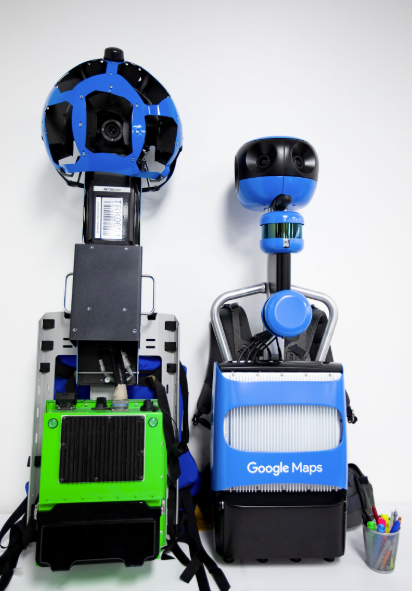
Here’s Google’s new Street View Trekker backpack


Years ago, Google’s Street View program expanded from streets to virtually everywhere, thanks to Google’s Trekker program that put 360-degree Street View cameras into a single backpack. Today, Google announced its upgraded Trekker backpack, which is significantly smaller and lighter than before. The old one weighed in at about 44 pounds.

It’s not just a new design, though, Google also notes that the new Trekker features improved hardware that will allow it to capture better and sharper imagery, thanks to higher-resolution sensors and an increased aperture.

“Like previous Trekker generations, the new version can be put on cars, boats or even ziplines,” the company explains. “This helps when capturing hard-to-access places, or when building maps for developing countries and cities with complex structures.”

While you probably can’t just get a Trekker to map out your garden, Google notes that it continues to run its Trekker loan program. This program is open to organizations like tourism boards, non-profits, government agencies, universities and research groups.

Chances are, you’ll see some improved Street View imagery from hard to reach places on Google Maps soon. Until then, you can go ahead and take a virtual stroll through Petra or across the beaches of Christmas Island.


Read Full Article

Bumble now lets you filter potential matches on Bumble Date, Bizz and BFF


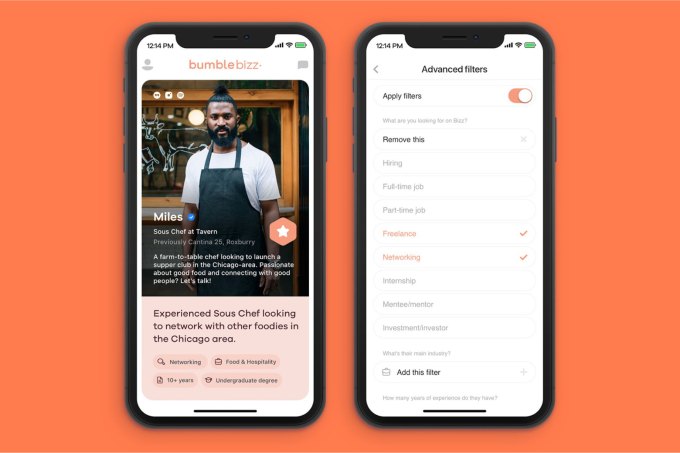
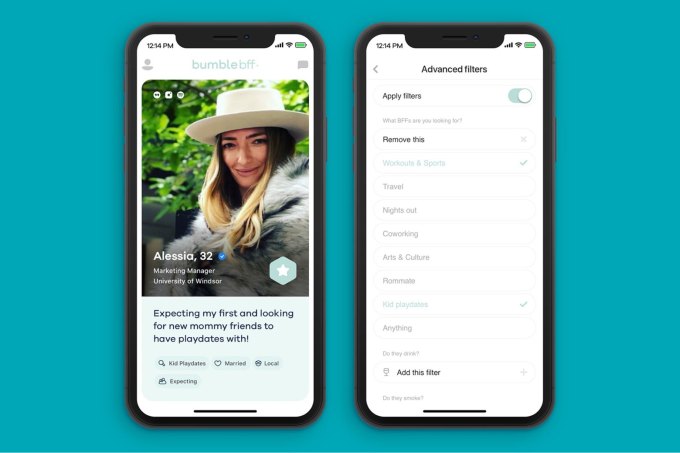
Bumble has come up with a new way for its dating app and related businesses to generate revenue. The company this week launched filters – a way to sift through potential matches by a set of specific criteria. For example, Bumble Date users can now filter matches by astrological sign or relationship type, among other things, while those on Bumble BFF or Bumble Bizz, could filter matches by interests or industry, respectively.

The new feature is meant to save users time by limiting their selection of potential matches to those who are more relevant to their own interests.

A dating app user may want to filter out those who are only looking for casual situations, while a business user may want to filter matches based on whether they’re looking for a job, mentor, or collaborator, Bumble explains. And on Bumble’s friend-finding platform, Bumble BFF, people may want to filter for people who enjoy the same things they do – like fitness or photography.

“We’ve been working internally and with our users to create just the right mix of filters that allow for deeper, more meaningful connections and we’re very pleased with what we’ve developed,” said Alexandra Williamson, Bumble Chief of Brand, in a statement about the launch. “Whether you’re looking for a new job in media, a new mom friend or a date with a Sagittarius who loves live music, Bumble Filters enable you to tailor your experience in a way that ultimately gives you more control of the kinds of relationships you’re looking to build,” she said.

Filtering matches by specific criteria isn’t anything new to dating apps. Other more traditional dating sites, like Match and OKCupid, have offered ways to filter matches, too. But Bumble’s more direct rival Tinder has focused less on filtering and more on speed of moving through matches. It doesn’t let users specify preferences beyond some basics – like location, distance, gender and age.

Whether or not filtering actually helps in delivering a good match, however, is less clear. But it’s certainly something people want.

Today, many women on dating apps ask men for their height, for instance – so often, in fact, that men began volunteering this information on their profiles, even if the profile doesn’t have a field for height. Often, sober people don’t want to match with people who say they drink regularly. Non-smokers generally want to date the same. And so on. But over-filtering could lead to users missing out – after all, how important is the star sign, really, or whether they have pets? (Allergies notwithstanding, of course.)

On the dating side of Bumble, the new filters include height, exercise, star sign, education, drinking, smoking, pets, relationship type, family plans, religion, and political leaning.

Bumble BFFs can filter for drinking, smoking, exercise and pets, too, as well as type of friendship, relationship status, whether they have kids, or if they’re new to the area.

And Bumble Bizz users can filter by industry, networking relationship type, education, and years of experience.

Bumble hopes filters will be an additional stream of revenue for its business, which it said in September was on track for a revenue run rate to $200 million per year. Bumble now claims 46 million users.

The company says all users will receive two free filters in Bumble Date, Bumble BFF, and Bumble Bizz, but additional filters will have to be purchased through Bumble Boost – the premium upgrade that also allow you to see who liked you, extend your matches, and rematch expired connections. (Boost’s pricing varies based on the time frame – a week, a month, etc. Its weekly plan is $8.99/week, currently).

Bumble’s filters are available on both iOS and Android.


Read Full Article

Bumble now lets you filter potential matches on Bumble Date, Bizz and BFF


Bumble has come up with a new way for its dating app and related businesses to generate revenue. The company this week launched filters – a way to sift through potential matches by a set of specific criteria. For example, Bumble Date users can now filter matches by astrological sign or relationship type, among other things, while those on Bumble BFF or Bumble Bizz, could filter matches by interests or industry, respectively.

The new feature is meant to save users time by limiting their selection of potential matches to those who are more relevant to their own interests.

A dating app user may want to filter out those who are only looking for casual situations, while a business user may want to filter matches based on whether they’re looking for a job, mentor, or collaborator, Bumble explains. And on Bumble’s friend-finding platform, Bumble BFF, people may want to filter for people who enjoy the same things they do – like fitness or photography.

“We’ve been working internally and with our users to create just the right mix of filters that allow for deeper, more meaningful connections and we’re very pleased with what we’ve developed,” said Alexandra Williamson, Bumble Chief of Brand, in a statement about the launch. “Whether you’re looking for a new job in media, a new mom friend or a date with a Sagittarius who loves live music, Bumble Filters enable you to tailor your experience in a way that ultimately gives you more control of the kinds of relationships you’re looking to build,” she said.

Filtering matches by specific criteria isn’t anything new to dating apps. Other more traditional dating sites, like Match and OKCupid, have offered ways to filter matches, too. But Bumble’s more direct rival Tinder has focused less on filtering and more on speed of moving through matches. It doesn’t let users specify preferences beyond some basics – like location, distance, gender and age.

Whether or not filtering actually helps in delivering a good match, however, is less clear. But it’s certainly something people want.

Today, many women on dating apps ask men for their height, for instance – so often, in fact, that men began volunteering this information on their profiles, even if the profile doesn’t have a field for height. Often, sober people don’t want to match with people who say they drink regularly. Non-smokers generally want to date the same. And so on. But over-filtering could lead to users missing out – after all, how important is the star sign, really, or whether they have pets? (Allergies notwithstanding, of course.)

On the dating side of Bumble, the new filters include height, exercise, star sign, education, drinking, smoking, pets, relationship type, family plans, religion, and political leaning.

Bumble BFFs can filter for drinking, smoking, exercise and pets, too, as well as type of friendship, relationship status, whether they have kids, or if they’re new to the area.

And Bumble Bizz users can filter by industry, networking relationship type, education, and years of experience.

Bumble hopes filters will be an additional stream of revenue for its business, which it said in September was on track for a revenue run rate to $200 million per year. Bumble now claims 46 million users.

The company says all users will receive two free filters in Bumble Date, Bumble BFF, and Bumble Bizz, but additional filters will have to be purchased through Bumble Boost – the premium upgrade that also allow you to see who liked you, extend your matches, and rematch expired connections. (Boost’s pricing varies based on the time frame – a week, a month, etc. Its weekly plan is $8.99/week, currently).

Bumble’s filters are available on both iOS and Android.


Read Full Article

Gift Guide: 6 rugged gifts for outdoorsy friends and family


Shopping for someone who prefers hiking and camping to the great indoors can be tricky. Not only are outdoor enthusiasts usually less impressed by traditional gifts (clothes, games, etc.) but their preferred realm of technical gear is vast and confusing. If you’d rather not go deep on the research yourself, we’ve got some solid touchpoints for expert outdoor gear gifting.

1. Party tent

Okay, hear me out. As a pack weight-conscious backpacker the idea of a light-up tent sounded ridiculous at first, but Big Agnes is onto something with their line of mtnGLO tents. I’ve been camping with the 2-person Big Agnes mtnGLO Copper Spur tent for more than a season now and these things are really cool. The company has embedded thin strips of LED lighting into the tent itself, illuminating the inside more evenly than you can pull of with a headlamp alone without overpowering your hard-earned nature vibes.

Photo via Big Agnes

A small detachable battery pack powers the lights and you can jettison that bit if you’re really looking to shed ounces. If not, enjoy tent-bound activities like reading and looking for your prescription medication with the newfound freedom of ample light. If your special giftee prefers car camping then even better: insta-party tent. Or you know, they can fish last night’s socks out of the bottom of their sleeping bag in record time.

If this is too gimmicky (I’m telling you, it’s not!) but you’re looking to gift a tent, check out REI’s in-house brand. They make super solid tents that are generally priced well below the competition and even offer a backpacking bundle and a camping bundle that make the perfect starter set of gear for someone new to losing themselves in the great outdoors.

2. Solar Charger

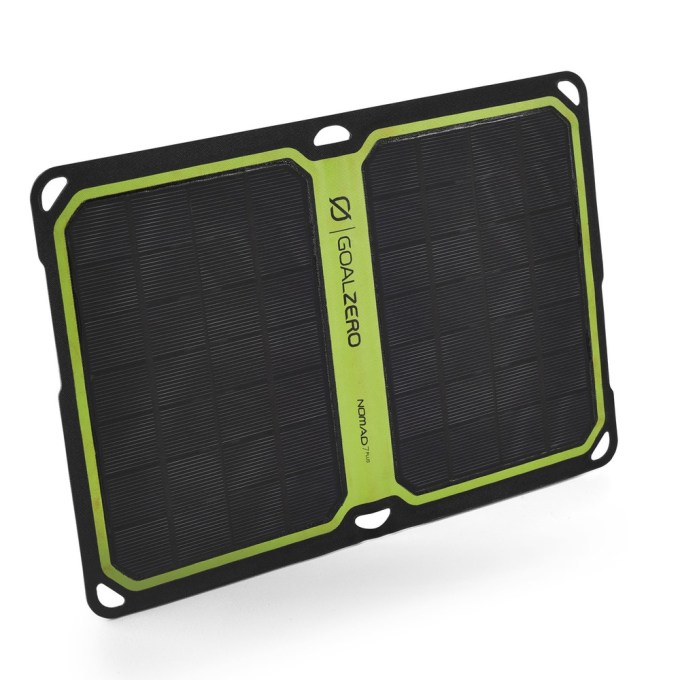
goal zero solar charger

If you’re shopping for a car camper or a day hiker, battery life isn’t much of a concern, but if your special someone likes to get lost in the wilderness overnight, they’ve probably stressed about battery life. Many people rely on their smartphone as their primary camera in the outdoors, so keeping it charged deep into a hike, climb or backpack is key. In most of these circumstances, a traditional portable battery back would be too heavy and wouldn’t be rechargeable in the field, but solar chargers can solve those problems.

Some people swear by solar panels by Suntactics and the Suntactics sCharger-5 Solar Charger is a reasonably sized option. Goal Zero is another prominent brand in the solar gadget market and the Goal Zero Nomad 7 Plus Solar Panel could make a good personal panel option. For car camping, #vanlife or something else epic yet experienced by car, check out the Goal Zero Yeti 400 Lithium Portable Power Station, a compact beast of a charger that’s priced accordingly ($599.95).

Note: Of course, solar chargers don’t work where sunlight is limited, so if you’re in the Pacific Northwest maybe skip this section.

Garmin Fenix 53. GPS watch

Why not an Apple Watch? Well, a lot of reasons. For anyone who does much extensive hiking, climbing and camping in the backcountry, Apple’s smartwatch is far too puny and fragile. Sure, it’s fine for running, but you need something with battery life worth writing home about and GPS features that help keep you safe — and on route — outdoors.

Garmin makes a lot of solid options here at different price points, including the Garmin Fenix 5 ($449.99) which happily comes in three sizes to accommodate small wrists. Garmin claims up to to 2 weeks of battery life in smartwatch mode on the Fenix 5, up to 24 hours in its GPS mode and up to 60 hours in battery saver mode. The Fenix 5 is configurable depending on your activity of choice, with profiles tuned to hiking, snowboarding and mountain biking.

Compass-maker Suunto also offers a few well-liked watches in the space, including the Suunto Ambit 3 Peak which boasts “route altitude profile navigation and extremely long battery life” i.e. the stuff you really need.

4. Compact camera gear

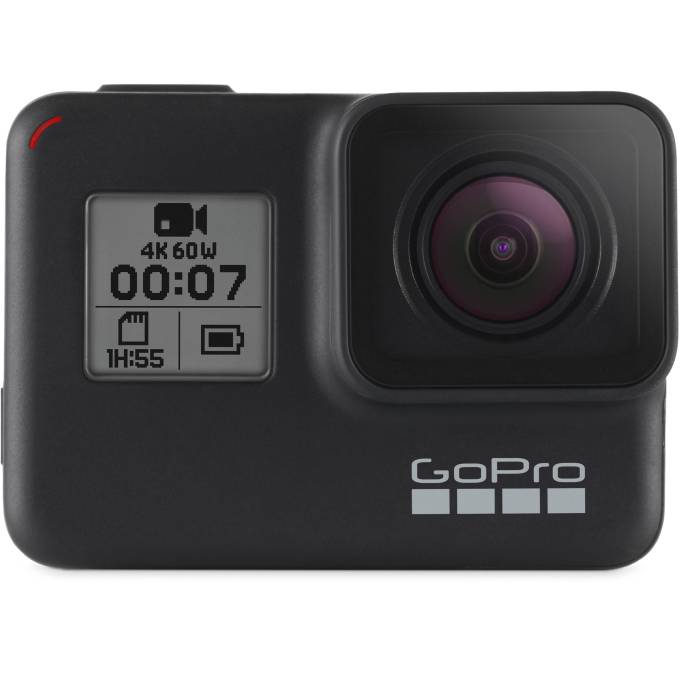
We covered camera gifting more extensively in out dedicated photography gift guide, but we’ll toss in a few ideas here just for fun. For anyone into the extreme outdoors (backcountry skiing, mountaineering, climbing etc.) a GoPro is a no-brainer. The company’s latest offering, the GoPro Hero7 Black, is top of the line for $399.99, but other GoPro models are available for significantly less.

GoPro Hero 7 Black

If you’re looking for something more geared toward photography rather than video, Sony’s RX100 line offers a killer compact camera that won’t take up much space in your pack. The new Sony RX100 V ($899) and RX 100 VI ($1,199) offer a higher end tiny pro camera, but the still-excellent older models of the Sony RX 100 can be had for a fraction of the price.

5. Satellite messaging

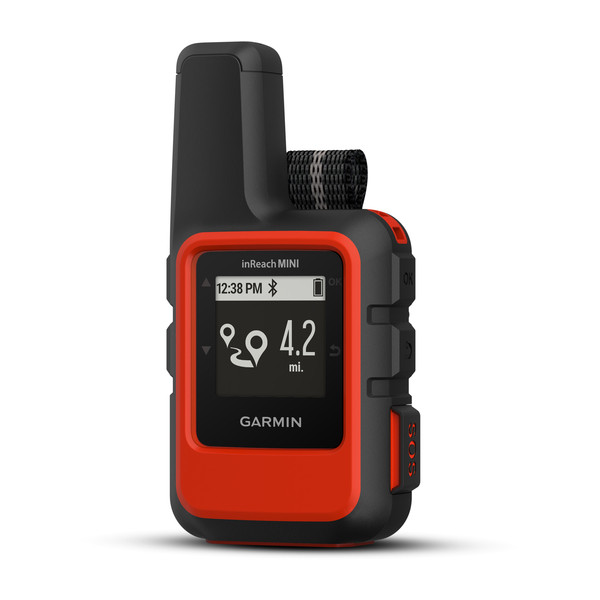
Garmin InReach Mini
This one might sound a little morbid, but if your loved one gets into a sticky situation miles from civilization they won’t be complaining. A handful of different devices can allow you to send an emergency signal when your phone can’t and many of them also allow for non-emergency satellite messaging — handy for coordinating meet-up points or checking in from the backcountry. Among these, the new Garmin InReach Mini ($349.99) is well regarded for its diminutive size and well-rounded feature set, though the Garmin inReach Explorer and Spot X are also solid options.

6. Small Stuff

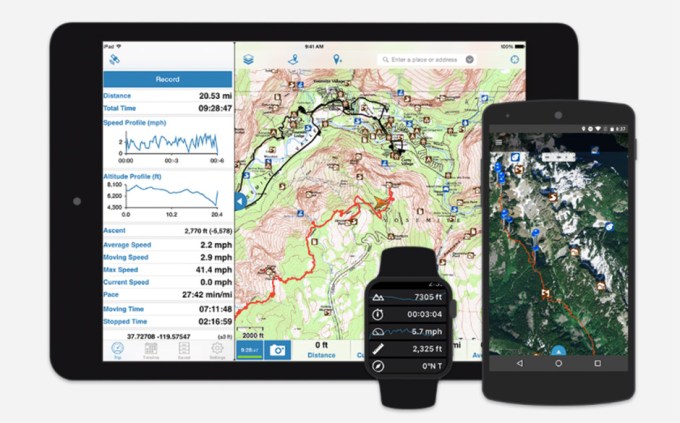
Okay, so you need a gift for someone outdoorsy but you want to find something a little more low key. Maybe a stocking stuffer or a casual friend gift. We can do that. A lot of people have touchscreen-friendly gloves but do they have technical touchscreen-friendly gloves? Snag a pair of the North Face’s ETip gloves which are both cute and functional or pick up a set of Mountain Hardware’s Power Stretch Stimulus Gloves, which make a nice grippy glove liner.Gaia GPS apps

And we’d be remiss if we didn’t recommend the Gaia GPS app, available for both iPhone and Android at $19.99. For navigating outdoors with topographical maps and even fairly complex routefinding, Gaia can’t be beat. Of course, we’d also be remiss if we didn’t remind you to bring a paper map — just in case.

TechCrunch Gift Guide 2018 banner


Read Full Article

AT&T is turning on 5G access for its new mobile hotspot this week


A little taste of 5G is coming early, courtesy of AT&T’s new mobile hotspot. The carrier announced this morning that it will be firing up limited 5G service in a dozen cities across the U.S. this Friday, currently only accessible via the Netgear Nighthawk 5G Mobile Hotspot.

Announced in October, the device actually hit the market prior to this week’s launch, offering what the carrier has somewhat confusingly referred to as “5G Evolution” — essentially faster access on existing 4G networks.

Branding, am I right?

Those who picked the router up will be able to access the new network speeds in Atlanta, Charlotte, Dallas, Houston, Indianapolis, Jacksonville, Louisville, Oklahoma City, New Orleans, Raligh, San Antonio and Waco. Las Vegas, Los Angeles, Nashville, Orlando, San Diego, San Francisco and San Jose are all coming early next year.

The first batch of 5G smartphones are also coming at some point next year, with Samsung notably having already announced two handsets for 2019. In the spring, the carrier will offer the router for a $499 up front fee, plus $70 a month for 15GB of data, with no long term commitment — a price, it notes, is around the same as the current 4G hot spots. Pricing for phone plans is still unannounced.

It’s all pretty limited, but in the current 5G land grab, every inch counts.


Read Full Article

Ada nets $19 million Series A to grow its customer service chatbot


Ada is on a mission to build chatbots powered by artificial intelligence. The company today is announcing a $19 million Series A that will go far in helping it reach that goal. The company sees the capital fueling international expansion and launching products into new verticals as well as doubling down on employees.

Chatbots were a buzzword several years back. After the initial buildup and bust, the remaining players in the space are building upon the expectations set early on. Users of chatbots expect services to take actions on their behalf and perform routine functions quickly and efficiently. Likewise, companies are seeking solutions that exceed customer expectations, while offering features that allow the company to scale and expand.

“While many enterprises are choosing to invest in AI and automation,” the company tells TechCrunch, “the recurring investment of time and resources to implement, manage and improve highly technical solutions is diminishing the ROI. In turn, businesses are seeking inclusive and accessible platforms that empower non-technical support teams to build, manage and track the automated customer experience. Even among our own clients, we’ve seen the formation of some of the world’s first automated automation customer experience service (ACX) departments–made up of customer service professionals, not programmers–dedicated to building an automated, AI-powered customer experience. Ada’s automation is changing how people are working and the role of customer service by creating completely new departments, titles, and roles.”

Ada sees the Series A capital to expand the features built-into its products, allowing for a deeper level of personalization and customization — items that will go far with its clients. Launched in 2016 the Toronto-based startup expects to double its staff in the coming months. Right now the company has 70 employees and hopes to be at 140 sometime in 2019.

“2018 was an exciting time for the customer service industry,” Ada said. “Reservations about chatbots and virtual assistants are dissipating, as consumers continue to realize the tremendous benefits of instant, automated, self-service support. Their rising expectations have resulted in an industry-wide shift, with businesses changing from an ‘agent-first’ to an ‘automation-first’ customer strategy.”

The Series A was round was led by FirstMark Capital with participation from Leaders Fund and Burst Capital, as well as returning investors Bessemer, Version One, and computer scientist, Barney Pell.

“Ada’s accessible and scalable platform lets non-technical customer service teams build and manage AI-powered chatbots to automate interactions. Ada has delivered transformational, measurable results to some of the world’s most innovative brands, helping them shift from a reactive, expensive support strategy to a proactive model that reduces customer effort,” said Matt Turck, Managing Director of FirstMark Capital, in a released statement “Ada has played an important role in driving automated customer experience, and we’re confident in the team and the platform to surpass their rapid projected growth.”

The company is based in Toronto. When asked why Toronto, the company points to several data points such as the city’s designation of the fastest growing tech market in North America and the recent announcements of significant new office complexes from Microsoft and Google.


Read Full Article

AirTaps True Wireless Earbuds Are Now Under $40


We can all admire the elegant design of Apple’s AirPods. But paying $159 for a pair of wireless earbuds is beyond most of us. However, wireless audio doesn’t have to be an expensive luxury. The AirTaps Wireless Bluetooth Earbuds look the part, and they deliver equally impressive sound. The difference? You can get them now for just $36.99 at MakeUseOf Deals.

Affordable Quality

Upon first inspection, you could easily think that AirTaps were made by Apple. These earbuds share the same sense of style, with clean white curves and a lightweight design.

The AirTaps connect to your phone via Bluetooth 4.2 to deliver crystal-clear wireless sound. You get three hours of music playback on a full charge, and the supplied charging case provides 10 full refills.

Aside from keeping you amused at work, these true wireless earbuds are perfect for workout playlists. The AirTaps are designed to stay put while you move around, and you have a range of 10 meters to play with. In addition, they are water-resistant.

Thanks to the built-in mic, you can even use the AirTaps to make handsfree calls and speak to Siri.

True Wireless Buds for $36.99

The AirTaps are normally priced at $99.90, but you can grab them now with the charging case for $36.99. They make a great gift for music lovers, and a nice upgrade for your new phone.

Want your products featured by MakeUseOf Deals? Learn more about how to sell your products online!

Read the full article: AirTaps True Wireless Earbuds Are Now Under $40


Read Full Article

5 Unique Travel Planning Apps to Find Your Next Trip


Travel Tools

Can’t figure out where to go next? These apps will help you find your next destination based on unique filters, like weather, visa requirements, regions, and more.

When you’re going on vacation, it’s all about where you go. Even when you have a place in mind, there are different considerations you need to make. The budget to travel there, the kind of weather you can expect, whether you need a visa or not, and so on. Sometimes, you want to go to multiple places but can’t figure out how to make it work.

But there are always apps to make things a little easier.

JetSet Weather (Web): Find Destinations Based On Average Weather

Jetset Weather finds travel destinations based on weather and temperature

They say the best apps are those that come from the maker fulfilling their own needs. JetSet Weather’s developer Emin Sinani built the app after not finding any way to filter destinations based on the kind of weather you can expect.

Travel is about change and a lot of the time, you desire that change in the form of weather. If you’re in a cold place, then you want a warm destination and vice versa. You can search for a destination, but the best feature is the Explore tab. Here, you can set filters for the type of temperature you’re looking for, which region you want to visit, when you’re visiting, as well as flight preferences. JetSet Weather will update the results according to what you choose.

The website also has a handy “Compare” feature. In this, you can add multiple cities that you’ve wanted to visit. In a calendar view, you will see their average temperature in each month, as well as average flight costs. It’s really cool and a great way to decide where to visit and when to visit.

VisaList (Web): Find Visa Requirements Based On Nationality

Some passports are stronger than others. But no matter which country you are from, there are some nations that require a visa to travel to. VisaList is the easy way to find everything you need to know.

Put in your home country and the app will generate a data map. You can immediately see which countries you can travel visa-free, visa on arrival, with an e-visa, or have to apply for a visa. Click on any country and you’ll get more details, like what you need to apply for the visa, how to apply for it, and any other essentials. It’s a simple one-stop destination to get all the information you need.

Like the best decision-making travel tools, VisaList can be used to filter destinations based on how much trouble you are willing to go through for a visa. If you want to travel quickly, the website can help find easy-to-go places.

Eightydays.Me (Web): Multi-Destination Europe Trips

EightyDays suggests multi destination european trips

Eightydays.Me might be a play on the classic novel, but it won’t take you around the world. Instead, it focuses only on Europe. But it nonetheless helps you plan a multi-destination trip across the continent.

There are different types of European trips you can choose from, like the mainland, Schengen only, Balkans, sunny destinations, and so on. What you need is your point of origin (and if it’s a round trip), as well as the travel dates.

After that, uncheck the “Anywhere” box ticked by default. Now you can add cities that you absolutely want to visit. Click the “Design Adventure” button to get recommendations from Eightydays.Me for a travel plan.

Plotted on a map, you can change the plan based on budget, or the number of cities you want to visit. Play around with the app and get different recommendations. You might discover places you didn’t know about, and find something interesting to do.

Great Escape (Web): Filters for Price, Visa, and Interests

Find next place to travel with Great Escape

Great Escape combines many of the things we like about the other apps and throws in a little more. While the end result has weather, price, visa requirements, and regional specifications, not all of it can be filtered or searched easily.

Set your home country or point of origin, and the site lets you adjust multiple filters such as the budget, how many stops in the flight, visa requirements, and the popularity of the destination. You can also set a country or a region that you want to visit, to get specific recommendations.

Your results are plotted on a map, showing the flight tracks to the destination. Click any destination and you’ll get more details, such as why Great Escape recommends going there. You’ll find information on what’s interesting there, the average temperature, a few pictures, and flight prices from Skyscanner. You can then use that to score cheaper tickets on Skyscanner.

MyTravelPersonality (Web, Android, iOS): Tinder-Like Trip Choices Based On AI

MyTravelPersonality uses a combination of artificial intelligence and Tinder-like design to create a profile of what you like and don’t like. Based on that, it will give you recommendations of where to travel.

Here’s how it works. Once you sign up, you will be shown a series of pictures, each with a caption describing the activity. Swipe right if it’s something you’d like to do or see, and swipe left if you don’t like it. The more you do this, the better MyTravelPersonality’s algorithm will build a profile of your travel tastes.

At any point, jump into the recommended destinations for you. You can add a bunch of filters to these, like weather, dates, flight costs, cost of living, type of activities, and so on. Destinations can be saved to a travel map for places you have visited or plan to go to.

Download: MyTravelPersonality for Android | iOS (Free)

How About a Random Destination?

With all of these travel planning apps, you should be able to find a place to visit based on your unique requirements. It’s also a good idea to use some of these together, such as finding a place through MyTravelPersonality, getting a plan from EightyDays that includes the city, and then checking visa requirements on VisaList.

But instead of all of this planning and filter, there is one other option. Let luck and serendipity guide you to your next adventure. Take a risk and pick a random destination to travel to.

Read the full article: 5 Unique Travel Planning Apps to Find Your Next Trip


Read Full Article

Ford comes up with a prototype noise-cancelling kennel to shelter dogs from fireworks


Dogs have a much wider range of hearing than humans do and noises that don’t bother us can give them a very ruff time. Fireworks are especially tough on many pups and also hard on owners who have to calm their panicking pets. To potentially help them, Ford has developed a noise-cancelling kennel prototype that it says was inspired by the noise control technology introduced used in its Edge SUV to soften engine and transmission noises.

When microphones inside the kennel detect the sound of fireworks, a built-in audio system sends out opposing frequencies that Ford claims significantly reduces or cancels the cacophony. The kennel is also built with high-density cork to further mute outside noises.

The noise-cancelling kennel is not currently for sale, but Ford says it “is the first in a series of initiatives—called interventions—that applies automotive know-how to help solve everyday problems.”

You might remember, especially if you have a small child, that last year Ford developed a cot called Max Motor Dreams to calm babies who only fall asleep in moving vehicles, a situation many exhausted parents (with high-mileage cars) are familiar with. The cot had small motors underneath that stimulated the feel of a moving vehicle, played actual road noise and even had built-in LED lighting to mimic the glow of streetlights.

At the time, Ford said the cot might be produced for sale if there was enough interest, but even though it went viral, Max Motor Dreams never did make it to the market. That’s not an encouraging sign for people who want to buy the noise-cancelling kennel, but in the meantime, here are some ways you can prepare your dogs for holiday fireworks. There is also a product called the ThunderShirt that is supposed to help alleviate anxiety in dogs, but of course results will vary from canine to canine.


Read Full Article

Google will make it easier for people without accounts to collaborate on G Suite documents


Soon it will be easier for people without Google accounts to collaborate on G Suite documents. Currently in beta, a new feature will enable G Suite users to invite people without G Suite subscriptions or Google accounts to work on files by sending them a pin code.

Using the pin code to gain access allows invitees to view, comment on, suggest edits to, or directly edit Google Docs, Sheets, and Slides. The owners and admins of the G Suite files monitor usage through activity logs and can revoke access at any time. According to the feature’s support article, admins are able to set permissions by department or domain. They can also restrict sharing outside of white-listed G Suite domains or their own organization.

In order to sign up for the beta program, companies need to fill in this form and select a non-G Suite domain they plan to collaborate with frequently.

According to a Reuters article published in February, since intensifying their focus on enterprise customers, Google has doubled the number of organizations with a G Suite subscription to more than 4 million. But despite Google’s efforts to build its enterprise user base, G Suite hasn’t come close to supplanting Office 365 as the cloud-based productivity software of choice for companies.

Office 365 made $13.8 billion in sales in 2016, versus just $1.3 billion for G Suite, according to Gartner. Google has added features to G Suite, however, to make the two competing software suites more interoperable, including an update that enables Google Drive users to comment on Office files, PDFs, and images in the Drive preview panel without needing to convert them to Google Docs, Sheets or Slide files first, even if they don’t have Microsoft Office or Acrobat Reader. Before that, Google also released a Drive plugin for Outlook.

This may not convince Microsoft customers to switch, especially if they have been using its software for decades, but at least it will get more workers comfortable with Google’s alternatives, and may convince some companies to subscribe to G Suite for at least some employees or departments.


Read Full Article

This fake package covers porch thieves in glitter and fart spray


Having a package stolen off your front porch sucks. No matter what’s inside the box, it just feels… violating. Someone came into your space and took your stuff just because they could probably get away with it. And even if you go to the cops with license plates and high-res face photos, they’ll often respond with a big, apathetic shrug (particularly around Christmas when package thefts skyrocket).

After having one of his own packages nabbed, engineer/YouTuber Mark Rober decided to take things into his own hands. He built a box that… well, it’ll make any would-be thieves think twice before hitting his house again. And probably make them have to go buy a really good vacuum.

Here’s the video:

In what might be the most wonderfully over-engineered act of lighthearted retaliation to ever exist, this thing is just layer upon layer of ingenuity.

It starts with a GPS tracker that lets Mark know when the box has been moved.

As soon as it’s opened, a custom-built spinning tub flings ridiculously fine glitter in every direction, covering whoever opened it from head to toe (or, in many of the filmed cases, from car door to car door). Look for the slo-mo glittersplosion at around the four-minute mark — that alone is a work of art.

A few seconds later comes a blast of canned fart spray. Or, I should say, the first blast of canned fart spray… because it keeps coming (partly in hopes that the thief throws out the box, allowing Mark to use the GPS tracker to recover it).

Oh, and the whole thing is being filmed (and uploaded online!) from basically every angle, thanks to a very carefully aligned rig of four hidden cameras.

And there’s more! I don’t want to spoil it, but everything down to the tiny details of the box itself were planned out to make thieves feel a little bit more silly after the glitter settles.

Now, this probably isn’t something you should try at home. Building packages that use hidden switches and circuit boards to do unexpected things when you open them seems like something that can land you on a list. But holy wow, watching it is therapeutic.

Want to go deeper? His co-builder on this project, Sean Hodgins, has a tear down video about the engineering involved.


Read Full Article

How to Transfer Files Between Android and Mac: 7 Easy Methods

How to Prevent Any App From Using Mobile Data on Android

5 Questions to Ask Before Getting a PayPal Credit Card


getting-paypal-credit-card

In Q3 2018, there were over 254 million active PayPal users in the world. It appears that people don’t realize—or simply don’t care—that there are several online payment processor alternatives to PayPal that are safer and better.

Sadly, convenience and availability tend to trump everything else.

And that’s true of the PayPal Credit Card as well. Despite its mixed reviews, a lot of people have and use a PayPal Credit Card. Should you start using one too? Here’s what you need to know to make an informed decision.

How the PayPal Credit Card Works

PayPal actually provides three different forms of credit:

  • PayPal Credit (formerly called Bill Me Later)
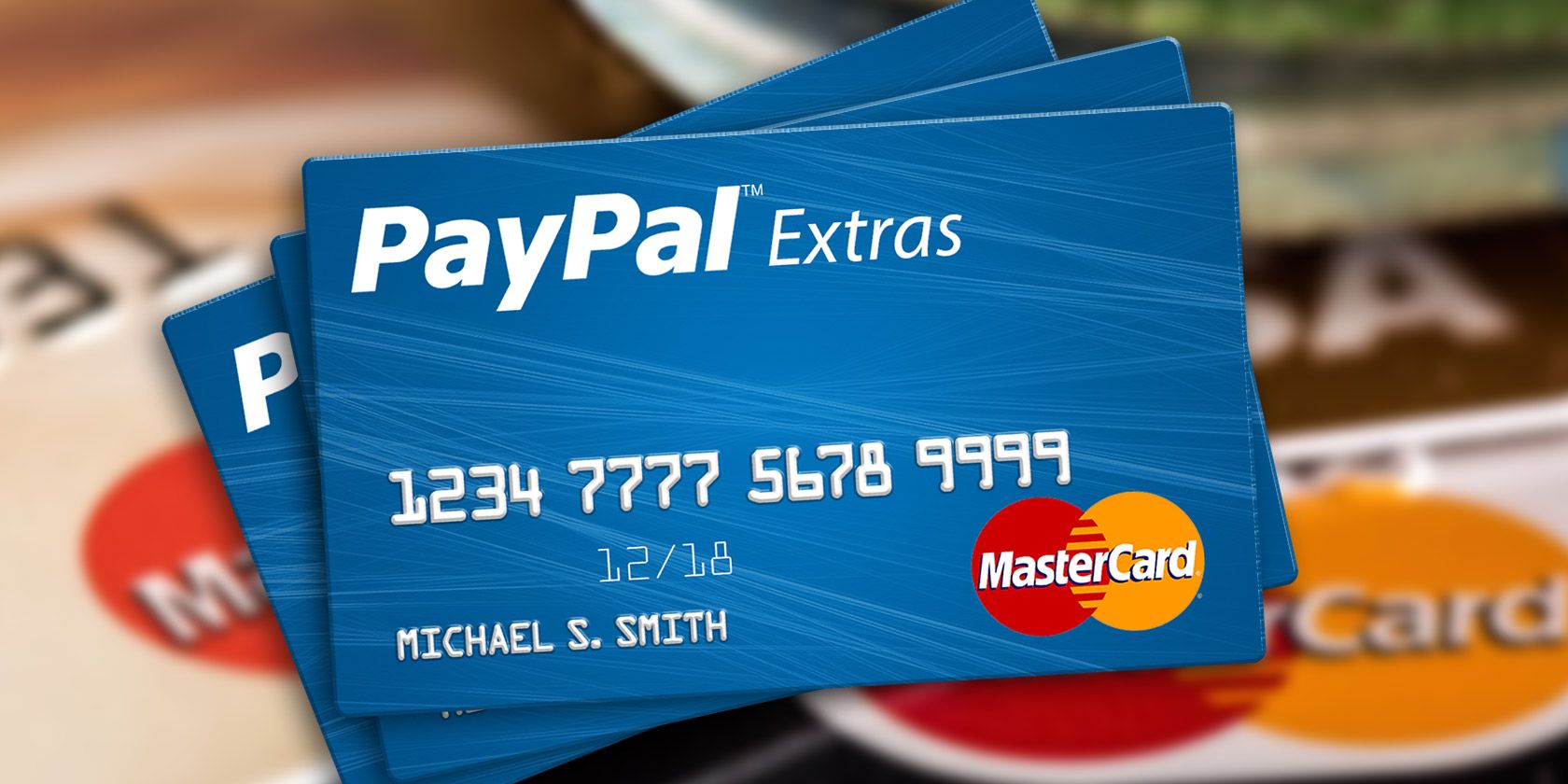
  • PayPal Extras MasterCard
  • PayPal Smart Connect Card

As we learned in our overview of PayPal’s consumer services, PayPal Credit isn’t actually a credit card. It’s simply a credit line that’s part of your online account and comes with some benefits. The Smart Connect Card is similar, except you get a physical card.

When people talk about PayPal’s credit card, 99% of the time they’re referring to the PayPal Extras MasterCard, which is an actual credit card provided by Synchrony Bank. This is what we’ll be focusing on for the remainder of this article.

Here’s a quick rundown of what you get with a PayPal Extras MasterCard:

  • There is no annual fee for this card.
  • 3 points per $1 spent at gas stations and restaurants.
  • 2 points per $1 spent at PayPal and eBay.
  • 1 point per $1 spent anywhere else, online or offline.
  • Redeem points for rewards. (More on that below.)
  • MasterCard’s built-in protections against various inconveniences, including identity theft, fraudulent purchases, and price drops within 60 days.

How to Get a PayPal Credit Card

In order to get a PayPal credit card, you must voluntarily apply for one, be at least 18 years of age, and live within the United States. Application approval is subject to credit approval by Synchrony Bank.

Depending on your credit score and history, Synchrony Bank will determine whether you get the PayPal Extras MasterCard (21.99%, 25.99%, or 28.99% APR) or the Smart Connect Card (26.99% APR and no rewards program). Even if you apply specifically for the PayPal Extras MasterCard, there’s no guarantee you’ll get it.

However, after using the PayPal Smart Connect Card responsibly for a while, PayPal may decide to upgrade your account to an PayPal Extras MasterCard. This could take between 12 and 18 months, depending on your credit-worthiness.

Should You Get a PayPal Credit Card?

By now, the PayPal Extras MasterCard probably seems like an awesome deal. There aren’t any fees to using it, you get reward points no matter what you buy, and you get the same level of protection as you’d get from any other MasterCard credit card.

But should you apply for one? There are valid reasons to do so, of course, but there are just as many reasons why you shouldn’t. Depending on your answers to these five questions, you’ll know whether getting one is in your best interests or not.

1. Do You Already Have Consumer Debt?

If you’re already swimming in debt, grabbing another credit card is one of the last things you should do. Even if the debt you have is so-called “good debt”—such as a mortgage loan or student loans—you should be wary about taking on more debt.

It’s easy to tell yourself that you’ll be responsible with a new credit card, but the only way to know for sure is by being honest with yourself and your current credit situation. Are you responsible with your current finances? If not, you probably won’t be with any new debt.

In 2014, PayPal’s VP of Credit noted that “[consumer spending] goes up 30% after a customer adopts a PayPal credit vehicle,” citing previous studies at the company. That was true whether the credit vehicle was PayPal Credit or a PayPal credit card.

2. What Is Your Personal Credit Score?

As is true any time you apply for a new line of credit, Synchrony Bank will want to know your credit history before approving or rejecting your application. This means a hard credit inquiry, which will remain on your credit report for two years.

This means you shouldn’t apply unless you’re confident you’ll be approved. Getting a hard credit inquiry on your report and failing the approval process will leave you in a worse state than before.

paypal-credit-card-credit-score

Nobody knows the exact criteria, of course, but the general consensus seems to be a minimum credit score of 600 for the PayPal Extras MasterCard. Note that nothing is guaranteed and you may be rejected for other reasons unrelated to credit score.

3. Can You Get a Better Credit Card?

The rewards program for the PayPal Extras MasterCard is pretty good, but there are other credit cards with better rewards programs out there. If you qualify, you might as well shoot for them instead.

The Blue Cash Preferred Card by American Express is one of the most coveted cards for reward seekers. It has a $95 annual fee, but you get 6% cash back at supermarkets, 3% cash back at gas stations and department stores, and 1% everywhere else.

The Discover It Card by Discover is another good one, earning 5% cash back on select categories that change every three months, including gas stations, restaurants, Amazon, wholesale clubs, department stores, and others. It has no annual fee.

On the other hand, if you’re going to carry a balance from month to month (which you should NOT do if you can help it), then a low-interest option like the Barclaycard Ring MasterCard might be better, which has a 13.99% variable APR and no annual fee.

You may decide that the PayPal Extras MasterCard is still best for you. Just make sure you explore what else is out there first.

4. Are the Rewards Appealing to You?

The only reason to choose a PayPal Extras MasterCard over another credit card is if you prefer its rewards program, especially if you shop frequently with PayPal and/or eBay.

Indeed, a lot of people don’t realize that PayPal actually has its own shopping portal and directory where you can find a bunch of deals that you may not find elsewhere. On top of that, you get 2x reward points per $1 spent in the PayPal shopping portal (and on eBay).

Obviously, this only matters if you actually care about the stuff you can redeem using your PayPal reward points. Here are some of the more interesting things you can get:

  • At 800 points, you can get gift cards for restaurants, gas stations, retail stores, and more.
  • At 3,000 points, you can get direct merchandise of various kinds, including houseware, kitchenware, sports gear, electronics, gadgets, and more.
  • At 6,000 points, you can get a direct cash back reward with money deposited straight into your PayPal balance.
  • At 15,000 points, you can get travel vouchers for hotels, airfare, and car rentals.

5. Do You Support PayPal’s Business Practices?

Just because it’s popular and used by millions all over the world doesn’t mean that PayPal is doing things right—at least in terms of ethics and trust.

It’s no secret that thousands of people have been burned by PayPal in one way or another: frozen funds, lost transactions, closed accounts, and poor customer support. Maybe you’ve been okay so far, but you could be the next unsuspecting victim.

In a more abstract sense, you have to decide whether you’re willing to do business with PayPal while knowing that they aren’t treating their customers as well as they could be. Do you want your hard-earned money going to a company like that?

Maybe you don’t care, and that’s fine too. This is a personal decision and only you can make it, but for many it’s been bad enough to warrant boycotts against PayPal.

Is a PayPal Credit Card Worth It?

I have a PayPal Debit MasterCard that’s tied to my PayPal balance, but I haven’t used it in years. I’d personally never consider the PayPal Extras MasterCard—but only because I have better credit cards available to me within my credit score range.

When would I consider a PayPal credit vehicle? If the only cards available to me had annual fees (such as the Capital One QuicksilverOne Rewards) or those with weak or no rewards (such as most student-level credit cards).

And for what it’s worth, I’ve never had an issue with my PayPal accounts.

Read the full article: 5 Questions to Ask Before Getting a PayPal Credit Card


Read Full Article

Mac Taking Too Long to Shut Down? 7 Tips and Fixes to Try


mac-osx-shut-down

One of the simple joys macOS offers is how quickly it starts up and shuts down. This normally takes just a few seconds, especially with the solid state flash storage in modern Mac computers.

But it’s not always perfect. Sometimes your Mac might become slow to shut down. When this happens, there are a number of tricks you can try to speed it up again.

Here are the best fixes for a Mac that takes forever to shut down.

1. Turn Off the Window Reopen Feature

macOS has a nifty feature that lets you save your current session (all your open apps, and the windows within those apps) when you shut down. It then reopens them automatically next time you log in. It’s great when you’ve finished working for the day and want to pick up where you left off tomorrow.

In order to do this, the operating system must save the session data to your hard drive. This takes time and can make your Mac shut down much slower, especially if you’re using an older Mac with a slow mechanical hard drive.

To speed up your shutdown, turn off this feature. Shut down as normal, but when the confirmation dialog box appears, make sure the option labeled Reopen windows when logging back in is not checked. If you’ve used the feature in the past, you might need a couple of restart cycles to see the full benefits.

reopen windows when logging in mac

2. Check for Stalled Print Jobs

Printers are notorious for causing computer problems. The most annoying of all is the stalled print job. You’ll try to print a document, but it won’t work for some reason. This proceeds to cause other computer tasks to grind to a halt.

If you use a printer and your Mac won’t shut down, double-check you haven’t got a stalled print job holding your system up. This can easily be the cause of the problem.

Go to Apple Menu > System Preferences > Printers & Scanners. Select your printer on the left, then click the Open Print Queue button. Delete any jobs that are left over and see if shutdown speed improves.

print queue mac

3. Close Down Apps More Quickly

Hanging software is another common reason why your Mac takes too long to shut down.

macOS attempts to close all open apps when it starts to shut down. But occasionally apps won’t comply, especially if you’ve been pushing your computer hard by using all the available memory.

The first fix to try for this is to close your apps manually (Cmd + Q, or right-click their Dock icon and choose Quit). If some refuse to close, you can force-quit them instead.

To do this, go to Apple Menu > Force Quit, or press Cmd + Option + Esc, and select the misbehaving app from the list. Click Force Quit to close it. Make sure you’ve saved your work before you do this.

force quit Mac

If the problem persists, you can try to speed up the time macOS takes to close apps when it’s shutting down.

By default, the system gives apps 20 seconds to close, after which it will attempt to force-quit them. You can reduce this from 20 seconds to five seconds by copying and pasting the following commands into the Terminal app:

sudo defaults write /System/Library/LaunchDaemons/com.apple.coreservices.appleevents ExitTimeOut -int 5
sudo defaults write /System/Library/LaunchDaemons/com.apple.securityd ExitTimeOut -int 5
sudo defaults write /System/Library/LaunchDaemons/com.apple.mDNSResponder ExitTimeOut -int 5
sudo defaults write /System/Library/LaunchDaemons/com.apple.diskarbitrationd ExitTimeOut -int 5
sudo defaults write /System/Library/LaunchAgents/com.apple.coreservices.appleid.authentication ExitTimeOut -int 5

You’ll have to provide your admin password when you enter the first command. After that, you can enter the rest unhindered as long as you don’t close and re-open Terminal.

Obviously, this is a more advanced solution to try. Give it a pass if you aren’t comfortable changing system settings in the Terminal.

4. Free Up Some Disk Space

This is a simple tip, but one worth pursuing. All computers will start to run into problems when they’re very low on disk space. They need free space to store temporary data.

A lack of free space can cause shutdown problems, particularly if you have open apps trying to save their state during the process. If you have less than 15 percent of your disk capacity free, try freeing up space on your Mac and see if that helps.

5. Check Your Disk Health

mac disk utility

Poor hard drive performance can cause a slow shutdown. Thankfully, this easy to check and fix in macOS. Just open the built-in Disk Utility app, select your drive in the left column, and click First Aid.

Next, click through the next two confirmation screens. While scanning, your computer will remain on, but it’s best to leave it alone while the job runs its course. This will detect and repair any disk problems you’ve got.

Disk repair advice for Macs once commonly recommended repairing permissions. However, while this was an option in older versions of Disk Utility, you no longer need to repair permissions on macOS. It hasn’t been necessary since the release of El Capitan in 2015.

6. Delete Your Caches

Your Mac caches a lot of data that it needs to access quickly and regularly. This helps to improve overall performance. However, caches tend to become bloated over time and can, in some cases, start to have the opposite effect.

Cache issues can even cause slow shutdowns. Clearing these macOS caches may solve the problem.

Delete the Kernel Cache

The first cache to delete is the kernel cache. macOS uses this to help it boot up quickly and safely. Purging the kernel cache from time to time can solve various problems, including making your Mac shut down more quickly.

To clear your kernel cache, you’ll need to restart your Mac in Safe Mode.

To do this, dold down the Shift key when pressing the power button to turn on your system. Keep it held until you see the Login window. This may take longer than for a normal boot.

Starting Safe Mode performs a few tasks along the way, including deleting the kernel cache. Once it loads, restart your Mac normally again and you’re done.

Delete App and System Caches

The next caches to delete are the system and app caches. You can do this quickly with an app like Disk Care from the App Store. If you prefer to save some money, you can instead do it manually.

First, open Spotlight with Cmd + Space. In the search bar, type (or paste) ~/Library/Caches. You can now delete the contents of this cache folder. As a general rule, it’s better to delete just the contents of each subfolder rather than simply selecting and deleting everything.

Next, in Spotlight type /Library/Caches (the same as before, but without the preceding tilde). Delete what’s here as well, then empty your Trash and restart.

delete caches mac

7. Reset NVRAM, PRAM, and SMC

Macs have two special attributes called NVRAM (or PRAM on older systems) and SMC (system management controller) that handle certain core system functions, like the backlight brightness and speaker volume. Problems with PRAM or SMC can cause slow shutdowns or startups.

To reset PRAM or NVRAM, you need to turn off your Mac and then turn it back on. Immediately press and hold the Cmd, Option, P, and R keys simultaneously. Continue holding these keys until you hear a second startup sound, or see the Apple logo appear and disappear for the second time. Then release.

The process to reset the SMC differs depending on what Mac you’re using. See our guide on how to reset your Mac’s SMC for full details.

Solve Mac Startup Problems

It can be tough to isolate the exact cause of a problem like your Mac taking too long to shut down. But if you work through the steps above, you should hopefully get it back to working as fast as the day you bought it.

Some of these tips can help solve startup issues, too. But if you need more help with that, check out our guide to fixing Mac boot problems for the answers.

Read the full article: Mac Taking Too Long to Shut Down? 7 Tips and Fixes to Try


Read Full Article

How Russia’s online influence campaign engaged with millions for years


Russian efforts to influence U.S. politics and sway public opinion were consistent and, as far as engaging with target audiences, largely successful, according to a report from Oxford’s Computational Propaganda Project published today. Based on data provided to Congress by Facebook, Instagram, Google and Twitter, the study paints a portrait of the years-long campaign that’s less than flattering to the companies.

The report, which you can read here, was published today but given to some outlets over the weekend; it summarizes the work of the Internet Research Agency, Moscow’s online influence factory and troll farm. The data cover various periods for different companies, but 2016 and 2017 showed by far the most activity.

A clearer picture

If you’ve only checked into this narrative occasionally during the last couple of years, the Comprop report is a great way to get a bird’s-eye view of the whole thing, with no “we take this very seriously” palaver interrupting the facts.

If you’ve been following the story closely, the value of the report is mostly in deriving specifics and some new statistics from the data, which Oxford researchers were provided some seven months ago for analysis. The numbers, predictably, all seem to be a bit higher or more damning than those provided by the companies themselves in their voluntary reports and carefully practiced testimony.

Previous estimates have focused on the rather nebulous metric of “encountering” or “seeing” IRA content put on these social metrics. This had the dual effect of increasing the affected number — to over 100 million on Facebook alone — but “seeing” could easily be downplayed in importance; after all, how many things do you “see” on the internet every day?

The Oxford researchers better quantify the engagement, on Facebook first, with more specific and consequential numbers. For instance, in 2016 and 2017, nearly 30 million people on Facebook actually shared Russian propaganda content, with similar numbers of likes garnered, and millions of comments generated.

Note that these aren’t ads that Russian shell companies were paying to shove into your timeline — these were pages and groups with thousands of users on board who actively engaged with and spread posts, memes and disinformation on captive news sites linked to by the propaganda accounts.
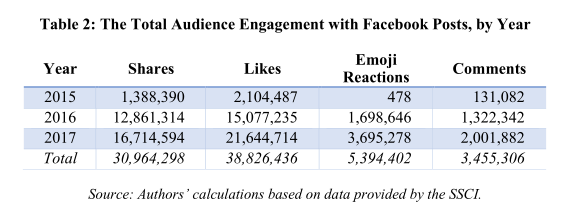
The content itself was, of course, carefully curated to touch on a number of divisive issues: immigration, gun control, race relations and so on. Many different groups (i.e. black Americans, conservatives, Muslims, LGBT communities) were targeted; all generated significant engagement, as this breakdown of the above stats shows:

Although the targeted communities were surprisingly diverse, the intent was highly focused: stoke partisan divisions, suppress left-leaning voters and activate right-leaning ones.

Black voters in particular were a popular target across all platforms, and a great deal of content was posted both to keep racial tensions high and to interfere with their actual voting. Memes were posted suggesting followers withhold their votes, or with deliberately incorrect instructions on how to vote. These efforts were among the most numerous and popular of the IRA’s campaign; it’s difficult to judge their effectiveness, but certainly they had reach.

Examples of posts targeting black Americans.

In a statement, Facebook said that it was cooperating with officials and that “Congress and the intelligence community are best placed to use the information we and others provide to determine the political motivations of actors like the Internet Research Agency.” It also noted that it has “made progress in helping prevent interference on our platforms during elections, strengthened our policies against voter suppression ahead of the 2018 midterms, and funded independent research on the impact of social media on democracy.”

Instagram on the rise

Based on the narrative thus far, one might expect that Facebook — being the focus for much of it — was the biggest platform for this propaganda, and that it would have peaked around the 2016 election, when the evident goal of helping Donald Trump get elected had been accomplished.

In fact Instagram was receiving as much or more content than Facebook, and it was being engaged with on a similar scale. Previous reports disclosed that around 120,000 IRA-related posts on Instagram had reached several million people in the run-up to the election. The Oxford researchers conclude, however, that 40 accounts received in total some 185 million likes and 4 million comments during the period covered by the data (2015-2017).

A partial explanation for these rather high numbers may be that, also counter to the most obvious narrative, IRA posting in fact increased following the election — for all platforms, but particularly on Instagram.
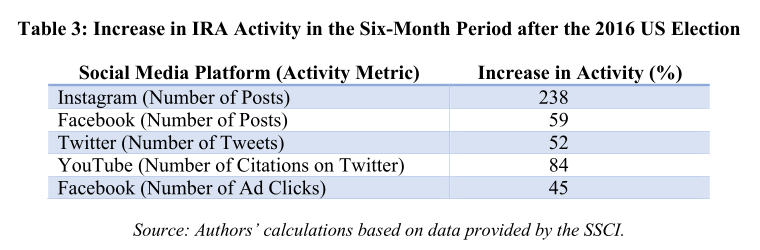
IRA-related Instagram posts jumped from an average of 2,611 per month in 2016 to 5,956 in 2017; note that the numbers don’t match the above table exactly because the time periods differ slightly.

Twitter posts, while extremely numerous, are quite steady at just under 60,000 per month, totaling around 73 million engagements over the period studied. To be perfectly frank, this kind of voluminous bot and sock puppet activity is so commonplace on Twitter, and the company seems to have done so little to thwart it, that it hardly bears mentioning. But it was certainly there, and often reused existing bot nets that previously had chimed in on politics elsewhere and in other languages.

In a statement, Twitter said that it has “made significant strides since 2016 to counter manipulation of our service, including our release of additional data in October related to previously disclosed activities to enable further independent academic research and investigation.”

Google too is somewhat hard to find in the report, though not necessarily because it has a handle on Russian influence on its platforms. Oxford’s researchers complain that Google and YouTube have been not just stingy, but appear to have actively attempted to stymie analysis.

Google chose to supply the Senate committee with data in a non-machine-readable format. The evidence that the IRA had bought ads on Google was provided as images of ad text and in PDF format whose pages displayed copies of information previously organized in spreadsheets. This means that Google could have provided the useable ad text and spreadsheets—in a standard machine- readable file format, such as CSV or JSON, that would be useful to data scientists—but chose to turn them into images and PDFs as if the material would all be printed out on paper.

This forced the researchers to collect their own data via citations and mentions of YouTube content. As a consequence, their conclusions are limited. Generally speaking, when a tech company does this, it means that the data they could provide would tell a story they don’t want heard.

For instance, one interesting point brought up by a second report published today, by New Knowledge, concerns the 1,108 videos uploaded by IRA-linked accounts on YouTube. These videos, a Google statement explained, “were not targeted to the U.S. or to any particular sector of the U.S. population.”

In fact, all but a few dozen of these videos concerned police brutality and Black Lives Matter, which as you’ll recall were among the most popular topics on the other platforms. Seems reasonable to expect that this extremely narrow targeting would have been mentioned by YouTube in some way. Unfortunately it was left to be discovered by a third party and gives one an idea of just how far a statement from the company can be trusted. (Google did not immediately respond to a request for comment.)

Desperately seeking transparency

In its conclusion, the Oxford researchers — Philip N. Howard, Bharath Ganesh and Dimitra Liotsiou — point out that although the Russian propaganda efforts were (and remain) disturbingly effective and well organized, the country is not alone in this.

“During 2016 and 2017 we saw significant efforts made by Russia to disrupt elections around the world, but also political parties in these countries spreading disinformation domestically,” they write. “In many democracies it is not even clear that spreading computational propaganda contravenes election laws.”

“It is, however, quite clear that the strategies and techniques used by government cyber troops have an impact,” the report continues, “and that their activities violate the norms of democratic practice… Social media have gone from being the natural infrastructure for sharing collective grievances and coordinating civic engagement, to being a computational tool for social control, manipulated by canny political consultants, and available to politicians in democracies and dictatorships alike.”

Predictably, even social networks’ moderation policies became targets for propagandizing.

Waiting on politicians is, as usual, something of a long shot, and the onus is squarely on the providers of social media and internet services to create an environment in which malicious actors are less likely to thrive.

Specifically, this means that these companies need to embrace researchers and watchdogs in good faith instead of freezing them out in order to protect some internal process or embarrassing misstep.

“Twitter used to provide researchers at major universities with access to several APIs, but has withdrawn this and provides so little information on the sampling of existing APIs that researchers increasingly question its utility for even basic social science,” the researchers point out. “Facebook provides an extremely limited API for the analysis of public pages, but no API for Instagram.” (And we’ve already heard what they think of Google’s submissions.)

If the companies exposed in this report truly take these issues seriously, as they tell us time and again, perhaps they should implement some of these suggestions.


Read Full Article