17 November 2018

Improved Grading of Prostate Cancer Using Deep Learning


Approximately 1 in 9 men in the United States will develop prostate cancer in their lifetime, making it the most common cancer in males. Despite being common, prostate cancers are frequently non-aggressive, making it challenging to determine if the cancer poses a significant enough risk to the patient to warrant treatment such as surgical removal of the prostate (prostatectomy) or radiation therapy. A key factor that helps in the “risk stratification” of prostate cancer patients is the Gleason grade, which classifies the cancer cells based on how closely they resemble normal prostate glands when viewed on a slide under a microscope.

However, despite its widely recognized clinical importance, Gleason grading of prostate cancer is complex and subjective, as evidenced by studies reporting inter-pathologist disagreements ranging from 30-53% [1][2]. Furthermore, there are not enough speciality trained pathologists to meet the global demand for prostate cancer pathology, especially outside the United States. Recent guidelines also recommend that pathologists report the percentage of tumor of different Gleason patterns in their final report, which adds to the workload and is yet another subjective challenge for the pathologist [3]. Overall, these issues suggest an opportunity to improve the diagnosis and clinical management of prostate cancer using deep learning–based models, similar to how Google and others used such techniques to demonstrate the potential to improve metastatic breast cancer detection.

In “Development and Validation of a Deep Learning Algorithm for Improving Gleason Scoring of Prostate Cancer”, we explore whether deep learning could improve the accuracy and objectivity of Gleason grading of prostate cancer in prostatectomy specimens. We developed a deep learning system (DLS) that mirrors a pathologist’s workflow by first categorizing each region in a slide into a Gleason pattern, with lower patterns corresponding to tumors that more closely resemble normal prostate glands. The DLS then summarizes an overall Gleason grade group based on the two most common Gleason patterns present. The higher the grade group, the greater the risk of further cancer progression and the more likely the patient is to benefit from treatment.
Visual examples of Gleason patterns, which are used in the Gleason system for grading prostate cancer. Individual cancer patches are assigned a Gleason pattern based on how closely the cancer resembles normal prostate tissue, with lower numbers corresponding to more well differentiated tumors. Image Source: National Institutes of Health.
To develop and validate the DLS, we collected de-identified images of prostatectomy samples which contain a greater amount and diversity of prostate cancer than needle core biopsies, even though the latter is the more common clinical procedure. On the training data, a cohort of 32 pathologists provided detailed annotations of Gleason patterns (resulting in over 112 million annotated image patches) and an overall Gleason grade group for each image. To overcome the previously referenced variability in Gleason grading, each slide in the validation set was independently graded by 3 to 5 general pathologists (selected from a cohort of 29 pathologists) and had a final Gleason grade assigned by a genitourinary-specialist pathologist to obtain the ground-truth label for that slide.

In the paper, we show that our DLS achieved an overall accuracy of 70%, compared to an average accuracy of 61% achieved by US board-certified general pathologists in our study. Of 10 high-performing individual general pathologists who graded every slide in the validation set, the DLS was more accurate than 8. The DLS was also more accurate than the average pathologist at Gleason pattern quantitation. These improvements in Gleason grading translated into better clinical risk stratification: the DLS better identified patients at higher risk for disease recurrence after surgery than the average general pathologist, potentially enabling doctors to use this information to better match patients to therapy.

Comparison of scoring performance of the DLS with pathologists. a: Accuracy of the DLS (in red) compared with the mean accuracy among a cohort-of-29 pathologists (in green). Error bars indicate 95% confidence intervals. b: Comparison of risk stratification provided by the DLS, the cohort-of-29 pathologists, and the genitourinary specialist pathologists. Patients are divided into low and high risk groups based on their Gleason grade group, where a larger separation between the Kaplan-Meier curves of these risk groups indicates better stratification.
We also found that the DLS was able to characterize tissue morphology that appeared to lie at the cusp of two Gleason patterns, which is one reason for the disagreements in Gleason grading observed between pathologists, suggesting the possibility of creating finer grained “precision grading” of prostate cancer. While the clinical significance of these intermediate patterns (e.g. Gleason pattern 3.3 or 3.7) is not known, the increased precision of the DLS will enable further research into this interesting question.
Assessing the region-level classification of the DLS. a: Annotations from 3 pathologists compared to DLS predictions. The pathologists show general concordance on the location and the extent of tumor areas, but poor agreement in classifying Gleason patterns. The DLS’s precision Gleason pattern for each region is represented by interpolating between the DLS’s prediction patterns for Gleason patterns 3 (green), 4 (yellow), and 5 (red). b: DLS prediction
patterns compared to the distribution of pathologists’ Gleason pattern classifications on 41 million annotated image patches from the test dataset. On patches where pathologists are discordant, where the tissue is more likely to be on the cusp of two patterns, the DLS reflects this ambiguity in it's prediction scores.
While these initial results are encouraging, there is much more work to be done before systems like our DLS can be used to improve the care of prostate cancer patients. First, the accuracy of the model can be further improved with additional training data and should be validated on independent cohorts containing a larger number and more diverse group of patients. In addition, we are actively working on refining our DLS system to work on diagnostic needle core biopsies, which occur prior to the decision to undergo surgery and where Gleason grading therefore has a significantly greater impact on clinical decision-making. Further work will be needed to assess how to best integrate our DLS into the pathologist’s diagnostic workflow and the impact of such artificial-intelligence based assistance on the overall efficiency, accuracy, and prognostic ability of Gleason grading in clinical practice. Nonetheless, we are excited about the potential of technologies like this to significantly improve cancer diagnostics and patient care.

Acknowledgements
This work involved the efforts of a multidisciplinary team of software engineers, researchers, clinicians and logistics support staff. Key contributors to this project include Kunal Nagpal, Davis Foote, Yun Liu, Po-Hsuan (Cameron) Chen, Ellery Wulczyn, Fraser Tan, Niels Olson, Jenny L. Smith, Arash Mohtashamian, James H. Wren, Greg S. Corrado, Robert MacDonald, Lily H. Peng, Mahul B. Amin, Andrew J. Evans, Ankur R. Sangoi, Craig H. Mermel, Jason D. Hipp and Martin C. Stumpe. We would also like to thank Tim Hesterberg, Michael Howell, David Miller, Alvin Rajkomar, Benny Ayalew, Robert Nagle, Melissa Moran, Krishna Gadepalli, Aleksey Boyko, and Christopher Gammage. Lastly, this work would not have been possible without the aid of the pathologists who annotated data for this study.

References
  1. Interobserver Variability in Histologic Evaluation of Radical Prostatectomy Between Central and Local Pathologists: Findings of TAX 3501 Multinational Clinical Trial, Netto, G. J., Eisenberger, M., Epstein, J. I. & TAX 3501 Trial Investigators, Urology 77, 1155–1160 (2011).
  2. Phase 3 Study of Adjuvant Radiotherapy Versus Wait and See in pT3 Prostate Cancer: Impact of Pathology Review on Analysis, Bottke, D., Golz, R., Störkel, S., Hinke, A., Siegmann, A., Hertle, L., Miller, K., Hinkelbein, W., Wiegel, T., Eur. Urol. 64, 193–198 (2013).
  3. Utility of Quantitative Gleason Grading in Prostate Biopsies and Prostatectomy Specimens, Sauter, G. Steurer, S., Clauditz, T. S., Krech, T., Wittmer, C., Lutz, F., Lennartz, M., Janssen, T., Hakimi, N., Simon, R., von Petersdorff-Campen, M., Jacobsen, F., von Loga, K., Wilczak, W., Minner, S., Tsourlakis, M. C., Chirico, V., Haese, A., Heinzer, H., Beyer, B., Graefen, M., Michl, U., Salomon, G., Steuber, T., Budäus, L. H., Hekeler, E., Malsy-Mink, J., Kutzera, S., Fraune, C., Göbel, C., Huland, H., Schlomm, T., Clinical Eur. Urol. 69, 592–598 (2016).

Former Oracle Exec Thomas Kurian to replace Diane Greene as head of Google Cloud


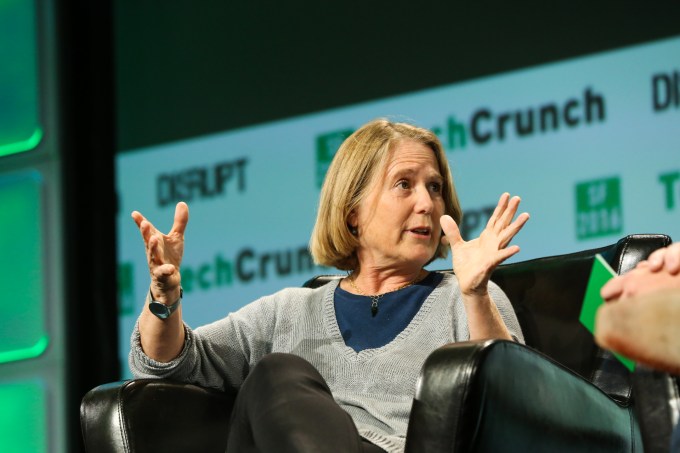
Diane Greene announced in a blog post today that she would be stepping down as CEO of Google Cloud and will be helping transition former Oracle executive Thomas Kurian to take over early next year.

Greene took over the position almost exactly three years ago when Google bought Bebop, the startup she was running. The thinking at the time was that the company needed someone with a strong enterprise background and Greene, who helped launch VMware, certainly had the enterprise credentials they were looking for.

In the blog post announcing the transition, she trumpeted her accomplishments. “The Google Cloud team has accomplished amazing things over the last three years, and I’m proud to have been a part of this transformative work. We have moved Google Cloud from having only two significant customers and a collection of startups to having major Fortune 1000 enterprises betting their future on Google Cloud, something we should accept as a great compliment as well as a huge responsibility,” she wrote.

The company had a disparate set of cloud services when she took over, and one of the first things Greene did was to put them all under a single Google Cloud umbrella. “We’ve built a strong business together — set up by integrating sales, marketing, Google Cloud Platform (GCP), and Google Apps/G Suite into what is now called Google Cloud,” she wrote in the blog post.

As for Kurian, he stepped down as president of product development at Oracle at the end of September. He had announced a leave of absence earlier in the month before making the exit permanent.  Like Greene before him, he brings a level of enterprise street cred, which the company needs as it continues to try and grow its cloud business.

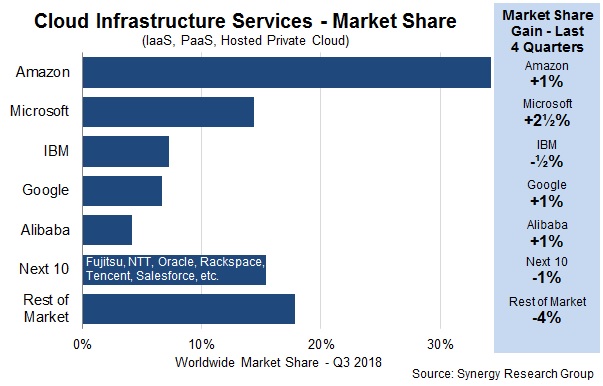
After three years with Greene at the helm, Google, which has tried to position itself as the more open cloud alternative to Microsoft and Amazon, has still struggled to gain market share against its competitors, remaining under 10 percent consistently throughout Greene’s tenure.

As Synergy’s John Dinsdale told TechCrunch in an article on Google Cloud’s strategy in 2017, the company had not been particularly strong in the enterprise to that point. “The issues of course are around it being late to market and the perception that Google isn’t strong in the enterprise. Until recently Google never gave the impression (through words or deeds) that cloud services were really important to it. It is now trying to make up for lost ground, but AWS and Microsoft are streets ahead,” Dinsdale explained at the time. Greene was trying hard to change that perception.

Google has not released many revenue numbers related to the cloud, but in February it indicated they were earning a billion a quarter, a number that Greene felt the $4 billion run rate put Google in elite company. Amazon and Google were reporting numbers like that for a quarter at the time. Google stopped reporting cloud revenue after that report.

Regardless, the company will turn to Kurian to continue growing those numbers now. “I will continue as CEO through January, working with Thomas to ensure a smooth transition. I will remain a Director on the Alphabet board,” Greene wrote in her blog post.

Interesting enough Oracle has struggled with its own transition to the cloud. Kurian gets a company that was born in the cloud, rather than one that has made a transition from on-prem software and hardware to one solely in the cloud. It will be up to him to steer Google Cloud moving forward.


Read Full Article

16 November 2018

Sheryl Sandberg claims she didn’t know Facebook hired agency behind ‘abhorrent’ anti-Soros campaign


Sheryl Sandberg has denied that she obstructed early investigations into election meddling and claimed that she was unaware Facebook was involved with an agency that ran “abhorrent” anti-Semitic campaigns that targeted George Soros, among others.

Facebook, the world’s largest social network, with more than 2.2 billion users, spent Thursday doing its best to fight a media relations forest fire that followed an explosive New York Times article revealing a campaign to smear George Soros, and other revelations.

The company fired PR and research firm Definers, the center of some of the story, it disputed allegations that it tried to hide details around Russian hacking and it held an hour-long call with journalists and CEO Mark Zuckerberg.

Now Sandberg has joined Zuckerberg and Facebook itself in distancing herself from some of the core claims of the Times report, which paints her in a particularly poor light.

“On a number of issues – including spotting and understanding the Russian interference we saw in the 2016 election – Mark and I have said many times we were too slow,” she wrote in a rebuttal posted to Facebook. “But to suggest that we weren’t interested in knowing the truth, or we wanted to hide what we knew, or that we tried to prevent investigations, is simply untrue.”

Sandberg repeated a common refrain at Facebook: the company wasn’t aware of the scale of the attacks it received until it was too late and it is now committed to “investing heavily” to prevent recurrences.

“While we will always have more work to do, I believe we’ve started to see some of that work pay off, as we saw in the recent US midterms and elections around the world where we have found and taken down further attempts at interference,” she wrote.

But perhaps the most striking part of Sandberg’s post is a brief passage in which she claims that she — Facebook’s chief operating officer — was unaware of the exact scope of Definers’ work for the company, which included disinformation campaigns against Apple, Google and the George Soros-backed Open Society Foundations.

From her post:

I also want to address the issue that has been raised about a PR firm, Definers. We’re no longer working with them but at the time, they were trying to show that some of the activity against us that appeared to be grassroots also had major organizations behind them. I did not know we hired them or about the work they were doing, but I should have. I have great respect for George Soros – and the anti-Semitic conspiracy theories against him are abhorrent.

Indeed, the claim that Sandberg didn’t even know the agency worked for Facebook flies in the face of the company’s original response, in which it wrote that its “relationship with Definers was well-known by the media.”

According to those statements, the relationship was well-known by the media but unknown to the company COO? OK then.

The New York Times’ allegations are hugely serious, enough to solicit fast and concerned responses from a multitude of politicians and prompt Facebook’s campaign PR machine to splutter into frenzied activity — don’t expect this issue to disappear soon.

Here’s a quick recap of what you need to know so far.

If you didn’t yet do so, go read The New York Times report.

And here’s the response from Sandberg in full:

I want to address some of the claims that have been made in the last 24 hours.

On a number of issues – including spotting and understanding the Russian interference we saw in the 2016 election – Mark and I have said many times we were too slow. But to suggest that we weren’t interested in knowing the truth, or we wanted to hide what we knew, or that we tried to prevent investigations, is simply untrue. The allegations saying I personally stood in the way are also just plain wrong. This was an investigation of a foreign actor trying to interfere in our election. Nothing could be more important to me or to Facebook.

As Mark and I both told Congress, leading up to Election Day in November 2016, we detected and dealt with several threats with ties to Russia and reported what we found to law enforcement. These were known traditional cyberattacks like hacking and malware. It was not until after the election that we became aware of the widespread misinformation campaigns run by the IRA. Once we were, we began investing heavily in more people and better technology to protect our platform. While we will always have more work to do, I believe we’ve started to see some of that work pay off, as we saw in the recent US midterms and elections around the world where we have found and taken down further attempts at interference.

I also want to address the issue that has been raised about a PR firm, Definers. We’re no longer working with them but at the time, they were trying to show that some of the activity against us that appeared to be grassroots also had major organizations behind them. I did not know we hired them or about the work they were doing, but I should have. I have great respect for George Soros – and the anti-Semitic conspiracy theories against him are abhorrent.

At Facebook, we are making the investments that we need to stamp out abuse in our system and ensure the good things people love about Facebook can keep happening. It won’t be easy. It will take time and will never be complete. This mission is critical and I am committed to seeing it through.


Read Full Article

Black Friday and Cyber Monday: A Gamer’s Complete Guide

7 Scams to Watch Out for on Black Friday and Cyber Monday


With Christmas approaching, shops feverishly publicize their best deals. But you can’t let supposed bargains go to your head. Companies rely on this momentary weakness—and so do cybercriminals.

Can you spot a Black Friday scam? How do you know if an online store is legit? How can you avoid fake sales? Here’s what to look out for this Black Friday and Cyber Monday.

1. Bait and Switch: Online and In-Store Variants

Festive gifts left around a Christmas tree

You might be tempted to enter competitions to fill the void left in your bank balance after the festivities. But free items can sometimes be a scam.

These typically come in the form of “bait and switch” fraud. Cybercriminals dangle expensive items in front of your eyes, and ask you to enter a draw where a number of lucky participants win, for example, a new iPhone.

To be in with a chance of winning, you need to enter a few personal details and fill out a survey. Scammers can use this to collect sensitive data or benefit from a pay-per-click scheme.

Never enter private details on sites you don’t trust.

Only use sites you’ve used before or that have been personally recommended to you by family or friends.

You rely on certain companies throughout the rest of the year. It’s churlish not to use them again in the run-up to Christmas. However, we can be tempted away if a more obscure site offers something unique and/or limited.

This doesn’t mean you can’t use smaller names, but shop around. Businesses with exclusive products might sell stock through eBay, Etsy, or as a third-party seller on Amazon.

Don’t become paranoid about this. Most sites are honest and only want to give you a good service. Just remember to check for signs of encryption (like an SSL certificate) and pay using a credit card and/or PayPal.

Bricks-and-mortar stores may also use the “bait and switch” method.

Instead of collating private information, they advertise a product that’s out of stock. They then console you by offering an inferior product; sometimes, however, they show you a more expensive item. Either way, they used an unavailable product to tempt you into shopping there.

2. Beware Cards Bearing “Gifts”

Similarly, you might enter a lucky dip to win a loaded gift card from a major online shop or supermarket. If you’re lucky, it could help buy the Christmas turkey and all the trimmings. And it’s worth clicking on a link if a friend recommended it to you, right?

But cybercriminals use services like WhatsApp to promote giveaways, generally as a supposed campaign to coincide with new stores opening. They then ask you to click on a link which requires some brief contact details. You won’t suspect anything because the message purports to be from a friend.

It’s fake. Your personal details will be collected, and your device could be infected with malware. It could also tap your address book to spread the scam to your contacts.

Even if you think it’s genuine, do your research. Type “Black Friday Walmart gift card scam” into Google and endless results will pop up.

Be immediately suspicious of any non-personalized messages. Confirm with your friend whether they sent it or not through another method.

If this dubious message came through as an email, ask by SMS. If you think their instant messaging is compromised, ask them in person or phone them.

Don’t trust links—period. Because the email promising amazing deals could be malicious.

Spotting a fraudulent email isn’t difficult, but can take some time. Rather than click links, instead delete emails and find the site yourself. Open another window and search.

Amazon lists many of its Black Friday deals on its homepage in advance so you can easily find the same bargains as those advertised in your email. Or not, as the case may be!

3. Fake Facebook Pages

Taking a photo on an iPhone for Christmas

A related scam has been perpetuated on social media for years, attempting to get more “likes” and shares. Facebook’s algorithm favors posts with the most interactions so the scam reaches a wider audience.

This is known as “like” farming.

Scammers promise free MacBooks, gift cards, and other Black Friday discounts. But once the message has reached enough profiles, the page or post changes, perhaps to a different product they can get serious cash from through a pay-per-click scheme.

Creators could sell the page and the information it’s collected too. Even Personally Identifiable Information (PII) like your address and birthday, can easily be sold on the Dark Web.

Fake pages could pose a further threat to passwords, usernames, and credit card information which may be stored for associated apps.

4. Delivery and Transaction Problems

If you’ve bought many gifts from numerous different retailers, it can be tricky to keep track of your orders. Simply buying from Amazon might actually be through third party sellers.

Following Black Friday and Cyber Monday, a well-known firm might email to tell you about a problem delivering a package. All you need to do is click on a link and arrange a good time.

Let’s reiterate: however authentic a message and its accompanying link appear, do not trust it.

An email might pretend to be FedEx, DHL, or UPS and ask you to open an attachment. Don’t download anything. You could be downloading ransomware, or a virus that tracks your activities.

A variation of this is a fraudulent email informing you that a company couldn’t deliver a package you sent, so you need to rearrange delivery or pay extra. Spoof emails might include order confirmations, refunds, and reminders about what’s on your Amazon Wishlist.

You could also receive an SMS asking you to click on a link to reschedule a failed parcel delivery or request a refund.

This is why it’s so important to keep track of your transactions. Don’t rely on orders filed under “My Account”. Keep physical records of invoices or order confirmations.

If a dispute arises, you’ve got all the details you need—and it’s reassuring when you open your bank statement in January!

Some services use different trading names for debiting accounts. If you can find them out, note down that additional name on corresponding paperwork. PayPal, for instance, tells you clients’ trading names which will be credited on your statements. And remember that Amazon often displays as “INT’L” followed by a lengthy number.

Keep note of payments made in December, and you can cross-reference them at a later date.

5. You Don’t Receive Purchases

Black Friday scammers pretend to send your puchases

What if you’ve ordered something and it’s not arrived?

It could be genuine. Hundreds of items get lost in the post and through private couriers, especially around Christmastime. Sadly, it could also be something more malicious.

Either way, you need to contact the seller. They should have proof of postage. Citizens’ rights typically say that you don’t pay for anything you’ve not received.

The final responsibility lies with the retailer. So, if something doesn’t turn up, you shouldn’t be charged.

Scammers might insist you wait; it’s a simple delaying tactic. Go to the hosting site. If it’s a third-party seller through Amazon, you need to talk to Amazon itself. The same goes for auction sites.

The best way to prevent this is by paying through verified methods with money-back guarantees.

PayPal offers a Buyer Protection program. This reimburses you the item price plus postage fees if a product either doesn’t arrive or isn’t as described. Exceptions exist, but we doubt you’ll invest in real estate, ready for Christmas!

Credit card companies are jointly liable with the trader if there’s a problem with the product, so you’ve got an added safety net. You can generally rely on “chargeback”, although individual companies have their own terms and conditions, so make sure you check these before using a credit card.

Be understanding, but remember: by law, you should be offered a refund or replacement.

6. Check Returns Policies

In most cases, you have the right to take back items within 28 days of purchases. There are exceptions; nonetheless, that’s a good rule of thumb.

Around the festive period, many retailers—notably the bigger, reputable brands—expand their returns policies and offer gift receipts. However, not all do. Amazon extends its policy, so anything bought through them between November 1 and December 31 can be returned until midnight January 31.

It doesn’t include third parties, though. And this is the key thing about returns policies: you need to check individual retailers because specifics change.

You particularly need to be careful around auction sites. In some cases, sellers will include a shorter return period; others insist you pay for sending stuff back yourself.

Most worryingly, some don’t accept returns at all. If you get an item that’s fake, damaged, or simply unwanted, you can’t do much about it. However, we advise you report counterfeit goods to parent companies, like eBay.

The key here is to know your rights—before purchasing!

7. Dubious Pricing Strategies

Walking past cafes and shops at Christmas while it snows

This isn’t a tactic employed by cybercriminals, but it’s nevertheless infuriating. It’s a sales technique used by most retailers.

Stores display an RRP or high-end price point, but advertise a sale price. It looks like you’re getting a fantastic discount, solely for this limited time. After that, the price shoots back up… right?

Sadly, these offers aren’t always what they appear. They’re bumping the price up for effect, then lowering it again.

You’ll probably save a fair amount of cash in relation to the RRP. But it’s still an example of retailers forcing a purchase when a similar (or better) discount has been available during the year.

Amazon Wishlists track price points in relation to when you added them, not in accordance to average cost. You can’t filter them to show the biggest price-drops, either.

You can save serious money by doing your Christmas shopping early, so why not set alerts for specific products? Festive items will likely be cheapest in the middle of summer, which doesn’t help you right now, but may next year.

That method’s not for everyone though. Instead, use price trackers like CamelCamelCamel to check whether a deal is really as good as it looks.

Don’t Get Carried Away This Christmas

The bottom line is, don’t panic. Adrenaline pumps harder through our bodies when we spot a bargain. This is especially the case if there’s a limited quantity, or, as with auction sites, a countdown. Amazon uses both tactics in its flash deals.

Remember: If it looks too good to be true, it probably is.

Keeping a cool head means you won’t blow your budget, making Christmas all the merrier!

Read the full article: 7 Scams to Watch Out for on Black Friday and Cyber Monday


Read Full Article

You Can Now Message Businesses Using Google Maps


Google is adding the ability for customers to message businesses directly from Google Maps. This means that if you find a business on Google Maps you’ll be able to message them without leaving the app. Which sure beats contacting them by phone or email.

You have been able to message businesses through Google since 2017. However, this was limited to the U.S. and required you to find their Business Profile on Google Search. Now, it’s being integrated into Google Maps, and rolled out to more countries.

How to Message a Business Through Google

To message a business, whether on Google Search or Google Maps, you just need to find their Business Profile. This will appear after you have either searched for a specific business or clicked on a business you’ve located through Maps.

Messaging a business is as simple as clicking Message on their Business Profile. This will open a message thread where you can message back and forth with the business. Perhaps to find out if they’re open on a certain day or to book a table or place an order.

You can also now see all of the messages you’ve sent to businesses using Google. Simply click on the hamburger menu located in the top left-hand corner of Google Maps, and then click on Messages. Here, you’ll be able to see what you’ve sent to who and when.

Unfortunately, you won’t be able to message every single business by default. Instead, businesses interested in communicating with their customers in this way need to install the new Google My Business app and sign up to enable the messaging feature.

Google Maps Is Starting to Feel Bloated

Google Maps has added lots of new features to Maps recently. And while most of them are useful in their own right, there’s a definite risk of Google Maps becoming bloated. After all, most of us still just want to use Google Maps to get directions from A to B.

For more on Google Maps’ newest features, check out how Google Maps uses landmarks for directions, how Google Maps helps you explore your local area, how Google Maps helps you plan group events, and how Google Maps helps you find EV charging points.

Image Credit: J_Lai/Flickr

Read the full article: You Can Now Message Businesses Using Google Maps


Read Full Article

The 10 Best Thanksgiving Apps for iPhone

The 6 Best PS4 Controllers to Buy This Black Friday

The 5 Best Lavalier Microphones Under $50

How to Run Linux on Android Devices

Why You Should Replace Google Play With an Alternative App Store

Why You Shouldn’t Leave Your Phone Plugged in Overnight


charge-overnight

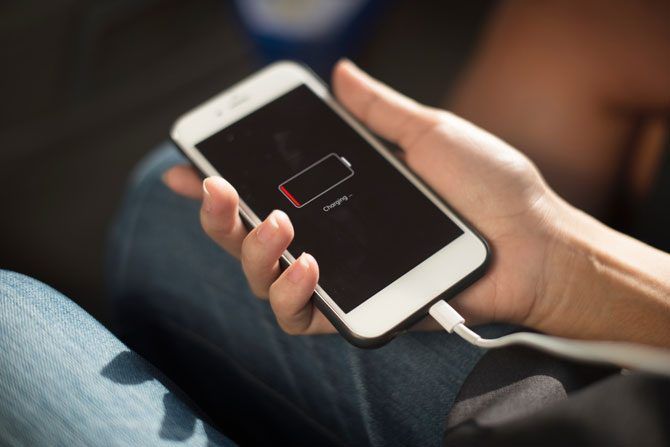
There are many myths on how to treat your smartphone, tablet, or laptop for battery longevity. The most common ones are to regularly drain your phone to 0%, and to always charge it to 100%. You might also have heard that your battery has a memory, and that you should never partially charge the cell.

This is all completely wrong, based on older battery technology which is no longer found in most smart devices. Here’s the truth about maintaining smartphone batteries.

Charge Cycles Determine Battery Life Expectancy

Should you keep a low battery fully charged

You want your tech to be usable for as long as possible; warranties are invalid if you fiddle with your device. Getting the most out of your battery is increasingly important as most people are uncomfortable with changing the default battery.

Rechargeable batteries will slowly lose some capacity over time, even if you don’t use them. Through regular use of your device, you will usually notice this capacity drop after the first year. While for most of us, getting through a single day on a single charge is impossible before the two-year mark.

“Battery charge cycles” is how manufacturers specify the life expectancy of a battery. A charge cycle is defined as the battery being charged from 0% to 100% and then discharged back down to 0%. The number of expected charge cycles will tell you how many full cycles the battery can handle before it noticeably starts to lose capacity.

Lithium-Ion (Li-Ion) batteries are used in the majority of today’s rechargeable tech. You can find some form of Lithium-Ion batteries in mobile phones, vaporizers, laptops, Teslas, and even chainsaws. The most popular Li-Ion battery is the 18650. This battery can take between 300 and 500 full charge cycles before being reduced to roughly 75-80% capacity, when major flaws start developing.

The King of Rechargeable Batteries: Lithium-Ion

Smartphones and tablets use a variation of the Li-Ion battery, Lithium-Ion Polymer (Li-Poly). This version of Lithium-Ion batteries is safer, smaller, and charges faster. Otherwise, the same lifespan rules apply to Li-Poly as with any Li-Ion battery.
One of the factors that increase the speed of Li-Ion battery degradation the most is charging it past 80% and letting it drop below 20%. The closer to 100% you go, the faster the chemical reaction that can create flaws will happen. If you have a Tesla, they curb the charging by default, don’t worry!

As the 300-500 number of charge cycles is based on cycles, and your battery degrades fastest below 20% and above 80%, you can extend its lifespan by avoiding extremes. Partial charges and discharges that combine to 100% are counted as a single full cycle. So if you instead partially charge and discharge your phone between 20% and 80%, research says you could get 1,000 full cycles (almost 3 years of daily charges) or more before hitting a noticeable drop in capacity.

Don’t Play Games While Your Phone Is Charging

Temperatures below 32 Fahrenheit (0 Celsius) and above 158 Fahrenheit (70 Celsius) will degrade your Li-Ion battery faster. Don’t leave your device in your car on a hot day and don’t put it in your freezer (or in the snow).

Leaving your smartphone plugged in while using it for anything intensive, like watching YouTube, or playing a game is a big no-no. This high-voltage and high-temperature state is the worst situation for your battery to be in.

Besides this, mini-charge-cycles can affect your battery negatively. Some parts of the battery will go through more charge cycles than others, which will age the battery. This could lead to battery cell damage, which can cause your phone to die even if your battery displays as charged.

Similarly, try to avoid the use of fast-charging technologies overnight, as this can induce a similar high-temperature situation. Fast-charging technology is not intended to be used to charge your phone from empty to full, but rather for short 20-30 minute charge periods. Li-Ion batteries will also degrade faster at 100%, so the less time your battery is fully charged, the better.

Samsung seems to be alone in that they have added a simple way to disable fast cable charging in the Samsung battery settings. This is available for both tablets and phones, so to get the longest lifespan out of your battery, you should disable this.

Use Software to Control Your Charging Habits

One way to take advantage of partial charges would be to stay close to your phone when it’s charging. However, alarms can be considered more efficient.

For Android, Accubattery displays tips to improve your battery’s health and allows you to set battery percentage alarms. Options to set up alarms for iOS seems to be lacking, but for 10$, FruitJuice has a lot of features to help extend your battery life on macOS.

Some laptops will have BIOS settings available where you can configure the maximum battery charge percentage. Lenovo has made this easier for Windows with their Lenovo Energy Management software. By installing this and selecting Optimize for Battery Lifespan, your laptop battery will stop charging at 80%.

Don’t Charge Your Phone Overnight

In general, you should try to avoid charging your phone overnight, and instead unplug your phone when you go to bed, and charge it after you wake up. During the time it takes you to shower and eat breakfast you should reach a comfortable charge percentage.

Definitely also avoid leaving your phone under your pillow while charging it. Besides the real risk of a fire, the lack of airflow can cause a high-temperature state, which will increase the battery degradation.

We’re not saying to only charge your phone in the morning. Realistically with partial charges, you will also charge it during work or in the evening. However, as much as you can, avoid going over 80%.

Although Li-Ion batteries don’t have a charge capacity memory, there is some research that says that you should fully discharge your battery at least once every 30 cycles. Your hardware can form a digital memory which will make the charge gauge inaccurate if the battery is never fully discharged. For most people this will happen naturally at least a few times a month, so we don’t recommend going out of your way to fully discharge your battery.

That said, if your phone dies randomly even though the battery gauge says you have charge left, it could be caused by miscalibration (or a faulty battery). If calibrating your battery (here’s how to do that on a MacBook) doesn’t fix the issue, then faulty batteries should be a valid claim if your battery is still under warranty.

Reduce the Battery Drain on Your Device

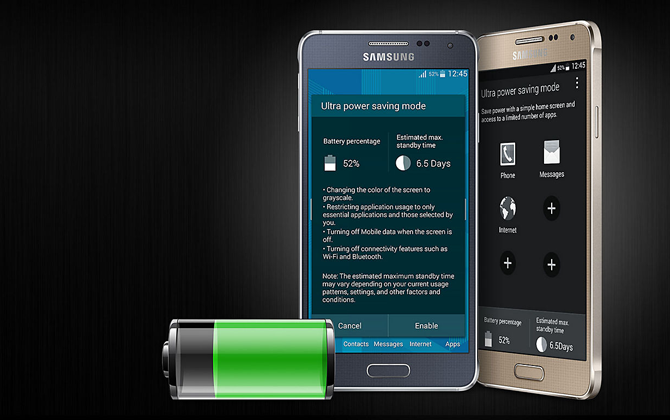
Samsung power saving mode

Beyond watching the temperature and charge percentage of your device, you can further extend the battery life by reducing how often you need to charge it. Fewer charges mean fewer cycles, which means a longer life for your battery and your device.

Reducing the screen timeout duration and turning down the brightness settings will have the biggest impact. There is a reason why tests use Screen-on-Time (SoT) when testing for battery life on smartphones. Apple has introduced some useful   features that use SoT to help curb your phone addiction in iOS 12.

In addition, most smartphones and some laptop operating systems will have a form of battery saver option. Turn this on when possible. There are simple steps to configure your Windows 10 device to optimize your battery life without extra software.

Battery saver will rarely affect your experience of the device negatively, especially when you are not actively using the device.

Disabling signals like Bluetooth, GPS, Wi-Fi, and mobile internet are common tips to save battery life. These days Bluetooth and Wi-Fi signals are pretty battery efficient. Disabling GPS and the mobile internet signal can reduce the battery drain noticeably on most devices.

Tips for Extending the Lifespan of Your Battery

In the short to medium term, you may not notice much difference. However, you’ll be happy when your phone still survives a day on a single charge after a year. Following these tips, your battery should not hit 80% charge capacity until after 2+ years of use.

  1. Use partial charges to keep your battery between 20% and 80%. You can use software to notify you when your battery reaches 80% so you can unplug it.
  2. Reduce the amount of time your battery is kept at 100% charge by not charging your phone at night. This is when the battery will degrade the fastest.
  3. Avoid using fast-charge for longer periods.
  4. Keep your device at room temperature, and avoid extreme temperatures.
  5. Where possible, set the maximum charge of your battery to 80%.
  6. Reduce the battery drain of your device by turning off unnecessary services. Use battery saver to get even longer use from every charge.
  7. If you are storing batteries unused for longer periods, discharge them to 70% and store them somewhere cool. Storing batteries at full charge will cause them to deteriorate faster.

If all that isn’t enough, the pressure to keep upgrading our devices has a real impact on the environment. In fact, as of 2016, we only recycle about 12.5% of our annual electronic waste. By getting longer use from your tech, you can pat yourself on the back for helping save the planet.

Read the full article: Why You Shouldn’t Leave Your Phone Plugged in Overnight


Read Full Article

The New Windows 10 Clipboard: Everything You Need for Copy Pasting


new-windows-clipboard

Microsoft has finally improved the Windows clipboard. It’s always been very basic, storing only the most recent item you copied. And the copied item was only available on the current PC.

Now, in Windows 10 1809, the clipboard can save more than one item and you can paste anything stored in the clipboard, even if it’s not the most recent item. In this article, we’ll show you how to use and manage the newly improved clipboard experience in Windows 10.

Enable the Windows 10 Clipboard History

The clipboard history is not enabled by default.

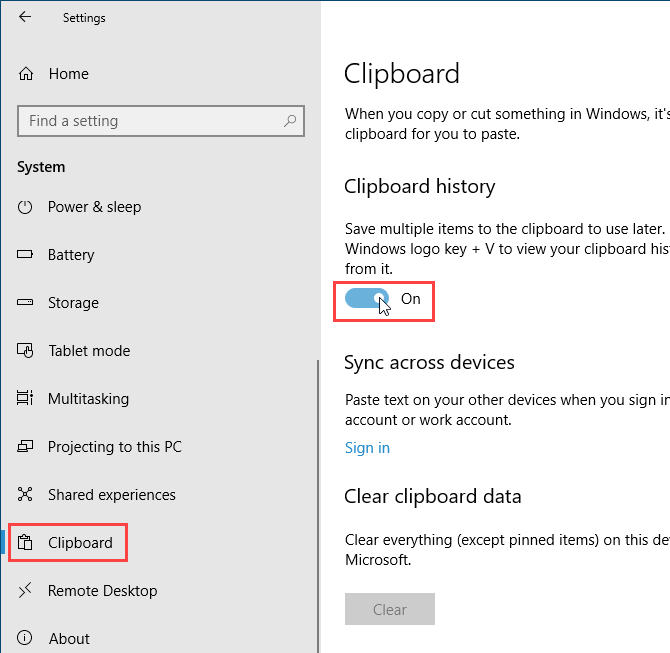
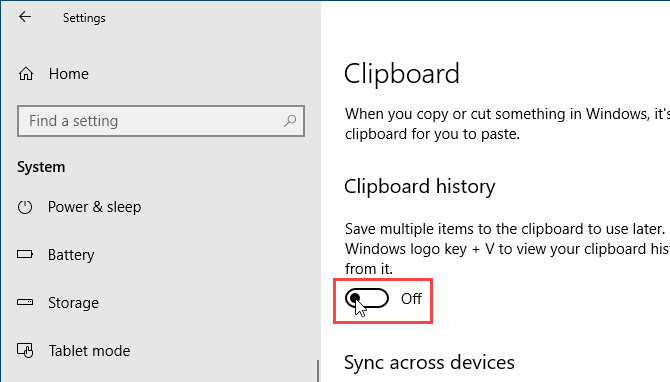
To turn it on, go to Start menu > Settings > System. Click Clipboard on the left, then click the slider button under Clipboard history on the right so it turns blue and reads On.

Enable Clipboard history using PC Settings in Windows 10

You can also enable the clipboard history directly on the clipboard.

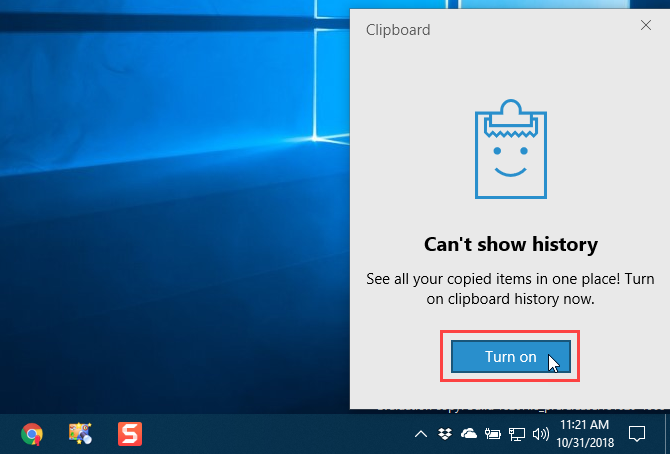
Press Windows key + V to access the clipboard. Then, click Turn on.

Enable Clipboard history on the clipboard in Windows 10

Access Your Clipboard History

Once you enable clipboard history, Windows stores every item you copy in the clipboard history.

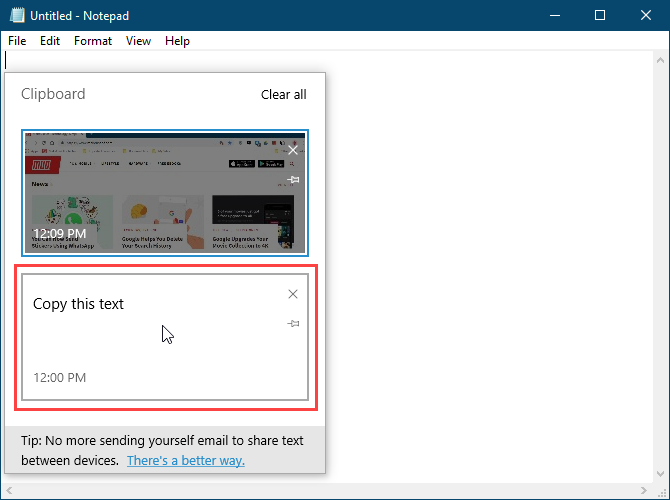
The clipboard still works using Ctrl + C to copy and Ctrl + V to paste. But in the new clipboard, Ctrl + C does not replace the last copied item. It adds to the stored items in the clipboard. And Ctrl + V pastes the most recently copied item.

To access your clipboard history, press Windows key + V. If a program that you can paste an item into is active, like Notepad or Word, the clipboard displays right below the cursor.

Scroll through the clipboard and click an item to paste it at the cursor.

Click an item on the clipboard to paste it into Notepad in Windows 10

Pin an Item to the Clipboard

You can use the new Windows 10 clipboard to store items you use often, like Quick Parts in Microsoft Word.

When you restart your PC, items stored in the clipboard are automatically deleted. But you can force items to stay in the clipboard by pinning them.

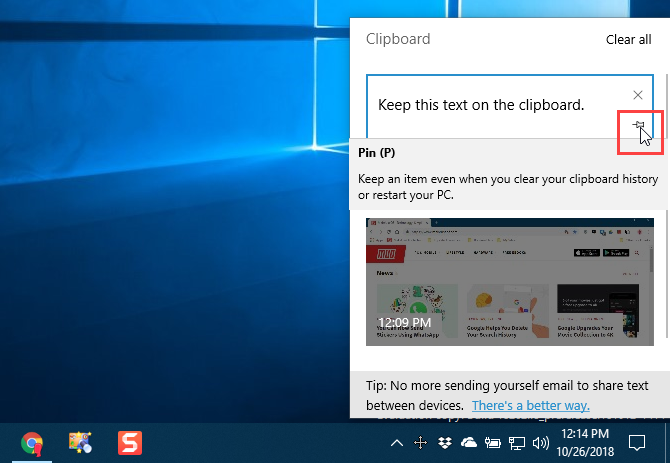
Press Windows key + V to open the clipboard history. Find the item you want to keep and click the thumbtack icon on that item. The thumbtack icon appears at an angle when an item is pinned and flat when it’s not pinned. Click the thumbtack icon again to unpin the item.

To delete a pinned item, click the X in the upper-right corner on the item. You do not have to unpin the item before deleting it.

Pin an item to the clipboard in Windows 10

Sync Your Clipboard History Across All Your Devices

If you use multiple Windows 10 devices, you’ll love this part of the improved clipboard. You can now sync clipboard items between devices.

Now when you copy something you want to transfer to another computer, you don’t have to paste it into a file and transfer that file using a cloud service like Dropbox or OneDrive, or even sneaker-net it using a USB flash drive.

To sync the clipboard between devices, you must be signed in to Windows with your Microsoft account, instead of a local Microsoft account.

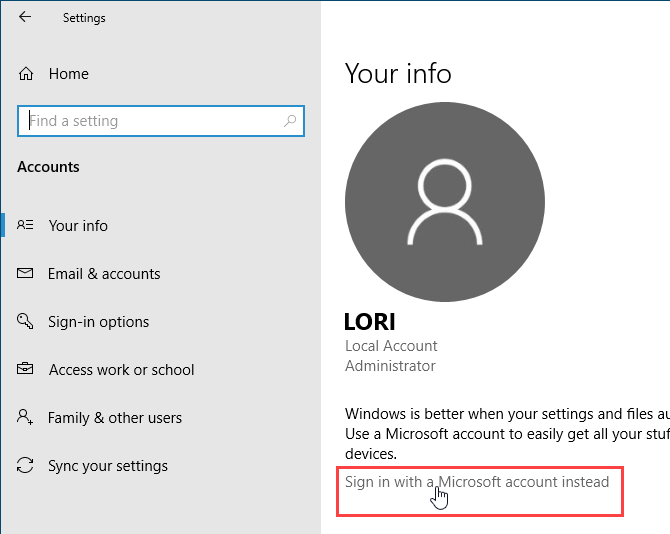
If your Windows account is currently a local account, go to Start menu > Settings > Accounts > Your Info and click Sign in with a Microsoft account instead.

Enter the email address and password for your Microsoft account and then enter the current password for your local account.

You can create a PIN when asked, but it’s not required. You can set it up later.

Sign in with a Microsoft account instead in Windows 10 Settings

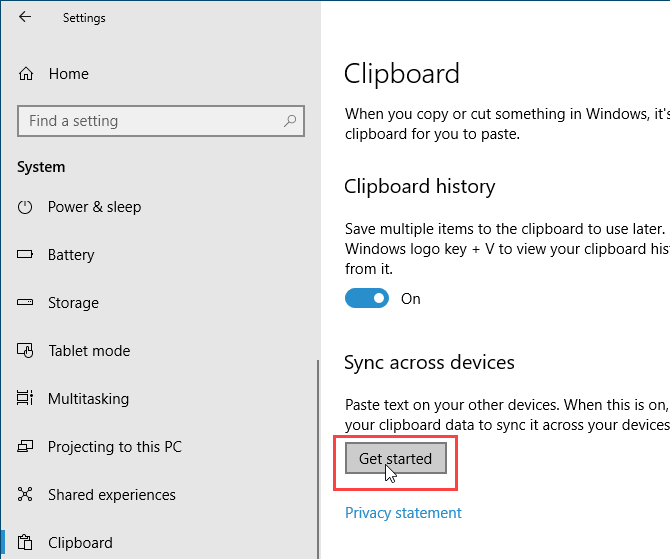
Once you sign in to Windows 10 using your Microsoft account, go to Start menu > Settings > System > Clipboard and click Get Started under Sync across devices.

Click Get Started under Sync across devices for the Windows 10 clipboard

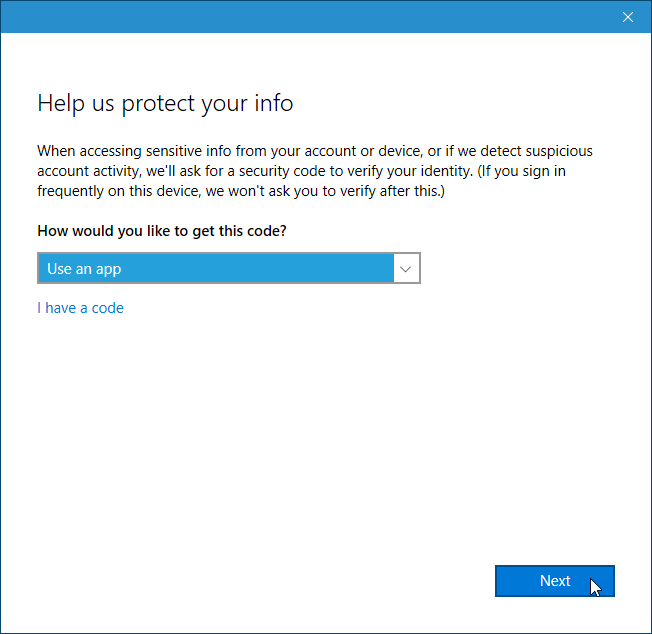
You’re asked for a security code which you can get in one of two ways: using your email or using an app, like Authy, Google Authenticator, or Microsoft Authenticator. Choose an option and click Next.

Enter the code sent through email or in the app. If you use the Microsoft Authenticator app, you’ll be asked to verify the code in the app. You’ll then be signed in to your Microsoft account.

Choose how to get the code for syncing the clipboard in Windows 10

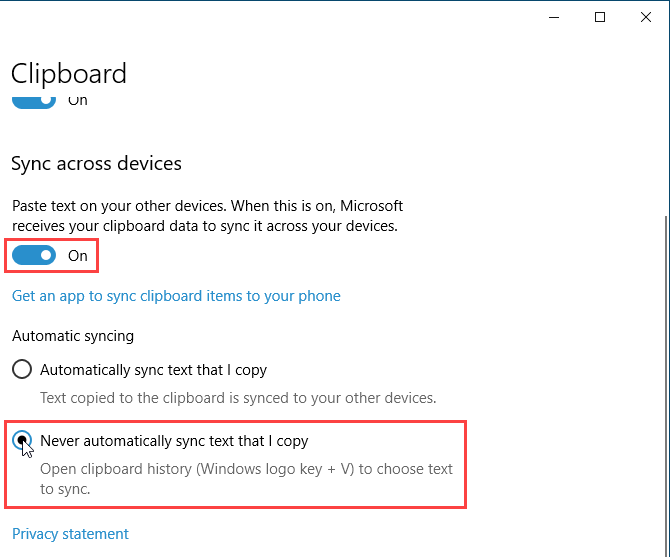
To sync clipboard items across devices, click the slider button under Sync across devices so it turns blue and reads On.

By default, all your clipboard items are synced across your devices (Automatically sync text that I copy under Automatic syncing). If you sometimes copy sensitive data, you may want to select Never automatically sync text that I copy instead. This way, your sensitive data is not uploaded to your Microsoft account.

If you choose to never automatically sync clipboard items, you can sync specific items manually.

Enable Sync across devices for the Windows 10 clipboard

Clear the Clipboard History

You can clear the clipboard history at any time.

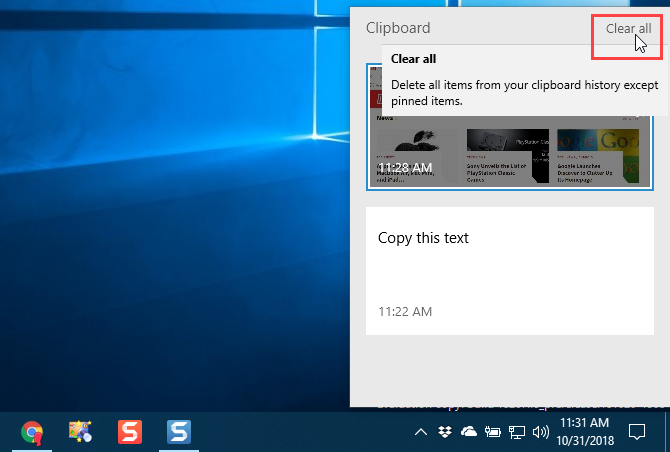
Press Windows key + V to open the clipboard history and click Clear all at the top of the window. All items except for pinned items are deleted.

To delete a single item, click the X in the upper-right corner of the item’s box.

Clear all clipboard history on the clipboard in Windows 10

You can also clear the clipboard history in the PC Settings.

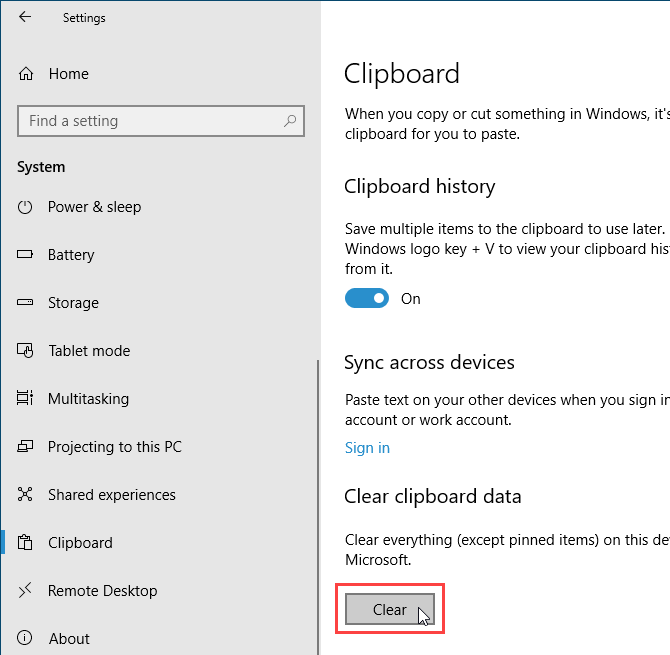
Go to Start menu > Settings > System > Clipboard and click Clear under Clear clipboard data.

There’s no confirmation, but the Clear button grays out.

Clear the clipboard history using PC Settings in Windows 10

Disable the Clipboard Experience

If you decide you don’t want Windows to store the clipboard history, you can disable it.

Go to Start menu > Settings > System > Clipboard and click the slider button under Clipboard history so it turns white and reads Off.

The entire clipboard history is deleted, including pinned items.

Disable clipboard history in Windows 10 Settings

Some Limitations and Security Considerations

Syncing clipboard items between devices is a great new feature, but it only works between devices running at least Windows 10 version 1809.

There are other limitations to be aware of.

  • The clipboard only keeps text and images up to 4MB.
  • You can sync a file name you copy. But if you copy a file to another location, the file is not stored in your clipboard history. So it’s not available on your other Windows 10 devices.
  • As we mentioned in the Sync Your Clipboard History Across All Your Devices section above, if you copy sensitive data like passwords, it syncs through Microsoft servers in plain text. So you should choose to never automatically sync text you copy.

Other Options for Managing Your Clipboard

Clipboard history and sync is one of the best new Windows 10 features in version 1809. Now, you don’t have to use a third-party tool to get these features with the clipboard.

But if you still prefer using another tool to get clipboard history and syncing, we have other options for clipboard managers.

If you use both a Windows PC and a Mac, there’s an option for you to sync clipboard history between Mac and Windows.

Read the full article: The New Windows 10 Clipboard: Everything You Need for Copy Pasting


Read Full Article

Kilogram


Kilogram

Facebook Messenger is building a “Watch Videos Together” feature


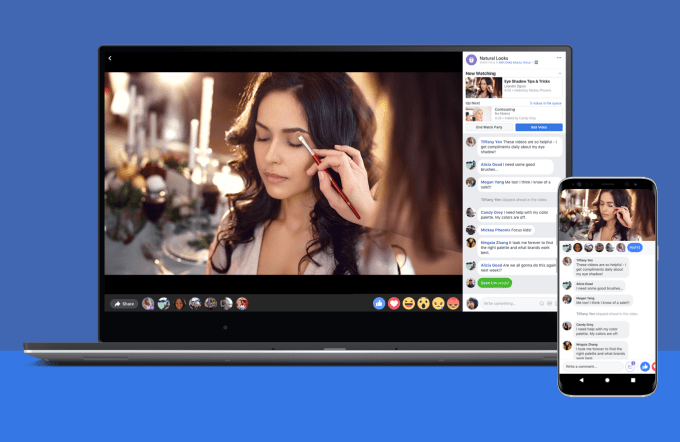
Netflix and chill from afar? Facebook Messenger is now internally testing simultaneous co-viewing of videos. That means you and your favorite people could watch a synchronized video over group chat on your respective devices while discussing or joking about it. This “Watch Videos Together” feature could make you spend more time on Facebook Messenger while creating shared experiences that are more meaningful and positive for well-being than passively zombie-viewing videos solo. This new approach to Facebook’s Watch Party feature might feel more natural as part of messaging than through a feed, Groups, or Events post.

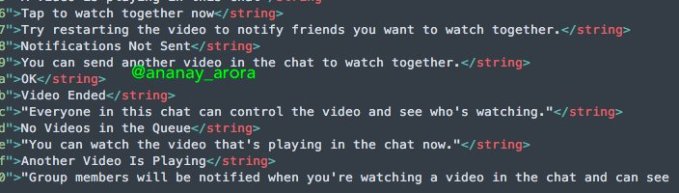
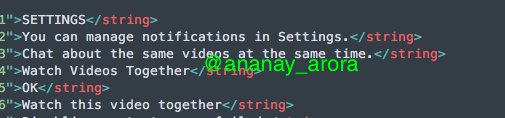
The feature was first spotted in Messenger’s codebase by Ananay Arora, the founder of deadline management app Timebound as well as a mobile investigator in the style of frequent TechCrunch tipster Jane Manchun Wong. The code he discovered describes Messenger allowing you to “tap to watch together now” and “chat about the same videos at the same time” with chat thread members receiving a notification that a co-viewing is starting. “Everyone in this chat can control the video and see who’s watching” the code explains.

A Facebook spokesperson confirmed to TechCrunch that this is an “internal test” and that it doesn’t have any more to share right now. But other features originally discovered in Messenger’s code like contact syncing with Instagram have eventually received official launches.

Watch Party exists on Facebook but could be more popular as a chat feature

A fascinating question this co-viewing feature brings up is where users will find videos to watch. It might just let you punch in a URL from Facebook or share a video from there to Messenger. The app could put a new video browsing option into the message composer or Discover tab.  Or if it really wanted to get serious about chat-based co-viewing, Facebook could allow the feature to work with video partners, ideally YouTube.

Co-viewing of videos could also introduce a new revenue opportunity for Messenger. It might suggest sponsored videos, such as recent movie trailers. Or it could simply serve video ads between a queue of videos lined up for co-viewing. Facebook has recently been putting more pressure on its subsidiaries like Messenger and Instagram to monetize as News Feed ad revenue growth slows down due to plateauing users growth and limited News Feed ad space.

Other apps like YouTube’s Uptime (since shut down), and Facebook’s first president Sean Parker’s Airtime (never took off) have tried and failed to make co-watching a popular habit. The problem is that coordinating these synced-up experiences with friends can be troublesome. By baking simultaneous video viewing directing into Messenger, Facebook could make it as seamless as sharing a link.


Read Full Article

Facebook Messenger is building a “Watch Videos Together” feature


Netflix and chill from afar? Facebook Messenger is now internally testing simultaneous co-viewing of videos. That means you and your favorite people could watch a synchronized video over group chat on your respective devices while discussing or joking about it. This “Watch Videos Together” feature could make you spend more time on Facebook Messenger while creating shared experiences that are more meaningful and positive for well-being than passively zombie-viewing videos solo. This new approach to Facebook’s Watch Party feature might feel more natural as part of messaging than through a feed, Groups, or Events post.

The feature was first spotted in Messenger’s codebase by Ananay Arora, the founder of deadline management app Timebound as well as a mobile investigator in the style of frequent TechCrunch tipster Jane Manchun Wong. The code he discovered describes Messenger allowing you to “tap to watch together now” and “chat about the same videos at the same time” with chat thread members receiving a notification that a co-viewing is starting. “Everyone in this chat can control the video and see who’s watching” the code explains.

A Facebook spokesperson confirmed to TechCrunch that this is an “internal test” and that it doesn’t have any more to share right now. But other features originally discovered in Messenger’s code like contact syncing with Instagram have eventually received official launches.

Watch Party exists on Facebook but could be more popular as a chat feature

A fascinating question this co-viewing feature brings up is where users will find videos to watch. It might just let you punch in a URL from Facebook or share a video from there to Messenger. The app could put a new video browsing option into the message composer or Discover tab.  Or if it really wanted to get serious about chat-based co-viewing, Facebook could allow the feature to work with video partners, ideally YouTube.

Co-viewing of videos could also introduce a new revenue opportunity for Messenger. It might suggest sponsored videos, such as recent movie trailers. Or it could simply serve video ads between a queue of videos lined up for co-viewing. Facebook has recently been putting more pressure on its subsidiaries like Messenger and Instagram to monetize as News Feed ad revenue growth slows down due to plateauing users growth and limited News Feed ad space.

Other apps like YouTube’s Uptime (since shut down), and Facebook’s first president Sean Parker’s Airtime (never took off) have tried and failed to make co-watching a popular habit. The problem is that coordinating these synced-up experiences with friends can be troublesome. By baking simultaneous video viewing directing into Messenger, Facebook could make it as seamless as sharing a link.


Read Full Article

Facebook has other ties to Definers, the GOP-led opposition research group


In the wake of a fairly catastrophic behind the scenes glimpse into Facebook’s high-level decision making, one question remains: Who brought a controversial Republican opposition research firm into the fold?

In a long call with reporters on Thursday, Mark Zuckerberg denied any knowledge of his company’s own dealings with Definers Public Affairs, the firm in question. Definers Public Affairs is “an outfit of elite GOP operatives” specializing in opposition research — a cutthroat dark art that’s the norm in politics but anomalous in virtue-conscious Silicon Valley.

Founded by a Republican campaign manager lauded for his dirt-digging prowess, Definers is far from a normal, politically neutral contractor. For one, the company shares staff and office space with America Rising, its oppo research-focused PAC, as well as a right-leaning news aggregator called NTK Network that surfaces stories placed by the company’s other wings.

In one effort, Definers pushed back against Facebook critics with a narrative that linked the social network’s detractors to George Soros, the billionaire Democrat and frequent target of anti-semitic conspiracy theories.

Zuckerberg did not mince words about his attitude toward his company’s relationship with Definers. “I learned about this yesterday. In general, this kind of firm might be normal in Washington…. but it’s not the kind of firm that Facebook should be working with,” Zuckerberg said on Thursday, noting that Facebook had cut ties with the firm.

In her statement late on Thursday, Sheryl Sandberg denied any knowledge of the firm too, stating that she didn’t know about the work they were doing for Facebook but “should have.” In the predictably flimsy and characteristically late response, Sandberg denounced conspiracy theories targeting Soros as “abhorrent.”

While the company still hasn’t explained how Facebook tapped the Republican-led firm for crisis communications, there are a few educated guesses to be made.

(TechCrunch contacted Facebook with questions about the scope of the firm’s work and how the relationship began and will update this story if we learn more.)

Other ties to the oppo research group

After denying any knowledge of Definers — curious given that Facebook itself stated that its “relationship with Definers was well known by the media” — Zuckerberg landed on an explanation: “Someone on our comms team must have hired them.” While this passing of the buck is questionable, it’s also probably true.

In fact, a noteworthy chunk of Facebook’s communications team has direct ties to Definers founder Matt Rhoades, who formerly ran Mitt Romney’s campaign bid for president. Facebook’s current Director of Policy Communications Andrea Saul served as the National Press Secretary for the Romney for President campaign from early 2011 to November 2012 under Rhoades. After the Romney campaign dried up, Saul went to work doing PR for Sheryl Sandberg’s nonprofit LeanIn.org for two years and found her way to Facebook in mid-2016.

Jackie Rooney, a Facebook spokesperson and member of Facebook’s Corporate and Internal Communications team, served on the Romney campaign as Chief of Staff to the campaign manager, Matt Rhoades. Rooney has been with Facebook for almost six years. Carolyn Glanville of Facebook’s Corporate Communications team, a relatively new hire at Facebook, also served on the Romney campaign as Deputy Communications Director.

A handful of other Facebook product team members also worked on the Romney campaign though were less directly connected to Rhoades. Romney has fundraised for Definers sister firm, the America Rising PAC, as recently as 2015. America Rising’s stated goal is to serve as “an independent organization that can drive the toughest negative narrative against Democrats.”

Beyond Facebook’s comms connections, another educated guess at the Definers culprit points to Joel Kaplan, Facebook’s deeply influential longtime chief lobbyist.

Kaplan, Facebook’s Vice President of Global Public Policy, served in the George W. Bush White House from 2001 until 2009, first as the Special Assistant to the President for Policy and later as Deputy Chief of Staff for Policy where he “integrated the execution of legislative, communications, and external outreach and policy strategies.” Both Rhoades and Pounder — Definers founder and President, respectively — worked on the Bush campaign in 2004 and went on to serve in the White House after the Bush campaign prevailed, developing some renown for their opposition research work.

“We distill and strategically deploy public information to build and influence media narratives, move public opinion and provide powerful ammunition for your public relations and government affairs efforts,” the group more commonly called Definers boasts. “Nobody else can say the same.”

Chain of Command

Having attended Harvard together, Kaplan and Sandberg are close. At Facebook, Kaplan reported to Communications and Public Policy VP Elliot Schrage before Schrage’s departure announced this June. Schrage reported to Sandberg, though Kaplan was often looped into high level decision making as well as part of “an elite group” of senior executives at the company.

According to the New York Times report, Facebook’s involvement with Definers began prior to October 2017, likely after the group set up shop in Silicon Valley a few months prior. While those conversations at times addressed content controversies, it’s hard to imagine that they wouldn’t also shape overarching communications strategy in the midst of ongoing crises as well.

After Facebook’s Cambridge Analytica scandal in March, Kaplan urged Sandberg to ramp up the lobbying efforts of fellow Bush administration alum Kevin Martin. Around the same time Facebook again “expanded” its work with Definers, switching to a more offensive strategy aligned with the on-the-attack style that the firm specializes in.

Like any decent political operative, Kaplan usually shirks the limelight — but not lately. Kaplan made headlines recently by appearing in the supporters section for Supreme Court Brett Kavanaugh during the nationally televised hearing. A week later, Kaplan and his wife hosted a celebration party for those who had worked on the Kavanaugh nomination that was attended by the nominee himself.

If there was a time when Facebook’s relationship with Republicans was in fact strained, Silicon Valley’s premier equivocator has swung fully the other way with help from Kaplan. While left-leaning Silicon Valley might balk, his deep Republican establishment ties remain more of an asset than a liability to Facebook and have allowed him to serve effectively in his role for more than 10 years at the company. Facebook continues to scratch its East Coast lobbying itch while giving lip service to West Coast political ideals and generally telling everyone what they want to hear.

The buck stops where

One of tech’s biggest companies bringing a Republican political oppo outfit in to mitigate a relentless series of PR catastrophes is noteworthy in its own right, but Zuckerberg’s ignorance of Facebook’s dalliance with Definers makes the whole thing even more odd. Who knew what and when? Did Sheryl Sandberg really not know that the company was contracting with the group? Given her closeness to Kaplan, Schrage, and her extreme awareness of Facebook’s image, cultivated via the comms team, is that even possible?

As Facebook’s two top executives theatrically recoil in horror at their own company’s foray into the political dark arts, they might be surprised to learn that the oppo is in fact coming from inside the house.

More likely, they wouldn’t be.


Read Full Article

Tinder tests ‘Swipe Surge’ in US to connect users during peak times


Tinder today announced the test of a new in-app experience it’s calling “Swipe Surge,” that will send notifications to users when there’s a spike in Tinder usage in their area. The feature is designed to allow Tinder to better capitalize on real-world events that drive increased usage – like music festivals, parties, or spring break holidays, for example.

The company says that it tested out sending push notifications to alert users about surge periods in its app back in 2016, and found that it resulted in users forming 2.5x more matches during a swipe surge.

Users also received nearly 20 percent more right swipes during these events, and they were 2.6x more likely to receive a message, Tinder noted.

Now it’s turning these push notifications into a real product with Swipe Surge.

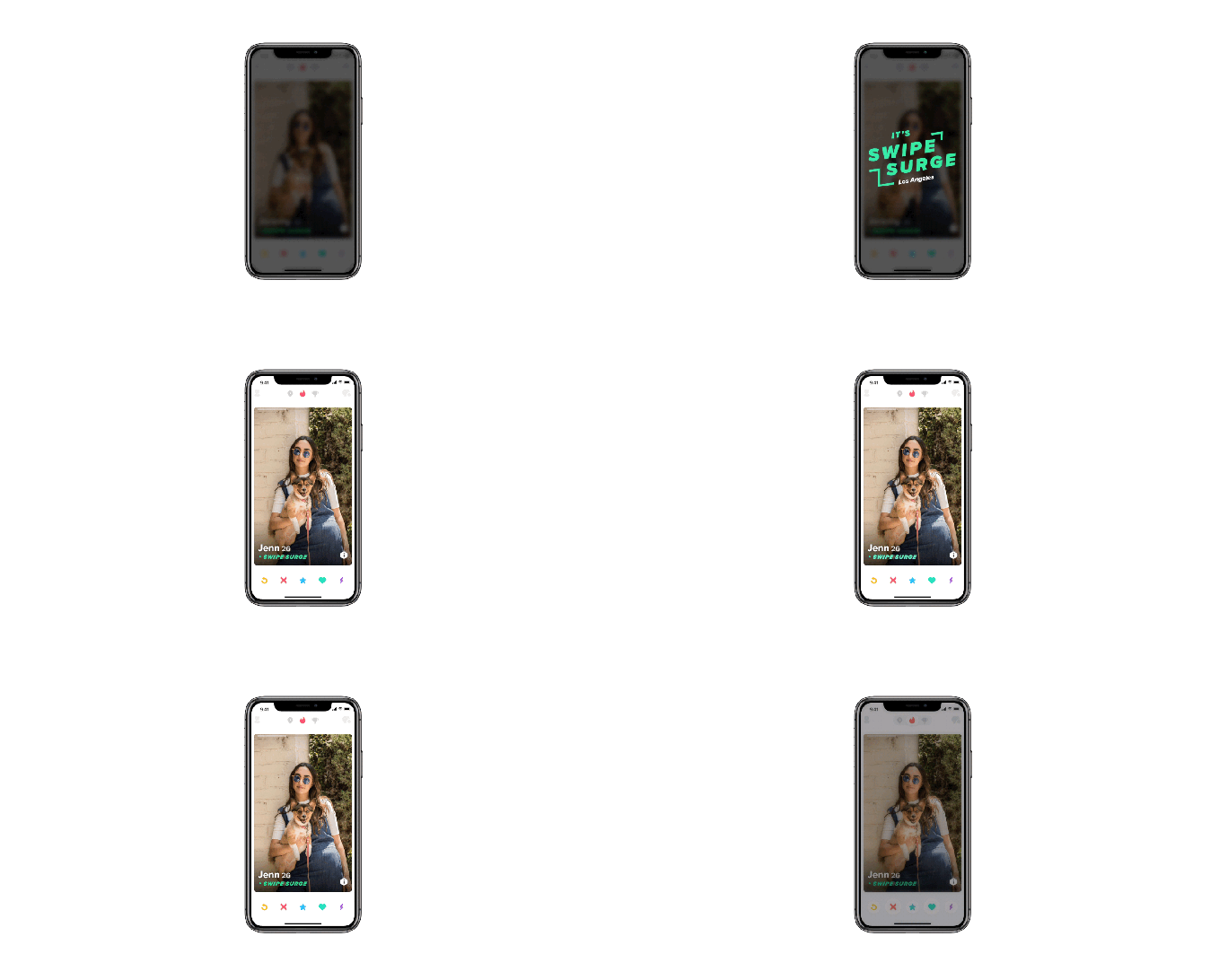
In addition to the alerts designed to draw Tinder users into the app at the same time, the app will include “Swipe Surge” branding during the event. People who already joined the surge by responding to the push notification will then move to the front of the match queue, and Tinder will show you who’s currently active in the app.

Tinder says that activity during a surge is 15x higher overall, and increases matchmaking potential by 250%.

The company has been working to promote Tinder as a dating app for the younger demographic in recent months, with its marketing campaign focused on the “single lifestyle,” media publication “Swipe Life,” and a test expansion of Tinder U, its college student product.

The Swipe Surge test is underway now in major U.S. markets, says Tinder.


Read Full Article

E3 slouches towards irrelevance again as Sony announces it’s skipping the show


I like E3. I really do. But it’s also monumentally dumb: game companies spending millions to show off essentially faked content to an increasingly jaded audience. And it’s increasingly out of step with how the gaming industry works. So it should come as no surprise that Sony will be skipping the show more or less altogether this year, joining Nintendo in taking a step back from spectacle.

Sony has been a part of CES for 20 years and this will be the first one it’s ever missed. I’ve gone to their events every time I’ve attended; I was there for their historic putdown of Microsoft after the latter announced some hugely unpopular restrictions on used games. I think you can actually see me near the front in the broadcast of that one. (You can! I’m at 1:29.)

And E3 has been a part of Sony’s yearly cadence as well. Like other companies, for years Sony hoarded information to debut at E3, TGS, and Gamescom, but E3 was generally where you saw new consoles and flagship titles debut. But as even E3’s organizers have admitted over and over again, that’s not necessarily a good thing.

Too often we have seen half-finished games on stage at E3 that end up cancelled before the year is out, or commitments made to dates the companies can’t possibly keep. Assigning a complex, creative industry to a yearly schedule of major announcements is a great way to burn them out, and that’s exactly what’s happening.

Variety first noticed Sony’s absence from ESA communications. In a statement issued to multiple outlets, Sony said:

As the industry evolves, Sony Interactive Entertainment continues to look for inventive opportunities to engage the community. PlayStation fans mean the world to us and we always want to innovate, think differently and experiment with new ways to delight gamers. As a result, we have decided not to participate in E3 in 2019. We are exploring new and familiar ways to engage our community in 2019 and can’t wait to share our plans with you.

They won’t be alone. Nintendo hasn’t had a real proper E3 press conference in years. Instead, they host a live stream around the event and have a big booth where people mainly just play games. Their Nintendo Direct videos come out throughout the year, when the titles and developers are good and ready.

Microsoft is still there, and still puts on quite a show. I remember the original announcement of the Kinect, probably one of the weirdest and dumbest things I’ve ever taken part in. It was memorable, at least.

But Microsoft is also doing its own thing, announcing throughout the year and on its own terms. The Xbox One X was only hinted at during E3, and announced in full much later. I wouldn’t be surprised if Microsoft also announced they were taking it easy this year at E3 — though this might also be a good opportunity for them to double down. With the schedules these huge shows go on, they might already be committed to one course or another.

Sony actually has its own PlayStation Experience event where it announces things and lets gamers and press play the latest, but even that was cancelled ahead of its expected December date. Is Sony just getting shy?

More likely they are leveraging their dominance in the console market to be a market leader and “decider,” as they say. They have no shortage of amazing games coming out, including lots of hot-looking exclusives. What have they got to prove? Although Sony itself is not participating in E3, the developers it backs will almost certainly be there. What better way to school the competition than to not show up and still have everyone talking about you?

With the PS4 Pro out there and a solid line-up already confirmed, Sony is sitting pretty for 2019, and the company probably feels this is a safe time to experiment with “inventive opportunities to engage the community,” as the statement put it. E3 will still be big, and it will still be fun. But the trend is clear: it just won’t be necessary.


Read Full Article