17 October 2018

How to Set Up a VPN on Your Mac

You have plenty of reasons for wanting to use a virtual private network (VPN) on your Mac. They include browsing safely on public Wi-Fi, hiding your location, accessing region-locked content, and keeping your file sharing habits to yourself.
Setting up a VPN on your Mac is easy. macOS has built-in support, and some VPN services provide their own hassle-free software. You can also install third-party tools for using different protocols.
Method 1: Use Your VPN Provider’s Software

Depending on your VPN provider (check out our best VPN services), they may provide access to software that allows you to use the service. This software is tailored to your provider. Thus, you don’t have to mess around with configuring your connections, inputting IP addresses, or checking which protocols you can use.
Most VPN providers provide this software for Mac and Windows users. Linux users will likely need to set up your VPN on their own. Using provider software is a simple case of downloading and installing the client, logging in with your username and password, then connecting to a server of your choice.
Provider software makes it easy to jump around from server to server, since the software keeps a list of available connections. If you’re using your VPN to access region-locked content, this makes it easy to pick a server to connect to. Some providers have specific servers that are compatible with BitTorrent traffic. The software makes it easy to make sure you don’t fall foul of the rules.
Method 2: Use Apple’s Networking Tools
macOS has built-in support for creating VPN connections as part of Apple’s own networking tools. You can access these by heading to System Preferences > Network, then clicking on the Plus button.
From here you can specify a VPN connection, pick the VPN type (protocol), and give your new VPN connection a name. It pays to be descriptive when naming your connection if you intend to use more than one VPN server. For example, you might plan to access region-locked content in other countries.
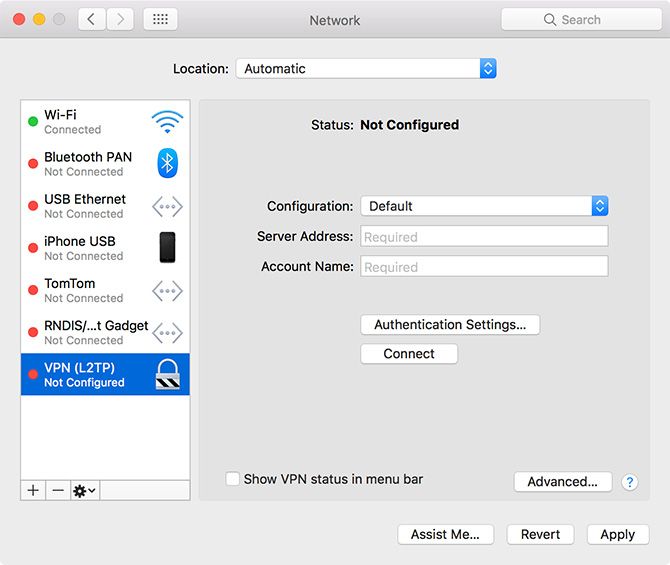
macOS includes support for L2TP (Layer 2 Tunneling Protocol) over IPSec, Cisco IPSec, and the newer IKEv2 (internet Key Exchange version 2) protocol when setting up a VPN. L2TP is considered reasonably secure, though the protocol itself provides no protection. Instead it uses the IPSec secure network protocol, which is still relied upon by millions of VPN users every day.
IKEv2 is a more modern choice of protocol, favored for its ability to quickly reestablish a VPN connection in case of network dropout. Like L2TP, it also uses IPSec for encryption, though it’s still favored by many over L2TP for its speed.
Apple’s desktop OS used to support PPTP (Point-to-Point Tunneling Protocol). This is a much older and more vulnerable protocol that was once favored by corporate networks but has since fallen by the wayside. If you want to create a PPTP connection, you’ll need to use a third-party app (like Shimo) to do so. But you should avoid this unless it’s necessary.
So which protocol should you use? That depends on which protocols your VPN provider provides access to. You should always avoid PPTP where possible, with L2TP and IKEv2 providing a passable level of security. But if you want an even more secure VPN connection…
Method 3: Use Third-Party VPN Software
Two other VPN protocols exist that aren’t supported out-of-the-box within macOS: SSTP (Secure Socket Tunneling Protocol) and OpenVPN.
SSTP is a proprietary standard which mostly only works with Windows, since it’s owned by Microsoft. SSTP uses closed-source SSL 3.0 encryption, which is why it’s considered highly secure (even though the code isn’t open to inspection).
OpenVPN, as the name may suggest, is a fully open source technology based on OpenSSL. This means the code is freely available for anyone to inspect. It supports AES (Advanced Encryption Standard). This open approach is often lauded a a proof-of-concept for stress-testing technology against outside attack.
Both of these standards are more secure than any included with macOS. It’s possible for VPN provider software to use either, so you might already use OpenVPN or SSTP and not even realize. But if you want greater control over your VPN setup, try one of the following apps.
We’ve recommended other free and open source macOS VPN clients if you need more options.
OpenVPN: Tunnelblick

If you want to use OpenVPN on your Mac, Tunnelblick is the best tool for the job. It’s free, open source, and provides an easy-to-manage GUI for connecting your Mac via OpenVPN. You can add a long list of connections using downloadable configuration files, then select different servers using the main client or menu bar icon.
Download: Tunnelblick (Free)
SSTP: sstp-client
While SSTP is a Windows technology, it’s possible to connect to an SSTP server using macOS or Linux with sstp-client. The macOS version of this client depends on the Macports project; the easiest way to install it is using Mac command line package manager Homebrew.
Download: sstp-client (Free)
Which VPN Solution Should You Use?
Your VPN provider will likely recommend you use their own client, which makes connecting and managing your VPN connections easy. If you want to use your own client, you’ll need to make sure the connection you make is compatible with your chosen VPN protocol.
When given the choice, OpenVPN provides better security than L2TP or IKEv2. You should always endeavor to keep your VPN client updated, since security issues can and do arise (and often receive patches quickly).
Another option is to install a VPN connection on your router. This allows you to manage your connection for the entire network, ideal if you’re connecting to a local VPN strictly for security purposes.
Read the full article: How to Set Up a VPN on Your Mac
Read Full Article
Amazon Photos vs. Google Photos: Which Is Best?

Google Photos is unrivaled in terms of user numbers, mainly as a result of being the default option on Android. However, there are alternatives worth considering instead.
One option most people seem to be ignoring is Amazon Photos. So, how does Amazon Photos compare to Google Photos? Should you switch from one to the other? Read on for our comparison to help you pick the one that’s right for you.
Amazon Photos vs. Google Photos: Cost
There are two big caveats that we need to get out of the way. Firstly, Amazon Photos is a paid service. Secondly, it is only available in selected countries.
If you don’t live in either the United States, United Kingdom, Canada, Germany, France, Italy, Spain, or Japan, you can stop reading now.
Furthermore, subscribing to Amazon Photos is not as straightforward as paying a monthly subscription fee. Because it’s a sub-feature of Amazon Drive, there are two principal ways you can gain access:
- Amazon Prime: If you subscribe to Amazon Prime, you’ll get access to Amazon Photos.
- Amazon Drive: If you don’t want to subscribe to Amazon Prime, you can pay for standalone access to Amazon Drive.
Note: Subscribing to Amazon Prime brings lots of benefits you should know about.
The cost of subscribing to Amazon Prime varies from country to country. In the U.S., it costs $12.99/month. Similarly, the cost of Amazon Drive varies. In the United States, two plans are available. 100GB of storage costs $11.99/year; 1TB will set you back $59.99/year.
Obviously, Amazon Photo’s geographical and paywall restrictions place it in sharp contrast to Google Photos. Google’s app is free to use and is available everywhere.
Amazon Photos vs. Google Photos: Platforms
Google Photos is available on Android and iOS. Since the death of Picasa, there is no desktop app.
Amazon Photos does offer a desktop app. It makes the service instantly appealing to anyone who’s spent a couple of years comparing Picasa alternatives.
Amazon Photos also offers an Android and iOS app. Amazon has even integrated the service directly into all Amazon Fire TV devices and Fire tablets. Google Photos is not available on Amazon devices. There is an unofficial Google Photos app on Roku devices.
Amazon Photos vs. Google Photos: Features
Storage Limits
If you use Amazon Photos via a Prime subscription, you can upload an unlimited number of full-resolution photos to the app.
The full-resolution aspect is important. Google Photos only offers free storage for photos up to 16 megapixels. Anything larger than 16 megapixels will count against your storage limits.
If you use Amazon Photos through your Amazon Drive subscription, the photos will count against your storage limits.
Amazon Photos also offers users 5GB of storage for videos and other files. Google Photos lets you upload an unlimited number of video files, as long as they are no more than 1080p resolution.
RAW Photos
Amazon Photos lets you upload RAW files. The feature will appeal to anyone who regularly has to use high-resolution RAW images in a professional environment, such as photographers and graphic designers.
In contrast, Google Photos will convert RAW files into JPEG automatically if they exceed the 16-megapixel limit.
Amazon Prints vs. Google Photo Books
Amazon and Google both provide a way to turn your treasured photographs into permanent hard copies. However, of the two services, Amazon’s is much more holistic.
On Google Photos, you’re limited to two options. You can either buy an 18cm x 18cm soft-cover book for $9.99 or a 23cm x 23cm hardcover version for $19.99. Extra pages (up to a maximum of 100) cost $0.35 and $0.65 respectively.
Amazon’s product list is more impressive. There are more than 10 items available, including books, prints, mugs, mouse mats, calendars, and even aluminum prints. Each of the products is available in multiple sizes.
For all the products, you can choose which photos are included.
Smart Organization
Google Photos’ smart recognition feature been one of the services best features for a few years. However, Amazon Photos’ image recognition is just as powerful.
You can use it to find similar animals, objects, and people. It will also group your photos into locations, as long as you’ve got location services enabled on your device. The feature can even arrange your shots by the type of environment, such as sunset, beach, or mountains.
Family Vault
One of Amazon Photos’ best features is the Family Vault feature.
It allows you to create a shared photo archive for up to six people (including the principle Prime subscriber). Each user receives their own Amazon Photos account with unlimited storage. People in the Family Vault can add their own snaps to build up a family-wide album. The Prime owner can add and remove members as required.
Note: You can only be a member of one family vault at a time!
The equivalent feature on Google Photos only allows you to share your entire library (or a subset of dates) with one other person, usually your partner. Google also offers Family Groups, but the feature will share access to content like apps and entertainment purchases. It might not be suitable for all users.
Sharing Photos With Others
Amazon Photos and Google Photos both let you share your photographs with other people.
On Amazon, you can share up 25 images at a time. Four sharing methods are possible; via a link, email, Facebook, or Twitter. You can also share videos and albums.
You can share Google Photos with friends by typing their name, phone number, or email address. You can also share using Facebook, Twitter, or via a shareable link.
Editing Photos
Again, both services offer both editing features—there’s nothing to choose between them. You can add filters, tweak the brightness, and play with other options such as color adjustment, rotation, and crop.
Both services let you change the time and date stamps.
Is Amazon Photos Worth Trying?
So, is Amazon Photos worth trying? It depends on your use case. Amazon Photos definitely makes our list of worthy Google Photos alternatives, and all things considered, Amazon’s offering offers slightly more features than Google Photos.
Not everyone will find the features to be worth the hassle of migrating. However, Prime subscribers should definitely check out Amazon Photos. And remember, you can run both services simultaneously, letting you spend time using both apps before making your decision.
If you’d like to learn more about Amazon Prime, grab a 30-day free trial of Amazon Prime. You’ll have full access to Amazon Photos and be able to try it out first-hand.
Read the full article: Amazon Photos vs. Google Photos: Which Is Best?
Read Full Article
MTV’s Real World will be revived with interactivity on Facebook Watch
The world’s first hit reality show “The Real World” is being reimagined for Facebook Watch 26 years after it debuted on cable. Come Spring 2019, fans will get a chance to vote on who’ll join as the final cast member and connect with the housemates through Facebook Watch Party’s synchronized viewing chat rooms as they “stop being polite and start getting real”.
It has been a year and a half since the 32nd and most recent season of The Real World aired on MTV. Deadline recently reported that the show was being rethought for the web and shopped to streaming platforms. Now we know where it’s landing.
Facebook’s first truly tent-pole show for its Watch video hub could lure in viewers and offer a halo effect to other programs on the platform after a lackluster slate of mostly no-name shows launched alongside the feature in August 2017. But it’s starting to gain momentum, as 50 million people now spend at least 1 minute per month on Watch, and total Watch view time is up 14X since the start of 2018. For comparison, over 18 Snapchat Shows have over 10 million viewers per month. Users who do come to Facebook Watch spend 5X longer watching than on spontaneously discovered News Feed videos, which seems to have emboldened it to invest more in Watch content.
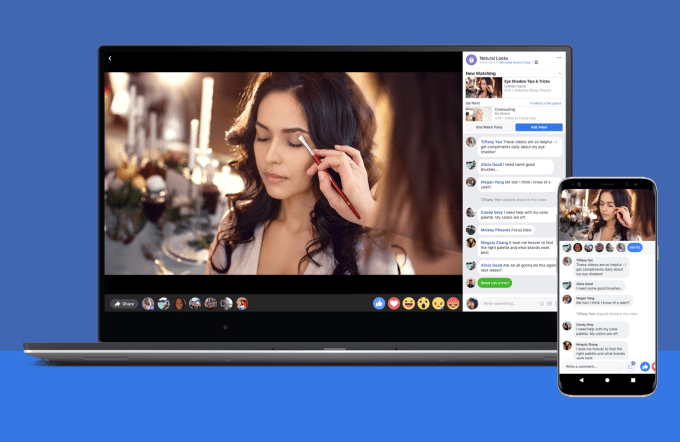
Facebook is hoping to outcompete YouTube Originals and Snapchat Discover’s Shows to win the mid-length social video market and the landslide of ad dollars shifting away from TV commercials.
As I wrote recently, there’s already plenty of user generated content to consume on these platforms, so the real opportunity is in super-premium shows that stand firmly apart from what litters feeds and Stories. Facebook Watch needs its own House Of Cards or Game Of Thrones. While it’s unclear how much Facebook paid for the Real World, it likely didn’t come cheap, but now it has arguably the highest profile show of any of the platforms.
Facebook’s partnership with MTV and Real World-creator Bunim/Murray Productions comes as part of a slew of original video content announcements revealed today at the MIPCOM TV industry trade show.
The [Business] INSIDER original game show on Facebook Watch called Confetti will expand internationally — curiously without INSIDER’s help. Facebook tells TechCrunch it will work with local partners in international markets to create versions of the HQ Trivia-style live video game show where players compete through their phones to win cash prizes. EMEA, APAC and LATAM editions of Confetti will launch by the end of this year.
Facebook Watch will also launch The World’s Most Amazing Dog, an interactive global competition show. In partnership with The Dodo, the show will spotlight top dogs and their owners from around the world.
Now that Facebook’s ad breaks are running in 25 countries, it’s able to get serious about monetizing Watch and recouping its content investments. Facebook has been paying up front for these shows but hopes that ad breaks could wean creators off its cash and create sustainable businesses based on Watch. But with today’s Wall Street Journal report that Facebook underreported the scale of video ad view time metrics bug that inflated measurements years ago, it may face additional skepticism that Watch is worth studios’ investment.
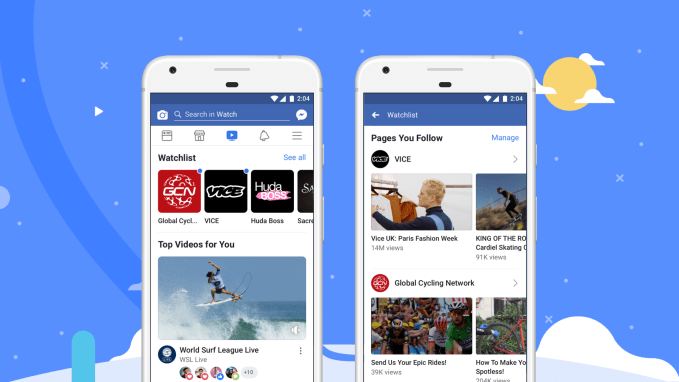
But again, it’s the name brand of The Real World that could change Watch’s trajectory. Facebook has signed on for three different one season runs of 12 episodes of the show localized for the US, Mexico, and Thailand. The new slate of content could also make Facebook’s new Portal smart screen more attractive since Watch is built in. And with Facebook building a TV set-top box for next year, it will want premium shows worthy of bigger screens.
“The Real World made history as the world’s first original reality show and trailblazing social experiment — and we’re thrilled to reboot the show for today’s audiences — representing and amplifying the real life, real people, real places and real social tensions of each country” says Matthew Henick, Facebook’s Head of Content Planning & Strategy. It poached Henick from BuzzFeed earlier this year to bring some experienced leadership to its intersection of traditional studio content and the smallest screen.
Last week Snapchat announced 12 original shows including two produced by Bunim/Murray. Yet with the ephemeral social apps losing users as well as over $300 million per quarter, it was only able to secure new and unknown docuseries like Endless Summer and Growing Up Is A Drag.
Despite Facebook jamming the Watch tab into its main app’s navigation bar, many users have ignored it. They already get short-form clips in the News Feed, longer web shows on YouTube, and full-length series on Netflix and Amazon Prime Video. It will require more big bets like The Real World to convince users that Watch is where they want to relax.

Read Full Article
Memory raises $5M to bring AI to time tracking
Memory, a startup out of Norway and maker of time tracking app Timely, has raised $5 million in further funding. Leading the round is Concentric, and Investinor, with participation from existing investor SNÖ Ventures. The company had previously raised $1 million in 2016 from 500 Startups, and SNÖ.
Founded by Mathias Mikkelsen, a designer by background and who I understand turned down a job offer at Facebook to try his hand at startup life, Memory is applying what it describes as AI and digital technology to create various tools to help solve “the abuses of time” that workers typically face in the modern workplace. The first of those abuses being tackled is the monotonous and time-consuming task of time tracking and filing time sheets — a meta problem if there ever was one.
“The problem we’re trying to solve is with time tracking, the most common currency of work that exists,” Mikkelsen tells me. “The problem is that people find it extremely painful to do and thus do it incorrectly. For example, what did you do last Friday? How long did it take? Humans are not built to remember that kind of detail and we shouldn’t be doing it. Harvard Business Review estimates that U.S. companies loose billions of dollars per day because of incorrect time tracking, so we think the potential is massive”.
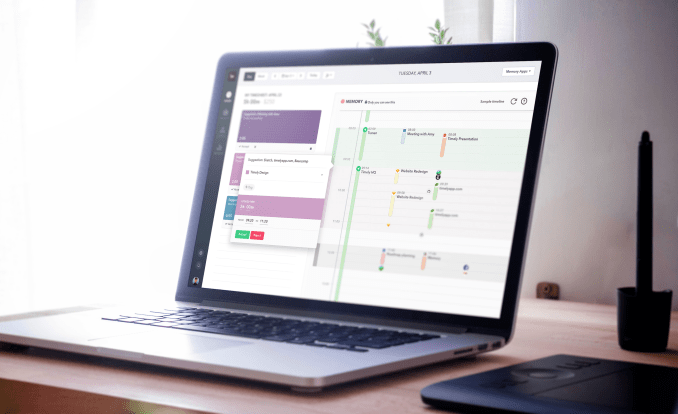
The resulting product, dubbed Timely, is billed as a fully automatic time tracking tool. Powered by “AI”, it automatically records everything employees work on and then claims to create accurate time sheets on their behalf.
“We solve it with tons of data and machine learning,” says Mikkelsen. “We have built an ML model (recurring neural net) that literally tracks, completely privately and securely, everything you do in life. Files you work on, locations, websites, calendar, email, etc. Then we analyse all of that, make sense of it and automatically create a timesheet for you. We round up the time, choose projects, tags, all of it. It matches your individual pattern and the only thing our customers have to do is to hit an Accept button and you’re done with your timesheet”.
Mikkelsen says that Timely is currently used by more than 4,000 paying businesses across 160 countries, and that having created a complete “virtual memory” of time data, the Oslo startup is developing new tools to improve the “quality of time” and help businesses use time more effectively. As part of this effort, Memory will use the new funding to double its current 30-person team. It also plans on refining Timely’s AI model and to accelerate international growth.


Read Full Article
How to Counter Data Breaches: 3 Simple Ways to Protect Your Data

Data breaches are, by far, one of today’s biggest and most threatening problems for not only commercial businesses, but consumers and governments too. With the growth of the general use of the internet, data breaches have increased at an alarming rate.
Today, breaches are commonplace and are viewed as part of the normal day-to-day. But what can you do about this? Here are some easy ways to protect your data from the threat of a data breach.
1. Use Access Controls
Many commercial data breaches occur due to the poor use, misuse or complete absence of access controls. Although it is true that many breaches occur due to flaws in IT infrastructure, just as many occur because of inadequate access controls.
Even with the most expensive, robust and impenetrable IT infrastructure, a lack of access control will provide cybercriminals with an open door.
Access controls—both physical and virtual—add a protective layer to your data. They manage who can access certain areas either within a physical location or on a system, and when. Without access controls, if a malicious party gains access to your systems undetected, they can then begin to read and steal sensitive information and personal data.
Although the use of access controls alone is not always enough, it is a simple first step.
Consumers should not ignore the importance of them, either. Fingerprint or PIN locks on a phone or a secure password protecting a desktop computer are basic access controls.
2. Securely Manage Your Identity Documents
It is not only online where you need to be aware of and protect yourself against data breaches. Cybercriminals regularly operate offline and try to source information which they can then use to launch a virtual attack. On the most basic level, compromising yourself offline can be just as damaging as compromising yourself online.
To that end, make sure that you are properly disposing of old documents such as bank statements and tax records that you no longer need. If something contains your Social Security Number, destroy it when you are finished. If you need your social security card for something, don’t carry it in your wallet alongside your bank cards.
It is the basic management of your personal physical information like this which can prevent your offline mistakes from transferring to the online world.
3. Keep Tabs on the Latest Cybersecurity News

If you are unaware of the potential threats you may face, you will struggle to fend them off. Cybercrime is constantly evolving, and cybercriminals are always developing new ways to dupe regular people into disclosing their data.
What once were obvious phishing emails are now beginning to look extremely authentic and have reportedly even tricked cybersecurity professionals. Furthermore, other problems such as advanced computer viruses and cryptojacking are plaguing millions of unsuspecting peoples’ computers worldwide.
By reading up on the latest in cybersecurity every so often and protecting your PC using robust and trusted antivirus software, you keep yourself consistently aware of the current threats and are better equipped to fight them off.
What If Things Do Go Wrong?
Although properly managing your personal information, being aware of the latest cybersecurity threats and using access control methods are key ways to protect yourself or your business, things do (and probably will at some point) go wrong.
If one day you receive notice that a website you use has suffered an attack and that your data has been compromised, there are several things you should immediately do to protect your interests.
The big problem with data breaches is the “maybe” factor—that is, that your data may have been stolen and that any stolen data may have been sensitive. The only people who know what has been stolen are the attackers, unfortunately. If you are part of a large-scale data breach the chances are that you’ll be fine, but that doesn’t mean you should be complacent.
Taking Action in Case of a Data Breach
It always helps to determine what was stolen. Although you can never know for certain, think about what type of information was stored on your account. Not all data us usable, but you are more at risk if you used a compromised site.
For example, was it less sensitive information such as your name and street? Very little can be done with this. However, once information such as email addresses, dates of birth and card information is at risk, immediate action is needed.
Not only should you change your passwords after a data breach—especially on sites where you use the same password—but you should also contact your bank, credit providers and credit bureaus to check that your identity hasn’t been compromised. Major credit bureaus such as Experian and Equifax let you set up fraud alerts and freeze your credit, too.
With proper management of your information, secure passwords backed up by two-factor authentication and the proper utilization of systems designed to alert you should things go wrong, your identity and information will always be secure, even when things go wrong.
Data Breaches Aren’t Going Anywhere
And they are only going to get worse.
Even though end-users aren’t typically the target of a corporate, or government data breach, they can still be affected.
Today, we live in a world powered by data… it has even been hailed as more valuable than oil. It is good practice for businesses of all sizes to prevent data breaches, and fortunately most understand this.
That being said, it is still important for individuals to be aware of them and their potential risks. This is particularly true if an individual is well-connected to a prominent company, industry, or is notable for other reasons.
Concerned that your data may have fallen into the wrong hands? Check our list of the biggest data breaches of 2018.
Read the full article: How to Counter Data Breaches: 3 Simple Ways to Protect Your Data
Read Full Article
YouTube is down
No, it’s not just you. As of Tuesday evening Pacific Time, YouTube was down for many users. The outage appears to have begun some time around 6:15 p.m., making this a pretty long outage for such a major site.
The company is well aware of the issue and tweeting its updates. The account began responding to tweets reporting the outage about an hour ago and has painstakingly replied to many, many reports from users since.
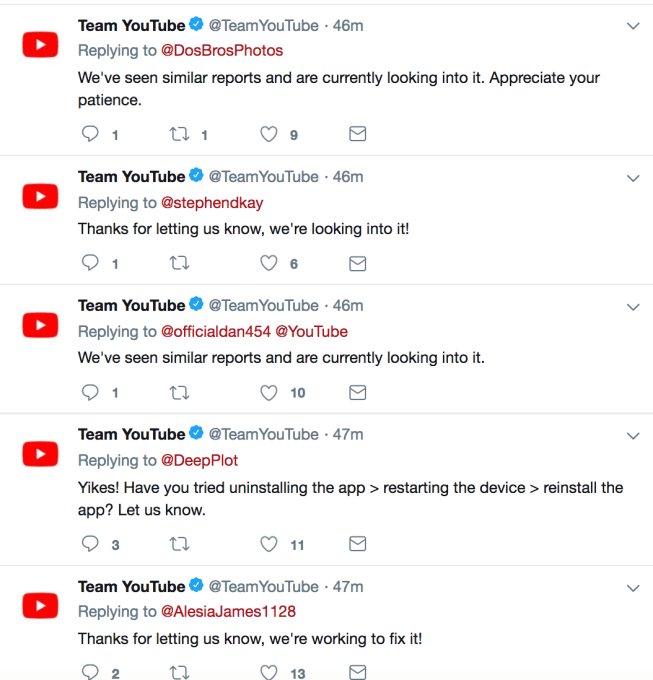
YouTube doesn’t experience downtime very often, making Tuesday’s outage pretty notable. We’ve reached out to YouTube about the cause of the outage and will update this story when we learn more.

Read Full Article
Periscope broadcasters can now assign their own chat moderators
It’s going to be harder for trolls to disrupt Periscope broadcasts. The Twitter-owned live-streaming app has offered chat moderation capabilities for years, but it has so far relied on group moderation. That means when users flagged a comment as abuse, spam or harassment, Periscope would randomly select a few other viewers to take a look and decide if that’s true. Violators would be banned if the users agreed. That worked well in some cases, but it still put control in the hands of the crowd, not the live streamer. Now, Periscope is changing that.
Instead of relying solely on group moderation, the company says broadcasters will instead be allowed to assign chat moderators before they start streaming.
These moderators can then watch the chat during the live broadcast and actively mute commenters in the audience who are disruptive.
After being muted, the person will not be allowed to chat for the remainder of the broadcast. This muting activity will be visible to anyone joining the broadcast from either Periscope or Twitter, but assigning chat moderators can only be done from Periscope, the company says.

When the live stream wraps, the broadcaster can then view a list of all the muted accounts and can choose to block those users from joining in future broadcasts.
The addition, which arrived alongside new replay editing tools, is another step toward improving the health of conversations on Periscope, the company claims. It follows another change announced this past summer, which focused on stricter enforcement of its rules around abuse and harassment.
Before, trolls whose comments were flagged during a broadcast were only temporarily blocked from chatting. They wouldn’t be able to comment on that live broadcast, but they could still join others in the future and continue to disrupt, threaten or abuse the video creator or the community.
The change that rolled out this summer made it so that those people who repeatedly got suspended for violating the guidelines would have their Periscope accounts reviewed and suspended.
Online harassment is not a new problem, to be sure, but the major social platforms have been struggling to get a handle on the issues.
In Twitter’s case, in particular, it’s been called out for being too tolerant of online harassment and hate speech, under the guise of protecting free speech. But Twitter has been trying to better handle abuse complaints, in more recent months, including through the acquisition of anti-abuse technology provider Smyte, which is helping to automate some of the processes here, as well as with the rollout of more stringent policies and anti-abuse features. Periscope hasn’t received as much attention, but is focusing on reducing the abuse that occurs during the real-time conversations on live broadcasts.
More info on how the new chat moderation feature works is here.

Read Full Article
Amazon Unveils the All-New Kindle Paperwhite

Amazon has unveiled the all-new Kindle Paperwhite. This updated version of what we have previously rated as the best value Kindle money can buy, is better than its predecessor in every way. In a nutshell, it’s lighter, brighter, thinner, and more waterproof.
It should be noted that the all-new Kindle Paperwhite isn’t the first Kindle to be waterproof. The all-new Kindle Oasis beat the Paperwhite to it. However, the Oasis is double the price of the Paperwhite, so the latter is a bargain by comparison.
The All-New Kindle Paperwhite
Amazon’s new Kindle Paperwhite has a refreshed design, with a flush-front six-inch, high resolution 300ppi screen and a back designed to be easier to grip. It’s just 8.18mm thick and weighs 182g, making it thinner and lighter than the previous model.
The all-new Kindle Paperwhite is IPX8 rated, which means it can withstand being immersed in up to two meters of water for up to 60 minutes. And, as an added bonus, for a limited time, Amazon is throwing in six months of Kindle Unlimited for free.
The all new Kindle Paperwhite: thinner, lighter, with Audible integration — and now waterproof! Pre-order now: https://t.co/rPpnwXCotc pic.twitter.com/zgylwNj3Gz
— Kindle (@AmazonKindle) October 16, 2018
Kevin Keith, Vice President of Amazon Devices, said, “Customers love the Kindle Paperwhite, and we’re excited to bring premium features—like a thinner and lighter flush-front design, additional storage, waterproofing, and Audible—to our most popular Kindle.”
The all-new Kindle Paperwhite is available to pre-order in the United States right now. The 8GB model, priced at $129.99, is set to start shipping on November 7. The 32GB model, priced at $159.99 (or $249.99 with free 3G) will follow in the coming months.
Better Value Than the Kindle Oasis
This new Paperwhite is clearly better than its predecessor in every conceivable way. And it’s only $10 more expensive. Sure, the Oasis is the best Kindle money can buy, but it has a price tag to match. Whereas the Paperwhite is within budget for most people.
If you do decide to buy the all-new Kindle Paperwhite we have a couple of articles you may be interested in reading. We’ll help you set up and use your Kindle Paperwhite, and then give you Kindle-inspired gift ideas to add to your Amazon wishlist.
Read the full article: Amazon Unveils the All-New Kindle Paperwhite
Read Full Article
Google Maps amplifies its app for electric vehicle owners
Google Maps is beefing up its app to help electric vehicle owners find the most suitable and closest place to charge up.
Google Maps said Tuesday it’s adding an EV charging feature to the app that will give users information about charging stations. Google has featured charging stations for a number of years now. But now, Google Maps is displaying more stations from supported networks and providing information about the stations themselves, including how many charging ports are available and how quickly they’ll be able to charge.
Users can type in keywords like “ev charging” or “EV charging stations” to see the nearest supported stations.
The EV charging search feature starts rolling out Tuesday on Android and iOS, with desktop launching in the coming weeks.
Google Maps now supports charging stations around the world, including Tesla and ChargePoint globally. In the U.S., the feature also includes SemaConnect, EVgo and Blink. ChargeMaster and Pod Point are included in Google Maps in the UK and ChargeFox stations will be shown in Australia and New Zealand.
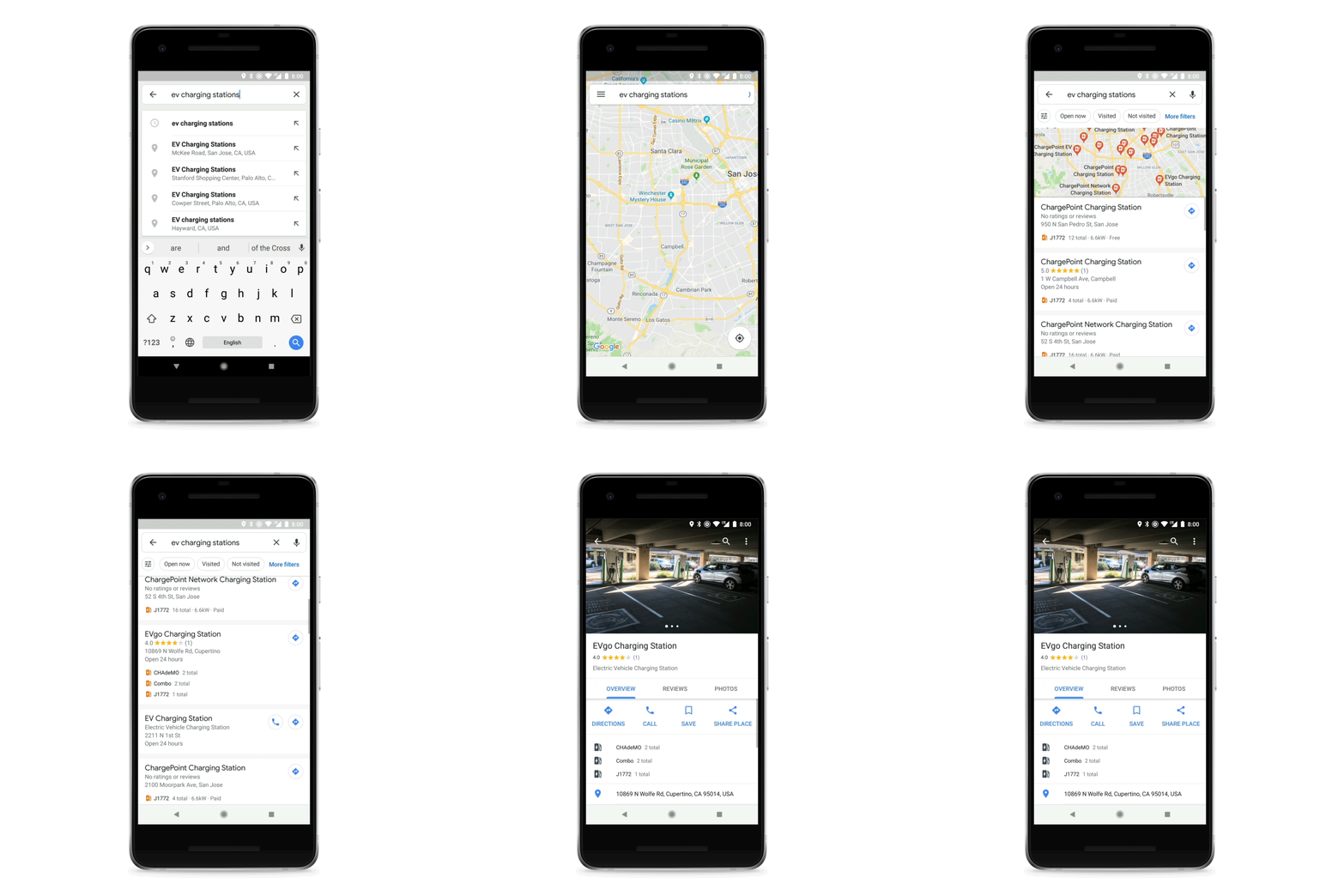
Google Maps will show information about the business where the station is located, the types of ports available, charging speeds, and how many ports there are. Users will also see information about the station from drivers, including photos, ratings, reviews and questions.
There are other third-party apps out there with this kind of information, notably PlugShare, which has been a go-to source for many electric vehicles owners in the past. Innogy recently acquired PlugShare’s parent company Recargo.

Read Full Article
Facebook News Feed now downranks sites with stolen content
Facebook is demoting trashy news publishers and other websites that illicitly scrape and republish content from other sources with little or no modification. Today it exclusively told TechCrunch that it will show links less prominently in the News Feed if they have a combination of this new signal about content authenticity along with either clickbait headlines orlanding pages overflowing with low-quality ads. The move comes after Facebook’s surveys and in-person interviews with discovered that users hate scraped content.
If illgotten intellectual property gets less News Feed distribution, it will receive less referral traffic, earn less ad revenue, and the there’ll be less incentive for crooks to steal articles, photos, and videos in the first place. That could create an umbrella effect that improves content authenticity across the web.
And just in case the scraped profile data stolen from 29 million users in Facebook’s recent massive security breach ended up published online, Facebook would already have a policy in place to make links to it effectively disappear from the feed.
Here’s an example of the type of site that might be demoted by Facebook’s latest News Feed change. “Latet Nigerian News” scraped one of my recent TechCrunch articles, and surrounded it by tons of ads.

An ad-filled site that scraped my recent TechCrunch article. This site might be hit by a News Feed demotion
“Starting today, we’re rolling out an update so people see fewer posts that ink out to low quality sites that predominantly copy and republish content from other sites without providing unique value. We are adjusting our Publish Guidelines accordingly” Facebook wrote in an addendum to its May 2017 post about demoting sites stuffed with crappy ads. Facebook tells me the new publisher guidelines will warn news outlets to add original content or value to reposted content or invoke the social network’s wrath.
Personally, I think the importance of transparency around these topics warrants a new blog post from Facebook as well as an update to the original post linking forward to it.
So how does Facebook determine if content is stolen? It’s systems compare the main text content of a page with all other text content to find potential matches. The degree of matching is used to predict that a site stole its content. It then uses a combined classifier merging this prediction with how clickbaity a site’s headlines are plus the quality and quantity of ads on the site.

Read Full Article
Macaw will curate Twitter for you, help expand your network
Twitter today inserts activity-based tweets into your timeline, alerting you to things like the popular tweets liked by people you follow, or those Twitter accounts that a lot of people in your network have just started to follow. These alerts can be useful, but their timing is sporadic and they can be easily missed. Plus, if you turn off Twitter’s algorithmic timeline (as may be possible for some), you’ll lose access to this sort of info. A new Twitter app called Macaw aims to help.
Macaw, which recently launched on Product Hunt, offers a set of similar information as Twitter does, with a few changes.
Macaw works by first pulling in a list of people you follow. It then tracks what tweets they like throughout the day and turns that into a feed of tweets that were most popular. Macaw does the same thing for users, too – that is, it shows you if a number of people have suddenly started following someone, for example.

Beyond this, Macaw will also show you the “Latest” tweets receiving likes from your network in a separate tab, as well as tweets where someone has asked a question.
This “Asks” section will highlight tweets where someone on Twitter has asked something like “Does anyone know…?” or “what are the best…?”, for example. This can help you find new conversations to participate in and help you expand your network.

The end result is a curated version of Twitter, where you can catch up with what’s important, without so much endless scrolling through your timeline.
Even if you’re on Twitter itself a lot, Macaw can still be useful.
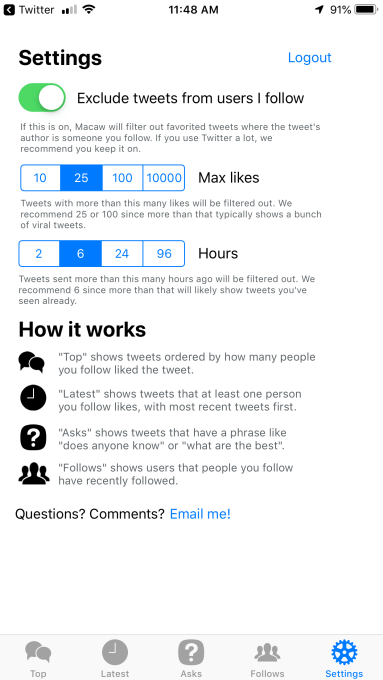
Its default setting will hide top tweets posted by someone in your network – because, chances are, you’ve already read them. With this setting turned on, you’ll only be shown top tweets by users you don’t yet follow.
You can also configure how many likes are required for something to be considered a “top” tweet. By default, this is set to 25, but you can change it to 10, 100, or even 1,000. You can adjust the default setting for the age of the tweet, too, from 6 hours to 2 hours, 24 hours, or 96 hours, based on how often you check in.
The app, however, is not a Twitter client.
That is, it doesn’t take the place of Twitter or other apps like Twitterific or Tweetbot, as you can’t use it to post tweets, access direct messages, update your profile, or follow users. You’ll need a different app, like the main Twitter client, for that. But a tap in Macaw will launch Twitter for you, making the transition feel seamless.
The app was built by Zachary Hamed, who had previously built Daily 140 for tracking a similar set of data, shared via email. He says he started building Macaw as a side project and launched it into private beta in August. It doesn’t currently have a business model, beyond a plan to maybe charge for additional features later on.
In some ways, Macaw is similar to Nuzzel, another Twitter summarization app that provides a list of top links that your network is sharing and discussing. But many of the best things on Twitter aren’t links, they’re individual tweets or tweetstorms. (Like that recent Google+ rant, for example).
Hamed admits Nuzzel was a source of inspiration for Macaw (a bird that screams constantly, by the way. Ha!)
“I was actually inspired by those notifications in the main Twitter app since I’ve always found them fascinating and by Nuzzel, which is one of my most used apps – and whose founder Jonathan I really respect,” Hamed says. “I think there is a lot of hidden insight to be found in posts people have liked and who they start following, especially if there is momentum around certain names or topics. As of now, Twitter only shares one to two of those recommendations, not all of it,” he adds.
*While we do like Macaw, the app, one thing we’re not a fan of are the fake reviews on the Macaw website, which pretend to be from @Jack, Mary Meeker, and Chamath Palihapitiya. It’s obviously meant to be a joke, but it falls flat – Macaw doesn’t need this sort of false promotion, and it’s wrong because it could confuse less savvy users.
Macaw is a free download on the App Store.


Read Full Article
Google-incubated AdLingo uses chatbot integration to create conversational ads
“Conversational marketing” is a phrase that I hear a lot, but when the team at AdLingo uses it, they mean something specific — namely, bringing chatbots and other conversational assistants into online advertising.
The startup is part of Google’s Area 120, and co-founder and general manager Vic Fatnani said he’s worked on advertising at Google for more than a decade.
“One of the things we saw happening was this paradigm shift with users and consumers going towards more of a conversational medium,” he said. “Everything is becoming more conversational, whether it’s through devices such as your phone, your speaker and eventually your car … We asked ourselves, ‘Hey if this shift is happening, why can’t marketing be more conversational?'”
You may be wondering whether consumers are really clamoring to interact with ads, but Fatnani said he and his co-founder Dario Rapisardi were determined not to build “a solution that needs a problem,” so they spent months talking to marketers and chatbot developers.
Apparently, when they asked about what challenges everyone was facing, the big answer was “discovery.” As Fatnani put it, “Hey, I have this amazing conversational assistant, but it’s really hard for me to bring this in front of audience.”

General Manager Vic Fatnani, Head of Partnerships Stephanie Lyras, Head of Engineering Dario Rapisardi
In his view, advertising provides the perfect medium to solve this problem. Instead of building a chatbot and just letting consumers find it on their own website or app, brands can integrate it into their advertising, allowing people who see the ad to ask questions and provide feedback.
“Imagine you want to launch a new soda drink in Brazil, a market that you’ve never entered before,” he added. “Imagine you can now run a conversational display ad and actually have people vote to say what kind of flavor would you like to drink.”
Or for a real example, there’s the Allstar Kia experience that you can see at the top of this post. Che company’s director of internet marketing Chris Ferrall said in a statement that “AdLingo lets our customers browse inventory, determine car trade-in value and make an appointment with a salesperson — all within an engaging, interactive experience that meets them right where they are.”
To be clear, Adlingo isn’t building the chatbots. Instead, Fatnani said, “The brands and developers bring the conversational experience to us, and we distribute that experience all over the web.”
To do this, the platform integrates with chatbot tools like Dialogue Flow, Microsoftbot Framework, LiveEngage and Blip. It’s also partnered with Valassis Digital and LivePerson (the Kia campaign happened through Valassis).
How does this all fit into Google’s larger plans for advertising? Fatnani said it doesn’t, at least not yet.
“We are completely separate efforts in terms of our product roadmap and what we execute,” he said, later adding, “At this point, we just want to make sure we’re really, really focused on our customer.”

Read Full Article
Keeps parent company Thirty Madison raises $15 million to fight male pattern baldness
Thirty Madison, the healthcare startup behind the hair loss brand Keeps, has brought in a $15.25 million Series A co-led by Maveron and Northzone.
The company provides a subscription-based online marketplace for men’s hair loss prevention medications Finasteride and Minoxidil. Keeps sells these drugs direct-to-consumer, working with manufacturers to keep the costs low.
On Keeps, a subscription of Minoxidil, an over-the-counter topical treatment often referred to as Rogaine, is $10 monthly. A subscription to Finasteride, a prescription drug taken daily, is $25 per month.
“It’s an end-to-end platform that is the single best place for guys who are looking to keep their hair,” Thirty Madison co-founder Steven Gutentag told TechCrunch.

Keeps is tapping into a big market. According to the American Hair Loss Association, two-thirds of American men experience some hair loss by the age of 35.
You may have heard of Hims, a venture-backed men’s healthcare company that similarly sells subscriptions to hair loss treatments, as well as oral care, skin care and treatments for erectile dysfunction. Keeps is its smaller competitor. For now, the company is focused solely on haircare, though with the new funds, Thirty Madison plans to launch Cove, a sister brand to Keeps that will provide treatments to migraine sufferers.
The company was founded last year by Gutentag and Demetri Karagas with a plan to develop several digital healthcare brands under the Thirty Madison umbrella.
“Going through this process myself of starting to experience hair loss, I was not sure where to turn,” Gutentag said. “I went online and looked up ‘why am I losing my hair,’ and if you search on Google, really for any medical condition, you usually walk away thinking you’re going to die … I was so fortunate that I got access to this high-quality specialist who could help me with my problem and I was in the position to afford those treatments but most people don’t get that access.”
Keeps also provide digital access to a network of doctors at a cost of roughly $30 per visit.
TechCrunch’s Connie Loizos wrote last year that “it’s never been a better time to be a man who privately suffers from erectile dysfunction, premature ejaculation or hair loss” because of advances and investments in telemedicine. Since then, even more money has been funneled into the space.
Hims has raised nearly $100 million to date and is rumored to be working on a line of women’s products. Roman, a cloud pharmacy for erectile dysfunction, raised an $88 million Series A last month and is launching a “quit smoking kit.” And Lemonaid Health, which also provides prescriptions to erectile dysfunction medications and more, secured $11 million last year.
Greycroft, Steadfast Venture Capital, First Round, Entrepreneurs Roundtable, HillCour and Two River also participated in Thirty Madison’s fundraise, which brings its total raised to date to $22.75 million.

Read Full Article
The 7 Types of Computer Viruses to Watch Out For and What They Do

Just like human viruses, computer viruses come in many forms and can affect your machine in different ways.
Obviously, your computer isn’t going to spend a week in bed and need a course of antibiotics, but a severe infection can wreak havoc on your system. They can delete your files, steal your data, and easily spread to other devices on your network.
Here are seven types of computer virus you should watch out for.
1. Boot Sector Virus
From a user perspective, boot sector viruses are some of the most dangerous. Because they infect the master boot record, they are notoriously difficult to remove, often requiring a full system format. This is especially true if the virus has encrypted the boot sector or excessively damaged the code.
They typically spread via removable media. They reached a peak in the 1990s when floppy disks were the norm, but you can still find them on USB drives and in email attachments. Luckily, improvements in BIOS architecture have reduced their prevalence in the last few years.
2. Direct Action Virus
A direct action virus is one of the two main types of file infector viruses (the other being a resident virus). The virus is considered “non-resident”; it doesn’t install itself or remain hidden in your computer’s memory.
It works by attaching itself to a particular type of file (typically EXE or COM files). When someone executes the file, it springs into life, looking for other similar files in the directory for it to spread to.
On a positive note, the virus does not typically delete files nor hinder your system’s performance. Aside from some files becoming inaccessible, it has a minimal impact on a user and can be easily removed with an anti-virus program.
3. Resident Virus
Resident viruses are the other primary type of file infectors. Unlike direct action viruses, they install themselves on a computer. It allows them to work even when the original source of the infection has been eradicated. As such, experts consider them to be more dangerous than their direct action cousin.
Depending on the programming of the virus, they can be tricky to spot and even trickier to remove. You can split resident viruses into two areas; fast infectors and slow infectors. Fast infectors cause as much damage as quickly as possible and are thus easier to spot; slow infectors are harder to recognize because their symptoms develop slowly.
In a worst-case scenario, they can even attach themselves to your anti-virus software, infecting every file the software scans. You often need a unique tool—such as an operating system patch—for their total removal. An anti-malware app will not be enough to protect you.
4. Multipartite Virus
While some viruses are happy to spread via one method or deliver a single payload, multipartite viruses want it all. A virus of this type may spread in multiple ways, and it may take different actions on an infected computer depending on variables, such as the operating system installed or the existence of certain files.
They can simultaneously infect both the boot sector and executable files, allowing them to act quickly and spread rapidly.
The two-pronged attack makes them tough to remove. Even if you clean a machine’s program files, if the virus remains in the boot sector, it will immediately reproduce once you turn on the computer again.
5. Polymorphic Virus
According to Symantec, polymorphic viruses are one of the most difficult to detect/remove for an anti-virus program. It claims anti-virus firms need to “spend days or months creating the detection routines needed to catch a single polymorphic”.
But why are they so hard to protect against? The clue is in the name. Anti-virus software can only blacklist one variant of a virus—but a polymorphic virus changes its signature (binary pattern) every time it replicates. To an anti-virus program, it looks like an entirely different piece of software, and can, therefore, elude the blacklist.
6. Overwrite Virus
To an end-user, an overwrite virus is one of the most frustrating, even if it’s not particularly dangerous for your system as a whole.
That’s because it will delete the contents of any file which it infects; the only way to remove the virus is to delete the file, and consequently, lose its contents. It can infect both standalone files and entire pieces of software.
Overwrite viruses typically have low visibility and are spread via email, making them hard to identify for an average PC user. They enjoyed a heyday in the early 2000s with Windows 2000 and Windows NT, but you can still find them in the wild.
7. Spacefiller Virus
Also known as “Cavity Viruses”, spacefiller viruses are more intelligent than most of their counterparts. A typical modus operandi for a virus is to simply attach itself to a file, but spacefillers try to get into the empty space which can sometimes be found within the file itself.
This method allows it to infect a program without damaging the code or increasing its size, thus enabling it to bypass the need for the stealthy anti-detection techniques other viruses rely on.
Luckily, this type of virus is relatively rare, though the growth of Windows Portable Executable files is giving them a new lease of life.
Malware Prevention Is Better Than Malware Removal
As always, taking sensible steps to protect yourself is preferable to dealing with the potentially crippling fallout if you’re unlucky enough to get infected.
For starters, you need to use a highly-regarded antivirus suite. Also, don’t open emails from unrecognized sources, don’t trust free USB sticks from conferences and expos, don’t let strangers use your system, and don’t install software from random websites!
Read the full article: The 7 Types of Computer Viruses to Watch Out For and What They Do
Read Full Article
Why Does My Xbox One Turn On by Itself?

Are you seeing your Xbox One turn on randomly? This issue can have several different causes. While it’s often hard to diagnose exactly what’s wrong, we have several elements you should check to pin down why your Xbox One randomly turns on.
Try each one of them in turn and you should be able to stop it from happening.
Why Does My Xbox One Turn On by Itself?
Check the following settings and elements if your Xbox One turns on by itself:
- Wipe down the front of your console near the Xbox logo power toggle.
- Since the Xbox One doesn’t have a physical power button, its capacitive button triggers when touched. A bit of grime, your pet’s tail, or even a static discharge can turn the system on inadvertently.
- If you have a Kinect, saying Hey Cortana, Xbox on or Xbox on will turn on your system with voice commands. It’s finicky, so you can turn your system on by accident with a similar phrase.
- You can disable this by visiting Settings > Power & startup > Power mode & startup and disabling Wake up Xbox by saying “Hey Cortana, Xbox on.”
- Some have reported that disabling automatic updates can fix this issue. Head to Settings > System > Updates and uncheck Keep my console up to date. You can uncheck Keep my games & apps up to date as well if you like.
- Pressing the Xbox button on a controller will turn the system on. Thus, your Xbox controller could be faulty.
- Try removing the batteries from your controller and see if your Xbox One keeps turning on by itself to test this.
- Disable the Instant-on mode, which lets your Xbox start up faster from a sleep-like state. To do so, visit Settings > Power & startup > Power mode & startup and select Power mode.
- Switch this from Instant-on to Energy-saving, which fully shuts down the console each time. You must press the Xbox button on a controller or the system to start it.
- With some televisions sets, turning on your TV may also turn on your Xbox.
- This is due to an option named HDMI-CEC or similar. Turning this off on your TV should keep your Xbox from turning on with your TV.
- Try plugging your Xbox into another outlet, or directly into the wall if you have it plugged into a power strip.
- Fully power off your Xbox by holding the Xbox power button on the front of the system for about 10 seconds. Then unplug the Xbox’s power supply for a short time before connecting it again and turning it back on.
- Make sure you’ve applied all Xbox One system updates, as they can resolve problems.
Your Xbox One Is Probably Not Haunted
The chances are that one of these is causing your Xbox One to turn on by itself. You can at least rest assured that it’s not haunted. Probably. If you still have the same issue after trying all of these fixes, you should contact Xbox Support.
Check out our article looking at more useful Xbox One settings for additional tweaks you can make.
Image Credit: Marco Verch/Wikimedia Commons
Read the full article: Why Does My Xbox One Turn On by Itself?
Read Full Article
No, your Twitter was not hacked
Twitter users on iOS were hit with a strange bug today. Instead of receiving notifications that included the tweet itself, they received a string of alphanumeric characters. The issue only affected iOS users, we confirmed with the company, and has since been resolved.
Twitter was quick to address the problem, following complaints from Twitter users about the weird notifications.
Twitter CEO Jack Dorsey posted at 12:42 PM ET today that Twitter was aware of the issue and was working on a fix.
Minutes later, he tweeted again that the issue was resolved.
We asked Twitter for more details on what went wrong, as a lot of people were wondering why their phones’ notification screen looked like this.
Some were also concerned it was a security issue of some kind, and didn’t know if a password reset was in order.
Twitter now says the issue was only a bug – nothing to be concerned about.
The company pointed us to a tweet from its Support channel (see below), which explains the issue in layman’s terms. It says the bug was related to the code used for iOS notifications – specifically the “red bubbles” (meaning the app icon’s badges).
Normally, you would not see this in “numbers and code,” Twitter explains.
But the issue is fixed, it’s not a hack, and we can all rest easy.
Whew.

Read Full Article
Macaw will curate Twitter for you, help expand your network
Twitter today inserts activity-based tweets into your timeline, alerting you to things like the popular tweets liked by people you follow, or those Twitter accounts that a lot of people in your network have just started to follow. These alerts can be useful, but their timing is sporadic and they can be easily missed. Plus, if you turn off Twitter’s algorithmic timeline (as may be possible for some), you’ll lose access to this sort of info. A new Twitter app called Macaw aims to help.
Macaw, which recently launched on Product Hunt, offers a set of similar information as Twitter does, with a few changes.
Macaw works by first pulling in a list of people you follow. It then tracks what tweets they like throughout the day and turns that into a feed of tweets that were most popular. Macaw does the same thing for users, too – that is, it shows you if a number of people have suddenly started following someone, for example.
Beyond this, Macaw will also show you the “Latest” tweets receiving likes from your network in a separate tab, as well as tweets where someone has asked a question.
This “Asks” section will highlight tweets where someone on Twitter has asked something like “Does anyone know…?” or “what are the best…?”, for example. This can help you find new conversations to participate in and help you expand your network.
The end result is a curated version of Twitter, where you can catch up with what’s important, without so much endless scrolling through your timeline.
Even if you’re on Twitter itself a lot, Macaw can still be useful.
Its default setting will hide top tweets posted by someone in your network – because, chances are, you’ve already read them. With this setting turned on, you’ll only be shown top tweets by users you don’t yet follow.
You can also configure how many likes are required for something to be considered a “top” tweet. By default, this is set to 25, but you can change it to 10, 100, or even 1,000. You can adjust the default setting for the age of the tweet, too, from 6 hours to 2 hours, 24 hours, or 96 hours, based on how often you check in.
The app, however, is not a Twitter client.
That is, it doesn’t take the place of Twitter or other apps like Twitterific or Tweetbot, as you can’t use it to post tweets, access direct messages, update your profile, or follow users. You’ll need a different app, like the main Twitter client, for that. But a tap in Macaw will launch Twitter for you, making the transition feel seamless.
The app was built by Zachary Hamed, who had previously built Daily 140 for tracking a similar set of data, shared via email. He says he started building Macaw as a side project and launched it into private beta in August. It doesn’t currently have a business model, beyond a plan to maybe charge for additional features later on.
In some ways, Macaw is similar to Nuzzel, another Twitter summarization app that provides a list of top links that your network is sharing and discussing. But many of the best things on Twitter aren’t links, they’re individual tweets or tweetstorms. (Like that recent Google+ rant, for example).
Hamed admits Nuzzel was a source of inspiration for Macaw (a bird that screams constantly, by the way. Ha!)
“I was actually inspired by those notifications in the main Twitter app since I’ve always found them fascinating and by Nuzzel, which is one of my most used apps – and whose founder Jonathan I really respect,” Hamed says. “I think there is a lot of hidden insight to be found in posts people have liked and who they start following, especially if there is momentum around certain names or topics. As of now, Twitter only shares one to two of those recommendations, not all of it,” he adds.
*While we do like Macaw, the app, one thing we’re not a fan of are the fake reviews on the Macaw website, which pretend to be from @Jack, Mary Meeker, and Chamath Palihapitiya. It’s obviously meant to be a joke, but it falls flat – Macaw doesn’t need this sort of false promotion, and it’s wrong because it could confuse less savvy users.
Macaw is a free download on the App Store.

Read Full Article