15 October 2018

Truphone, an eSIM mobile carrier that works with Apple, raises another $71M, now valued at $507M


Truphone — a UK startup that provides global mobile voice and data services by way of an eSIM model for phones, tablets and IoT devices — said that it has raised another £18 million ($23.7 million) in funding; additionally securing £36 million ($47 million) more “on a conditional basis” to expand its business after signing “a number of high-value deals.”

It doesn’t specify which deals these are, but Truphone was an early partner of Apple’s to provide eSIM-based connectivity to the iPad; and it will also be offering a service for new iPhone XS and XR models, taking advantage of the dual SIM capability. Truphone says that strategic partners of the company include Apple (“which chose Truphone as the only carrier to offer global data, voice and text plans on the iPad and iPhone digital eSIM”); Synopsys, which has integrated Truphone’s eSIM technology into its chipset designs; and Workz Group, a SIM manufacturer, which has a license from Truphone for its GSMA-accredited remote SIM provisioning platform and SIM operating system.

The company said that this funding, which was made by way of a rights issue, values Truphone at £386 million ($507 million at today’s rates) post-money. Truphone told TechCrunch that the funding came from Vollin Holdings and Minden Worldwide — two investment firms with ties to Roman Abramovich, the Russian oligarch who also owns the Chelsea football club, among other things — along with unspecified minority shareholders. Collectively, Abramovich-connected entities control more than 80 percent of the company.

We have asked the company for more detail on what the conditions are for the additional £36 million in funding to be released and all it is willing to say is that “it’s KPI-driven and related to the speed of growth in the business.”

For some context, Truphone most recently raised money almost exactly a year ago, when it picked up £255 million also by way of a rights issue, and also from the same two big investors. The large amount that time was partly being raised to retire debt. That deal was done at a valuation of £370 million ($491 million at the time of the deal). Going just on sterling values, this is a slight down-round.

Truphone, however, says that business is strong right now:

“The appetite for our technology has been enormous and we are thrilled that our investors have given us the opportunity to accelerate and scale these groundbreaking products to market,” said Ralph Steffens, CEO, Truphone, in a statement. “We recognised early on that the more integrated the supply chain, the smoother the customer experience. That recognition paid off—not just for our customers, but for our business. Because we have this capability, we can move at a speed and proficiency that has never before seen in our industry. This investment is particularly important because it is testament not just to our investors’ confidence in our ambitions, but pride in our accomplishments and enthusiasm to see more of what we can do.”

Truphone is one of a handful of providers that is working with Apple to provide plans for the digital eSIM by way of the MyTruphone app. Essentially this will give users an option for international data plans while travelling — Truphone’s network covers 80 countries — without having to swap out the SIMs for their home networks.

The eSIM technology is bigger than the iPhone itself, of course: some believe it could be the future of how we connect on mobile networks. On phones and tablets, it does away with users ordering, and inserting or swapping small, fiddly chips into their devices (that ironically is also one reason that carriers have been resistant to eSIMs traditionally: it makes it much easier for their customers to churn away). And in IoT networks where you might have thousands of connected, unmanned devices, this becomes one way of scaling those networks.

“eSIM technology is the next big thing in telecommunications and the impact will be felt by everyone involved, from consumers to chipset manufacturers and all those in-between,” said Steve Alder, chief business development officer at Truphone. “We’re one of only a handful of network operators that work with the iPhone digital eSIM. Choosing Truphone means that your new iPhone works across the world—just as it was intended.” Of note, Alder was the person who brokered the first iPhone carrier deal in the UK, when he was with O2.

Truphone has not released numbers detailing how many devices are using its eSIM services at the moment — either among enterprises or consumers — but it has said that customers include more than 3,500 multinational enterprises in 196 countries. We’ll update this post as we learn more.


Read Full Article

How to Automate Your Garage Door With IFTTT and Raspberry Pi


Smart home gadgets are cool but can be expensive. With a Raspberry Pi and a component or two, it’s easy and cheap to connect existing devices to the internet.

Making your garage door internet-aware is a great introduction to learning how to control the real world with a Pi. And let’s be honest, who doesn’t want to feel a bit like Batman and have their garage open by itself when they pull into their driveway?

What You’ll Need

To automate your garage door, you will need:

  • A garage door motor that can take an external trigger.
  • A Raspberry Pi (any model) connected to the internet. This tutorial assumes your Pi is running the Raspbian operating system (if it’s not, see our article on how to install Raspbian on your Raspberry Pi).
  • A relay expansion board, which can find find on Amazon.
  • A 2A power supply for the Raspberry Pi. A lower-rated model may have trouble driving the relay board as well as the Pi.
  • Four jumper cables (plus one more for each extra door you want to control).
  • Enough two-core cable to reach between the Pi and the garage door motor. Cheap speaker wire is ideal, but telephone or Ethernet cable can work too.

Once you’ve collected those components together, it’s time to get started.

How This Automated Garage Door Works

Most garage door motors can be triggered to open or close through an external input. Manufacturers include these inputs so that installers can hook up a simple push button somewhere in the home to open or close the door without using the regular remote. When a trigger button is pushed and released, it momentarily closes a circuit which tells the motor to start or stop.

You’re going use a relay in place of an external button. Closing the relay briefly will close the circuit, exactly as if a trigger button had been pressed. A Python script running on the Raspberry Pi will let you control the relay, and therefore the door, from your home network.

Step 1: Connect the Raspberry Pi to the Relay

You’ll be making at least four connections between your Raspberry Pi and the relay board. If you’re using a Pi Zero you will either need to solder the connections directly, or solder a GPIO header to the Pi and use jumper wires for the connections. The latter option is recommended because if you ever want to disconnect the relay board and use the Raspberry Pi for something else, you won’t have to de-solder your connections. The bigger model Pis already have header pins for connecting push-on jumper cables.

If you’re new to using the GPIO, be sure to read our article Everything You Need to Know About Raspberry Pi GPIO Pins.

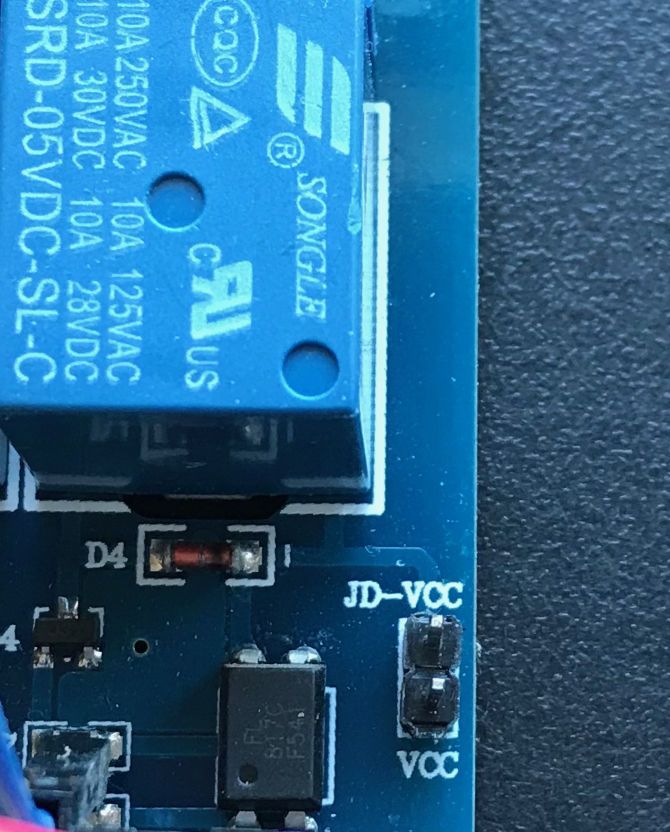
Before hooking everything up, check to see if your relay board has a jumper connecting the VCC and JD-VCC pins together. If it has, remove it, because you’ll need to power VCC and JD-VCC separately.

Relay board JD-VCC to VCC jumper

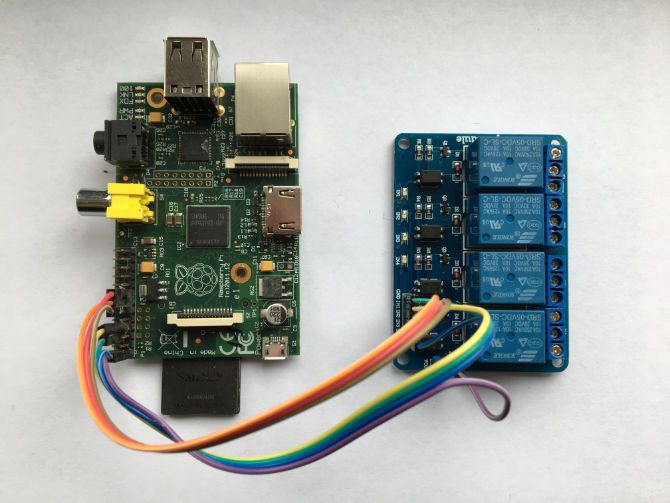
With everything powered down, connect the relay board to your Pi as follows:

  • Begin by connecting Pi Pin 2 (5V rail) to the JD-VCC on the relay board.
  • Connect Pi Pin 1 or Pin 17 (3.3V rail) to VCC on the relay board.
  • Connect Pi Pin 6 (GND) to GND on the relay board.
  • Finally, connect Pi Pin 7 (GPIO 4) to IN1 on the relay board. This is the connection that switches the relay.

If you have more than one garage door, or if you want to add control for electric gates, you should add extra connections between IN2, IN3, etc. on the relay board and other free GPIO input/output pins on the Pi.

Raspberry Pi connected to a relay board

Step 2: Install Dependencies on the Raspberry Pi

Raspbian comes with Python pre-installed, but you will need to add the GPIO library. Type the following into the terminal window on your Pi:

sudo apt-get update
sudo apt-get -y install python-rpi.gpio

Now make a new folder in your home directory, somewhere to put the Python script that’s going to control the relays:

mkdir ~/garagedoor
cd ~/garagedoor

Finally, download bottle, a lightweight framework that will create a simple web server on your Pi:

wget https://bottlepy.org/bottle.py

Step 3: Create the Control Script

Here’s a very simple Python script to control the relay board via HTTP:

# Python Script To Control Garage Door

# Load libraries
import RPi.GPIO as GPIO
import time
from bottle import route, run, template

# Set up the GPIO pins
GPIO.setmode(GPIO.BOARD)
GPIO.setup(7, GPIO.OUT)
GPIO.setup(11, GPIO.OUT)
GPIO.output(7, True)   
GPIO.output(11, True)

# Handle http requests to the root address
@route('/')
def index():
 return 'Go away.'

# Handle http requests to /garagedoor
@route('/garagedoor/:doornum')
def garagedoor(doornum=0):
 if doornum == '0':
 return 'No door number specified'

 elif doornum == '1':
 GPIO.output(7, False)
 time.sleep(.8)
 GPIO.output(7, True)
 return 'Door number 1 cycled.'

 elif doornum == '2':
 GPIO.output(11, False)
 time.sleep(.8)
 GPIO.output(11, True)

 return 'Door number 2 cycled'

run(host='0.0.0.0', port=1234)

On your Raspberry Pi, create a new Python file using nano:

nano door.py

Copy and paste the script above into the empty document. Exit and save with CTRL+X, then Y, and Enter to confirm.

Now test the script by running it:

python door.py

If everything is working, you will see a message like this:

Python script running message

If you get any error messages, check that everything got pasted into the file correctly and that you don’t have another web server like Apache running on the same port (it will interfere with the server the script creates).

Assuming there are no errors, go to a web browser on another computer on the same network, and into the address bar type the IP address of your Pi followed by a colon and 1234. For example, if the IP address of your Raspberry Pi was 11.22.33.44, you would type 11.22.33.44:1234 into your browser.

If everything works, you will see a message telling you to go away!

Now add /garagedoor/1 after the IP address and port number, like this: 11.22.33.44:1234/garagedoor/1

Hit Enter, and you should hear the first relay on the board click twice as it closes and opens again. If you change the 1 to a 2 and reload the page, you’ll hear the second relay cycle.

Step 4: Connect the Relay to the Door Motor

Refer to your garage door motor manual to find where an external controller can be connected. Attach the two-core cable to it, and connect up the other end of the cable to the relay board’s screw terminals.

Relay board connections to door motor

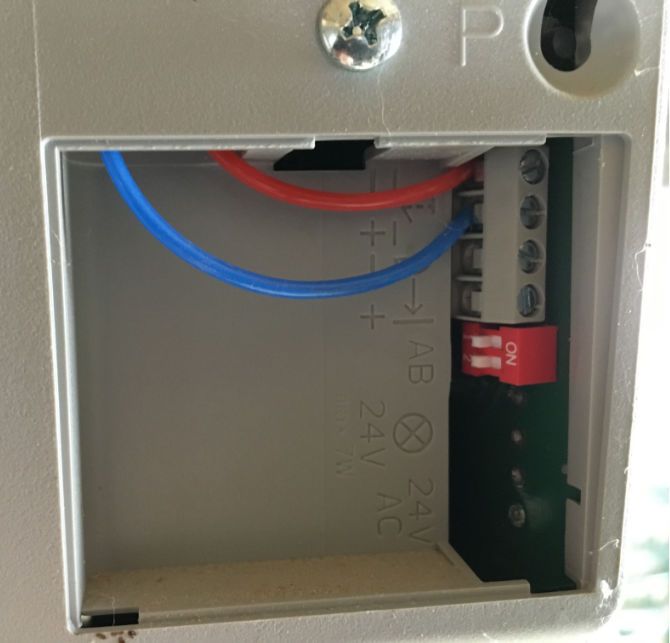
There are three terminals per relay—use the normally open pair as shown in the picture.

Garage door motor connection

Test everything from the web browser again (you can just refresh the page). If all goes well, the relay will click a couple of times and your garage door should start to open.

Step 5: Set the Script to Autoload

If your Raspberry Pi reboots for any reason, such as a power outage, your Python script will stop running. To make it load on startup, add the following line to your /etc/sc.local file (if you are logged into your Pi as a different user, change Pi to your username):

nohup python /home/pi/garagedoor/door.py &

Do this using your usual text editor, saving the file when you’re done.

Security Considerations to Keep in Mind

There is no kind of security on this sample Python script—anyone who can access your Raspberry Pi via its IP address will be able to open and close your garage door. It’s tempting to think that just because nobody knows your script is there, nobody will find it, but security through obscurity has been shown time and again to be a bad idea.

A full authentication system is beyond the scope of this tutorial, but a simple solution to security is to not make your Pi accessible outside of your home network.

Here are some more tips for securing your Raspberry Pi.

Controlling Your Garage Door With IFTTT or Siri

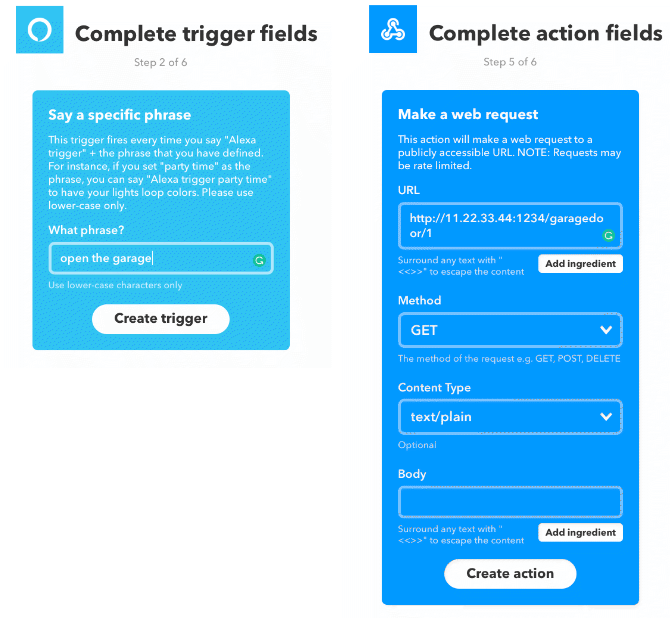
If you do choose to make your Pi accessible from the open internet, you can control your garage door from services like If This Then That (IFTTT). For example, you can combine the Alexa and Webhooks IFTTT services to open your garage door when you say a trigger phrase to an Amazon Echo.

IFTTT Alexa and webhook applet

If you drive a car with an IFTTT connected service, you could create an applet to open the door as your car approaches your property, Batman-style.

Want to know more? See our downloadable guide to using IFTTT like a pro.

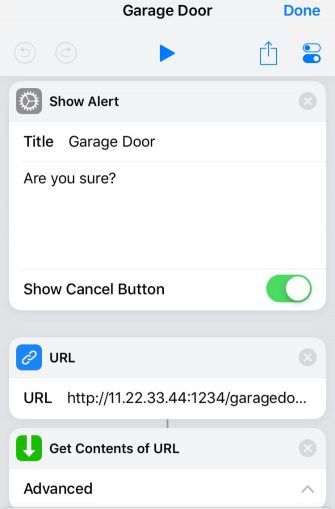
Another way to trigger your newly internet-aware garage door is with a Siri shortcut. Putting a really simple shortcut into your widgets means you can forget about carrying annoying keys and instead open your garage with a swipe and tap on your iPhone.

Siri shortcut to call garage door script

Beyond the Garage: More DIY Smart Home Projects

Relay boards can switch mains voltage and so can control most household appliances. This project can serve as the basis for adding smarts to almost anything with a power supply. Coffee machines, lighting, air conditioners—all are ripe for automating with a Raspberry Pi and some relays.

Be sure to check out these smart home automation projects for more ideas.

Read the full article: How to Automate Your Garage Door With IFTTT and Raspberry Pi


Read Full Article

Why You Should Buy Your Tech From China (And How to Do It Safely)


Most of the brand-name tech we buy today has inflated prices to cover advertisement cost, store rentals, staff etc. The Chinese market is different, and many manufacturers don’t market their products in the same traditional ways.

The tech you buy is also most likely already made in China, so buying your new laptop with a more direct line from the manufacturer will not only save you money, but will hopefully help force the Big Names™ to re-examine their price points to bring affordable tech to everyone.

What Tech Can You Buy From China?

Cheaper production costs, little to no advertisement expense, and a lax grasp on copyright law means that if you have some patience for delivery times, you can grab a bargain on anything from fitness trackers and other wearables, to laptops, mobile phones and even DIY go-carts.

The tech is equivalent in quality and specs to brand names you know, and other than slow delivery time and potentially poor customer service, there aren’t many good reasons not to get on the Chinese market bandwagon.

An increasingly recommended product line to look out for is Xiaomi. As a brand, they are quickly gaining ground on many staples like Samsung, Asus, and Apple. You may have already heard about the Xiaomi mi band fitness tracker or their popular redmi mobile smartphones, one of the top cheap Android phones.

Why Is It Cheaper to Buy Tech From China?

Want to try some new technology before breaking open your savings for high-end products? By buying from China, you can get your smart bulbs, drones, cameras, laptops, or robotic vacuum cleaners, test them, and either use them until you replace them, or give them away and buy a higher-end product when you’re ready.

You’re not paying for staff, customer service, fast delivery times, easy returns, or extended warranties (a warranty that few of us ever use). What you do pay for, is the same quality of product with a different brand name and logo.

Just get the product that you need and forgo the rest of the first world customer service expectations you may have. You can always get your own gadget insurance to cover your shiny device afterward.

Where to Buy Chinese Tech

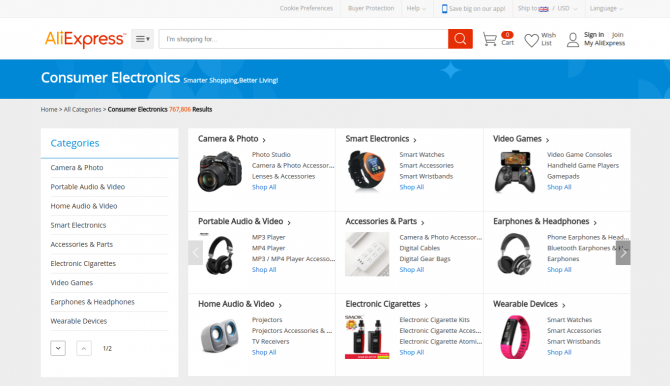
Right now, two of the better and more popular sites are AliExpress and Banggood. Other popular websites include:

Be wary that the quality of service might be sketchy with some of these sites, but doing a quick Google search will usually let you know if the site is still good.

AliExpress online marketplace

Your miles may vary with GearBest, Lightake, and Geekbuying, whose delivery and customer service is reportedly going downhill. Gearbest especially has had a big fall from grace this year, but remains popular.

TomTop and Tradingshenzen are both popular, and might be a better option than the other three these days.

Our recommendation would be to hit AliExpress first and then check out the other sites for potential deals.

Some recommended stores on AliExpress include HK Goldway, Mi Store, Mi Global Store, Fantacy, Eternal Team, and Xiaomi MC Store.

More often than not, products will be delivered as advertised, and if they aren’t, the sellers are happy to re-deliver or to offer refunds for broken items or non-deliveries. Negative ratings will often kill a seller on AliExpress, so they will do a lot to avoid it.

How to Shop Safely From China

Many of the websites offering Chinese brands will do crazy deals regularly to get new customers signed up, so look for those and make your savings even higher. There is usually at least one coupon code you can use.

Most Chinese product resellers have a similar policy to AliExpress. Our article on whether AliExpress is safe or legit will answer many of your questions about what you can expect to experience when using these sites.

If you’re buying from AliExpress or other sites where there are multiple sellers, try to avoid sellers with few reviews. If prices are much cheaper than any equivalent products, keep in mind that it may be a scam or fake products, and look for something that seems closer to the average price point.

All that said, you will need to do your due diligence, and look for reviews of the product and the seller that you are buying from. Doing this will help ensure that you’re not being scammed, or receiving a dodgy product. The time spent doing this will definitely be worth it.

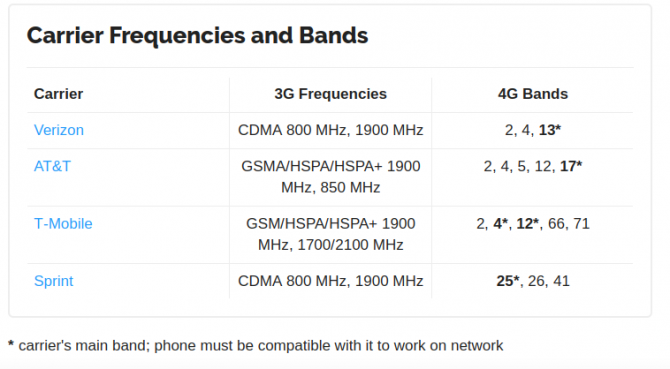
Mobile carrier frequency bands

If you are buying a mobile phone, make sure that the wireless carrier bands are available in your area and with your carrier. Our look at GSM, CDMA, and mobile frequency bands will help. You can find specifics about what frequencies your carrier uses on Frequencycheck.com.

Shipping and Delivery Times From China

When buying products from China, shipping could take up to 6 weeks depending on their warehouse locations. In busy periods, your order could take a week to start shipping. If patience is not a virtue you hold, Amazon might be a better option.

Do not order from any of these sites if you need to get the items by a specific date. If you do, make sure you order at least two months ahead of any birthday or anniversary to stay on the safe side and avoid disappointment.

If you are buying a more expensive product, we recommend getting the shipping insurance offered on check-out. It usually won’t add a lot to your overall cost, but if something does get lost the seller is much more likely to offer you a quick refund. Gearbest, for example, will only refund half of what you paid if you don’t have the insurance.

Customs and Import Duties

Most products you order from these websites will be marked as “gift” to avoid extra custom or import charges. There is still a chance that your package will get stopped in customs, especially if you chose one of the faster delivery options like DHL.

More often than not you will avoid this cost, but to avoid any nasty surprises, here is a US customs calculator you can use to see how much it could potentially be. In the US, the import duty is determined by the type of item you buy, and its price.

Returning Items to China

Returning orders can cause more headaches than what they are worth, so don’t order something that you would expect to return if it isn’t suitable for what you want. For cheaper items especially, your return shipping costs may be more expensive than the item itself.

Security Concerns When Buying Tech From China

In a world where we share (willingly or not) more and more information about ourselves and our lives, privacy, and device security are both becoming increasingly important to all of us.

We have previously written about the potential security holes in some mobile devices from Huawei and ZTE. While it’s hard to keep up with the products and manufacturers to watch out for, it’s likely they have similar privacy policies—some are just more obvious in their data mining than others.

It probably goes without saying though: don’t use these phones for government or security cleared business. See our guide to privacy on Huawei phones for more.

Read the full article: Why You Should Buy Your Tech From China (And How to Do It Safely)


Read Full Article

11 Free Photoshop Brushes to Make Your Photos Stand Out


Adobe Photoshop CC 2018 comes with a revamped brush panel. Unfortunately, there are just four default brush panels, meaning photographers and digital artists may feel short changed.

However, one of the “hidden” goodies is from Kyle T. Webster. If you have an Adobe Creative Cloud membership then you can download and use the 1000-brush strong megapack made by the international award-winning illustrator. Then, there are tons of free Photoshop brushes you can find on the web.

In this article, we uncover Photoshop brushes specifically made for photographers.

1. Bokeh Brushes

Bokeh Brush

Bokeh is a photography effect that is created by an out-of-focus background. Portrait photographs commonly rely on these blurred specular highlights behind the headshot. A good bokeh needs a lens with at least an f/2.8 aperture, but what if you want to add a bokeh in post-processing?

You can create a blurred background in Adobe Photoshop. Or you can use this free bokeh brush set to manufacture a creative effect. This freebie set of 92 brushes is free for commercial use.

2. Grunge Brushes

Free Subtle Grunge Brushes

The grunge effect harks back to the early days of tintype photography and film which followed it. The vintage effect can be easily re-created in Adobe Photoshop with layer masks and a tintype texture.

You can use these free subtle grunge brushes to give your photos an aged look. The brushes can be used to frame the photos or add subtle textures.

If you are looking for more grunge brushes, then this set of vintage grunge brushes by alex16 on Deviant Art isn’t bad either.

3. Lens Flare Brushes

Lens Flare Brushes

This single category of Photoshop brushes that imitate different sources of light may justify an article of its own. There is such variety. Take your pick from lens flares to sunbursts, from light swirls to lightning bolts.

For now, we will just download and use these free lens flare brushes. The 15 high quality lens optical flares and stars brushes are 2500 pixels+ in size and should be just right against a dark background. Just remember to use them with attribution.

4. Lightning Brushes

Lightning Bolt Brushes

Have you ever tried to take a photograph of a lightning bolt? It’s an exercise in patience and precision. Lightning is unpredictable. And you must think about your own safety first. The easier option is to use a stroke of a lightning brush on your photo. It’s not as rewarding though.

These 40 high-resolution lightning bolt Photoshop brushes are good enough. And they might help you apply realistic effects to your photos.

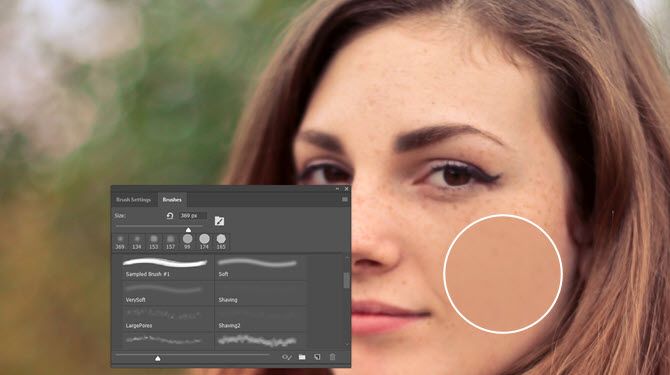
5. Skin Brushes

Free Skin Brush Set

You can use these to change skin tone, airbrush any blemishes, or even add stubble. But use them subtly for retouching portraits or any other photograph. The combination pack has three brush sets and is meant for non-commercial use. You can also download the three sets separately.

6. Hair Brushes

Free Adobe Photoshop Hair Brush Set

Like skin tone brushes, hair brushes are also useful for subtle retouching. Hair selections can be difficult. So try a hair brush to finetune your profile photo in Photoshop. For instance, you can use a specific brush to create facial hair. Or retouch parts of a headshot masked from its background.

You can create your own hair brush in Photoshop too, but these free downloads give you a starter pack to work with. The 10 high-resolution graphics can be used in any color. Use them for free with attribution. Also, look around the site for other hair brush sets.

7. Smoke Brushes

Free Smoke Brushes for Adobe Photoshop

Long tendrils of wispy smoke against a black or white background makes an eye catching image. It’s one of those cool project ideas for newbie photographers. You will need gear like an external flash, tripod, a reflector, a black cloth, and a few incense sticks to make it happen. But it’s too much bother when you need to add a quick smoke effect.

These 10 smoke brushes for Photoshop can get you there for the price of an email signup.

8. Fog Brushes

Fog Brushes for Adobe Photoshop

This set of 106 fog brushes can be used as transparent overlays with any image. You can give them any color with Photoshop’s color tool. Use them on landscapes or even for double exposure portraits.

The set is available on Gumroad and is free for commercial use. You can also name your own price and help the developer.

9. Cloud Brushes

Adobe Photoshop Cloud Brush Set

A sunny landscape photo always looks more beautiful with a few patches of clouds. Clouds can also lend mood to landscape photos or be the objects of attention if you want to try some exposure blending.

This photorealistic set of nine cloud brushes hosted on Deviantart offer a nice mix of heavier puffy clouds as well as wispy, mist-like clouds.

This set of 17 free high-resolution cloud brushes on FudgeGraphics.com is worth a download too.

10. Tree Brushes

Adobe Photoshop Free Tree Brush Set

When we are talking about landscape photography, then why leave out the more natural elements. Adobe Photoshop CC has a cool Tree Filter that adds realistic trees. But flatter tree brushes can not only help you frame a shot but also create interesting silhouettes.

The brush set has nine different brushes and can be useful for making flat wallpapers as the artist intends. If you are looking for more variety, then try a search on 123Brushes for their free tree brush packs.

11. Logo Brushes

Badge shape logo brush for Adobe Photoshop

You can take a neat font, any shape, or a calligraphic brush and create a cool logo in Photoshop. You can search for vector shapes too. But logo brushes for Photoshop are a shortcut if you don’t want to make your own custom logo brush.

You will find a rich set of logo brushes that will give you more options to play around with. Pick one and make your own custom watermark for your images. Another alternative is to search for a brush with the kind of shape you are looking for.

Create Your Own Photoshop Brushes Now

Custom brushes are used mostly by digital artists. But as the above roster shows, photographers can also find a few benefits.

The sheer variety of free Photoshop brushes on offer across the web is because it’s not too difficult to create your own. So why not create your own custom Photoshop brushes and share them on the web so that others can use them in their work.

Read the full article: 11 Free Photoshop Brushes to Make Your Photos Stand Out


Read Full Article

14 October 2018

Make your own phone with MakerPhone (some soldering required)


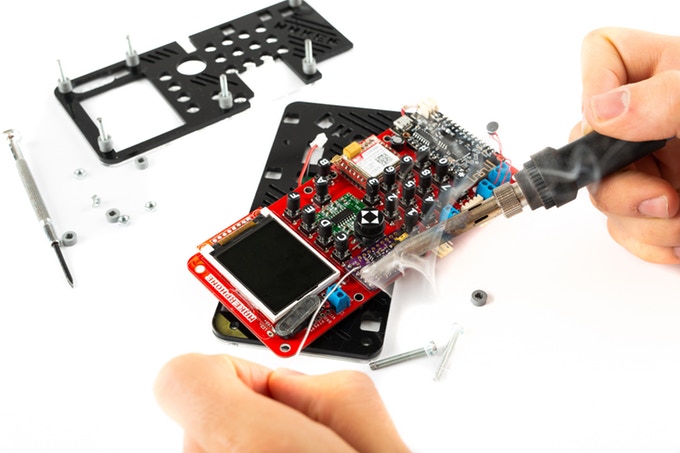
There’s no shortage of interesting electronics kits out there to occupy an idle Sunday, but with this one you get a phone out of the bargain. The MakerPhone is a kit looking for funds on Kickstarter that lets you assemble a working mobile phone from a number of boards and pieces, and the end result looks about as wild as you’d expect.

For about a hundred bucks, you get a mainboard, casing, LCD, wireless module, processor, and all the other pieces you need to make a basic smartphone. You’re not going to be browsing Instagram on this thing, but you can make calls, send texts, and play Snake. Remember when that was enough?

This is purpose-built hardware, of course — you won’t be putting it together cap by cap — but it’s not exactly plug and play, either. You’ll need a soldering iron, snippers, and some Python chops. (Not delicious python meat — Python the programming language.)

The MakerPhone microcontroller is Arduino-compatible, so you can tweak and extend it, too. But the creators (who previously shipped a similarly DIY handheld gaming machine) say you don’t need any experience to do this. It takes you through the absolute basics and there are pledge tiers that get you all the tools you’ll need, too.

I love the chunky UI, too. I like big pixels and I cannot lie.

Sure, this probably won’t be your everyday device (it’s huge) but it’s a fun project and maybe you could make it your weird home messaging machine. I don’t know. Be creative.

The MakerPhone is already well past its $15,000 goal, most of which was people snapping up the early bird $89 deal. But there are plenty available at $94, and it comes with a toolkit at $119.


Read Full Article

Make your own phone with MakerPhone (some soldering required)


There’s no shortage of interesting electronics kits out there to occupy an idle Sunday, but with this one you get a phone out of the bargain. The MakerPhone is a kit looking for funds on Kickstarter that lets you assemble a working mobile phone from a number of boards and pieces, and the end result looks about as wild as you’d expect.

For about a hundred bucks, you get a mainboard, casing, LCD, wireless module, processor, and all the other pieces you need to make a basic smartphone. You’re not going to be browsing Instagram on this thing, but you can make calls, send texts, and play Snake. Remember when that was enough?

This is purpose-built hardware, of course — you won’t be putting it together cap by cap — but it’s not exactly plug and play, either. You’ll need a soldering iron, snippers, and some Python chops. (Not delicious python meat — Python the programming language.)

The MakerPhone microcontroller is Arduino-compatible, so you can tweak and extend it, too. But the creators (who previously shipped a similarly DIY handheld gaming machine) say you don’t need any experience to do this. It takes you through the absolute basics and there are pledge tiers that get you all the tools you’ll need, too.

I love the chunky UI, too. I like big pixels and I cannot lie.

Sure, this probably won’t be your everyday device (it’s huge) but it’s a fun project and maybe you could make it your weird home messaging machine. I don’t know. Be creative.

The MakerPhone is already well past its $15,000 goal, most of which was people snapping up the early bird $89 deal. But there are plenty available at $94, and it comes with a toolkit at $119.


Read Full Article

A fictional Facebook Portal videochat with Mark Zuckerberg


TechCrunch: Hey Portal, dial Mark

Portal: Do you mean Mark Zuckerberg?

TC: Yes

Portal: Dialling Mark…


TC: Hi Mark! Nice choice of grey t-shirt.

MZ: Uh, new phone who dis? — oh, hi, er, TechCrunch…

TC: Thanks for agreeing to this entirely fictional interview, Mark!

MZ: Sure — anytime. But you don’t mind if I tape over the camera do you? You see I’m a bit concerned about my privacy here at, like, home

TC: We feel you, go ahead.

As you can see, we already took the precaution of wearing this large rubber face mask of, well, of yourself Mark. And covering the contents of our bedroom with these paint-splattered decorator sheets.

MZ: Yeah, I saw that. It’s a bit creepy tbh

TC: Go on and get all taped up. We’ll wait.

[sound of Mark calling Priscilla to bring the tape dispenser]

[Portal’s camera jumps out to assimilate Priscilla Chan into the domestic scene, showing a generous vista of the Zuckerbergs’ living room, complete with kids playing in the corner. Priscilla, clad in an oversized dressing gown and with her hair wrapped in a big fluffy towel, can be seen gesticulating at the camera. She is also coughing]

Priscilla to Mark: I already told you — there’s a camera cover built into into Portal. You don’t need to use tape now

MZ: Oh, right, right!

Okay, going dark! Wow, that feels better already

[sound of knuckles cracking]

TC: So, Mark, let’s talk hardware! What’s your favorite Amazon Echo?

MZ: Uh, well…

TC: We’d guess one with all the bells & whistles, right? There’s definitely something more than a little Echo Show-y about Portal

MZ: Sure, I mean. We think Alexa is a great product

TC: Mhmm. Do you remember when digital photo frames first came out? They were this shiny new thing about, like, a decade ago? One of those gadgets your parents buy you around Thanksgiving, which ends up stuck in a drawer forever?

MZ: Yeah! I think someone gave me one once with a photo of me playing beer pong on it. We had it hanging in the downstairs rest room for the longest time. But then we got an Android tablet with a Wi-Fi connection for in there, so…

TC: Now here we are a decade or so later with Portal advancing the vision of what digital photo frames can be!

MZ: Yeah! I mean, you don’t even have to pick the pictures! It’s pretty awesome. This one here — oh, right you can’t see me but let me describe it for you — this one here is of a Halloween party I went to one year. Someone was dressed as SpongeBob. I think they might have been called Bob, actually… And this is, like, some other Facebook friends doing some other fun stuff. Pretty amazing.

You can also look at album art

TC: But not YouTube, right? But let’s talk about video calling

MZ: It’s an amazing technology

TC: It sure is. Skype, FaceTime… live filters, effects, animoji…

MZ: We’re building on a truly great technology foundation. Portal autozooming means you don’t even have to think about watching the person you’re talking to! You can just be doing stuff in your room and the camera will always be adjusting to capture everything you’re doing! Pretty amazing.

TC: Doing what Mark? Actually, let’s not go there

MZ: Portal will even suggest people for you to call! We think this will be a huge help for our mission to promote Being Well — uh, I mean Time Well Spent because our expert machine learning algorithms will be nudging you to talk to people you should really be talking to

TC: Like my therapist?

MZ: Uh, well, it depends. But our AI can suggest personalized meaningful interactions by suggesting Messenger contacts to call up

TC: It’s not going to suggest I videchat my ex is it?

MZ: Haha! Hopefully not. But maybe your mom? Or your grandma?

TC: Sounds incredibly useful. Well, assuming they didn’t already #deletefacebook.

But let’s talk about kids

MZ: Kids! Yeah we love them. Portal is going to be amazing for kids

TC: You have this storybook thing going on, right? Absent grandparents using Portal to read kids bedtime stories and what not…

MZ: Right! We think kids are going to love it. And grandparents! We’ve got these animal masks if you get bored of looking at your actual family members. It’s good, clean, innovative fun for all the family!

TC: Yeah, although, I mean, nothing beats reading from an actual kid’s book, right?

MZ: Well…

TC: If you do want to involve a device in your kid’s bedtime there are quite a lot of digital ebook apps for that already. Apple has a whole iBooks library of the things with read-aloud narration, for example.

And, maybe you missed this — but quite a few years ago there was a big bunch of indie apps and services all having a good go at selling the same sort of idea of ‘interactive remote reading experiences’ for families with kids. Though not many appear to have gone the distance. Which does sort of suggest there isn’t a huge unmet need for extra stuff beyond, well, actual children’s books and videochat apps like Skype and FaceTime.

Also, I mean, children’s story reading apps and interactive kids’ e-books are pretty much as old as the hills in Internet terms at this point. So, er, you’re not really moving fast and breaking things are you!?

MZ: Actually we’re more focused on stable infrastructure these days

TC: And hardware too, apparently. Which is a pretty radical departure for Facebook. All those years everyone thought you were going to do a Facebook phone but you left it to Amazon to flop into that pit… Who needs hardware when you can put apps and tracker pixels on everything, right?!

But here you are now, kinda working with Amazon for Portal — while also competing with Alexa hardware by selling your own countertop device… Aren’t you at all nervous about screwing this up? Hardware IS hard. And homes have curtains for a reason…

MZ: We’re definitely confident kids aren’t going to try swivelling around on the Portal Plus like it’s a climbing frame, if that’s what you mean. Well, hopefully not anyway

TC: But about you, Facebook Inc, putting an all-seeing-eye-cum-Internet-connected-listening-post into people’s living rooms and kids’ bedrooms…

MZ: What about it?

[MZ speaking to someone else in the room] Does the speaker have an off switch? How do I mute this thing?

TC: Hello? Mark?

[silence]

[sound comes back on briefly and a snatch of conversation can be heard between Mark and Priscilla about the need to buy more diapers. Mark is then heard shouting across the room that his Shake Shack order of a triple cheeseburger and fries plus butterscotch malt is late again]

[silence] 

[crackle and a congested throat clearing sound. A child is heard in the background asking for Legos]

MZ: Not now okay honey. Okay hon-, uh, hello — what were you saying?

TC: Will you be putting a Portal in Max’s room?

MZ: Haha! She’d probably prefer Legos

TC: August?

MZ: She’s only just turned one

TC: Okay, let’s try a more direct question. Do you at all think that you, Facebook Inc,

might have a problem selling a $200+ piece of Internet-connected hardware when your company is known for creeping on people to sell ads?

MZ: Oh no, no! — we’ve, like, totally thought of that!

Let me read you what marketing came up with. Hang on, it’s around here somewhere…

[sound of paper rustling]

Here we go [reading]:

Facebook doesn’t listen to, view, or keep the contents of your Portal video calls. Your Portal conversations stay between you and the people you’re calling. In addition, video calls on Portal are encrypted, so your calls are always secure.

For added security, Smart Camera and Smart Sound use AI technology that runs locally on Portal, not on Facebook servers. Portal’s camera doesn’t use facial recognition and doesn’t identify who you are.

Like other voice-enabled devices, Portal only sends voice commands to Facebook servers after you say, ‘Hey Portal.’ You can delete your Portal’s voice history in your Facebook Activity Log at any time.

Pretty cool, huh!

TC: Just to return to your stable infrastructure point for a second, Mark — did you mean Facebook is focused on security too? Because, well, your company keeps leaking personal data like a sieve holds water

MZ: We think of infrastructure as a more holistic concept. And, uh, as a word that sounds reassuring

TC: Okay, so of course you can’t 100% guarantee Portal against hacking risks, though you’re taking precautions by encrypting calls. But Portal might also ‘accidentally’ record stuff adults and kids say in the home — i.e. if its ‘Hey Portal’ local listening function gets triggered when it shouldn’t. And it will then be 100% up to a responsible adult to find their way through Facebook’s labyrinthine settings and delete those wiretaps, won’t it?

MZ: You can control all your information, yes

TC: The marketing bumpf also doesn’t spell out what Facebook does with ‘Hey Portal’ voice recordings, or the personal insights your company is able to glean from them, but Facebook is in the business of profiling people for ad targeting purposes so we must assume that any and all voice commands and interactions, with the sole exception of the contents of videocalls, will go into feeding that beast.

So the metadata of who you talk to via Portal, what you listen to and look at (minus any Alexa-related interactions that you’ve agreed to hand off to Amazon for its own product targeting purposes), and potentially much more besides is all there for Facebook’s taking — given the kinds of things that an always-on listening device located in a domestic setting could be accidentally privy to.

Then, as more services get added to Portal, more personal behavioral data will be generated and can be processed by Facebook for selling ads.

MZ: Well, I mean, like I told that Senator we do sell ads

TC: And smart home hardware too now, apparently.

One more thing, Mark: In Europe, Facebook didn’t used to have face recognition technology switched on did it?

MZ: We had it on pause for a while

TC: But you switched it back on earlier this year right?

MZ: Facebook users in Europe can choose to use it, yes

TC: And who’s in charge of framing that choice?

MZ: Uh, well we are obviously

TC: We’d like you to tap on the Portal screen now, Mark. Tap on the face you can see to make the camera zoom right in on this mask of your own visage. Can you do that for us?

MZ: Uh, sure

[sound of a finger thudding against glass]

MZ: Are you seeing this? It really is pretty creepy!

Or — I mean — it would be if it wasn’t so, like, familiar…

Facebook CEO Mark Zuckerberg arrives to testify before a joint hearing of the US Senate Commerce, Science and Transportation Committee and Senate Judiciary Committee on Capitol Hill, April 10, 2018 in Washington, DC. (Photo: JIM WATSON/AFP/Getty Images)

[sound of a child crying]

Priscilla to Mark: Eeeew! Turn that thing off!

TC: Thanks Mark. We’ll leave you guys to it.

Enjoy your Shake Shack. Again.


Portal: Thanks for calling Mark, TechCrunch! Did you enjoy your Time Well Spent?


Read Full Article

A fictional Facebook Portal videochat with Mark Zuckerberg


TechCrunch: Hey Portal, dial Mark

Portal: Do you mean Mark Zuckerberg?

TC: Yes

Portal: Dialling Mark…


TC: Hi Mark! Nice choice of grey t-shirt.

MZ: Uh, new phone who dis? — oh, hi, er, TechCrunch…

TC: Thanks for agreeing to this entirely fictional interview, Mark!

MZ: Sure — anytime. But you don’t mind if I tape over the camera do you? You see I’m a bit concerned about my privacy here at, like, home

TC: We feel you, go ahead.

As you can see, we already took the precaution of wearing this large rubber face mask of, well, of yourself Mark. And covering the contents of our bedroom with these paint-splattered decorator sheets.

MZ: Yeah, I saw that. It’s a bit creepy tbh

TC: Go on and get all taped up. We’ll wait.

[sound of Mark calling Priscilla to bring the tape dispenser]

[Portal’s camera jumps out to assimilate Priscilla Chan into the domestic scene, showing a generous vista of the Zuckerbergs’ living room, complete with kids playing in the corner. Priscilla, clad in an oversized dressing gown and with her hair wrapped in a big fluffy towel, can be seen gesticulating at the camera. She is also coughing]

Priscilla to Mark: I already told you — there’s a camera cover built into into Portal. You don’t need to use tape now

MZ: Oh, right, right!

Okay, going dark! Wow, that feels better already

[sound of knuckles cracking]

TC: So, Mark, let’s talk hardware! What’s your favorite Amazon Echo?

MZ: Uh, well…

TC: We’d guess one with all the bells & whistles, right? There’s definitely something more than a little Echo Show-y about Portal

MZ: Sure, I mean. We think Alexa is a great product

TC: Mhmm. Do you remember when digital photo frames first came out? They were this shiny new thing about, like, a decade ago? One of those gadgets your parents buy you around Thanksgiving, which ends up stuck in a drawer forever?

MZ: Yeah! I think someone gave me one once with a photo of me playing beer pong on it. We had it hanging in the downstairs rest room for the longest time. But then we got an Android tablet with a Wi-Fi connection for in there, so…

TC: Now here we are a decade or so later with Portal advancing the vision of what digital photo frames can be!

MZ: Yeah! I mean, you don’t even have to pick the pictures! It’s pretty awesome. This one here — oh, right you can’t see me but let me describe it for you — this one here is of a Halloween party I went to one year. Someone was dressed as SpongeBob. I think they might have been called Bob, actually… And this is, like, some other Facebook friends doing some other fun stuff. Pretty amazing.

You can also look at album art

TC: But not YouTube, right? But let’s talk about video calling

MZ: It’s an amazing technology

TC: It sure is. Skype, FaceTime… live filters, effects, animoji…

MZ: We’re building on a truly great technology foundation. Portal autozooming means you don’t even have to think about watching the person you’re talking to! You can just be doing stuff in your room and the camera will always be adjusting to capture everything you’re doing! Pretty amazing.

TC: Doing what Mark? Actually, let’s not go there

MZ: Portal will even suggest people for you to call! We think this will be a huge help for our mission to promote Being Well — uh, I mean Time Well Spent because our expert machine learning algorithms will be nudging you to talk to people you should really be talking to

TC: Like my therapist?

MZ: Uh, well, it depends. But our AI can suggest personalized meaningful interactions by suggesting Messenger contacts to call up

TC: It’s not going to suggest I videchat my ex is it?

MZ: Haha! Hopefully not. But maybe your mom? Or your grandma?

TC: Sounds incredibly useful. Well, assuming they didn’t already #deletefacebook.

But let’s talk about kids

MZ: Kids! Yeah we love them. Portal is going to be amazing for kids

TC: You have this storybook thing going on, right? Absent grandparents using Portal to read kids bedtime stories and what not…

MZ: Right! We think kids are going to love it. And grandparents! We’ve got these animal masks if you get bored of looking at your actual family members. It’s good, clean, innovative fun for all the family!

TC: Yeah, although, I mean, nothing beats reading from an actual kid’s book, right?

MZ: Well…

TC: If you do want to involve a device in your kid’s bedtime there are quite a lot of digital ebook apps for that already. Apple has a whole iBooks library of the things with read-aloud narration, for example.

And, maybe you missed this — but quite a few years ago there was a big bunch of indie apps and services all having a good go at selling the same sort of idea of ‘interactive remote reading experiences’ for families with kids. Though not many appear to have gone the distance. Which does sort of suggest there isn’t a huge unmet need for extra stuff beyond, well, actual children’s books and videochat apps like Skype and FaceTime.

Also, I mean, children’s story reading apps and interactive kids’ e-books are pretty much as old as the hills in Internet terms at this point. So, er, you’re not really moving fast and breaking things are you!?

MZ: Actually we’re more focused on stable infrastructure these days

TC: And hardware too, apparently. Which is a pretty radical departure for Facebook. All those years everyone thought you were going to do a Facebook phone but you left it to Amazon to flop into that pit… Who needs hardware when you can put apps and tracker pixels on everything, right?!

But here you are now, kinda working with Amazon for Portal — while also competing with Alexa hardware by selling your own countertop device… Aren’t you at all nervous about screwing this up? Hardware IS hard. And homes have curtains for a reason…

MZ: We’re definitely confident kids aren’t going to try swivelling around on the Portal Plus like it’s a climbing frame, if that’s what you mean. Well, hopefully not anyway

TC: But about you, Facebook Inc, putting an all-seeing-eye-cum-Internet-connected-listening-post into people’s living rooms and kids’ bedrooms…

MZ: What about it?

[MZ speaking to someone else in the room] Does the speaker have an off switch? How do I mute this thing?

TC: Hello? Mark?

[silence]

[sound comes back on briefly and a snatch of conversation can be heard between Mark and Priscilla about the need to buy more diapers. Mark is then heard shouting across the room that his Shake Shack order of a triple cheeseburger and fries plus butterscotch malt is late again]

[silence] 

[crackle and a congested throat clearing sound. A child is heard in the background asking for Legos]

MZ: Not now okay honey. Okay hon-, uh, hello — what were you saying?

TC: Will you be putting a Portal in Max’s room?

MZ: Haha! She’d probably prefer Legos

TC: August?

MZ: She’s only just turned one

TC: Okay, let’s try a more direct question. Do you at all think that you, Facebook Inc,

might have a problem selling a $200+ piece of Internet-connected hardware when your company is known for creeping on people to sell ads?

MZ: Oh no, no! — we’ve, like, totally thought of that!

Let me read you what marketing came up with. Hang on, it’s around here somewhere…

[sound of paper rustling]

Here we go [reading]:

Facebook doesn’t listen to, view, or keep the contents of your Portal video calls. Your Portal conversations stay between you and the people you’re calling. In addition, video calls on Portal are encrypted, so your calls are always secure.

For added security, Smart Camera and Smart Sound use AI technology that runs locally on Portal, not on Facebook servers. Portal’s camera doesn’t use facial recognition and doesn’t identify who you are.

Like other voice-enabled devices, Portal only sends voice commands to Facebook servers after you say, ‘Hey Portal.’ You can delete your Portal’s voice history in your Facebook Activity Log at any time.

Pretty cool, huh!

TC: Just to return to your stable infrastructure point for a second, Mark — did you mean Facebook is focused on security too? Because, well, your company keeps leaking personal data like a sieve holds water

MZ: We think of infrastructure as a more holistic concept. And, uh, as a word that sounds reassuring

TC: Okay, so of course you can’t 100% guarantee Portal against hacking risks, though you’re taking precautions by encrypting calls. But Portal might also ‘accidentally’ record stuff adults and kids say in the home — i.e. if its ‘Hey Portal’ local listening function gets triggered when it shouldn’t. And it will then be 100% up to a responsible adult to find their way through Facebook’s labyrinthine settings and delete those wiretaps, won’t it?

MZ: You can control all your information, yes

TC: The marketing bumpf also doesn’t spell out what Facebook does with ‘Hey Portal’ voice recordings, or the personal insights your company is able to glean from them, but Facebook is in the business of profiling people for ad targeting purposes so we must assume that any and all voice commands and interactions, with the sole exception of the contents of videocalls, will go into feeding that beast.

So the metadata of who you talk to via Portal, what you listen to and look at (minus any Alexa-related interactions that you’ve agreed to hand off to Amazon for its own product targeting purposes), and potentially much more besides is all there for Facebook’s taking — given the kinds of things that an always-on listening device located in a domestic setting could be accidentally privy to.

Then, as more services get added to Portal, more personal behavioral data will be generated and can be processed by Facebook for selling ads.

MZ: Well, I mean, like I told that Senator we do sell ads

TC: And smart home hardware too now, apparently.

One more thing, Mark: In Europe, Facebook didn’t used to have face recognition technology switched on did it?

MZ: We had it on pause for a while

TC: But you switched it back on earlier this year right?

MZ: Facebook users in Europe can choose to use it, yes

TC: And who’s in charge of framing that choice?

MZ: Uh, well we are obviously

TC: We’d like you to tap on the Portal screen now, Mark. Tap on the face you can see to make the camera zoom right in on this mask of your own visage. Can you do that for us?

MZ: Uh, sure

[sound of a finger thudding against glass]

MZ: Are you seeing this? It really is pretty creepy!

Or — I mean — it would be if it wasn’t so, like, familiar…

Facebook CEO Mark Zuckerberg arrives to testify before a joint hearing of the US Senate Commerce, Science and Transportation Committee and Senate Judiciary Committee on Capitol Hill, April 10, 2018 in Washington, DC. (Photo: JIM WATSON/AFP/Getty Images)

[sound of a child crying]

Priscilla to Mark: Eeeew! Turn that thing off!

TC: Thanks Mark. We’ll leave you guys to it.

Enjoy your Shake Shack. Again.


Portal: Thanks for calling Mark, TechCrunch! Did you enjoy your Time Well Spent?


Read Full Article