30 August 2018

2 Ways to Add a Button to Your Raspberry Pi Project


add-button-raspberry

Learning to use the GPIO pins on your Raspberry Pi opens up a whole world of possibilities. The basic principles learned through beginner projects pave the way toward useful knowledge of both DIY electronics and programming.

This tutorial will show you two ways to add a button to your Raspberry Pi project. The button will be used to control an LED. Written instructions are available below the video.

You Will Need

To get started, make sure you have the following components:

  • 1 x Raspberry Pi (Any will do, model 3B is used in this tutorial)
  • 1 x Push Button
  • 1 x LED
  • 1 x 220 Ohm Resistor (Higher values are fine, your LED will just be dimmer)
  • 1 x Breadboard
  • Hook up wires

Once gathered, you should have components that look something like this:
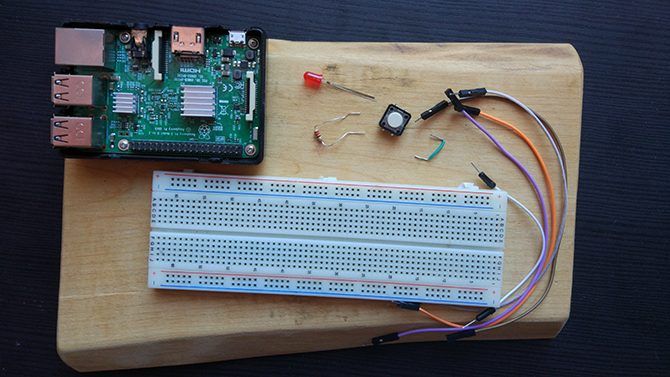
Parts Needed for Pi Button Tutorial

You’ll also need an SD card with the Raspbian operating system installed. The quickest way to do this is with the NOOBS (New Out Of the Box Software) image. Instructions on how to do this are available in this video:

Setting Up the Circuit

You will be using the GPIO pins of the Pi to make the circuit, and if you are unfamiliar with them our guide to Raspberry Pi GPIO pins will help. The circuit here is almost the same as in our previous Raspberry Pi LED project, with the addition of the button you’ll be using today.

Set up your circuit according to this diagram:
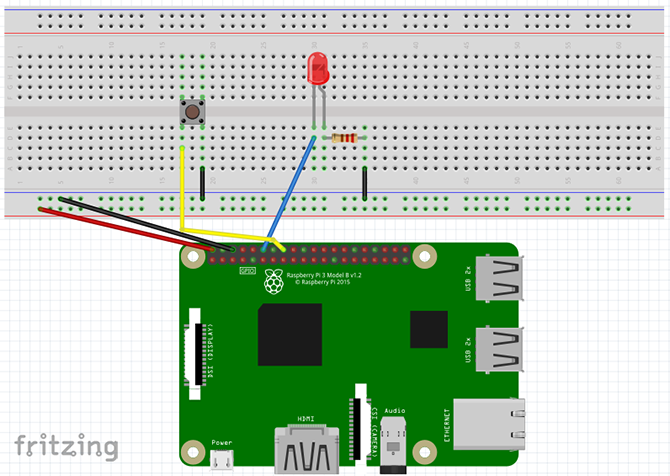
Fritzing Diagram for Pi Button Tutorial

  • The 5v and GND pins connect to the power rails of the breadboard.
  • Pin 12 (GPIO 18) connects to the positive leg of the LED.
  • One leg of the resistor attaches to the negative leg of the LED, and the other leg attaches to the ground rail of the breadboard.
  • Pin 16 (GPIO 23) attaches to one side of the button, the other side attaches to the ground rail of the breadboard.

Once it’s set up, here’s how it should look:
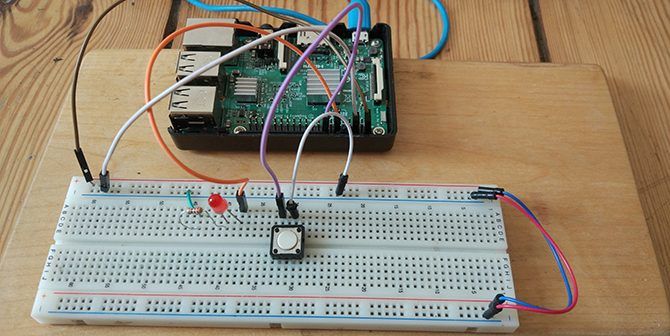
Raspberry Pi hooked up to a button and LED on a breadboard.

Check over your circuit to make sure it is correct, and then power up your Raspberry Pi.

Method 1: The RPi.GPIO Library

Once the Pi has booted, head to the menu and select Programming > Thonny Python IDE. A new Python script will open. If you are totally new to Python, it’s a great language for beginners and there are many great places to learn more about Python after you are done with this tutorial!
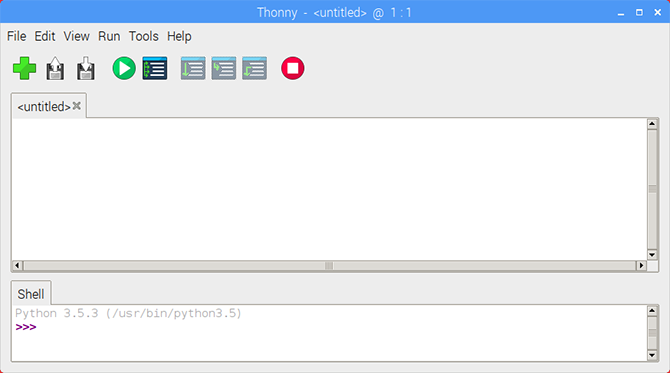
Thonny Python IDE

Start by importing the RPi.GPIO library, and setting the board mode.

import RPi.GPIO as GPIO

GPIO.setmode(GPIO.BOARD)

Now declare the variables for the LED and button pin numbers.

ledPin = 12
buttonPin = 16

Note that since we have the board mode set to BOARD we are using the pin numbers rather than the GPIO numbers. If that is confusing to you, a Raspberry Pi pinout chart can help clear it up.
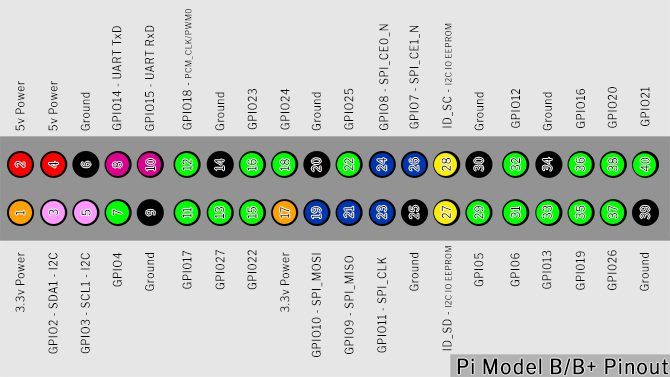
My Pi Pinout

Setting Up the Button

It’s time to set up the GPIO pins. Set the LED pin to output, and the button pin to input with a pull-up resistor

GPIO.setup(ledPin, GPIO.OUT)
GPIO.setup(buttonPin, GPIO.IN, pull_up_down=GPIO.PUD_UP)

The text after GPIO.IN refers to the internal pull-up resistor of the Raspberry Pi. You need to enable this to get a clean reading from the button. Since the button is going to the ground pin, we need a pull-up resistor to hold the input pin HIGH until you press it.

Before we go on, let’s look at pull-up and pull-down resistors.

Intermission: Pull Up/Pull Down Resistors

When you configure a GPIO pin to input, it reads that pin to determine its state. In this circuit, you need to read whether a pin is HIGH or LOW to trigger the LED when the button is pressed. This would be simple if those were the only states a pin can have, but unfortunately, there is a third state: FLOATING.

A floating pin has a value between high and low, causing the input to act unpredictably. Pull-up/pull-down resistors solve this.

Pull-Up Resistor Example Diagram

The above image is a simplified diagram of a button and a Raspberry Pi. The GPIO pin connects to ground through the button. The internal pull-up resistor attaches the GPIO pin to the internal Pi power supply. This current flows and the pin is safely pulled up to HIGH.

When you press the button, the GPIO pin connects directly to the ground pin, and the button reads low.

Pull-Down Resistor Example Diagram

Pull-down resistors are for when the switch is connected to the power pin. This time, the internal resistor attaches the GPIO pin to ground, holding in LOW until you press the button.

Pull-up and Pull-down resistor theory is confusing at first glance, but important knowledge to have when working with microcontrollers. For now, if you don’t quite understand it, don’t worry!

Let’s continue where we left off.

The Program Loop

Next, set up the program loop:

while True:
  buttonState = GPIO.input(buttonPin)
  if buttonState == False:
    GPIO.output(ledPin, GPIO.HIGH)
  else:
    GPIO.output(ledPin, GPIO.LOW)

The while True loop continually runs the code inside it until we end the program. Every time it loops it updates the buttonState by reading the input from the buttonPin. While the button is not being pressed, it stays HIGH.

Once the button is pressed, buttonState becomes LOW. This triggers the if statement, since False is the same as LOW, and the LED turns on. The else statement turns the LED off whenever the buttonPin is not False.

Save and Run Your Script

Save your script by clicking File > Save As and choosing a file name. You can run the sketch by clicking the green Play button in the Thonny toolbar.

Thonny Control Panel

Now press the button, and your LED should light up! Press the red Stop button at any time to stop the program

Push Button Testing Gif

If you are having difficulties, check your code and circuit setup thoroughly for errors and try again.

Method 2: GPIO Zero Library

The RPi.GPIO library is fantastic, but there is a new kid on the block. The GPIO Zero Library was created by Raspberry Pi community manager Ben Nuttall with the intention of making code simpler, and easier to read and write.

To test out the new library open up a new Thonny file, and import the library.

from gpiozero import LED, Button
from signal import pause

You’ll notice you didn’t import the whole library. Since you are only using an LED and button, you require only those modules in the script. We also import Pause from the signal library, which is a Python library for event management.

Setting up the pins is much easier with GPIO Zero:

led = LED(18)
button = Button(23)

Since the GPIO Zero library has modules for the LED and button, you do not need to set up inputs and outputs like before. You will notice that though the pins haven’t changed, the numbers here are different from above. That is because GPIO Zero only uses the GPIO pin numbers (also known as Broadcom or BCM numbers).

The rest of the script is only three lines:

button.when_pressed = led.on
button.when_released = led.off

pause()

The pause() call here simply stops the script from exiting when it reaches the bottom. The two-button events get triggered whenever the button is pressed and released. Save and run your script and you’ll see the same result as before!

Two Ways to Add a Button to Raspberry Pi

Out of the two ways to set up the button, the GPIO Zero method seems to be the easiest. It is still worth learning about the RPi.GPIO library as most beginner Raspberry Pi projects use it. As simple as this project is, the knowledge can be used for a number of things.

Using the GPIO pins is a great way to learn and invent your own devices, but its far from everything you can do with the Pi. Our unofficial guide to the Raspberry Pi is brimming with creative ideas and tutorials you can try out yourself!

Read the full article: 2 Ways to Add a Button to Your Raspberry Pi Project


Read Full Article

The Best Microsoft Office Templates for Teachers Going Back to School


teacher-templates

Templates are some of the handiest tools we can use for creating documents. If you need a template for an existing or new business or any personal tasks, templates help us get the document done faster and easier than starting from scratch.

So, to help those instructors, professors, and teachers who are looking for a way to speed up document creation throughout the school year, here’s a list of Microsoft Office templates just for you.

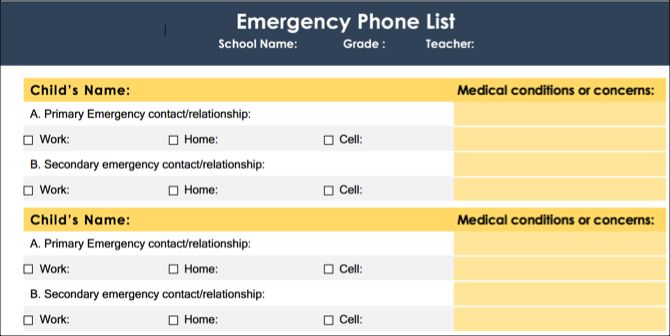
Emergency Contact List

Emergency Contact List

Get ready for a new school year with this emergency contact list template. You can list all students’ names, their primary and secondary contacts with three phone numbers each, and any medical conditions or concerns.

This is a great Microsoft Word template for keeping your students’ emergency contacts all in one spot.

Student Information Sheet

Student Info Template

For keeping track of each student’s details individually, this student information sheet template is ideal. Start with basics like the student’s parent or guardian contact information including physical addresses, phone numbers, and email addresses.

Then use the second page to list concerns. There are sections for medical and allergy details, academic issues, social concerns, and an area for anything outside those categories.

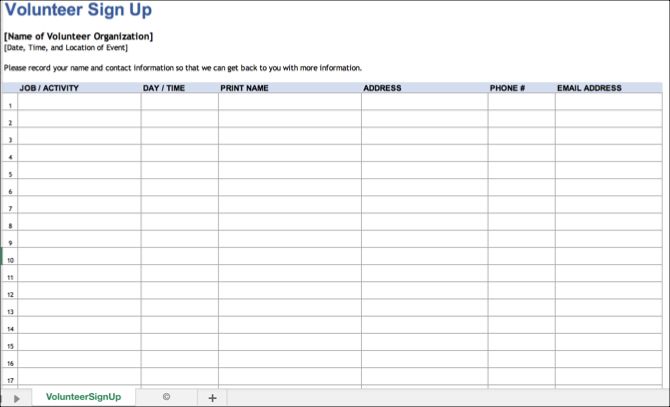
Volunteer Signup Sheet

Volunteer Signup Template

When you are looking for some help in the classroom, with donating supplies or planning field trips, you may need to turn to the parents and guardians. This volunteer signup sheet template for Microsoft Excel works well for most any type of activity or event.

Volunteers can add the job or activity, date and time, their name, address, phone number, and email address. You can use this sheet to keep track of those who are willing to lend a helping hand and contact them easily when it’s their turn.

Short Class Syllabus

Class Syllabus Template

If creating a short syllabus at the beginning of the school year is part of your tasks, then take a look at this Word template. Begin with the goals for the class. Then list the needs and resources including required background details, materials needed, print resources, and online resources.

You can add rules, policies, and grading scale details in the policies section, include additional information if needed, and finish it off with your contact information. For a brief syllabus for just one class, this template helps you get it done.

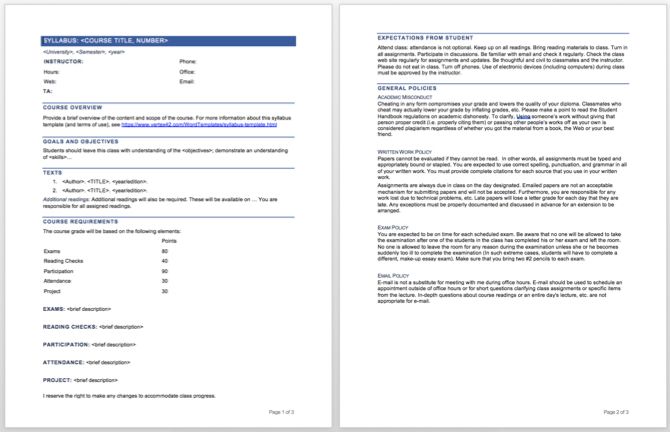
Longer Class Syllabus

Class Syllabus Template

Another nice class syllabus option is this next Word template. It includes the same basic information as the one above, just formatted a bit differently. The instructor’s contact information is at the top, followed by a course overview. Next, you’ll see sections for the class goals and necessary materials.

The course requirements area is lengthier in that it breaks down the items for more detail. You can list your point system for exams and assignments and provide descriptions for participation and attendance. The end of the syllabus template has spots for student expectations and general policies that include rules for written work, exams, and email.

This template is perfect if you want to expand your syllabus and need to those extra sections.

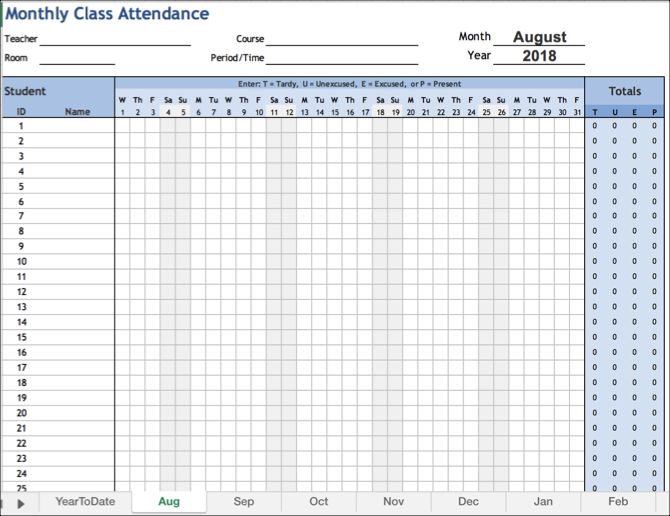
Monthly Attendance Workbook

Monthly Attendance Workbook

Get ready to keep track of who shows up for class and who doesn’t with an attendance sheet template. This one for Excel is useful because it includes a tab for each month. Then you’ll see a tab for year-to-date attendance which is automatically populated from the other tabs.

You can use both student IDs and names and have room for 30 students. Instructions for using the template are on the first tab on the year-to-date overview.

Weekly Attendance Sheet

Weekly Attendance Template

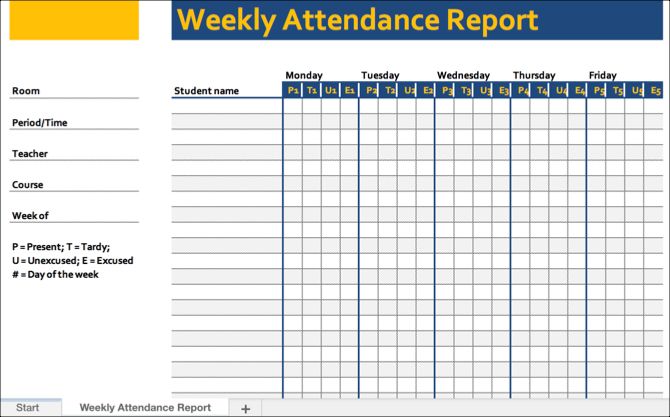
If you prefer a weekly attendance sheet, then this next template is for you. For Excel, the template has spots for a room number, period, teacher, course, and week of for you to pop right in.

List out your students’ names and then follow the simple key for their attendance status. You have present, tardy, unexcused, and excused listed across the top. So, you can just enter a mark for each student’s attendance option for that week. This also makes glancing at the overall attendance for the week easy.

Basic Individual Lesson Plan

Basic Lesson Plan

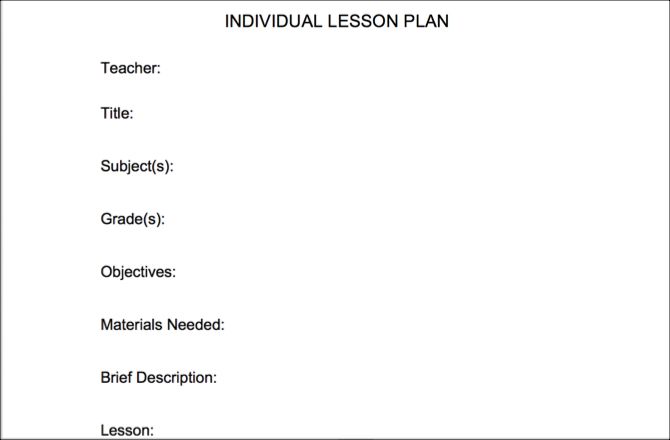
For a very basic, simple lesson plan, this template works. Fill out the sections starting with teacher, title, subject, and grade. Then move onto objectives, materials needed, a brief description, and lesson. And finish it off with the assessment, source, and standards sections.

If you want a short and sweet lesson plan template, this one for Word is a good option.

Organized Lesson Plan

Organized Lesson Plan

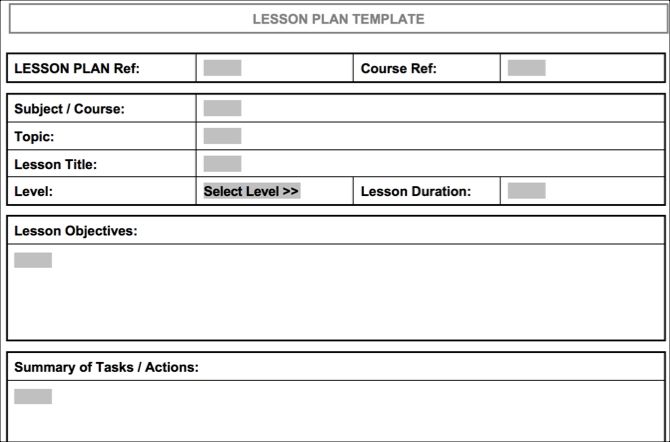
If you prefer a lengthier lesson plan with a clear structure, then check out this organized lesson plan template for Word. Using a table format, you can enter a code for the lesson plan and course reference. Then input the subject or course, topic, lesson title, level, and lesson duration.

The next sections of the table are for objectives, a summary of tasks, materials or equipment, references, and take-home tasks. So, if a more detailed lesson plan is what you seek, then this is the one for you.

Weekly Lesson Plan

Weekly Lesson Plan

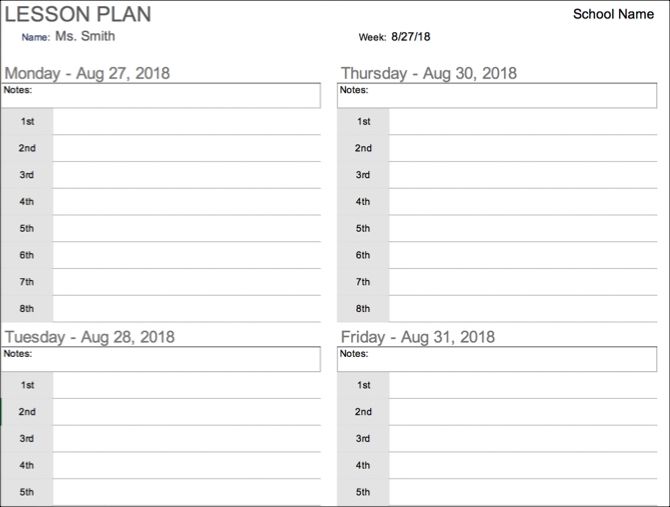
This next lesson plan template isn’t for individual classes but for weekly planning instead. You can quickly add the lessons you are planning for the first through the eighth periods of the day as needed.

When you enter the date for the week, the days and dates in the plan automatically adjust. There is a place at the top of each day for notes and a larger place at the end as well. If you use a weekly plan for lessons, then you’ll like this template for Excel.

And, if you’re in the market for an actual calendar, take a look at these calendar templates for Microsoft Office.

Parent / Teacher Conference Form

Parent Teacher Conference

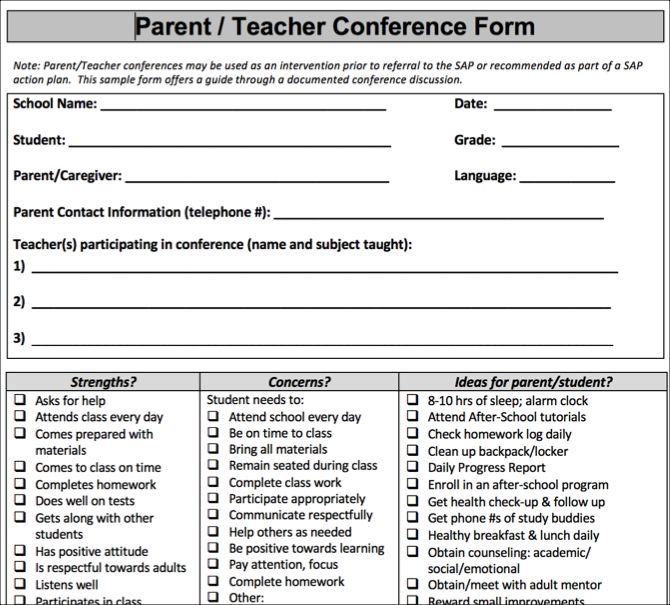
If you teach elementary or middle school, then you likely set up parent / teacher conferences at least once during the school year. This Word template can help you get a jump start on the planning for those important meetings.

The top of the form has all the basics with the school, student, and parent or guardian names. It’s the bottom part of the form that makes things easier. There are three sections for strengths, concerns, and ideas. You can mark the boxes for the items that apply in each section, adds notes to each, and include more comments at the bottom.

Meeting with each student’s caregiver is quite a task, but this template makes your preparation easier.

Conference Record

Conference Record

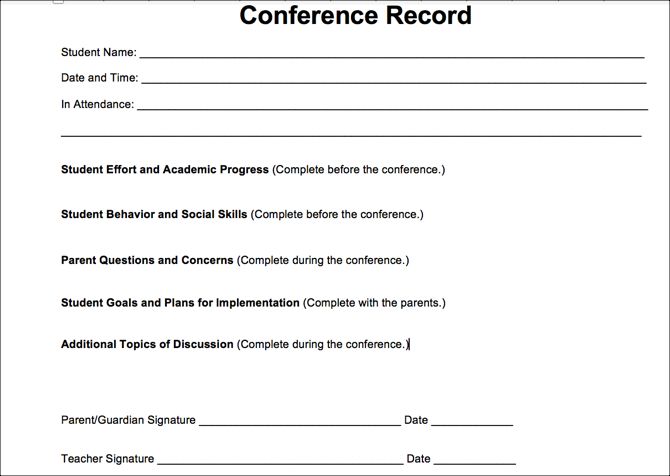
If you would like something less formal for your parent/teacher conferences, then this Word template might be right up your alley. Less structured, you still have places for the basic details at the top.

Then you can write more descriptive text for each of the sections rather than just marking checkboxes. Fill out the effort and progress, behavior and social skills, and goals and plans. There are spots for parent questions and concerns as well as additional topics.

This type of template lets you fill out what’s needed before you meet and then jot down more details during the conference.

These Office Templates for Teachers Earn an A+

Concentrate on the class, the lessons, and the instruction you give, rather than the documentation. These handy templates for Microsoft Office should help and we also have several educational templates for PowerPoint for you.

And if you want to help your class even more, we have a list of useful templates for students you can share with them.

Image Credit: Syda_Productions/Depositphotos

Read the full article: The Best Microsoft Office Templates for Teachers Going Back to School


Read Full Article

29 August 2018

Begging the Question


Begging the Question

What Is SIP? macOS System Integrity Protection Explained


macos-sip

macOS changed significantly with the release of 10.11 El Capitan and the introduction of System Integrity Protection, or SIP for short. It’s a security measure that had some pretty big implications for the operating system back in 2015.

These days, most of us have adapted to a post-SIP macOS. But you might still wonder what it is, what exactly it does, and why you’re best off leaving it alone.

So let’s take a look at SIP, what purpose it serves, and why it came about in the first place.

What Is System Integrity Protection?

Put simply, System Integrity Protection is a security measure Apple introduced to protect certain parts of your macOS installation and core processes, and to vet third-party kernel extensions. It actively protects parts of your system from modification, and blocks installation of insecure extensions.

While you have SIP enabled, certain areas are entirely off-limits in the name of (unsurprisingly) protecting the integrity of your system. You can gain certain privileges via Apple’s developer program, allowing signed software to take actions like installing drivers.

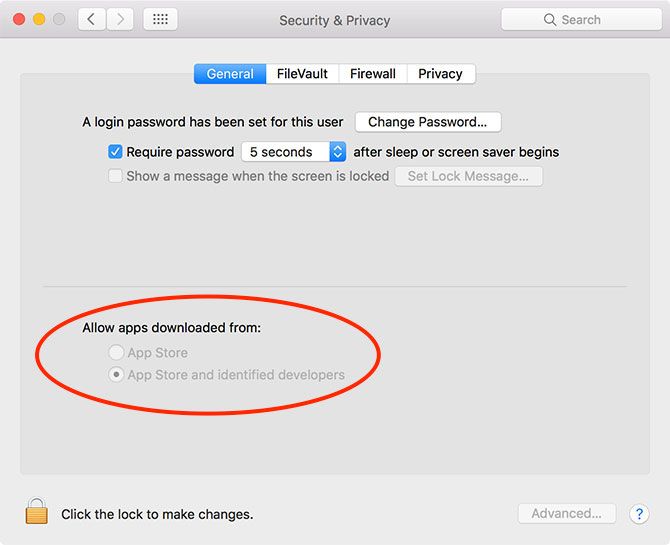
macOS Gatekeeper

SIP is invisible, and works entirely in the background. It’s not the same as Gatekeeper, Apple’s other security feature that blocks installation of unsigned third-party software. But it’s certainly part of the security-conscious trend that saw Apple introduce the technology, previously known as File Quarantine.

Why Is System Integrity Protection Necessary?

SIP protects your Mac from unwanted meddling. It’s a security feature that appeared in the face of an increasing macOS malware threat. Gone are the days of Apple’s “I’m a PC” marketing slogans that claim the system is virtually bulletproof.

Mac malware exists; there have been many documented cases from simple JavaScript “ransomware” to pervasive malware that attempts to steal your admin password. SIP and Gatekeeper only go so far in protecting against these threats. Mac dangers are a real issue, particularly when it comes to browser technologies like the Java plug-in and Adobe Flash.

Apple noted that much of the threat to macOS (then OS X) came from the fact that most Apple computers use a single user account with admin privileges. Having admin (root) access to your computer provides autonomy, but prior to SIP, this led to some users unwittingly approving the installation of malware.

In short: your Mac isn’t safe, even from yourself. By limiting what root access can do, Apple effectively builds a barrier between you and the most sensitive parts of your system. The side effect of this approach is that you no longer have complete control, particularly with tweaking appearance and application behavior.

This tightening of Apple’s grip over macOS has led some users to complain that the platform is following too closely in the footsteps of Apple’s mobile platform, iOS. On the upside, iOS is the most secure mobile platform on the market, so the approach has some merit.

Which Parts of macOS Does SIP Protect?

SIP affects directories, processes, and kernel extensions. That means you cannot make changes to the following directories:

  • /System
  • /usr
  • /bin
  • /sbin

Most of these directories aren’t even visible, so the protection is mainly aimed at preventing third-party programs from writing to these areas. This also includes the ability to make changes to core system files, which means less customization than pre-SIP macOS.

Users and third-party apps can still make changes to the following directories:

  • /Applications
  • /Library
  • /usr/local

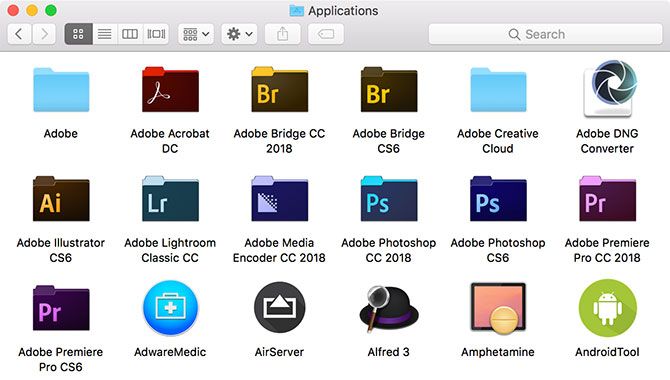
macOS Applications

SIP also protects most applications that come installed with macOS from interference too.

Finally, third-party kernel extensions (including drivers) must now be signed with an Apple Developer ID. Your Mac won’t boot if unsigned kernel extensions are present.

How Does SIP Affect Mac Software?

In the few years since SIP was introduced, developers and users alike have adjusted to the lockdown of certain system components. Many developers rewrote apps from the ground up to work alongside SIP. Lots more have since launched that already accommodate Apple’s restrictions.

All apps in the Mac App Store must work with SIP in order to gain Apple’s approval. The vast majority of third-party apps work just fine too. There are a few exceptions like Winclone, which still requires the disabling (and then re-enabling) of SIP in order to perform its function as a Boot Camp cloning tool.

Install or Buy App Mac App Store

While there are plenty of small handy Mac tweaks for fixing just about everything still available, deep system tweaks are mostly no longer viable. For example, theming apps designed to change the colors, look, and feel of Finder relied on code injection, which you can’t do anymore. These apps are no longer viable without building something new from scratch.

Ultimately, though, software is not affected unless the developer specifically points it out. If that’s the case, it might be worth looking for a different app to perform the same task. SIP exists to protect you. For the vast majority of users who see macOS as a functional base with which to get work done, it’s well worth living within these constraints.

How Do You Disable SIP on macOS?

If you really want to disable SIP, you can do so by rebooting into your Mac’s recovery partition (hold Cmd + R at startup), then using the csrutil command line utility. Check out our full guide to disabling SIP, but we’d recommend you re-enable it when you’re done tinkering.

It’s also worth pointing out that your computer will re-enable SIP every time you update your OS, or upgrade to a new version of macOS. You might as well leave it on and work around it, since it’s here to stay.

System Integrity, Protected

Apple’s efforts to secure macOS have led to it enjoying an excellent security record. Built on a Unix base, macOS provides signature Apple user-friendliness and approach to user privacy. It’s completed with a rock-solid foundation and a focus on security.

Since new software is built with SIP in mind, only old software, deep system-level tweaks, and the odd niche third-party app will ever require you disable it.

In the end, it’s a security feature, and one that follows Apple’s design sensibilities for the macOS platform. Since the use of Apple’s OS is one of the primary motivators for buying a Mac, it doesn’t make much sense to disable a feature like this.

Read the full article: What Is SIP? macOS System Integrity Protection Explained


Read Full Article

Diver attacked by Elon Musk as “pedo guy” is prepping a libel suit


A British cave diving expert who helped save the young Thai football team that got trapped in caves this summer is preparing a legal action against Elon Musk for making “false and defamatory statements”, TechCrunch has confirmed.

BuzzFeed reported the development earlier, after obtaining a letter sent to Musk’s home on August 6 by a firm representing the diver, Vernon Unsworth.

The background here is that in a highly offensive and extremely bizarre episode last month — even for the famously ‘loose cannon online’ Musk — the Tesla and SpaceX CEO took to Twitter to attack Unsworth, branding him a “pedo guy”.

The bizarre attack came after Unsworth had given a critical interview to the media saying the mini sub which Musk had designed and brought to Thailand “had absolutely no chance of working”. Unsworth ended an interview segment by suggesting Musk should “stick his submarine where it hurts” — a tongue-in-cheek phrase which apparently triggered Musk’s Twitter outburst.

Facing a backlash over his comments about a man who had successfully helped rescue the boys, Musk subsequently deleted the offensive tweets and quasi-apologized for slurring Unsworth in a further set of tweets, on July 18, though these were only posted within a Twitter thread, rather than being broadcast to his ~22.4M Twitter followers.

At the time Musk said Unsworth’s comment had angered him, and that had made him lash out, but he also added: “Nonetheless, his actions against me do not justify my actions against him, and for that I apologize to Mr. Unsworth and to the companies I represent as leader. The fault is mine and mine alone.”

The public element of the episode might have ended there but earlier this week Musk dredged it all up again by repeating his offensive insinuation against Unsworth during a debate with ex-TechCrunch journalist Drew Olanoff — who had brought up the “pedo guy” attack as an example of Musk himself telling untruths.

Yet instead of reiterating his apology to Unsworth, Musk doubled down on his original offensive attack — writing: “You don’t think it’s strange he hasn’t sued me? He was offered free legal services.”

To which Olanoff replied: “What I think is especially strange here is that you’re wondering why he hasn’t sued you while the rest of us are wondering why you did something so egregious that he could sue you for in the first place.”

We contacted the law firm for confirmation that it is representing Mr Unsworth in a defamation suit against Musk. Partner Lin Wood was unavailable to speak about the matter when we called but he confirmed via email that the firm is representing Unsworth in a defamation suit against Musk, and that it is preparing a legal action.

In the letter sent by the firm to Musk’s home earlier this month Wood informs Musk he has been retained by Unsworth on account of the defamatory statements made by Musk on Twitter alleging that he is a pedophile.

Wood also writes that he is preparing a civil complaint of libel and invites Musk to contact him “in an attempt to avoid litigation and to see the public record corrected”.

It’s not clear whether or not Musk had seen the letter at the time of his tweets to Olanoff.

We’ve reached out to Musk (via Twitter) for comment on the legal action and to ask whether he will be withdrawing his repeat allegation against Unsworth. We’ll update this story with any response.

The Tesla CEO’s erratic behavior online has caused other high profile headaches for his companies in recent weeks, after he tweeted about taking Tesla private — triggering wild swings in the stock price and scrutiny (and potential problems) from the Securities and Exchange Commission, only for the idea to be nixed weeks later.

The associated risks for shareholders in a public company whose CEO uses Twitter as a weapon to indulge personal spats and feuds — and to spitball major business decisions — without, apparently, any thought for the legal and reputational consequences for him or his companies, are hard to quantify but equally difficult to deny.


Read Full Article

Find the Perfect InDesign Resume Template to Showcase Your Skills

Sonos releases new speaker Amp, partners with Sonance for in-wall speakers


Sonos is doubling down on the custom in-home audio market with new products and partnerships. The company today announced a new version of the Sonos Amp and a partnership with Sonance that will result in three architectural speakers — in-wall, in-ceiling and outdoor — that Sonos says will gain additional functionality when paired with a Sonos system.

Sonos is also announcing upcoming Control APIs that the company says will make it easier to integrate Sonos into the ever-evolving smart home. This jibes with Sonos’ long-standing approach of working with other platforms to offer its customers as many services as possible.


The new Amp allows owners to use traditional home audio speakers with a Sonos system. Connect a turntable or stream media with just the Amp and power a set of bookshelf speakers. According to the spec sheet, the Amp has enough power to push most high-end bookshelf speakers.

The Amp replaces the Connect:Amp. The new version is more powerful, works with more platforms and is more expensive at $599 rather than $499. This new version outputs 125 watts per channel at 8 ohms; it can power four speakers instead of two. The additional power makes the Amp more versatile than its predecessor, too. Sonos says the Amp can be used to add stereo sound to a TV (thanks in part to HDMI Arc support) or add wireless rears to a Sonos theater setup. Or, two Amps can be used to add a complete surround sound system. Multiple Amp units can be stacked or mounted in a rack.

The Amp works with AirPlay 2 and with Alexa when used in conjunction with an Amazon Alexa-enabled Sonos device like a Sonos One or Beam.

With a product like the Amp, Sonos has a new offering for those customers looking to integrate the convenient Sonos line into their high-end home theater setup. That’s a serious market, too, and the company’s new partnership with Sonance shows Sonos is committed to addressing the home audio enthusiast while building products to compete with Apple and Amazon.

Together, they will produce in-wall speakers that when used with a Sonos Amp will offer additional functionality. The company stopped short of detailing the added functionality. These speakers are set for an early 2019 release.

This is Sonos’ first large announcement after going public on August 2.


Read Full Article

Google steps back from running the Kubernetes infrastructure


Google today announced that it is providing the Cloud Native Computing Foundation (CNCF) with $9 million in Google Cloud credits to help further its work on the Kubernetes container orchestrator and that it is handing over operational control of the project to the community. These credits will be split over three years and are meant to cover the infrastructure costs of building, testing and distributing the Kubernetes software.

Why does this matter? Until now, Google hosted virtually all the cloud resources that supported the project like its CI/CD testing infrastructure, container downloads and DNS services on its cloud. But Google is now taking a step back. With the Kubernetes community reaching a state of maturity, Google is transferring all of this to the community.

Between the testing infrastructure and hosting container downloads, the Kubernetes project regularly runs over 150,000 containers on 5,000 virtual machines, so the cost of running these systems quickly adds up. The Kubernetes container registry served almost 130 million downloads since the launch of the project.

It’s also worth noting that the CNCF now includes a wide range of members that typically compete with each other. We’re talking Alibaba Cloud, AWS, Microsoft Azure, Google Cloud, IBM Cloud, Oracle, SAP and VMware, for example. All of these profit from the work of the CNCF and the Kubernetes community. Google doesn’t say so outright, but it’s fair to assume that it wanted others to shoulder some of the burdens of running the Kubernetes infrastructure, too. Similarly, some of the members of the community surely didn’t want to be so closely tied to Google’s infrastructure either.

“By sharing the operational responsibilities for Kubernetes with contributors to the project, we look forward to seeing the new ideas and efficiencies that all Kubernetes contributors bring to the project operations,” Google Kubernetes Engine product manager William Deniss writes in today’s announcement. He also notes that a number of Google’s will still be involved in running the Kubernetes infrastructure.

“Google’s significant financial donation to the Kubernetes community will help ensure that the project’s constant pace of innovation and broad adoption continue unabated,” said Dan Kohn, the executive director of the CNCF. “We’re thrilled to see Google Cloud transfer management of the Kubernetes testing and infrastructure projects into contributors’ hands – making the project not just open source, but openly managed, by an open community.”

It’s unclear whether the project plans to take some of the Google-hosted infrastructure and move it to another cloud, but it could definitely do so — and other cloud providers could step up and offer similar credits, too.


Read Full Article

10 Relaxing Netflix Shows to Watch When You’re Stressed


relaxing-netflix

What do Breaking Bad, Hannibal, and The Americans have in common? Sure, they’re all top-quality shows deserving of all awards that came their way, but they’re also dark, heavy, and difficult to watch when you’re stressed out or have a lot on your mind.

Sometimes you just want to come home, plop down on the couch, and watch a palate cleansing-type of show to help you unwind. For that, you’ll want to check out these relaxing Netflix shows.

NB: You won’t find any traditional sitcoms or standup comedies on this list. We’re delving into the more unusual corners of Netflix in search of real relaxation. If you believe laughter is the best medicine then see our articles on the best Netflix sitcoms, overlooked Netflix sitcoms, and the best Netflix standup specials.

1. Comedians in Cars Getting Coffee

Imagine a talk show hosted by comedian Jerry Seinfeld where every guest is one of his comedian friends—and takes place inside a cafe as well as during the car ride there. No scripts. No self-promotion. It’s entirely authentic, genuine, and absolutely hilarious.

Just look at the name of the show, it says it all: Comedians in Cars Getting Coffee. The episodes are about 15 to 20 minutes long, and each one features a vintage car picked by Seinfeld himself to match the personality of the episode’s guest.

It’s the ultimate show for when you want to shut off your brain and just have a laugh.

Watch Comedians in Cars Getting Coffee on Netflix

2. Bob Ross: Beauty Is Everywhere

Bob Ross: Beauty Is Everywhere is basically the same thing as The Joy of Painting, but the episodes are taken from the 1991-1992 seasons of the show, and not all of the episodes are there.

But who cares? Nothing beats the feeling of watching Bob Ross paint up another scenic masterpiece, complete with his soft voice and gentle encouragements. Looking for a show you can fall asleep to? Look no further.

Watch Bob Ross: Beauty Is Everywhere on Netflix

3. Chef’s Table

Have you seen Jiro Dreams of Sushi? If you did and you liked it, then you really should watch Chef’s Table. Directed by the same person (David Gelb), Chef’s Table is one of the best Netflix documentaries for foodies.

Every episode focuses on the life and cuisine of a world-class Michelin-starred chef, and brings out the human element that’s often missing in food documentaries.

But if that sounds boring, think again. Not only is Chef’s Table one of the most beautifully shot shows, period, it’s deeply engrossing and even inspirational. The hours will melt away as you watch. There’s nothing quite like it.

Watch Chef’s Table on Netflix
Watch Chef’s Table France on Netflix

4. Explained

While Explained is a Netflix show, it feels more suited for a YouTube series in that every episode is about 15 minutes long, educational, entertaining, and entirely self-contained to a single per-episode topic.

As of this writing, there are Explained episodes for: cryptocurrency, K-pop, esports, the stock market, cricket, the longevity of life, and more. It’s enough to give you a general understanding of a topic’s history and importance, and it’s presented in a mostly unbiased way that’s engaging—and surprisingly relaxing.

Watch Explained on Netflix

5. The Great British Baking Show

Also known as The Great British Bake Off, this show is perhaps the most wholesome reality TV competition you’ll ever watch (rivaled only by MasterChef Junior).

The Great British Baking Show has amateur bakers face off in a series of elimination rounds until there’s a winner. But the best part is that it’s devoid of the hardcore competitive spirit that props up most American reality shows. It oozes with kindness, humor, and great food. What’s not to love?

Watch The Great British Baking Show on Netflix
Watch The Great British Baking Show: Masterclass on Netflix

6. Terrace House

Have you ever wanted to watch Big Brother or Real World but without any of the fabricated drama or scripted narratives? Well, that’s Terrace House for you.

Six strangers come together to live in a shared house for a month, with hidden cameras everywhere. But this is a Japanese reality show, and there’s a different culture and atmosphere than what you normally see in American reality TV. It’s soft, it’s polite, and it’s a joy to watch.

The original Terrace House (Boys & Girls Next Door) ran for three years in Japan, but Netflix revived it in 2015 with Boys & Girls in the City. This was followed by the sequels Aloha State and Opening New Doors. Only the Netflix-produced ones are available on Netflix.

Watch Terrace House: Boys & Girls in the City on Netflix
Watch Terrace House: Aloha State on Netflix
Watch Terrace House: Opening New Doors on Netflix

7. Planet Earth

Planet Earth is the third highest ranked show on IMDb. The first show on that list? Planet Earth II.

These two shows comprise the most incredible nature documentary experience currently available. Using state-of-the-art technology, they capture some of the most secret moments in all of wildlife. In the case of Planet Earth II, it’s all captured in 4K.

Each episode took years to produce, and you can tell. There’s a reason why Planet Earth sits atop our list of the best BBC documentaries on Netflix.

Watch Planet Earth on Netflix
Watch Planet Earth II on Netflix

8. Samurai Gourmet

Samurai Gourmet is a lighthearted show that follows a newly retired Japanese man who roams his neighborhood and explores the rich culinary offerings therein.

In a word, Samurai Gourmet is refreshing. Few shows are as easy to watch as this one, and it demands nothing of you.

Watch Samurai Gourmet on Netflix

9. Aggretsuko

Aggretsuko is a Japanese anime, but don’t let that turn you away. It’s ultra cute, but it’s not a kid’s show. The cuteness contrasts against the main character’s mundane and frustrating office life, as well as her secret love of death metal karaoke.

The episodes are short at just 15 minutes, so you can pop them on whenever you—like the main character—feel like you need to blow off some steam.

Watch Aggretsuko on Netflix

10. Curious & Unusual Deaths

This show is a bit of an oddball on this list, but I back it wholeheartedly.

In each episode, Curious & Unusual Deaths explores three different unusual deaths that actually happened in the past, and investigates how these strange deaths happened. The deaths are often thematically related (e.g. Trapped to Death).

Despite the morbid subject, Curious & Unusual Deaths is downright fun to watch because the deaths are just so weird. Not to mention how corny the narration is. Every death is wrapped up with a groan-inducing pun, and that just adds to the experience.

Watch Curious & Unusual Deaths on Netflix

Relax Even More With Netflix’s Slow TV

The “slow TV” fad seems to have come and gone, but you can still find some beautiful slow TV shows on Netflix. Notable titles include Moving Art, Fireplace for Your Home, and Train Ride Bergen to Oslo.

Never heard of slow TV before? To cut a long story short, it’s a kind of realism where the footage is played back in real-time as it was recorded. Using the example above, watching a recording of a fireplace counts as slow TV. It’s devoid of any drama, making it perfect for when you just want to zone out to get away from the stresses of everyday life.

Learn more in our quick guide to slow TV.

Read the full article: 10 Relaxing Netflix Shows to Watch When You’re Stressed


Read Full Article

Facebook has restored the cross-posted tweets that were removed from users’ profiles


Facebook says it has corrected the issue of users’ deleted posts, which had affected those who had previously cross-posted their Tweets to their Facebook profile – a feature that’s no longer supported. Earlier this month, Facebook locked down its API to prevent third-party apps from being able to post to profiles as the logged-in user, and Twitter was one of those apps impacted by the change.

However, the changes to Facebook’s API would not have mass deleted all of users’ cross-posted Tweets. It should have only prevented Twitter users from continuing to automatically post from Twitter to their Facebook profile or business page.

But Twitter, for whatever reason – an accident, one would hope – requested its Facebook app be deleted. This resulted in removals of all the content that had been cross-posted by Twitter to Facebook being also deleted from users’ profiles.

Facebook was in touch with Twitter since then, and received permission to have the app re-enabled. (Though it took longer than expected – Twitter was made aware of the problem early in the evening on Tuesday but it wasn’t until the wee hours of the morning on Wednesday that Facebook confirmed it was restoring the content – which means they received permission from Twitter to do so. Obviously, Facebook can’t just turn on a third-party app again after the developer says to take it down – it had to ask. Twitter, we understand, didn’t give Facebook immediate permission to fix the problem. Maybe it’s still mad about the whole cross-posting thing being turned off?)

While, technically speaking, the error is on Twitter’s side here, Facebook probably should have had some kind of warning in place to alert the app developers – whomever they may be – of the consequences of their decisions. That is, deleting their app would also delete all the content shared through it over the years.

Many Twitter users had heavily relied on the cross-posting feature to maintain their presence on Facebook and continue their discussions with a new audience. The deletions meant they lost years’ worth of Facebook posts and conversations, in many cases.

Facebook says it has restored all the removed content, a spokesperson told TechCrunch via email around 1:20 AM ET on Wednesday. All impacted users should be able to see their cross-posts tweets and their discussions again.


Read Full Article

Sinemia takes aim at MoviePass again, with new $9.99 plan


Sinemia continues its campaign to take advantage of MoviePass’ high-profile struggles and win over the better-known movie ticket subscription service’s customers. Today, it announced a new plan priced at $9.99 per month.

MoviePass, after all, recently announced that it would be keeping its monthly subscription price at $9.95, but limiting subscribers to three movies per month (with discounts on additional tickets).

The new Sinemia tier also includes three tickets each month, but it has the additional benefit of allowing subscribers to buy tickets for any 2D, non-IMAX screen, and to buy those tickets in advance. MoviePass, in contrast, is rotating the available movies each day, and it requires subscribers to buy their tickets at the theater, on the same day as the screening.

Just a couple weeks ago, Sinemia announced a refer-a-friend program that rewards subscribers who convince their friends to leave other subscription services. The company makes no secret of the fact that it’s targeting MoviePass in particular — in today’s announcement, it describes the new plan as one that “matches MoviePass’ latest.”

Sinemia offers a variety of other options, ranging from $3.99 per month for one ticket, to $14.99 for three tickets, with IMAX and 3D access.


Read Full Article

Facebook Watch is launching worldwide


Facebook Watch, the social network’s home to original video content and answer to YouTube, is now becoming available worldwide. The Watch tab had first launched last August, only in the U.S., and now touts over 50 million monthly viewers who watch at least a minute of video within Watch. Since the beginning of the year, total time spent viewing videos in Watch is up by 14x, says Facebook.

The company has continued to add more social features to Watch over the past year, including participatory viewing experiences like Watch Parties, Premiers, and those with audience involvement, like an HQ Trivia competitor, Confetti, built on the new gameshow platform.

Watch also offers basic tools for discovery, saving videos for later viewing, and lets users customize a feed of videos from Facebook Pages they follow.

Along with international availability, Facebook is introducing “Ad Breaks” to more publishers. These can be either mid-roll or pre-roll ads, or images below the video. Publishers can either insert the ads themselves or use Facebook’s automated ad insertion features. Facebook says 70+ percent of mid-roll ads are viewed to completion.

Ad Breaks are now offered to creators who publish 3-minute videos that generate over 30,000 1-minute views in total over the past 2 months; who have 10,000 Facebook followers or more; who are in a supported country; and who meet other eligibility criteria.

Supported countries today include the U.S., UK, Ireland, Australia, and New Zealand. Next month, that list will expand to include Argentina, Belgium, Bolivia, Chile, Colombia, Denmark, The Dominican Republic, Ecuador, El Salvador, France, Germany, Guatemala, Honduras, Mexico, Netherlands, Norway, Peru, Portugal, Spain, Sweden, and Thailand, supporting English content and other local languages. More countries and languages will then follow.

Also new today is the global launch of Creator Studio, where Pages can manage their entire content library and business. This includes the ability to search across their library to view post-level details and insights, as well as manage interactions across Pages, Facebook Messages, comments, and Instagram. Other tools here focus on using Ad Breaks, viewing monetization and payments, and publishing the videos.

The Creator Studio is also seeing the addition of a new metric on audience retention added now, allowing publishers to better program their content.

YouTube, too, also this year launched an updated version of its Creator Studio, now called YouTube Studio, offering similar analytics for its own network.

Facebook isn’t the only one making a play for YouTube’s creators – Amazon’s Twitch has been offering deals to woo creators to its game-streaming site, a recent report claimed.

“Our goal is to provide publishers and creators with the tools they need to build a business on Facebook,” the company said in an announcement. “Facebook’s Fostering an active, engaged community and sharing longer content that viewers seek out and regularly come back to are key to finding success,” it noted.


Read Full Article

9 Laptop Docking Stations for Turning a Notebook Into a Desktop

Apple updates AirPort Express firmware with AirPlay 2 support


Surprise, the AirPort Express isn’t dead! While Apple stopped selling AirPort products back in April, the company is still updating the firmware of the once beloved AirPort Express.

This firmware update is quite significant as it adds support for AirPlay 2 and the Home app. In other words, you can now plug speakers to a dusty AirPort Express and turn them into wireless speakers for your home sound system.

The AirPort Express was a pretty basic home router. It hasn’t been updated since 2012, which means that it’s nowhere near as performant as today’s cheap routers. It only supports 802.11n while everybody has moved on to 802.11ac.

Its Ethernet ports are limited to 100 Mbps. So if you have fiber internet, the AirPort Express is not a good solution as it caps your internet connection to 100 Mbps.

But the AirPort Express also has an audio jack — something that you can’t find in many Apple products these days. Today’s update makes this audio jack relevant again, as it’s a cheap way to get started with AirPlay 2.

After updating the device with the AirPort Utility app on your Mac or iOS device, you can launch the Home app and add the router as a new Home accessory. After that, you’ll find the AirPort Express in your AirPlay speaker list.

Apple recently released AirPlay 2, an update to its audio and video protocol. With AirPlay 2, you can stream music from your Apple devices to multiple speakers at once. On your phone, you can control the volume of each speaker individually and play the same song across your home.

While Sonos, Bose and other speaker manufacturers are updating their devices to support AirPlay 2, chances are many devices won’t get an update. The AirPort Express update can help you go through this transition.


Read Full Article

10 Free Photoshop Brushes and How to Install Them


photoshop-brushes-install

Digital artists need Adobe Photoshop brushes. And brushes are an absolute necessity for photographers and UX designers too. They add that extra shine to any project in Photoshop. The best Photoshop brushes cost money. But thanks to the open community, you can find plenty of high-resolution brushes that are free as well.

It isn’t too tough to find a free brush when you have community sites like DeviantArt, Brusheezy, and ArtStation around. But we decided to save you a search by recommending 10 Adobe Photoshop brush sets that can be downloaded for free.

1. Kyle T. Webster

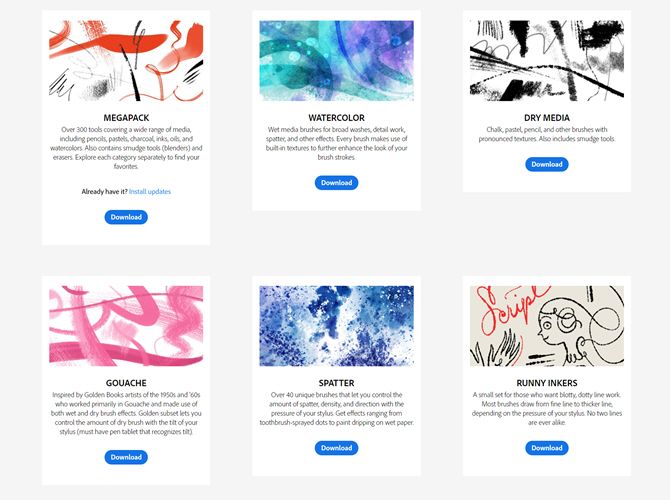
Photoshop brushes from Kyle T. Webster

A voluminous set of more than 1000 brushes is one of the new Adobe Photoshop CC 2018 features you shouldn’t miss. When you go to the download page on Adobe.com, you will learn a bit more about the award-winning illustrator and the world’s topmost authority on Photoshop brushes. There are 15 free Photoshop brush sets on offer.

Take your pick from watercolor, dry media, spatter, runny inkers, or just the megapack with 300 brushes to begin with. It’s available to Creative Cloud members for free.

2. Real Markers

Photoshop brushes -- 12 Markers

If you are into sketchnotes or just sketching, then this free 12 brush pack could be for you. Eilert Janben is a freelance illustrator from Germany who uses his own brushes for storyboarding. The entire set boasts 300 brushes but will cost you $9. So why not take a peek with the twelve free brushes first.

3. Abstract Bokeh Brushes

24 Abstract Bokeh Brushes

Bokeh is those out-of-focus orbs of light that make close-up photos pop. The best way to create bokeh is with the lens itself. The second-best way is creative trickery with Photoshop. Brusheezy is a site well known for its Photoshop brushes and PSD resources. This single find has 24 high-resolution brushes in sizes up to 5000px.

4. Eyeshadow Photoshop and GIMP Brushes

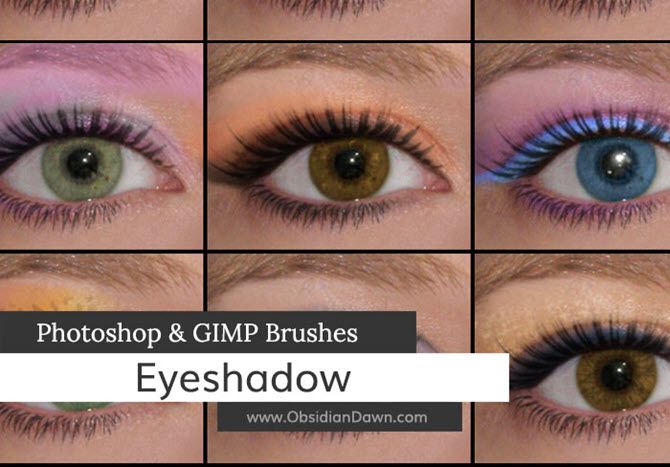
Adobe Photoshop Eyeshadow Brush

After Brusheezy, make a stop at DeviantArt to fill your cart with a variety of Photoshop resources. This unique set of eyeshadow brushes for Photoshop and GIMP is just a small part of it. The 52 brush set should fit right into your palette if you are interested in make-up mockups and other eye effects on portrait photos.

The description says—it includes various glittery effects, patterned eye makeup, and face painting styled eye accents (a butterfly and a swirl). Maybe, you can pair it with these eyelash brushes made by the same developer.

5. Tech Photoshop Brushes

Adobe Photoshop Tech Brush Set

We are a tech site, so why avoid these cool Photoshop and GIMP brushes that are made of tech shapes and diagrams? The brushes are made by the same developer as the eyeshadow brushes and you can find them on Stephanie’s site.

The brush shapes include circles, hexagons, lines, blueprints, diagrams, binary designs (including a Matrix-like binary arrangement), gears, circuits, and other tech forms.

6. Free Calligraphy Brushes

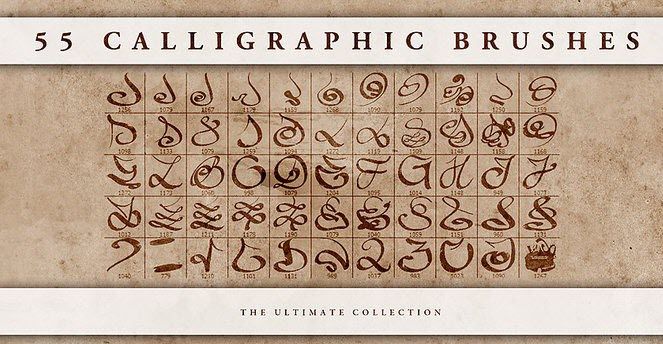
Adobe Photoshop Calligraphy Brushes

Calligraphy brushes are the first thing you will search for when you are a brush lover. BrushLovers.com has a huge stock of free Photoshop brushes and I found this nice set there. The 54 free calligraphy brushes can help you mimic the style of traditional calligraphic pens and create interesting hand-lettered effects.

7. Woodland Wonderland: Gouache Brush

Download a Gouache Brush

Gouache is an opaque watercolor and is a painting medium. The Photoshop equivalent is a creative option for digital coloring. The Woodland Wonderland 31 brush pack from RetroSupply is a set of natural media-inspired Photoshop brushes. It isn’t free but there is a free sampler pack which will give you a free Gouache brush for the price of your email address.

You can also subscribe to the site and get hold of their other freebies too. The whole site is about adding a touch of retro to your designs, so a brush set like Edge and Fold Distressor brushes could be useful too.

8. Sketchy Cartography Brushes

Sketchy Cartography Brushes

Let’s make two stops at MyPhotoshopBrushes.com and pick up this unique set of 146 cartography brushes. Maybe, you are in the mood for making your own Indiana Jones-style treasure map. Or, an inspired history assignment for your kids. The vintage sketches of geographical shapes and map lines can add the right effects.

9. Hi-Resolution Cloud Brushes

Hi-Res Cloud Brushes

Take the help of Franz Jeitz and his 17 brush set of cloud effects. These high-resolution brushes can be added to any photo which needs a more interesting sky. You can add the cloud to the night sky too and make it look realistic with the help of Photoshop. Maybe, you can give it a shot in your next project when you replace a background using Photoshop.

10. Free Christmas Holiday Text Brushes

Christmas Brushes for Adobe Photoshop

It’s never too early to start thinking about Christmas, and if it creeps up on you you’ll wish you had these brushes installed and ready to go. You can take this 20 brush set and create inspiring text designs for flyers, Christmas cards, and Christmas photos. The brushes are vector scalable to high-resolution.

Browse MyPhotoshopBrushes.com for other free Christmas and winter sets too. The brushes are free for personal and commercial use.

How to Install New Brushes in Adobe Photoshop CC

Installing new brushes in Photoshop shouldn’t take more than a few seconds. The more important part is organizing the brushes in their own groups so they become easier to manage. But, let’s install some first:

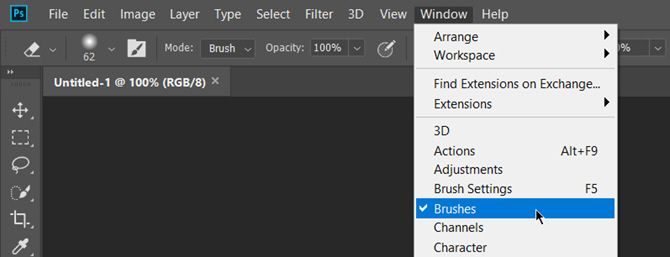
1. Open Adobe Photoshop. Go to Windows > Brushes and open the Brushes panel.

Install Adobe Photoshop Brushes

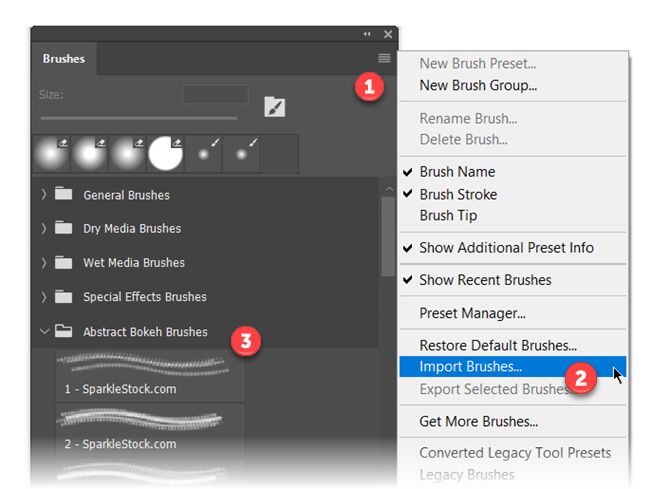
2. Click the small hamburger menu icon on the top right corner of the panel and click Import Brushes

Adobe Photoshop Brushes Panel

3. Browse to the folder location on your PC where you have downloaded the new brushes. Find the file with the .ABR extension and double-click the file to load it.

4. The single brush or group of brushes in a folder will now appear at the bottom of the list of Photoshop brushes.

5. Delete unwanted brushes. Select a brush. Choose Delete Brush from the panel menu, or click the Delete icon.

More Photoshop Brushes to Download

The Creative Cloud Marketplace is a good place to scour for the best digital art resources. But it is like a shiny Fifth Avenue shop. The web is so vast, you will always find a nook here that’s more like a bazaar with freebies to dive into. And, if all else fails, you can learn to create your own Photoshop brushes by mixing and mashing different shapes.

Read the full article: 10 Free Photoshop Brushes and How to Install Them


Read Full Article