31 July 2018

Dixons Carphone now says ~8.8M more customers affected by 2017 breach


A Dixons Carphone data breach that was disclosed earlier this summer was worse than initially reported. The company is now saying that personal data of 10 million customers could also have been accessed when its systems were hacked.

The European electronics and telecoms retailer believes its systems were accessed by unknown and unauthorized person/s in 2017, although it only disclosed the breach in June, after discovering it during a review of its security systems.

Last month it said 5.9M payment cards and 1.2M customer records had been accessed. But with its investigation into the breach “nearing completion”, it now says approximately 10M records containing personal data (but no financial information) may have been accessed last year — in addition to the 5.9M compromised payment cards it disclosed last month.

“While there is now evidence that some of this data may have left our systems, these records do not contain payment card or bank account details and there is no evidence that any fraud has resulted. We are continuing to keep the relevant authorities updated,” the company said in a statement.

In terms of what personal data the 10M records contained, a Dixons Carphone spokeswoman told us: “This continues to relate to personal data, and the types of data that may have been accessed are, for example, name, address or email address.”

The company says it’s taking the precaution of contacting all its customers — to apologize and advise them of “protective steps to minimize the risk of fraud”.

It adds it has no evidence that the unauthorized access is continuing, having taken steps to secure its systems when the breach was discovered last month, saying: “We continue to make improvements and investments at pace to our security environment through enhanced controls, monitoring and testing.”

Commenting in a statement, Dixons Carphone CEO, Alex Baldock, added: “Since our data security review uncovered last year’s breach, we’ve been working around the clock to put it right. That’s included closing off the unauthorised access, adding new security measures and launching an immediate investigation, which has allowed us to build a fuller understanding of the incident that we’re updating on today.

“Again, we’re disappointed in having fallen short here, and very sorry for any distress we’ve caused our customers. I want to assure them that we remain fully committed to making their personal data safe with us.”

Back in 2015, Carphone Warehouse, a mobile division of Dixons Carphone, also suffered a hack which affected around 3M people. And in January the company was fined £400k by the ICO as a consequence of that earlier breach.

Since then new European Union regulations (GDPR) have come into force which greatly raise the maximum penalties which regulators can impose for serious data breaches.

Last month, following Dixon’s disclosure of the latest breach, the UK’s data watchdog, the ICO, told us it was liaising with the National Cyber Security Centre, the Financial Conduct Authority and other relevant agencies to ascertain the details and impact on customers.

Of the 5.9M payment cards which Dixons disclosed last month as having been compromised, it said the vast majority had been protected by chip and PIN technology. But around 105,000 lacked the security tech so Dixons said at the time could therefore have been compromised.

It’s the additional 1.2M records containing non-financial personal data — such as name, address or email address — that have been revised upwards now, to ~10M records, which constitutes almost half the Group’s customer base in the UK and Ireland.

The spokeswoman told us the Group has approximately 22M customers in the region.


Read Full Article

How to Run Multiple Copies of the Same App on Android

Dixons Carphone now says ~8.8M more customers affected by 2017 breach


A Dixons Carphone data breach that was disclosed earlier this summer was worse than initially reported. The company is now saying that personal data of 10 million customers could also have been accessed when its systems were hacked.

The European electronics and telecoms retailer believes its systems were accessed by unknown and unauthorized person/s in 2017, although it only disclosed the breach in June, after discovering it during a review of its security systems.

Last month it said 5.9M payment cards and 1.2M customer records had been accessed. But with its investigation into the breach “nearing completion”, it now says approximately 10M records containing personal data (but no financial information) may have been accessed last year — in addition to the 5.9M compromised payment cards it disclosed last month.

“While there is now evidence that some of this data may have left our systems, these records do not contain payment card or bank account details and there is no evidence that any fraud has resulted. We are continuing to keep the relevant authorities updated,” the company said in a statement.

In terms of what personal data the 10M records contained, a Dixons Carphone spokeswoman told us: “This continues to relate to personal data, and the types of data that may have been accessed are, for example, name, address or email address.”

The company says it’s taking the precaution of contacting all its customers — to apologize and advise them of “protective steps to minimize the risk of fraud”.

It adds it has no evidence that the unauthorized access is continuing, having taken steps to secure its systems when the breach was discovered last month, saying: “We continue to make improvements and investments at pace to our security environment through enhanced controls, monitoring and testing.”

Commenting in a statement, Dixons Carphone CEO, Alex Baldock, added: “Since our data security review uncovered last year’s breach, we’ve been working around the clock to put it right. That’s included closing off the unauthorised access, adding new security measures and launching an immediate investigation, which has allowed us to build a fuller understanding of the incident that we’re updating on today.

“Again, we’re disappointed in having fallen short here, and very sorry for any distress we’ve caused our customers. I want to assure them that we remain fully committed to making their personal data safe with us.”

Back in 2015, Carphone Warehouse, a mobile division of Dixons Carphone, also suffered a hack which affected around 3M people. And in January the company was fined £400k by the ICO as a consequence of that earlier breach.

Since then new European Union regulations (GDPR) have come into force which greatly raise the maximum penalties which regulators can impose for serious data breaches.

Last month, following Dixon’s disclosure of the latest breach, the UK’s data watchdog, the ICO, told us it was liaising with the National Cyber Security Centre, the Financial Conduct Authority and other relevant agencies to ascertain the details and impact on customers.

Of the 5.9M payment cards which Dixons disclosed last month as having been compromised, it said the vast majority had been protected by chip and PIN technology. But around 105,000 lacked the security tech so Dixons said at the time could therefore have been compromised.

It’s the additional 1.2M records containing non-financial personal data — such as name, address or email address — that have been revised upwards now, to ~10M records, which constitutes almost half the Group’s customer base in the UK and Ireland.

The spokeswoman told us the Group has approximately 22M customers in the region.


Read Full Article

Stuck in Windows 10 S Mode? Here’s How to Get Out of It for Good


Windows 10 has several versions which can be difficult to keep straight. One of the most prominent was Windows 10 S, a limited mode which only let you install software from the Windows Store.

In early 2018, Microsoft dropped Windows 10 S as a dedicated OS flavor and introduced S Mode instead. Now, manufacturers can choose to ship their devices with Windows 10 S Mode enabled.

If you have Windows 10 S Mode on your computer and want to leave it, here’s how.

Before You Leave Windows 10 S Mode

You should know what Windows 10 S Mode does and its advantages before you leave it, because doing so is a one-way option.

Essentially, S Mode limits you to only using software from the Windows Store. You can’t install traditional desktop software, including browsers, game clients, and more. It also doesn’t let you change the default search engine in Edge from Bing or use the Command Prompt.

For power users, S Mode is far too limiting. But for those with less experience, S Mode can actually be handy. The restricted environment makes it much harder for malware to attack a computer, and helps keep it running smoothly.

How to Leave Windows 10 S Mode for Good

Leaving S Mode is free, and isn’t difficult. Open the Start Menu and type Store to launch the Microsoft Store app. Click the Search icon in the upper-right and search for Switch Out of S Mode.

You’ll see a banner about S Mode with a Learn more button. Click this, then follow the steps to leave S Mode and get a full version of Windows. Depending on the version of Windows that shipped with your PC, you’ll get either Windows 10 Home or Professional.

If you’re looking for a lightweight computer, check out why Chromebooks beat Windows 10 S Mode.

Read the full article: Stuck in Windows 10 S Mode? Here’s How to Get Out of It for Good


Read Full Article

Get 3TB of Lifetime Cloud Storage with Zoolz for $75


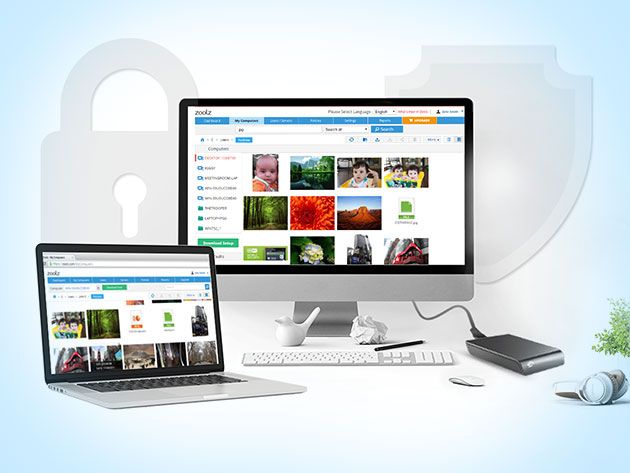
Dropbox and Google Drive are great for syncing a few files between your devices. But if you want to back up all your files, these services can be really expensive. Zoolz Cloud Storage offers all the same features at a far more affordable price. Right now, you can get lifetime access to your very own 3TB cloud vault for just $74.95 at MakeUseOf Deals.

Smart Storage

Zoolz makes it easy to back up your files. After you download the app on Windows or Mac, you simply select what you want to upload. The app then works in the background, keeping all your files synced.

Your 3TB of storage space is split into two sections. The 1.5TB Instant Vault is perfect for the files you use every day. Your data is synced instantly, and Zoolz can keep multiple versions of each file.

For the things you want to keep longer term, the 1.5TB Cold Storage provides a safe home. It’s like your very own digital attic — the place to put precious family photos and important tax records.

You can access all your uploaded files via any web browser, and the Zoolz mobile apps offer instant previews. Copies of your data are kept in several secure locations, and you can back up two devices on one account.

Lifetime 3TB Storage for $74.95

This deal is worth $2,100, but you can order now for just $74.95 to get lifetime backup.

Read the full article: Get 3TB of Lifetime Cloud Storage with Zoolz for $75


Read Full Article

5 Apps to Identify a Song by Humming, Tapping on Keyboard, or Asking Others


identify-song-apps

When you come across a song you don’t know, you can usually use Shazam or SoundHound to find its name. But if the song is stuck in your head, these music identifying apps can’t work. That’s when you need something different.

You have multiple options, all of which we’ll tackle here. There are sites that let you hum the tune or tap the beat on the keyboard, and the site will try to guess based on that. Or you can go to certain forums to ask others. Here are your best options.

Wat Zat Song (Web): Sing a Sample for People to Identify

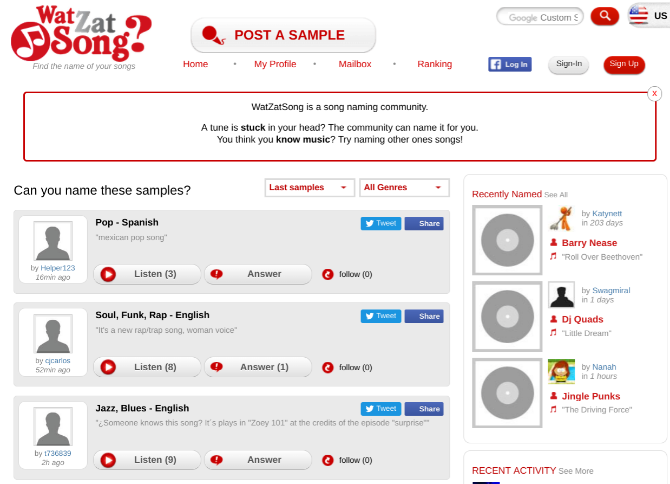
The easiest way to express that tune stuck in your head is to sing it out loud. Wat Zat Song is a web app made to let you post a quick recording, which others can then comment on.

You’ll need to sign up to get started. Click the “Post a Sample” button, and wait for it to prompt you to record your voice. Lean in to your microphone and belt out the best rendition you can of the tune you want to know. Turn it into a post and wait for the community to weigh in.

While you wait, you can help others who are similarly stuck. Click “Listen” on any post to hear the audio, and then answer it if you can. You can also “follow” any post so that you’ll get a notification when there are any updates on it.

Name That Song (Reddit): Reddit’s Song Identification Community

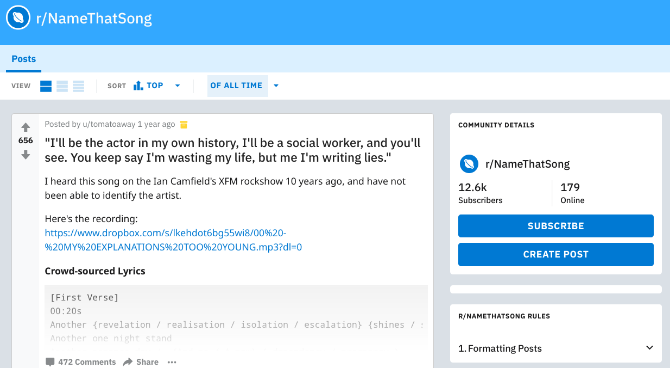
Of course, there is an entire subreddit dedicated to naming songs that you can’t identify. In fact, there are two, but we’ll get to the other one later. For now, head over to r/NameThatSong to figure out that tune.

As with most Reddit communities, there are some rules on how to format your posts, so read those first. Plus, adhere to the age-old rules of what not to do on Reddit. You can usually make a text post, but don’t be afraid to upload a quick video of yourself singing that tune.

While Name That Song is all about music, you can also try your luck at r/TipOfMyTongue. This one isn’t limited to music alone, and also helps you find books without authors, or movies without actors, or just about anything else. It’s a much larger community that Name That Song, so you might have better luck there.

Identification of Music Group (Facebook): The Best in the Business

The Identification of Music Group (IoMG) is about three years old now and is one of the best Facebook groups you can follow. It has over 95,000 members and gets about 50,000 posts every month. The entire group has one purpose: to help you figure out what that tune is.

Like with the Reddit group, you can ask the question in various ways. You could write it as a question and give context, or use a homemade recording of yourself singing, humming, or recreating the tune in any way.

The group has a few rules that you should familiarize yourself with first. They want you to do a few basic steps before you post, like trying to find the tune on Shazam, search old posts, and generally be respectful and helpful. Do that and the whole group will rally around you to help you identify that tune.

Find Music By Lyrics (Web): When You Only Know a Few Words

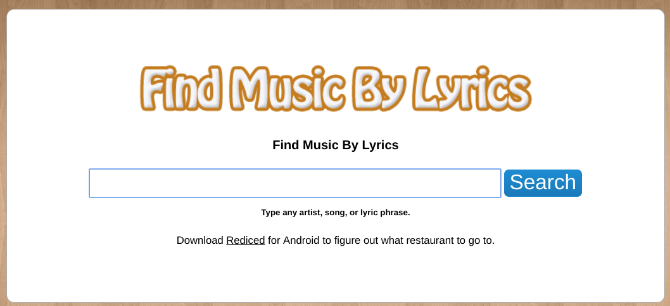
With some songs, you have a few words in your head, but not all the lyrics. And if the words are too common, you need to prime Google search with operators. Find Music By Lyrics (FMBL) makes the process easy.

You can type an artist’s name, a song, or a few words of the lyrics to get a match in seconds. FMBL has a bunch of Google operators already clubbed in, making it easier to use than Google itself.

For example, try searching for the phrase “look who’s crawling lyrics” in Google. You’ll get a bunch of links to Linkin Park’s song, Crawling. But do the same search in FMBL and you’ll get results for that phrase from different songs, like Still Tippin’ by Mike Jones, Boris The Spider by The Who, and Wedding Dress by Melee.

Musipedia (Web): Tap a Beat or Play a Virtual Piano

If you need to know the answer immediately, you can’t wait for a reply on these forums. Musipedia uses AI and some innovative methods to search for your song. Here are the various ways:

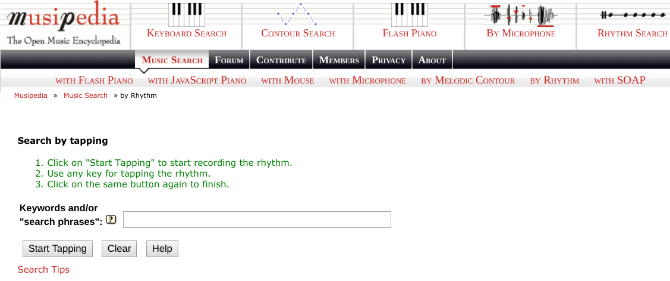
  1. You can tap the beat of the song on your computer’s keyboard, and hope to identify it based on that.
  2. You can sing into your microphone.
  3. You can use a virtual piano to play notes on it. You can also use your mouse to “compose” a tune on the piano, which is easier than playing it.
  4. The “music contour search” is the most complicated, and you should only use that if you’ve exhausted all the other options.

Musipedia isn’t new, and we’ve talked about it before, but it still remains the best app for this kind of internet magic.

The Best Music Identification App?

These apps are only going to be useful when you can’t play that song again and it’s only stuck in your head. But when the song is playing, you should use something like Shazam. So what’s the best music identification app today?

Image Credit: SIphotography/Depositphotos

Read the full article: 5 Apps to Identify a Song by Humming, Tapping on Keyboard, or Asking Others


Read Full Article

Google snags Sony’s ‘Magic Lab’ VR guru


Google has hired Richard Marks, Sony’s Magic Lab head who was behind much of the company’s VR efforts, to a position in its Advanced Technology and Projects group, VentureBeat reports.

Google confirmed the hire to TechCrunch, sending along a statement from ATAP head Dan Kaufman. “ATAP is at the intersection of science and application where our goal is to solve significant problems and close the gap between what if and what is. We’re super excited about Richard joining the senior team and look forward to his contributions.”

According to LinkedIn, Marks spent the last 19 years at Sony, including time as a research fellow while getting his doctorate at Stanford. Marks has been the public face of Sony’s virtual reality efforts throughout the development of the company’s virtual reality tech, but has also worked on some of the computer vision tech behind other PlayStation products.

The Magic Lab, which Marks ran, was devoted to researching gaming technologies for future generation hardware and software. One of the big projects to emerge from the group was called “Project Morpheus,” a precursor for what would later be called PlayStation VR.

While Sony was quick to express an interest in virtual reality technologies and publicly debut its experiments with PS VR years before its 2016 launch, the technology platform has been facing an uncertain future as headset sales have failed to meet expectations.

The PlayStation VR headset debuted as a cheaper alternative to headsets from Oculus and HTC that debuted at prices that were hundreds of dollars more expensive, but after aggressive price slashing from Oculus moved hardware margins downwards across the board, the console maker seems to have had a tougher time distinguishing its efforts. Also, while it had appeared that Sony’s efforts were arriving ahead of a current-generation Xbox VR play, the company announced that it would not be pursuing a virtual reality headset for the Xbox One X, though that was initially a selling point of the more powerful system.

It’s unclear where exactly Marks will be directing his attention at Google within ATAP, though the company certainly has plenty of efforts in the AR/VR and gaming spaces that would benefit from his experience.


Read Full Article

YouTube Admits Vertical Videos Are Here to Stay


The YouTube website now adapts to the aspect ratio of the video it’s playing. The idea is to provide you, the viewer, with the best possible viewing experience. But it also means YouTube admitting that vertical videos are here to stay. Sadly.

Vertical Video Syndrome

For decades video was shot in landscape mode, because our eyes are positioned next to one another, and TVs and PCs were designed to accommodate that. And then along came the smartphone with its vertical design. And people started shooting vertical videos.

For a time many of us fought this, even naming it Vertical Video Syndrome. But the battle is over, and the vertical video brigade won. Instagram’s IGTV actually insists on vertical video, and now YouTube is admitting defeat by getting rid of those black bars.

YouTube Removes the Bars

On the YouTube Help Forum, a community manager announced that “the YouTube video player on desktop […] now automatically adapts to provide the best viewing experience based on the video’s size (aspect ratio) and your computer’s screen/browser size.”

This has been the case on YouTube’s mobile apps—on Android and on iOS—for some time, but the update is now live on desktop too. Which means that whether you’re watching a YouTube video on mobile or desktop you should no longer see black bars.

Instead of black bars, YouTube will try to expand the video to fill the available space. If this isn’t possible, which is the case with videos shot vertically on smartphones, white space will fill the voids on either side. Which is a lot less jarring on the eyes.

Some YouTubers are complaining that the update means parts of their videos are being cut off, and the change in aspect ratio is adversely affecting the quality. However, unfortunately for the whiners, there is currently no way to disable this feature.

Smartphones Ruined Everything

This is a sad day for those of us old enough to remember the fight back against vertical videos. But the current generation of youngsters has grown up believing vertical video is fine, thank you very much, because everyone except this guy now owns a smartphone.

Image Credit: Rego Korosi/Flickr

Read the full article: YouTube Admits Vertical Videos Are Here to Stay


Read Full Article

Newly legal 3D-printed gun blueprints targeted by state lawsuits


Hot on the heels of the effective legalization of 3D models used to print firearm components, 21 states have filed a joint lawsuit against the federal government, alleging not only that decision is dangerous but also that it’s also illegal for a number of reasons. But the lawsuit may backfire via the so-called Streisand Effect, further entrenching the controversial technology.

Earlier this month brought the news that U.S. government dropped its case against Cody Wilson and his companies dedicated to the proliferation of 3D models of firearm parts. There are still restrictions on how guns can be made and sold, but the files containing 3D data and allowing people to print components seem to have been determined not to fall under those rules.

This was unwelcome news for those in favor of stricter gun control laws, a group apparently including the attorney generals of 21 states. Bob Ferguson, AG for Washington, announced that his team would be leading a lawsuit intended to block the federal actions that legalized this particular form of data.

“These downloadable guns are unregistered and very difficult to detect, even with metal detectors, and will be available to anyone regardless of age, mental health or criminal history. If the Trump Administration won’t keep us safe, we will,” he said in a press release issued today.

They allege that the administration needs the Defense Department to sign off on the decision, and that Congress needed to be notified 30 days in advance. The decision is also held (owing to a lack of on-record citations or consultations) to be “arbitrary and capricious,” and thus illegal under the Administrative Procedure Act.

The Tenth Amendment also gives states the right to regulate firearms, and the filers say that the federal action deprives them of this right and is therefore unconstitutional.

That’s all well in order, but the danger posed by these files is overestimated, as is the ability of the government, state or federal, to curtail their distribution. If this lawsuit is successful, it will have little or no effect on 3D printed guns at all.

“The status quo – which currently ensures public safety and national security by prohibiting publication of firearm design files on the Internet – should be maintained,” reads a letter sent from a number of AGs to Secretary of State Mike Pompeo and AG Jeff Sessions.

At the risk of dipping into an extremely charged debate and sensitive political topic (I’ve added the “Opinion” tag just in case), the status quo does no such thing. It must be said that if effective gun control is the goal, there are far more important steps to pursue. Loopholes abound in existing regulations, for instance gun show purchases of unregistered firearms and “80 percent lowers,” which are a quite legal method for creating them.

Furthermore any attempt to remove something from the internet is doomed to failure, as we have seen again and again, often enough that the phenomenon has its own nickname, the Streisand Effect. Workarounds for illegal content are numerous and effective, and presumably the type of person interested in printing their own gun will not be shy about using a VPN or torrent site. If anything a concerted effort to remove something from the internet usually causes that thing to be permanently maintained online as a sort of middle finger to the authorities. It’s not in the internet’s DNA to forget.

While it’s true that outlawing the 3D models would give prosecutors and investigators more to work with, the nefarious actors of the world haven’t been waiting with bated breath on the outcome of the previous lawsuit. Criminals, terrorists, foreign adversaries and so on in the first place don’t even need these files to obtain or create unregistered guns in the first place, nor would their being illegal deter them in the least.

The lawsuit may, it is true, tie up and possibly bankrupt Wilson and his supporters, but that’s not much of a victory and certainly doesn’t make anyone safer. Unfortunately this particular demon isn’t going back in the box.


Read Full Article

The 10 Best Fast Food Restaurant Apps for Android

5 Ways to Protect Yourself Against Keyloggers


Keyloggers are one of the most well-known and feared security threats on computers today. Keyloggers carry a fearsome reputation for several reasons, not least because they’re hard to detect, but because the direct damage to your life extends well beyond the computer and screen in front of you.

Keylogging malware is, unfortunately, very common. More often than not a malware variant packs a keylogger for maximum damage and to compound the attacker’s investment. Luckily, there are several methods to protect your system from a keylogger. And while no defense is perfect, these five steps drastically improve your chances.

What Is a Keylogger?

Before looking at how to mitigate a keylogger, consider what a keylogger is and where they come from.

A keylogger is consistent to its name. The term refers to a malicious computer program that captures and records your keystrokes; that’s every word, character, and button you press on your keyboard. The keylogger sends a record of your keystrokes to the attacker. This record might contain your banking logins, credit and debit card details, social media passwords, and everything else in-between. In short, keyloggers are a dangerous tool in the battle against identity and financial fraud.

The overwhelming majority of keyloggers are bundled with other forms of malware. In the “old” days, the malware delivering a keylogger would remain silent for as long as possible. That means, unlike other virus and malware variants, files remain intact, there’s a little system disruption as possible, and you continue using your system as normal.

However, that’s not always the case. For instance, the recently discovered MysteryBot targets Android devices with a banking Trojan, a keylogger, and ransomware—that’s quite the combination. But by-and-large, a keylogger will feature as part of a large exploit kit that grants an attacker control over various aspects of your system.

There’s another common variety of keylogger you hear about, too, but not something you immediately think about. Have you got it yet? That’s right; card readers and skimmers, and other point-of-sale malware deploy keyloggers to copy your PIN to use later. The PoSeidon malware is a prime example of this type of scam.

Now you know, how can you protect yourself?

5 Ways to Protect Yourself Against Keyloggers

Protecting against keyloggers covers a fairly standard security spectrum. That is, your online and personal digital security needs this level of protection on a day-to-day basis. There’s a lot more than just keyloggers out there.

1. Use a Firewall

In most instances, the keylogger has to transmit its information back to the attacker for it to do any harm. The keylogger must send data out from your computer via the internet. As your internet passes through a firewall (for instance, Windows Firewall is a default security setting for Windows 10 systems), there’s a chance it will realize something isn’t quite right.

That said, there’s also a stronger chance it won’t detect an issue. An easily terminated keylogger isn’t much use to the attacker. The Windows Firewall is an excellent option for most users, but several excellent third-party firewall options come with extensive functionality. Unsure where to start? Check out these seven third-party firewall options to get started.

A firewall alone might not stop a keylogger or its associated malware, but it is better to have one than not.

2. Install a Password Manager

One constant piece of security advice is to update and change your passwords (along with using a strong single-use password to begin with). But, let’s face it: it’s really hard to remember tens of 16-character passwords for the staggering number of sites most of us use. Keyloggers are effective in their simplicity; it copies the keystrokes and logs the information. But what if you never actually typed a password?

Most password managers use autofill functionality to provide a master password that unlocks a specific account. Your password still works, you’re already browsing your Twitter feed, and all without typing. Sounds great, right?

Unfortunately, a password manager can only get you so far, for a few reasons.

  1. Some password managers don’t copy and paste your password. Instead, they use an auto-type function to input the password. Any keylogger worth its salt will copy virtual keystrokes, too. But…
  2. …A sufficiently well-designed keylogger will also periodically take screenshots as well as record the contents of the clipboard.
  3. Some dangerous advanced malware variants will target offline password databases, stealing the entire list rather than one at a time.

Now, all is not lost. For example, KeePass negates the first and second issue using Two-Channel Auto-Type Obfuscation (TCATO). TCATO basically splits the password down into two subparts, sends both to the clipboard, then merges in the password field. However, by their admission, TCATO isn’t 100% secure, noting that “it is theoretically possible to write a dedicated spy application that specializes on logging obfuscated auto-type.”

The point of a password manager wasn’t to stop keylogging. However, if you do encounter a keylogger and you have a password manager installed, there’s a chance you only lose the strong single-use password for one account, rather than every password for every account you own. Check out this comparison of five password manager services to get you started.

3. Update Your System (And Keep It That Way)

Being proactive about system security is always a good idea. One of the most important parts of a proactive defense is keeping your system up to date. That includes your operating system as well as the applications and programs you run on it. Keyloggers and other malware look for exploits in outdated software and can take advantage of them, sometimes without you knowing anything is wrong.

Security researchers find new exploits all of the time. Some are relatively benign. Others are patched immediately by the developer. But others still become critical exploits used to expose your computer to malware.

Particularly rare and unreleased vulnerabilities are known as zero-day exploits and carry a significant threat. Indeed, the CIA ran into trouble when it emerged hackers had liberated their previously unknown and top secret zero-day vulnerability stockpile, releasing powerful exploits into the wild—leading directly to the enormous WannaCry ransomworm.

Updating software isn’t always convenient, but it could save you and your system from serious trouble down the line.

4. Consider Additional Security Tools

The default security options for Windows 10 and macOS are okay, but you should always consider bulking that security out for maximum protection. Check out our list of the best security and antivirus tools for your system. These are Windows-focused, but many have macOS equivalents and are worth the small investment.

If you want security tools that specifically target keyloggers, check these two free options out:

  • Ghostpress: a free anti-keylogger with an extremely small performance footprint. Features Process Protection to stop any other program terminating Ghostpress.
  • KL-Detector: a basic keylogger detection tool. Once you detect a keylogger, it’s up to you to remove it, but the tool will alert you to the keyloggers presence.

Another worthwhile investment is Malwarebytes Premium. Unlike the free version, Malwarebytes Premium constantly monitors your system for potential threats. This alone drastically cuts your chances of picking up something nasty.

5. Change Your Passwords

If you suspect something is wrong, use a different computer to change your passwords. The measures listed above should provide ample protection against keyloggers, but there always seems to be people who have their passwords stolen even though they did everything right.

Frequently changing your passwords will help minimize the potential damage of a keylogging attack. Your password may be stolen, but it would be uncommon for it to be stolen and used immediately unless that keylogger was targeted directly at you (in which case you may have bigger problems than keylogging!). If you change your password every two weeks, your stolen information will no longer be useful.

Remove Your Keylogger…

These methods will help protect against keyloggers by decreasing their opportunity to infect your PC with malware. Furthermore, you’re taking steps to isolate the amount of data a keylogger can access in the event you happen to pick one up. And, although you can never have 100% protection, you can certainly empower yourself and your system in the battle against malware.

Read the full article: 5 Ways to Protect Yourself Against Keyloggers


Read Full Article

How to Get Instant Emergency Alerts on Your Phone and PC

Google’s lead lawyer moves into a global policy role


Google is promoting its top lawyer Kent Walker into a global policy position, CNBC reports. Walker, Google SVP and general counsel, has already been a public voice in the company’s recent privacy tangles, but will move into a formal role as senior vice president of global affairs, overseeing Google’s policy, trust and safety, corporate philanthropy and legal teams.

Last year, Walker joined Richard Salgado, Google’s Director, Law Enforcement and Information Security, to head to Capitol Hill for the first round of reckoning on big tech’s failure to mitigate political disinformation campaigns during the 2016 U.S. presidential election.

Since then, Walker has commented publicly on Google’s policies around political ad transparency and extremist content on YouTube, among other policy issues facing the company. With social platforms at an ethical crossroads globally and tech chafing at its newly forced compliance with international privacy laws, any public-facing global policy role will be very much in the spotlight in 2018 and beyond.

Google hired Walker away from eBay in 2006, where he served as the company’s deputy general counsel. Prior to his time at eBay (and AOL, prior to that), Walker was an Assistant U.S. Attorney with the Department of Justice.


Read Full Article

OpenAI’s robotic hand doesn’t need humans to teach it human behaviors


Gripping something with your hand is one of the first things you learn to do as an infant, but it’s far from a simple task, and only gets more complex and variable as you grow up. This complexity makes it difficult for machines to teach themselves to do, but researchers at Elon Musk and Sam Altman-backed OpenAI have created a system that not only holds and manipulates objects much like a human does, but developed these behaviors all on its own.

Many robots and robotic hands are already proficient at certain grips or movements — a robot in a factory can wield a bolt gun even more dexterously than a person. But the software that lets that robot do that task so well is likely to be hand-written and extremely specific to the application. You couldn’t for example, give it a pencil and ask it to write. Even something on the same production line, like welding, would require a whole new system.

Yet for a human, picking up an apple isn’t so different from pickup up a cup. There are differences, but our brains automatically fill in the gaps and we can improvise a new grip, hold an unfamiliar object securely, and so on. This is one area where robots lag severely behind their human models. And furthermore, you can’t just train a bot to do what a human does — you’d have to provide millions of examples to adequately show what a human would do with thousands of given objects.

The solution, OpenAI’s researchers felt, was not to use human data at all. Instead, they let the computer try and fail over and over in a simulation, slowly learning how to move its fingers so that the object in its grasp moves as desired.

The system, which they call Dactyl, was provided only with the positions of its fingers and three camera views of the object in-hand — but remember, when it was being trained, all this data is simulated, taking place in a virtual environment. There, the computer doesn’t have to work in real time — it can try a thousand different ways of gripping an object in a few seconds, analyzing the results and feeding that data forward into the next try. (The hand itself is a Shadow Dexterous Hand, which is also more complex than most robotic hands.)

In addition to different objects and poses the system needed to learn, there were other randomized parameters, like the amount of friction the fingertips had, the colors and lighting of the scene, and more. You can’t simulate every aspect of reality (yet), but you can make sure that your system doesn’t only work in a blue room, on cubes with special markings on them.

They threw a lot of power at the problem: 6144 CPUs and 8 GPUs, “collecting about one hundred years of experience in 50 hours.” And then they put the system to work in the real world for the first time — and it demonstrated some surprisingly human-like behaviors.

The things we do with our hands without even noticing, like turning an apple around to check for bruises or passing a mug of coffee to a friend, use lots of tiny tricks to stabilize or move the object. Dactyl recreated several of them, for example holding the object with a thumb and single finger while using the rest to spin to the desired orientation.

What’s great about this system is not just the naturalness of its movements and that they were arrived at independently by trial and error, but that it isn’t tied to any particular shape or type of object. Just like a human, Dactyl can grip and manipulate just about anything you put in its hand, within reason of course.

This flexibility is called generalization, and it’s important for robots that must interact with the real world. It’s impossible to hand-code separate behaviors for every object and situation in the world, but a robot that can adapt and fill in the gaps while relying on a set of core understandings can get by.

As with OpenAI’s other work, the paper describing the results is freely available, as are some of the tools they used to create and test Dactyl.


Read Full Article

One more thing re: “privacy concerns” raised by the DCMS fake new report…


A meaty first report by the UK parliamentary committee that’s been running an inquiry into online disinformation since fall 2017, including scrutinizing how people’s personal information was harvested from social media services like Facebook and used for voter profiling and the targeting of campaign ads — and whose chair, Damian Collins — is a member of the UK’s governing Conservative Party, contains one curious omission.

Among the many issues the report raises are privacy concerns related to a campaign app developed by a company called uCampaign — which, much like the scandal-hit (and now seemingly defunct) Cambridge Analytica, worked for both the Ted Cruz for President and the Donald J Trump for President campaigns — although in its case it developed apps for campaigns to distribute to supporters to gamify digital campaigning via a tool which makes it easy for them to ‘socialize’ (i.e. share with contacts) campaign messaging and materials.

The committee makes a passing reference to uCampaign in a section of its report which deals with “data targeting” and the Cambridge Analytica Facebook scandal, specifically — where it writes [emphasis ours]:

There have been data privacy concerns raised about another campaign tool used, but not developed, by AIQ [Aggregate IQ: Aka, a Canadian data firm which worked for Cambridge Analytica and which remains under investigation by privacy watchdogs in the UK, Canada and British Columbia]. A company called uCampaign has a mobile App that employs gamification strategy to political campaigns. Users can win points for campaign activity, like sending text messages and emails to their contacts and friends. The App was used in Donald Trump’s presidential campaign, and by Vote Leave during the Brexit Referendum.

The developer of the uCampaign app, Vladyslav Seryakov, is an Eastern Ukrainian military veteran who trained in computer programming at two elite Soviet universities in the late 1980s. The main investor in uCampaign is the American hedge fund magnate Sean Fieler, who is a close associate of the billionaire backer of SCL and Cambridge Analytica, Robert Mercer. An article published by Business Insider on 7 November 2016 states: “If users download the App and agree to share their address books, including phone numbers and emails, the App then shoots the data [to] a third-party vendor, which looks for matches to existing voter file information that could give clues as to what may motivate that specific voter. Thomas Peters, whose company uCampaign created Trump’s app, said the App is “going absolutely granular”, and will—with permission—send different A/B tested messages to users’ contacts based on existing information.”

What’s curious is that Collins’ Conservative Party also has a campaign app built by — you guessed it! — uCampaign, which the party launched in September 2017.

While there is nothing on the iOS and Android app store listings for the Conservative Campaigner app to identify uCampaign as its developer, if you go directly to uCampaign’s website the company lists the UK Conservative Party as one of it’s clients — alongside other rightwing political parties and organizations such as the (pro-gun) National Rife Association; the (anti-abortion) SBA List; and indeed the UK’s Vote Leave (Brexit) campaign, (the latter) as the DCMS report highlights.

uCampaign’s involvement as the developer of the Conservative Campaigner app was also confirmed to us (in June) by the (now former) deputy director & head of digital strategy for The Conservative Party, Anthony Hind, who — according to his LinkedIn profile — also headed up the party’s online marketing, between mid 2015 and, well, the middle of this month.

But while, in his initial response to us, Hind readily confirmed he was personally involved in the procurement of uCampaign as the developer of the Conservative Campaigner app, he failed to respond to any of our subsequent questions — including when we raised specific concerns about the privacy policy that the app had been using, prior to May 23 (just before the EU’s new GDPR data protection framework came into force on May 25 — a time when many apps updated their privacy polices as a compliance precaution related to the new data protection standard).

Since May 23 the privacy policy for the Conservative Campaigner app has pointed to the Conservative Party’s own privacy policy. However prior to May 23 the privacy policy was a literal (branded) copy-paste of uCampaign’s own privacy policy. (We know because we were tipped to it by a source — and verified this for ourselves.)

Here’s a screengrab of the exchange we had with Hind over LinkedIn — including his sole reply:
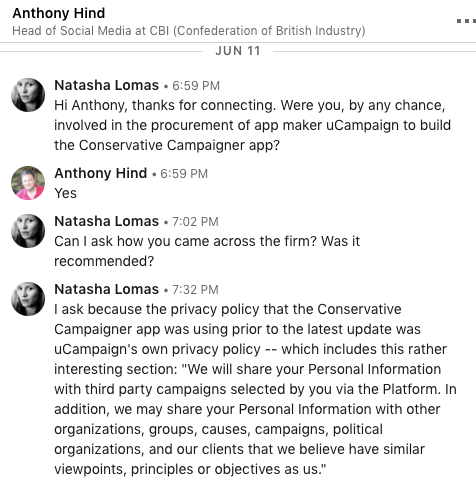
What looks rather awkward for the Conservative Party — and indeed for Collins, as DCMS committee chair, given the valid “privacy concerns” his report has raised around the use (and misuse/abuse) of data for political targeting — is that uCampaign’s privacy policy has, shall we say, a verrrrry ‘liberal’ attitude to sharing the personal data of app users (and indeed of any of their contacts it would have been able to harvest from their devices).

Here’s a taster of the data-sharing permissions this U.S. company affords itself over its clients’ users’ data [emphasis ours] — according to its own privacy policy:

CAMPAIGNS YOU SUPPORT AND ALIGNED ORGANIZATIONS

We will share your Personal Information with third party campaigns selected by you via the Platform. In addition, we may share your Personal Information with other organizations, groups, causes, campaigns, political organizations, and our clients that we believe have similar viewpoints, principles or objectives as us.

UCAMPAIGN FRIENDS

We may share your Personal Information with other users of the Platform, for example if they connect their address book to our services, or if they invite you to use our services via the Platform.

BUSINESS TRANSFERS

We may share your Personal Information with other entities affiliated with us for internal reasons, primarily for business and operational purposes. uCampaign, or any of its assets, including the Platform, may be sold, or other transactions may occur in which your Personal Information is one of the business assets of the transaction. In such case, your Personal Information may be transferred.

To spell it out, the Conservative Party paid for a campaign app that could, according to the privacy policy it had in place prior to May 23, have shared supporters’ personal data with organizations that uCampaign’s owners — who the DCMS committee states have close links to “the billionaire backer of SCL and Cambridge Analytica, Robert Mercer” — view as ideologically affiliated with their objectives, whatsoever those entities might be.

Funnily enough, the Conservative Party appears to have tried to scrub out some of its own public links to uCampaign — such as changing link for the developer website on the app listing page for the Conservative Campaigner app to the Conservative Party’s own website (whereas before it linked through to uCampaign’s own website).

As the veteran UK satirical magazine Private Eye might well say — just fancy that! 

One of the listed “features” of the Conservative Campaigner app urges Tory supporters to: “Invite your friends to join you on the app!”. If any did, their friends’ data would have been sucked up by uCampaign too to further causes of its choosing.

The version of the Campaigner app listed on Google Play is reported to have 1,000+ installs (iOS does not offer any download ranges for apps) — which, while not in itself a very large number, could represent exponentially larger amounts of personal data should users’ contacts have been synced with the app where they would have been harvested by uCampaign.

We did flag the link between uCampaign and the Conservative Campaigner app directly to the DCMS committee’s press office — ahead of the publication of its report, on June 12, when we wrote:

The matter of concern here is that the Conservative party could itself be an unwitting a source of targeting data for rival political organizations, via an app that appears to offer almost no limits on what can be done with personal data.
Prior to the last update of the Conservative Campaigner app the privacy policy was simply the boilerplate uCampaign T&Cs — which allow the developer to share app users personal info (and phone book contacts) with “other organizations, groups, causes, campaigns, political organizations, and our clients that we believe have similar viewpoints, principles or objectives as us”.
That’s incredibly wide-ranging.
So every user’s phone book contacts (potentially hundreds of individuals per user) could have been passed to multiple unidentified organizations without people’s knowledge or consent. (Other uCampaign apps have been built for the NRA, and for anti-abortion organizations, for example.)
uCampaign‘s T&Cs are here: https://ucampaignapp.com/privacy.html
Even the current T&Cs allow for sharing with US suppliers.
Given the committee’s very public concerns about access to people’s data for political targeting purposes I am keen to know whether Mr Collins has any concerns about the use of uCampaign‘s app infrastructure by the Conservative party?
And also whether he is concerned about the lack of a robust data protection policy by his own party to ensure that valuable membership data is not simply passed around to unknown and unconnected entities — perhaps abroad, perhaps not — with zero regard for or accountability to the individuals in question.

Unfortunately this email (and a follow up) to the DCMS committee, asking for a response from Collins to our privacy concerns, went unanswered.

It’s also worth noting that the Conservative Party’s own privacy policy (which it’s now using for its Campaigner app) is pretty generous vis-a-vis the permissions it’s granting itself over sharing supporters’ data — including stating that it shares data with

  • The wider Conservative Party
  • Business associates and professional advisers
  • Suppliers
  • Service providers
  • Financial organisations – such as credit card payment providers
  • Political organisations
  • Elected representatives
  • Regulatory bodies
  • Market researchers
  • Healthcare and welfare organisations
  • Law enforcement agencies

The UK’s data watchdog recently found fault with pretty much all of the UK political parties’ when it comes to handling of voter data — saying it had sent warning letters to 11 political parties and also issued notices compelling them to agree to audits of their data protection practices.

Safe to say, it’s not just private companies that have been sticking their hand in the personal data cookie jar in recent years — the political establishment is facing plenty of awkward questions as regulators unpick where and how data has been flowing.

This is also not the only awkward story re: data privacy concerns related to a Tory political app. Earlier this year the then-minister in charge of the digital brief, Matt Hancock, launched a self-promotional, self-branded app intended for his constituents to keep up with news about Matt Hancock MP.

However the developers of the app (Disciple Media) initially uploaded the wrong privacy policy — and were forced to issue an amended version which did not grant the minister such non-specific and oddly toned rights to users’ data — such as that the app “may disclose your personal information to the Publisher, the Publisher’s management company, agent, rights image company, the Publisher’s record label or publisher (as applicable) and any other third parties, for use in conjunction with additional user promotions or offers they may run from time to time or in relation to the sale of other goods and services”.

Of course the Matt Hancock App was a PR initiative of (and funded by) an individual Conservative MP — rather than a formal campaign tool paid for by the Conservative Party and intended for use by hundreds (or even thousands) of Party activists for use during election campaigns.

So while there are two issues of Tory-related privacy concern here, only one loops back to the Conservative Party political organization itself.


Read Full Article

The 6 Best Ergonomic Keyboards to Improve Computer Comfort

YouTube’s dark theme has started gradually rolling out to Android


A dark theme option for YouTube users on Android is in the early stages of rolling out to end users, Google confirmed to TechCrunch, following a number of reports and sightings of the dark mode showing up for users in the app’s settings. The feature has taken a bit longer to launch than expected – YouTube first announced a dark mode for its mobile app back in March, when it launched on iOS. At the time, the company said the dark theme for Android was coming “soon.”

Five months later, well, here it is.

Similar to its iOS counterpart, the dark theme is toggled on or off in the Android app’s Settings. When enabled, YouTube’s usual white background switches to black throughout the YouTube app experience as your browse, search and watch videos.

The dark theme has a variety of benefits for end users. It gives watching videos a more cinematic feel, for starters. And when you’ve been staring at your screen for a long time, it can help you to better focus on the content, and not the controls. It can also help to cut down on glare, and help viewers take in the true colors of the videos they watch, the company previously explained.

Plus, some tests have shown dark themes can save battery life – something that’s particularly useful for YouTube’s 1.8 billion monthly users, who are spending more than an hour per day watching YouTube videos on mobile devices.

[gallery ids="1682814,1682813"]

Above: Image credits, Imgur user absinth92

YouTube first introduced a dark theme in May 2017, when it debuted a series of enhancements to its desktop website, including its simpler, Material Design-inspired look. At the time, it said a dark theme for mobile was a top request.

The YouTube app isn’t alone in catering to users’ desire for a dark mode. Other high-profile apps have gone this route as well, including Twitter, Reddit, Twitter clients like Tweetbot and Twitterific, Reddit clients like Beam, Narwhal, and Apollo, podcast player Overcast, calendar app Fantastical, Telegram X, Instapaper, Pocket, Feedly and others.

Google told us that the dark theme for YouTube on Android is still in the early phases of a gradual rollout, and it will have more updates about this launch in the “coming weeks.”

The change arrives alongside update a YouTube Community Manager shared in YouTube’s Help Forum about YouTube’s adaptive video player. The player on desktop now removes the black bars alongside 4:3 and vertical videos, by adjusting the viewing area accordingly, they said.


Read Full Article

YouTube’s dark theme has started gradually rolling out to Android


A dark theme option for YouTube users on Android is in the early stages of rolling out to end users, Google confirmed to TechCrunch, following a number of reports and sightings of the dark mode showing up for users in the app’s settings. The feature has taken a bit longer to launch than expected – YouTube first announced a dark mode for its mobile app back in March, when it launched on iOS. At the time, the company said the dark theme for Android was coming “soon.”

Five months later, well, here it is.

Similar to its iOS counterpart, the dark theme is toggled on or off in the Android app’s Settings. When enabled, YouTube’s usual white background switches to black throughout the YouTube app experience as your browse, search and watch videos.

The dark theme has a variety of benefits for end users. It gives watching videos a more cinematic feel, for starters. And when you’ve been staring at your screen for a long time, it can help you to better focus on the content, and not the controls. It can also help to cut down on glare, and help viewers take in the true colors of the videos they watch, the company previously explained.

Plus, some tests have shown dark themes can save battery life – something that’s particularly useful for YouTube’s 1.8 billion monthly users, who are spending more than an hour per day watching YouTube videos on mobile devices.

[gallery ids="1682814,1682813"]

Above: Image credits, Imgur user absinth92

YouTube first introduced a dark theme in May 2017, when it debuted a series of enhancements to its desktop website, including its simpler, Material Design-inspired look. At the time, it said a dark theme for mobile was a top request.

The YouTube app isn’t alone in catering to users’ desire for a dark mode. Other high-profile apps have gone this route as well, including Twitter, Reddit, Twitter clients like Tweetbot and Twitterific, Reddit clients like Beam, Narwhal, and Apollo, podcast player Overcast, calendar app Fantastical, Telegram X, Instapaper, Pocket, Feedly and others.

Google told us that the dark theme for YouTube on Android is still in the early phases of a gradual rollout, and it will have more updates about this launch in the “coming weeks.”

The change arrives alongside update a YouTube Community Manager shared in YouTube’s Help Forum about YouTube’s adaptive video player. The player on desktop now removes the black bars alongside 4:3 and vertical videos, by adjusting the viewing area accordingly, they said.


Read Full Article

30 July 2018

Google Calendar makes rescheduling meetings easier


Nobody really likes meetings — and the few people who do like them are the ones with whom you probably don’t want to have meetings. So when you’ve reached your fill and decide to reschedule some of those obligations, the usual process of trying to find a new meeting time begins. Thankfully, the Google Calendar team has heard your sighs of frustration and built a new tool that makes rescheduling meetings much easier.

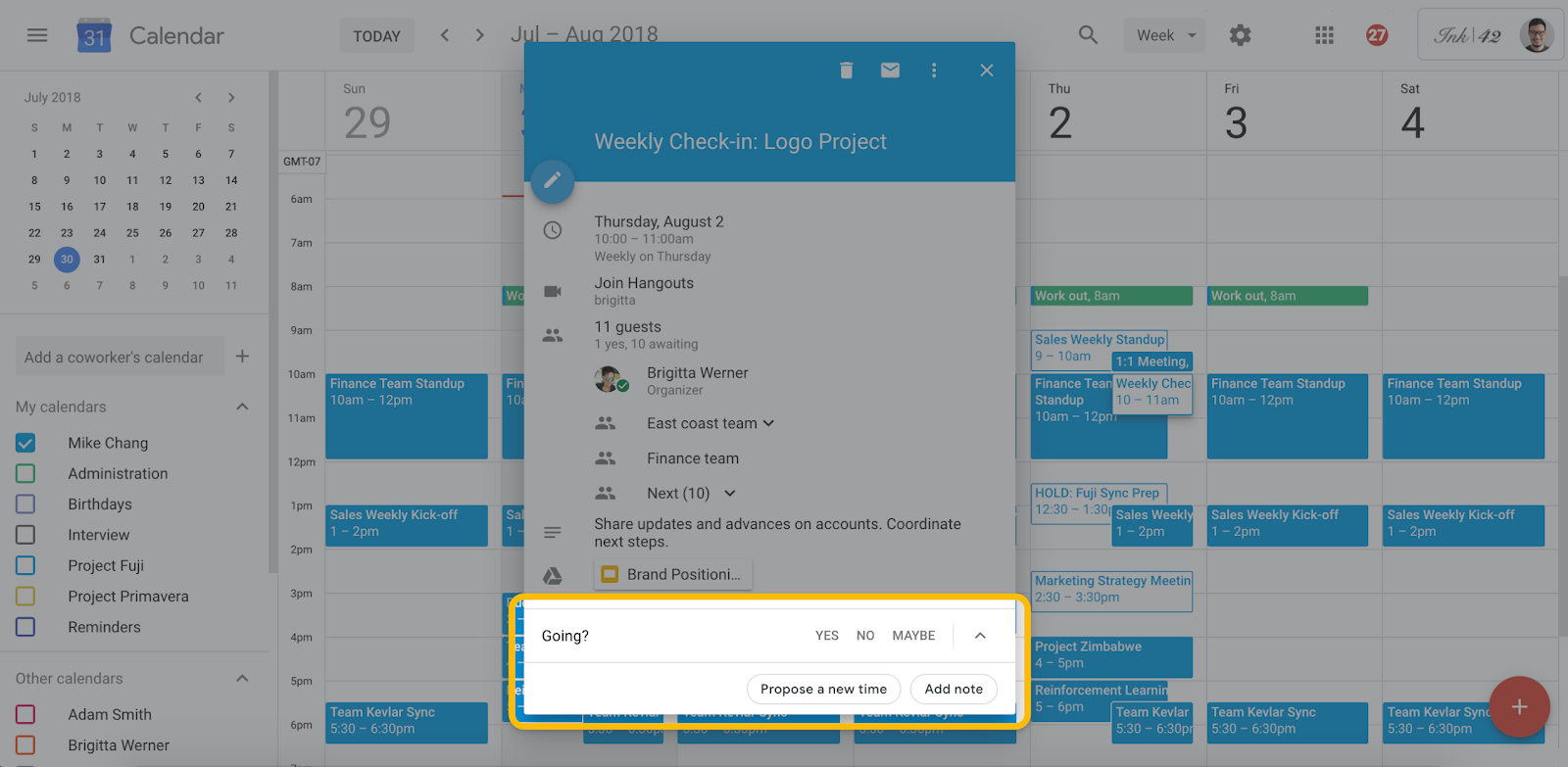
Starting in two weeks, on August 13th, every guest will be able to propose a new meeting time and attach to that update a message to the organizer to explain themselves. The organizer can then review and accept or deny that new time slot. If the other guests have made their calendars public, the organizer can also see the other attendees’ availability in a new side-by-side view to find a new time.

What’s a bit odd here is that this is still mostly a manual feature. To find meeting slots to begin with, Google already employs some of its machine learning smarts to find the best times. This new feature doesn’t seem to employ the same algorithms to proposed dates and times for rescheduled meetings.

This new feature will work across G Suite domains and also with Microsoft Exchange. It’s worth noting, though, that this new option won’t be available for meetings with more than 200 attendees and all-day events.


Read Full Article

Google Assistant can now do things automatically at a scheduled time


Back at Google I/O, Google announced two new features for Google Assistant: custom routines and schedules — both focusing on automating things you do regularly, but in different ways.

The first lets you trigger multiple commands with a single custom phrase — like saying “Hey Google, I’m awake” to unsilence your phone, turn on the lights and read the news. Schedules, meanwhile, could trigger a series of commands at a specific time on specific days, without you needing to say a thing.

While custom routines launched almost immediately after I/O, scheduling has been curiously absent. It’s starting to roll out today.

As first noticed by DroidLife, it looks like scheduling has started rolling out to users by way of the Google Home app.

To make a schedule:

  • Open the Google Home app
  • Go to Settings>Routines
  • Create a new routine with the + button
  • Scroll to the “Set a time and day” option to schedule things ahead of time

If you don’t see the “time and day” option yet, check back in a day or two. Google is rolling it out over the next few days (generally done in case there’s some bug it missed), so it might pop up without much fanfare.

Want your bedroom lights to turn on every morning at 7 am on workdays? You can do that. Want that song from the Six Flags commercials to play every day at noon to get you over the hump and/or drive your roommates up a wall? Sure! Want to double-check the door lock, dim the downstairs lights and make sure your entertainment center is off at 2 am? If you’ve got all the smart home hardware required, it should be able to handle it.

While a lot of things you might use Google Assistant for can already be scheduled through their respective third-party apps (most smart lights, for example, have apps with built-in scheduling options), this moves to bring everything under one roof while letting you fire off more complicated sequences all at once. And if something breaks? You’ll know where to look.


Read Full Article