23 April 2018

Facebook face recognition error looks awkward ahead of GDPR


A Facebook face recognition notification slip-up hints at how risky the company’s approach to compliance with a tough new European data protection standard could turn out to be.

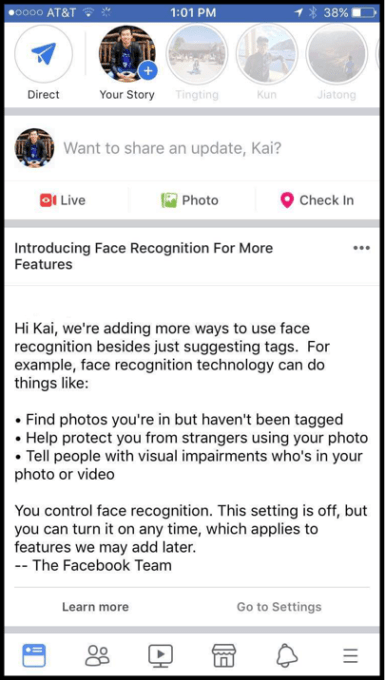
On Friday a Metro journalist in the UK reported receiving a notification about the company’s face recognition technology — which told him “the setting is on”.

The wording was curious as the technology has been switched off in Europe since 2012, after regulatory pressure, and — as part of changes related to its GDPR compliance strategy — Facebook has also said it will be asking European users to choose individually whether or not they want to switch it on. (And on Friday begun rolling out its new consent flow in the region, ahead of the regulation applying next month.)

The company has since confirmed to us that the message was sent to the user in error — saying the wording came from an earlier notification which it sent to users who already had its facial recognition tech enabled, starting in December. And that it had intended to send the person a similar notification — containing the opposite notification, i.e. that “the setting is off”.

“We’re asking everyone in the EU whether they want to enable face recognition, and only people who affirmatively give their consent will have these features enabled. We did not intend for anyone in the EU to see this type of message, and we can confirm that this error did not result in face recognition being enabled without the person’s consent,” a Facebook spokesperson told us.

Here are the two notifications in question — showing the setting on vs the setting off wordings:

This is interesting because Facebook has repeatedly refused to confirm it will be universally applying GDPR compliance measures across its entire global user-base.

Instead it has restricted its public commitments to saying the same “settings and controls” will be made available for users — which as we’ve previously pointed out avoids committing the company to a universal application of GDPR principles, such as privacy by design.

Given that Facebook’s facial recognition feature has been switched off in Europe since 2012 “the setting is on” message would presumably have only been sent to users in the US or Canada — where Facebook has been able to forge ahead with pushing people to accept the controversial, privacy-hostile technology, embedding it into features such as auto-tagging for photo uploads.

But it hardly bodes well for Facebook’s compliance with the EU’s strict new data protection standard if its systems are getting confused about whether or not a user is an EU person.

Facebook claims no data was processed without consent as a result of the wrong notification being sent — but under GDPR it could face investigations by data protection authorities seeking to verify whether or not an individual’s rights were violated. (Reminder: GDPR fines can scale as high as 4% of a company’s global annual turnover so privacy enforcement is at last getting teeth.)

Facebook’s appetite for continuing to push privacy hostile features on its user-base is clear. This strategic direction also comes from the very top of the company.

Earlier this month CEO and founder Mark Zuckerberg urged US lawmakers not to impede US companies from be using people’s data for sensitive use-cases like facial recognition — attempting to gloss that tough sell by claiming pro-privacy rules would risk the US falling behind China.

Meanwhile, last week it also emerged that Zuckerberg’s company will switch the location where most international users’ data is processed from its international HQ, Facebook Ireland, to Facebook USA. From next month only EU users will have their data controller located in the EU — other international users, who would have at least technically fallen under GDPR’s reach otherwise, on account of their data being processed in the region, are being shifted out of the EU jurisdiction — via a unilateral T&Cs change.

This move seems intended to try to shrink some of Facebook’s legal liabilities by reducing the number of international users that would, at least technically, fall under the reach of the EU regulation — which both applies to anyone in the EU whose data is being processed and also extends EU fundamental rights extraterritorially, carrying the aforementioned major penalties for violations.

However Facebook’s decision to reduce how many of its users have their data processed in the EU also looks set to raise the stakes — if, as it appears, the company intends to exploit the lack of a comprehensive privacy framework in the US to apply different standards for North American users (and from next month also for non-EU international users, whose data will be processed there).

The problem is, if Facebook does not perform perfect segregation and management of these two separate pools of users it risks accidentally processing the personal data of Europeans in violation of the strict new EU standard, which applies from May 25.

Yet here it is, on the cusp of the new rules, sending the wrong notification and incorrectly telling an EU user that facial recognition is on.

Given how much risk it’s creating for itself by trying to run double standards for data protection you almost have to wonder whether Facebook is trying to engineer in some compliance wiggle room for itself — i.e. by positioning itself to be able to claim that such and such’s data was processed in error.

Another interesting question is whether the unilateral switching of ~1.5BN non-EU international users to Facebook USA as data controller could be interpreted as a data transfer to a third country — which would trigger other data protection requirements under EU law, and further layer on the legal complexity…

What is clear is that legal challenges to Facebook’s self-serving interpretation of EU law are coming.


Read Full Article

Facebook hit with defamation lawsuit over fake ads


In an interesting twist, Facebook is being sued in the UK for defamation by consumer advice personality, Martin Lewis, who says his face and name have been repeatedly used on fake adverts distributed on the social media giant’s platform.

Lewis, who founded the popular MoneySavingExpert.com tips website, says Facebook has failed to stop the fake ads despite repeat complaints and action on his part, thereby — he contends — tarnishing his reputation and causing victims to be lured into costly scams.

“It is consistent, it is repeated. Other companies such as Outbrain who have run these adverts have taken them down. What is particularly pernicious about Facebook is that it says the onus is on me, so I have spent time and effort and stress repeatedly to have them taken down,” Lewis told The Guardian.

“It is facilitating scams on a constant basis in a morally repugnant way. If Mark Zuckerburg wants to be the champion of moral causes, then he needs to stop its company doing this.”

In a blog post Lewis also argues it should not be difficult for Facebook — “a leader in face and text recognition” — to prevent scammers from misappropriating his image.

“I don’t do adverts. I’ve told Facebook that. Any ad with my picture or name in is without my permission. I’ve asked it not to publish them, or at least to check their legitimacy with me before publishing. This shouldn’t be difficult,” he writes. “Yet it simply continues to repeatedly publish these adverts and then relies on me to report them, once the damage has been done.”

“Enough is enough. I’ve been fighting for over a year to stop Facebook letting scammers use my name and face to rip off vulnerable people – yet it continues. I feel sick each time I hear of another victim being conned because of trust they wrongly thought they were placing in me. One lady had over £100,000 taken from her,” he adds.

Some of the fake ads appear to be related to cryptocurrency scams — linking through to fake news articles promising “revolutionary Bitcoin home-based opportunity”.

So the scammers look to be using the same playbook as the Macedonian teens who, in 2016, concocted fake news stories about US politics to generate a mint in ad clicks — also relying on Facebook’s platform to distribute their fakes and scale the scam.

In January Facebook revised its ads policy to specifically ban cryptocurrency, binary options and initial coin offerings. But as Lewis’ samples show, the scammers are circumventing this prohibition with ease — using Lewis’ image to drive unwitting clicks to a secondary offsite layer of fake news articles that directly push people towards crypto scams.

It would appear that Facebook does nothing to verify the sites to which ads on its platform are directing its users, just as it does not appear to proactive police whether ad creative is legal — at least unless nudity is involved.

Here’s one sample fake ad that Lewis highlights:

And here’s the fake news article it links to — touting a “revolutionary” Bitcoin opportunity, in a news article style mocked up to look like the Daily Mirror newspaper…

The lawsuit is a personal action by Lewis who is seeking exemplary damages in the high court. He says he’s not looking to profit himself — saying he would donate any winnings to charities that aim to combat fraud. Rather he says he’s taking the action in the hopes the publicity will spotlight the problem and force Facebook to stamp out fake ads.

In a statement, Mark Lewis of the law firm Seddons, which Lewis has engaged for the action, said: “Facebook is not above the law – it cannot hide outside the UK and think that it is untouchable.  Exemplary damages are being sought. This means we will ask the court to ensure they are substantial enough that Facebook can’t simply see paying out damages as just the ‘cost of business’ and carry on regardless. It needs to be shown that the price of causing misery is very high.”

In a response statement to the suit, a Facebook spokesperson told us: “We do not allow adverts which are misleading or false on Facebook and have explained to Martin Lewis that he should report any adverts that infringe his rights and they will be removed. We are in direct contact with his team, offering to help and promptly investigating their requests, and only last week confirmed that several adverts and accounts that violated our Advertising Policies had been taken down.”

Facebook’s ad guidelines do indeed prohibit ads that contain “deceptive, false, or misleading content, including deceptive claims, offers, or business practices” — and, as noted above, they also specifically prohibit cryptocurrency-related ads.

But, as is increasingly evident where big tech platforms are concerned, meaningful enforcement of existing policies is what’s sorely lacking.

The social behemoth claims to have invested significant resources in its ad review program — which includes both automated and manual review of ads. Though it also relies on users reporting problem content, thereby shifting the burden of actively policing content its systems are algorithmically distributing and monetizing (at massive scale) onto individual users (who are, by the by, not being paid for all this content review labor… hmmm… ).

In Lewis’ case the burden is clearly also highly personal, given the fake ads are not just dodgy content but are directly misappropriating his image and name in an attempt to sell a scam.

“On a personal note, as well as the huge amount of time, stress and effort it takes to continually combat these scams, this whole episode has been extremely depressing – to see my reputation besmirched by such a big company, out of an unending greed to keep raking in its ad cash,” he also writes.

The sheer scale of Facebook’s platform — which now has more than 2BN active users globally — contrasts awkwardly with the far smaller number of people the company employs for content moderation tasks.

And unsurprisingly, given that huge discrepancy, Facebook has been facing increasing pressure over various types of problem content in recent years — from Kremlin propaganda to hate speech in Myanmar.

Last year it told US lawmakers it would be increasing the number of staff working on safety and security issues from 10,000 to 20,000 by the end of this year. Which is still a tiny drop in the ocean of content distributed daily on its platform. We’ve asked how many people work in Facebook’s ad review team specifically and will update this post with any response.

Given the sheer scale of content continuously generated by a 2BN+ user-base, combined with a platform structure that typically allows for instant uploads, a truly robust enforcement of Facebook’s own policies is going to require legislative intervention.

And, in the meanwhile, Facebook operating a policy that’s essentially unenforceable risks looking intentional — given how much profit the company continues to generate by being able to claim it’s just a platform, rather than be ruled like a publisher.


Read Full Article

You Can Now List an Item on eBay in Seconds


If you regularly sell stuff on eBay the shopping site’s updated mobile app could save you a lot of time and effort. This is thanks to the latest version of the eBay app having the ability to populate a listing for you without you having to lift a finger.

If you’re reading this you have probably listed at least one item on eBay. And if so, you’ll know how time-consuming the process of writing a description, taking photos, and setting a starting price can be. But eBay’s mobile app can now do all of that for you.

eBay Simplifies the Listing Process

With its latest update to the eBay app on Android and on iOS, the shopping site has endeavored to simplify the listing process as much as possible. This, according to eBay, “allows items to be listed on eBay within seconds.” And that isn’t an exaggeration.

All you need to do is scan the barcode of the item you’re looking to sell, select its condition, and then click “List your item”. And that’s it. Your item will be listed with a basic description, photos, and a suitable starting price. All within seconds.

If you no longer have the barcode to scan in, you can simply search for the item you’re looking to sell instead. Either way, eBay will choose a price likely to help it sell. And if you’re not happy with eBay’s judgement you can edit your listing before posting it.

Kelly Vincent, eBay’s VP of Consumer Selling Product & Engineering, said:

“This latest update continues to leverage eBay’s structured data […] to instantaneously populate product details, pricing and shipping information in the listing flow. This is one of many enhancements we’ll be making this year. We’ll continue to leverage structured data and new technology developments to help our sellers ‘get it sold.'”

Saving You Lots of Time and Effort

This automated option is primarily aimed at new sellers who aren’t well-versed in the ways of eBay. Still, it could also appeal to people who want to list lots of different items quickly and who haven’t got time to craft eBay listings from scratch.

For those of you who want to spend a little longer listing items for sale, we have previously listed critical tips to help you sell more on eBay. However, beware these eBay scams, and remember that the world of online shopping extends far beyond eBay.


Read Full Article

The Torrent Guide for Everyone


You aren’t necessarily a pirate if you use torrents.

This guide is available to download as a free PDF. Download The Torrent Guide for Everyone now. Feel free to copy and share this with your friends and family.

Using torrents is not illegal if you are not downloading or sharing pirated content that is copyrighted. In all the ruckus about the ban on torrent sites, we forget that there are many more legal uses for torrents than illegal ones.

Still not convinced?

Like cars or your butter knife torrents are simple to use. It’s your responsibility how you use them.

Although it’s fairly simple, many people experience difficulties at the start. Even those that would call themselves “advanced users” often don’t know even half of what’s possible.

This guide aims to guide you through the first steps and also present some cool tricks so that more experienced users get their fair share of worth as well.

BitTorrent: Just a Simple Way to Share Files

Most of us are more familiar with more conventional forms of file sharing, such as email and FTP. BitTorrent is just another file sharing method we can use.

BitTorrent introduces a major difference. Whereas email and FTP rely on one computer hosting the file and transmitting it to connected computers, BitTorrent files are spread out over many computers using a technology called peer-to-peer networking. We can use BitTorrent to share or download any type of files: EXE, MP3, AVI, JPG, DOCX, etc.
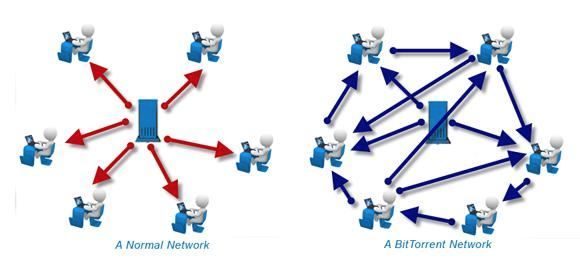
Torrent vs. Normal Network

Let’s use the analogy of book sharing to illustrate how BitTorrent works.

There is a book you want to read but you only have one chapter with you. You look around and find a friend who has a few more chapters. It still isn’t a complete book, so both of you search for few more guys around the block who might have the remaining pages. There are a bunch of guys and though nobody has the complete book yet, you can share the chapters among each other till all of you get a copy of the complete book one by one.

On the internet, the “book” becomes the file you want to download. The file is broken up into little pieces or bits. Each of you has at least one piece so you start to download and share these “bits” until everyone has the entire file. Each piece that you (or someone else) downloads are available to all the others. At the same time, you are downloading some pieces while uploading others.

Thus, you can all share rather than placing the onus on one computer to host the file and distribute it.

Understanding Common BitTorrent Terms

These key terms will further explain how each part of the protocol works.

Torrent: At the beginning of all this is the torrent file itself. This is the file you search for when you want to download something. Usually, the torrent file name is descriptive enough. For instance, an Ubuntu release can have this file name: ubuntu-17.10-desktop-amd64.iso.torrent

Remember, the .torrent file is not the entire file. It is extremely small and it just contains the information that points to the actual file and the people who are sharing it. It is like a map which is used by the BitTorrent client to assemble all the pieces together.

BitTorrent client: A BitTorrent client is your downloader. It is the piece of software which takes the .torrent file, reads the information in it and starts the download. Torrent clients are available for all platforms including Android and iOS. On the iOS, you may have to jailbreak the phone.

Peer: A peer is any computer participating in the download and upload of a torrent file.

Seeder: A seed (or seeder) is anyone who has a complete copy of the file being shared across the torrent network.

Leecher: A leech (or a leecher) is the person who does not have the complete file yet but has joined the network to download it. A leecher becomes a seeder when he downloads the entire file and then shares it across the network.

Swarm: The swarm is the sum total of all the leechers and seeders (i.e. all the computers) participating in the torrent process.

Index: An index is, as the name implies, a searchable list of .torrent files, hosted on a website.

Share ratio: The ratio is the amount of data a user has uploaded divided by the amount of data they have downloaded for a particular torrent (UL÷DL). A share ratio greater than 1 has a positive effect on the user’s reputation because it means that the user has sent more data to other users than he has received. Conversely, a share ratio under 1 has a negative effect.

Tracker: The tracker is a server which has the information of who has what files and who needs which ones, thus acting as a bridge between seeders and leechers. Some trackers are private requiring a registration where most are public.

Before we get into the process and get our hands dirty, let’s pause and review the legality of torrents again. Even though the torrent protocol is technically legal, its abuse is at the core of the fight against digital piracy. Big Brother is watching your every move, so stay aware and stay clean.

BitTorrent Isn’t Illegal: Understanding Copyright Laws

“Season 7 of Game of Thrones exceeded 1 billion illegal downloads and streams across piracy channels by the 3rd September 2017.”
MUSO.com

Peer-to-peer file sharing is completely legal, but using it to obtain copyrighted content is not. When you are dependent on downloads for your creative work or education, take the time to understand copyright laws.

In some countries it’s okay to download (use) material for personal use, but distribution makes it a punishable offense. With torrents, the water gets a bit muddied because the protocol makes everyone both downloader and distributor.

There have been numerous cases where torrent trackers which index the torrents available have been shut down for infringing some country’s laws. Organizations like the Recording Industry Association of America (RIAA) and the Motion Picture Association of America (MPAA) have become proactive against many of them because it represents a source of piracy.

Remember, downloaders can be pinpointed by their IP addresses, so the cloak of anonymity is not there to hide behind.

The safest course of action is to follow the copyright laws as laid down. Browse to the copyright policy link of the respective tracker website; the better ones have it.

Getting Started With Torrents

A torrent client is a piece of software that is designed for peer to peer file sharing with the BitTorrent protocol. A good torrent client should be safe, reliable, and user-friendly. Here’s how easy it is to grab a solid torrent client, set it up, and download our first file.

Finding the Right Torrent Software

A simple Google Search will throw up some popular names. BitTorrent was the first torrent client and it is still going strong after 16 years of solid service. But you might want to look at the larger field and a few more options for your operating systems.

A good place to get acquainted with the whole shebang is Wikipedia’s Comparision of BitTorrent clients. Or you can check out our articles on the best torrent clients for Windows, best torrent clients for Mac, and best torrent clients for Linux. Chromebook users can try tools like JSTorrent and Bitford.

There are many free and lightweight software available. Some clients are ad-supported (including BitTorrent’s official client) and you have to pay to remove the ads.

Installing the Torrent Client

The download is small at 2.74MB for the Windows version of BitTorrent Free. If you are installing BitTorrent for the first time, just follow the screenshots. Installations of the other BitTorrent clients are also similar.

Optimizing Your Torrent Client for Speed

A torrent client is no different from any other software. You can take it out “straight from the box” and run it. Or you could change a thing here and there to give it a smoother run.

BitTorrent includes a Setup Guide that can help you test your bandwidth and configure the client for maximum performance. Go to Options > Setup Guide (or use Ctrl + G). BitTorrent recommends that you follow the steps in order.
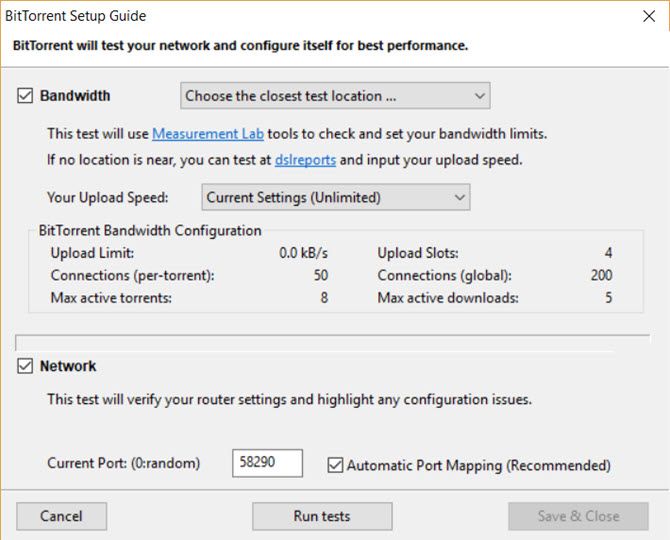
BitTorrent Setup Guide

The Setup Guide runs two tests:

It tests your bandwidth for upload speeds. BitTorrent will try to upload at your maximum speed, so you have to find out how much it is and cap it a specific limit to avoid choking your connection. Choose the closest location from the dropdown.

It tests and verifies your router settings. When BitTorrent runs for the first time, a port is automatically selected for you. A port is where your computer receives the communication signals from the outside network. This test checks if the port is open for traffic or there is some configuration issue.

Later in the guide, we will dig into the Preferences screen and optimize your BitTorrent for speed and performance.

Downloading Your First Torrent

Search engines are cagey about promoting torrent links on the search results page. This is another front in the battle against copyright infringement. Earlier in 2017, Google and other search engines worked on a voluntary anti-piracy code. Policing has got stricter with search engines and ISP’s honoring genuine takedown requests.

The discussion is not against torrents, but against piracy sites. Google and other internet continue to deindex them from their search results. SEO traffic to dubious sites are cut off and torrent sites, in general, do not find a place in the search results.

For instance, The Pirate Bay is banned in the U.K and India among other countries even though these torrent sites and meta-search engines also host legal content (e.g. LibreOffice and various Linux distros).

Which torrent sites should you go to? If you were miffed with The Pirate Bay closure, here are some reliable Pirate Bay alternatives.

Going to a trustworthy torrent site also lets us avoid the pitfalls of downloading a corrupted file or even worse, a malicious virus. A good torrent website filters out the undesirable and hosts clean .torrents. Here are a few more recommended ones:

SkyTorrents: A clean privacy focussed torrent site without ads.

Zooqle: A clean interface with nearly three million verified torrents and counting. You can sign-up to manage your torrent downloads on the site.

Torlock: A torrent download site with 100% verified torrents. Torlock pays its users $1 for every fake torrent they discover but I couldn’t verify this claim independently.

SeedPeer: A fast and clean site with a large catalog of three million verified torrents.

RarBG: The trustworthy site is popular in the torrent community and is another alternative for PirateBay buffs.

Demonoid: A well-known name that has survived the churn. The only downside is that Demonoid is a private torrent community and you need to register when slots are available.

How to Search for Torrents to Download
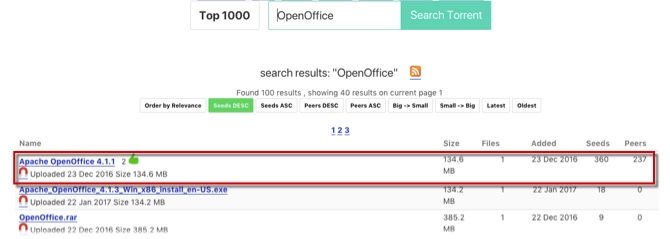
Download a Torrent File

1. Hop over to any of the torrent sites and search for your desired torrent file. For instance, the screenshot below is from Sky Torrents. Enter your keyword.

Remember, a torrent file is nothing but a small 15-100KB file which points to the contents of the whole file and the people in the swarm. These .torrent files are uploaded by torrent sharers around the web.

2. Choose a healthy torrent link to download from. Usually, it will be one that has a high number of seeders and peers. Some torrent sites also display an icon that shows it has been verified as “clean” by the community. It is always a good idea to go through any comments contributed by the community below the link.

3. Click on the torrent link. The tiny “.torrent” file is downloaded to your desktop in a couple of seconds. You can also click the icon of a magnet that is a magnet link for the torrent. A magnet link is a server-less way of downloading the torrent information. Instead of a torrent file sitting on a server somewhere, you download it directly from a peer.

Most torrent websites carry both options. Many sites have moved to magnet links exclusively because you can then download the torrent even if the original tracker is down or closed.

4. Browse to your saved .torrent file and double-click it to open the file with your torrent client. You can also use the menu of the software to add the .torrent file for download. Or alternatively, drag and drop the .torrent file into your software window.

With a magnet link, the torrent client will automatically launch the torrent client. Now, your software begins the download by first connecting to the tracker server to find out who else is downloading the same file and which bits they have.

5. The tracker server identifies the users participating in the share and labels them as either seeders or leechers. Look for a torrent with a higher number of seeders. The ratio of seeders to leechers is the share ratio and a higher figure makes for a healthier (and faster) torrent.

6. The download begins, but if it starts slowly, don’t be alarmed. Gradually the speed picks up as the swarm increases.

The time to complete the download will depend on the file size, the speed of your connection and the quality of the swarm. After your download finishes, you may enjoy the file you just got. Now after all that hard work if you are thinking of deleting the leftover .torrent file and closing the client software just pause here. This single selfish act is known as a “hit and run” (HnR or H&R) in the torrent community and is a cardinal sin of the torrent world.

How to Be a Good Member of the Torrent Community

Hit-and-runners are called “leechers” by the torrent community. Strictly speaking, a leecher is one who does not have a complete copy of a particular file yet. A leecher turns into a seeder only when he starts sharing his completed copy with the rest of the swarm.

Unfortunately, the term has also come to symbolize those users who download without uploading (i.e. take but not give back to the swarm). To avoid this name calling, follow this cardinal rule:

“After your download finishes, leave your Torrent client software running for at least three hours, or until you have uploaded as much as you have downloaded (a 1:1 share ratio). Sometimes it may not be possible to follow this rule but it is important to get close to it.”

Tip: Do your downloading at night so that by the time you wake up you have downloaded your file and you would have uploaded your share too.

Torrent Safety Rules: Be Careful What You Download

At first, you might feel like a kid let loose in a chocolate shop, but beware as there are many fake torrents out there. Most of them are malicious. Here are five golden rules of internet security which have never failed me:

  1. Make it a habit to scour around for any comments left by earlier downloaders regarding the quality of torrents.
  2. Download torrents from a reputable website or join a private tracker. Private trackers moderate the quality vigorously but then they are equally rigorous with their rules.
  3. Try to avoid downloading files which have been split and zipped into a mass of kilobyte sized files. Commonly they are fake torrents.
  4. Always read the rules and the copyright policy of the website you are downloading from.
  5. Don’t download pirated software or computer game files from unsafe public torrent sites.

The Best Software for Torrenting

You started with an idea about torrents, a torrent client and a net connection. With the help of some search engines, you got to your first .torrent file and downloaded with success your first file.

Now just like a good handyman, you need to find the best software for your OS to go from a torrent newbie to a torrent ninja.

Security Software: Your firewall and anti-virus software will be the first line of defense against bad torrents.

Archiving Utility: Many files are compressed before they get uploaded. You will need a fast extraction software to de-compress them. WinRAR and WinZip are common but I would recommend you take a look at 7-Zip an excellent free alternative along with PeaZip and Zipware.

Media Player: Torrents are often the best way to exchange public domain movies and audio files. Any good media file installed on your system can handle the variety if they have the right codecs installed. VLC Media Player is still the best open-source media player out there.

Also, check out this select list of the top media players for Windows and the best media players for Mac. VLC is common on both lists.

Codecs for Playback Support: When you can’t play back a video or audio file, then the error is often due to a missing codec. A codec is a piece of code that is behind the compression and decompression of data. Download the right codec and it will solve your problems. Codec download sources include:

How to Speed Up Your Torrent Downloads

What’s the point of the torrent protocol when the download speed resembles a turtle in a sack race? The download speed depends on a few factors and some of them are within your control. Let’s see how you can optimize your torrent client with a few nips and tucks to the settings.

The screenshots below come from BitTorrent on Windows 10. But torrent clients share common settings and it won’t be difficult for you to go under the hood.

1. Check Your Bandwidth

To optimize your torrent download speed, you have to know your maximum download and upload limits. You also have to find out if your ISP is throttling the use of torrents in any way. There are several ways you can check if you are getting the bandwidth you paid for. It is more important to measure the health of the internet now as Net Neutrality curbs get dismantled in some countries.

Note down your download and upload speeds. This will be important in a little while.

The Internet Health Test by Battle for the Net is a website you should bookmark to measure your bandwidth and report if you spot any issues. The speed test takes less than a minute to complete.

If you are in Europe, then check out Respect My Net which is a platform to report net neutrality violations in the EU. Alternative speed test tools like Speedtest are available too.

Internet Health Test

Your own computer may be snacking on your bandwidth. If you see a consistent drop and the fault isn’t with your ISP, then look at these reasons for a drop in your internet speed.

TCP Optimizer 4 is a tiny free program that can optimize your internet connection. The FAQ is available on the linked page.

2. Use the Right Torrent Client

Some clients are feature-packed while several are as simple as possible. You also might prefer a cross-platform torrent client that you can configure easily across all your machines. BitTorrent and uTorrent have existed for a long time but now they are loaded with ads, so I prefer using lightweight torrent clients.

For Windows: Take a look at Tixati or qBitTorrent, which are open-source software and have all the core features you want. I haven’t tried it yet, but there are some polished clients like FrostWire and BitLord which you can also look at.

For macOS: Transmission was the best torrent client for macOS but it was hit with a few security issues. But alternatives to Transmission are plentiful.

For Linux: Ubuntu comes pre-installed with Transmission. There are a number of good torrent clients available. qBitTorrent again finds the top place. Take a look at the other modern torrent clients for Linux.

Torrent Clients on the Cloud: Today, cloud torrenting is secure, anonymous, and fast. You can access your files from anywhere. Offcloud, Bitport.io, Put.io, and Seedr.cc provide well-rounded services.

3. Choose Healthy Torrents

A good torrent is one where the number of seeders is higher than the number of leechers. The more seeders, the healthier your torrent will be, so choose a torrent the seeder-leecher ratio is high. On many sites, you will find them marked with a green badge which usually signals that it is also verified by the community.
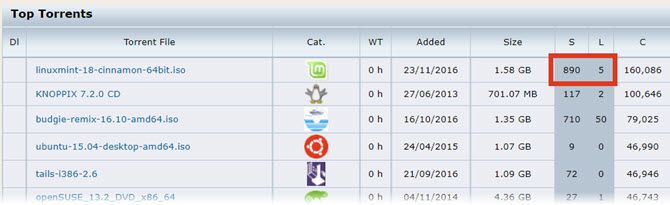
Healthy Torrent

4. Allow Torrents Through the Firewall

Firewall software hate torrent connections and often block it. They can also block the download of the torrent client itself.

As a first step, add an exclusion to Windows Defender or any other security software you have installed.

Next, go to your torrent client and select the option that allows it to automatically add an exception to Windows Firewall:

Go to Options> Preferences> Connection > Add Windows Firewall exception. Click Apply and OK.
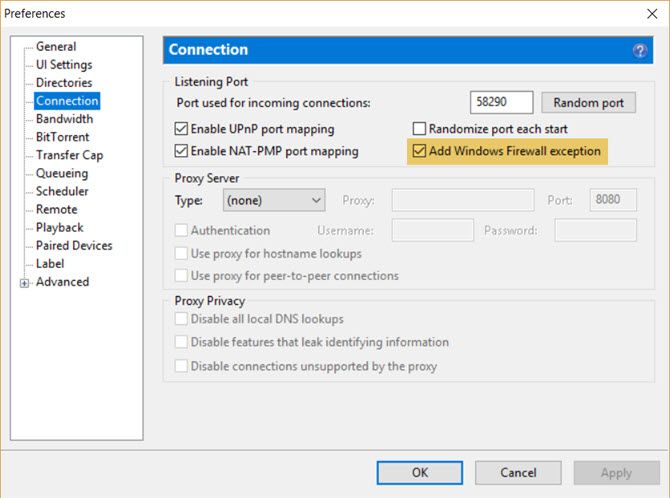
Add Firewall Exception to BitTorrent.

Never shut down your antivirus and firewall as they are your first line of defense against malicious downloads.

5. Change the Default Port

BitTorrent uses the default ports 6881 to 6999. As torrent connections spark a lot of traffic, ISPs try to throttle the bandwidth on these ports. Good torrent clients will let you change the ports so connections are unrestricted. Change it to another range or randomize it every time.
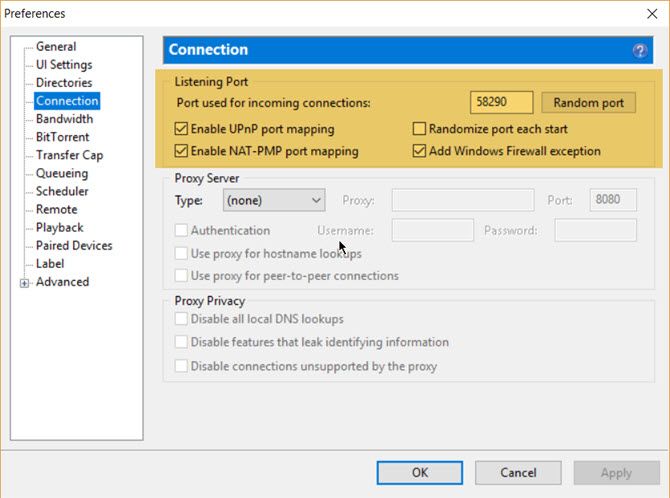
Randomize ports in BitTorrent

Just to go Options > Preferences > Connection. Under the Listening Port settings, enable the following:

  • Enable UPnP Port Mapping
  • Enable NAT-PMP Port Mapping
  • Randomize Port Each Start

Apart from the ones needed for essential tasks like email and browsing, most ports are blocked by default by routers to prevent malicious connections. If the home computer is behind a router, the ports have to be opened through the feature called port range forwarding to enable torrent traffic.

Our brief tutorial on how to increase your torrent download speed with proper port management is written in a simple way.

6. Don’t Cap Your Max Upload or Download Speeds

Think of your bandwidth as a highway which is trying to handle rush hour traffic in both directions. If you do have a reason to limit your maximum download and upload rates then do so. For instance, when you are streaming or gaming online. But don’t set it too low as it will throttle your own download rate.

TorrentFreak recommends a simple calculation. But you can just set a lower percentage than your maximum and experiment.

  • Maximum upload speed: 80 percent of your maximum upload speed
  • Maximum download speed: 95 percent of your maximum download speed

You can see the setting when you go to Options > Preferences > Bandwidth > Global Upload Rate Limiting / Global Download Rate Limiting.
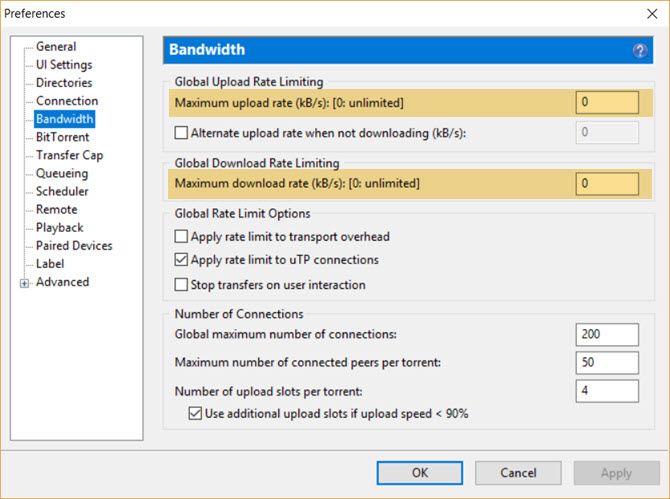
BitTorrent Global Upload Rate

But to get the maximum speeds, it’s better to set both at “0” which is the unlimited or the maximum permissible rate allowed by your ISP. The BitTorrent protocol which works on the value of “fairness” identifies you to the swarm according to the quality of your bandwidth.

If your speed is too low, then you will be automatically grouped with similar peers on slow connections. In short, you get back what you put into the swarm. I don’t worry too much about upload speeds but instead work with a small batch (queue) of active torrents to improve the overall health.

Note: BitTorrent asks for Kbps under “Maximum upload and download rate” and not Mbps. Use a bandwidth conversion tool like ToolStudio or use the Google Search bar trick for the conversion.

7. Set the Number of Connections

The number of connections is the essential part of a BitTorrent optimization. These can be set from Options > Preferences > Bandwidth.
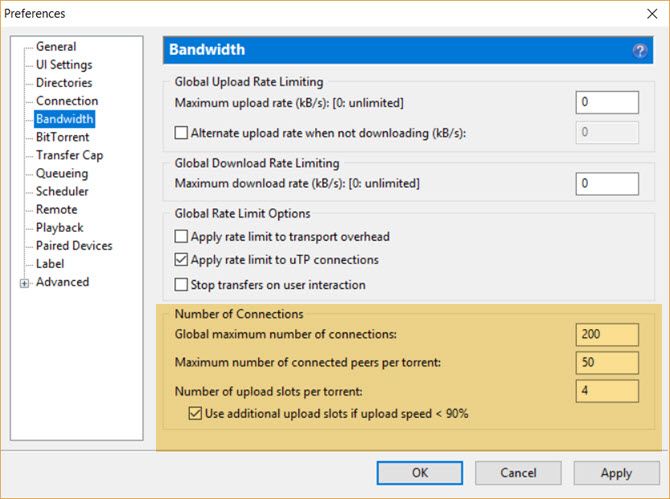
Optimize Number of Connections

Global maximum number of connections gives the maximum number of connections that a BitTorrent client can make for any P2P exchange. Setting this too high does not mean higher speeds. Setting it too high would take up useless bandwidth and too low a figure would miss out on peers.

Maximum number of connected peers per torrent gives the maximum number of peers that a BitTorrent client can connect to for any P2P exchange.

Number of upload slots per torrent gives the maximum number of peers that your client will upload to for any P2P exchange. These upload slots go to peers who are missing part of the download that you have. Too low and it will affect your download speeds as well.

Use additional upload slots if upload speed <90%. Enable this checkbox for healthy uploads.

As most of us are (probably) operating with speeds above 1 Mbps the default settings are recommended for all users: a 200/50/4 configuration for around 8 active torrents (which can be configured from the Queueing section).
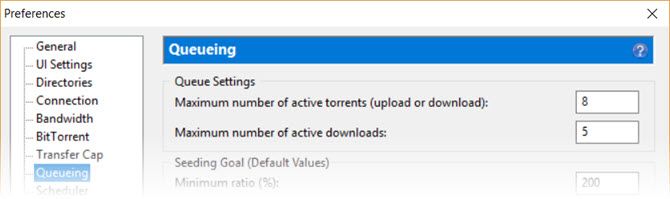
BitTorrent Settings for Queueing

I don’t like to set a higher number for the maximum number of active torrents and active downloads because it also increases the read-write operations on the hard drive while I am working on other tasks.

Fiddle around with the settings. Torrent downloads are dependent on your bandwidth and the peer network. So, there is no size fits all. The worst that can happen is your torrent speed will slow down but you will gain an idea of what works for your bandwidth.

8. Prioritize Specific Torrents

This method is useful when you have several simultaneous downloads and you want to speed up one of them. It is also helpful to free a slot if you have a limit for the maximum number of active downloads.

Right-click on the torrent download you want to prioritize. Go to Bandwidth Allocation and choose your priority level (for e.g. High).
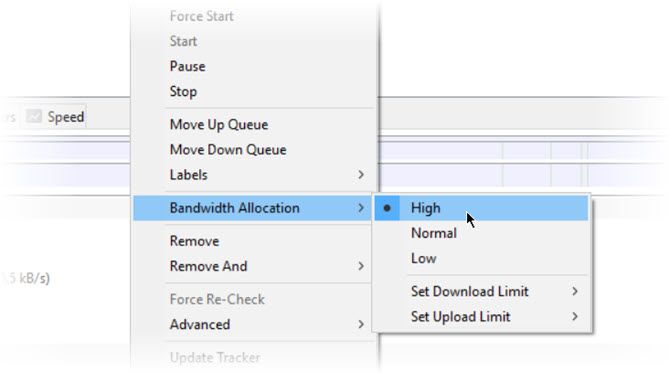
Prioritize a Torrent Download

Do remember this won’t help if the torrent health is bad. It also won’t help if you set all your downloads to High priority.

9. Update Torrent Trackers

Try to update torrent trackers and see if it increases the number of peers and seeders. More peers help to boost speeds. Torrent trackers do this by publicly announcing the IP address of all peers sharing the file. Extra peers can come from other torrent trackers on the web. And, you can add them to your present tracker list.
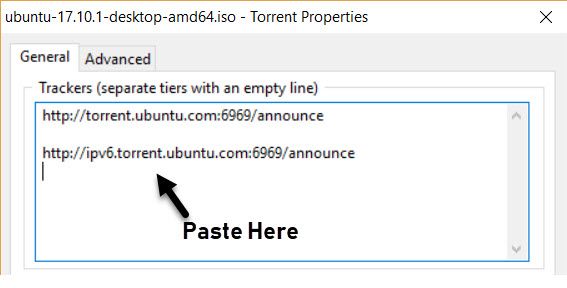
Find and paste trackers

Right-click on the active downloading torrent and click Update Tracker. You can also find other tracker lists on the web. Then, right-click on the downloading torrent. Go to Properties > General tab. Paste the tracker URLs at the end of the existing tracker list box.

10. Use the Scheduler to Manage Your Torrent Downloads

Let’s say you want to run the torrent at full speed when no one else in the family uses the internet. Most torrent clients also have a scheduler that helps you set a speed a limit, cancel the speed limits, seed only, or stop torrents at specific hours of the day.

  1. Go to Options > Preferences > Scheduler.
  2. Tick the checkbox for Enable Scheduler. A grid of green boxes turns from gray to green. The grid has one box per hour and covers Monday through Sunday, midnight to midnight.
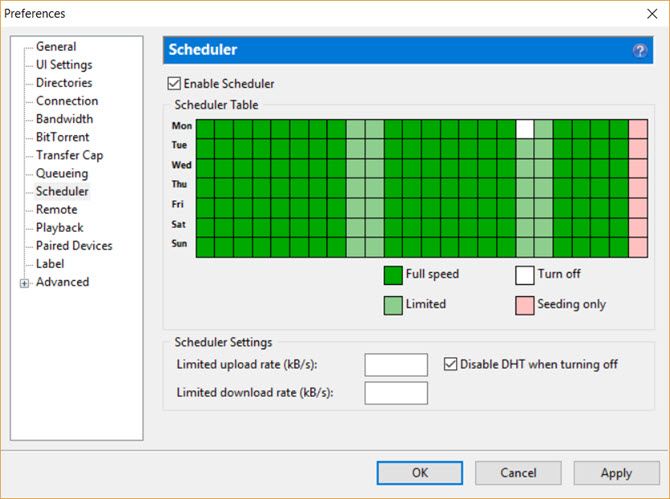
    BitTorrent - Scheduler
  3. The labels below the grid indicate the status you can apply to each hour by clicking on the grid boxes. For instance, light green boxes indicate limited download and upload rates. You can click on the boxes to cover the specific time slots and limit your connection during those range of hours.

11. Set a Good Share Ratio

Torrents rely on the community and healthy exchange of files. As a responsible member, you should give back as much as you take. A torrent client can help you do this automatically by setting a share ratio. Private torrent sites encourage a share ratio of 1:1 which means that you’ve downloaded exactly the same amount of data as you’ve uploaded.
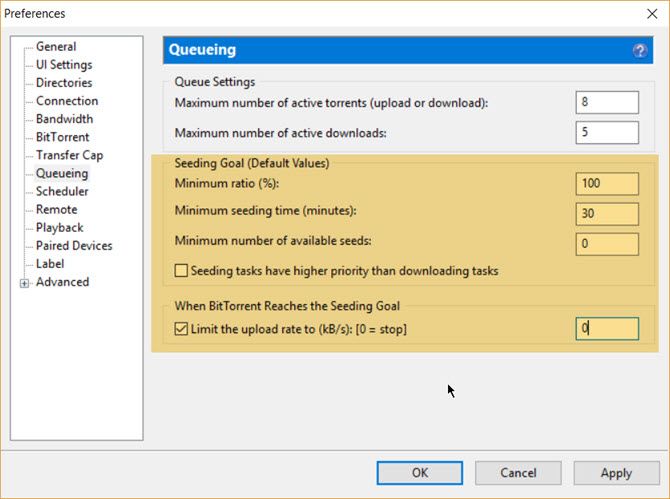
Set a Good Share Ratio in BitTorrent

You can automatically stop sharing at this specific ratio. You get to save bandwidth and time instead of constantly checking on your uploaded share.

  1. Go to Options > Preferences > Queueing > Default Values.
  2. Set the Minimum ratio to 100% (which is a 1:1 sharing ratio).
  3. Alternatively, you can set a Minimum seeding time in minutes.
  4. Set the action for When BitTorrent Reaches the Seeding Goal. A value of “0” automatically stop the seeding when the share ration is achieved.

12. Prevent ISPs From Throttling Your Traffic

ISPs often limit bandwidth to get over peak congestion at specific times of the day (usually, weekends and evening). A simple setting called Protocol Encryption in most of the torrent clients helps to override this bandwidth shaping. With protocol encryption, ISPs find it difficult if not impossible to detect that the traffic is coming from BitTorrent.

Go to Options > Preferences > BitTorrent > Protocol Encryption > Enabled.
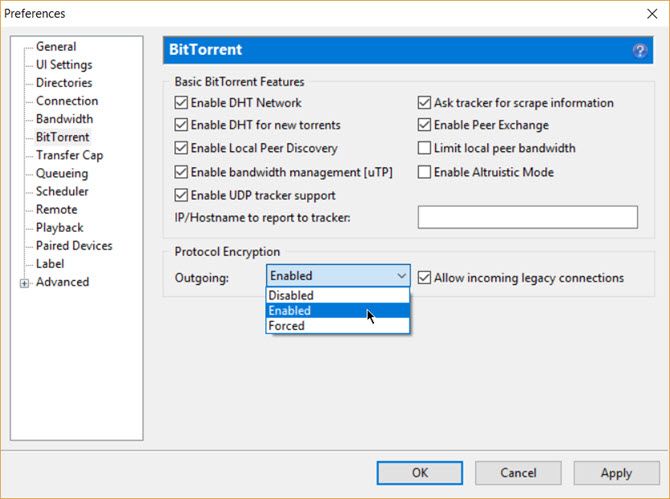
Prevent ISPs from Throttling Traffic

Experiment with Enabled, Disabled, and Forced options because you could be getting better speeds with encryption disabled. Also, it can reduce the total number of available peers and even make some downloads impossible.

The BitTorrent protocol uses the RC4 encryption cipher which is very weak but enough to pass a deep packet inspection by ISPs. Also, the protocol encryption won’t hide your IP address. For that, you will have to use a VPN which uses the industry standard AES encryption to cover your tracks and routes your traffic through another remote server.

13. Use a VPN to Stay Safe

A virtual private network will encrypt all your traffic and not only those from torrents. The strong AES encryption cannot be decrypted by your ISP or other snoops easily. There is also no need to change any setting on your torrent client. You just need to install a VPN client and there are many cheap but secure VPN solutions available worldwide.

A seedbox is another alternative to bypass torrent connection blocks. These are dedicated virtual servers that are also encrypted. A seedbox manages your torrent downloads and then transfers the downloads to your computer via a normal download. We have mentioned a few seedboxes in an earlier section too.

How to Create and Share Your Own Torrents

There’s a community behind this file sharing protocol. And, it isn’t a one-way street. To be a true peer to peer member you should share your own torrents. It is easy with the help of the same torrent client you use to download any torrent.

Again, remember that it is not about bootlegging illegal content. It is just a useful way to share a large digital file with the public without storing it in a cloud folder.

  1. Open BitTorrent (or any torrent client). Look for the menu button that says Create New Torrent (or go to File > Create New Torrent).
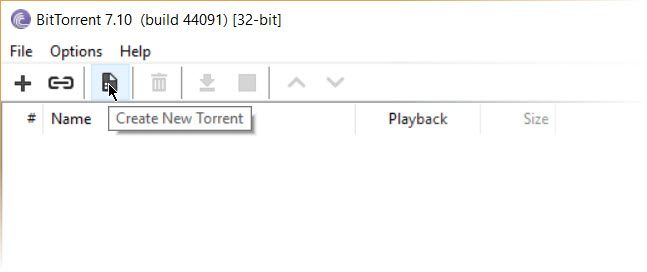
    Create New Torrent
  2. The Create New Torrent box opens up. For uploading a single file click on Add File and for uploading a bunch of files in a folder click on Add Directory. Browse to where you have kept the files (or folder) for upload. Include these as your source files.
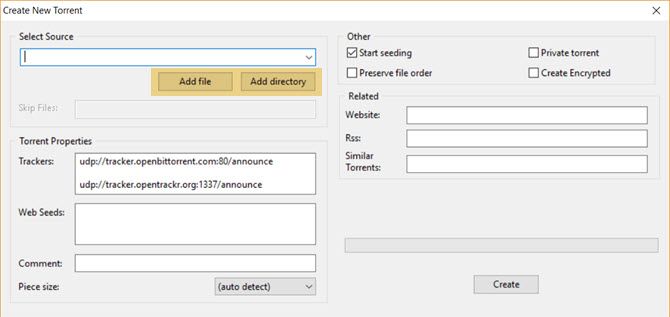
    Add a File or a Bunch of Files
  3. Fill in the Trackers under Torrent Properties is an important step towards finishing your torrent upload. You just have to copy paste a list of trackers (more specifically called the announce URLs) and these are available on some reliable websites. For instance, TorrentFreak has a list of trackers you can use. GitHub has a regularly updated list of public trackers too. A Google Search will net you many more.
  4. If you decide to list more than one, put a blank line between each URL by hitting Enter twice. Check the Start seeding box and click on Create. You can leave this unchecked if you don’t want to seed right now.
  5. Select the Preserve file order option when you want to maintain the folder structure for the downloaders. Don’t select the Private torrent box (unless you’re using a private tracker).
  6. Save the torrent file with a nice descriptive name. As soon as you save your torrent file, it gets added to your active list in BitTorrent, and the status should say Seeding or Finished if you start seeding right away.
  7. Upload the .torrent file to a tracker website like Piratebay (though the site is legally frowned upon) or a legal torrent site like Legit Torrents or GameUpdates. All tracker websites have an Upload link or a button. Usually, they require a log-in for you to access their upload page. Please read the rules and the copyright policy before you upload your .torrent file.
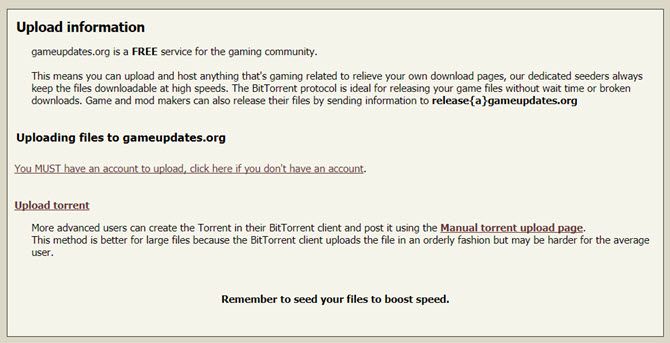
    A Legal Torrent Site
  8. Share the link with your family, friends, or the community.

You can also make your own private torrent and share it only with friends and family. But this involves a few more steps and right now is outside the scope of this basic beginner’s guide.

Conclusion: The Wonders of Peer-to-Peer Sharing

The peer to peer network grows without limits as every new player not only takes from the network but also gives something back.

Today, we see how the protocol has evolved into blockchain and decentralized apps. These technologies are not only giving us a wealth of digital content but fundamentally changing the world. As part of the swarm, it is up to us to follow the rules of the game.


Read Full Article
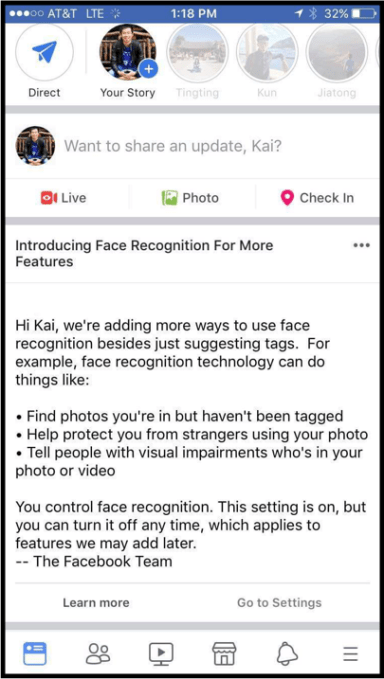
The Better Way to Share YouTube Videos: Use the New Chat System


Sharing a YouTube video is so last year. If you want to scream “Have you seen this?” to your friends, there’s a better way to do it now, and you can do it right from within the YouTube app: use YouTube’s own chat system for sharing and discussing videos in a perfectly social way.

The chat feature is specific to the YouTube app on Android and iOS. When you share and receive videos in the app, you can also chat about them one on one or in a group, reply with another video, and invite others to the conversation. Start by sharing a video.

  1. Open YouTube (screenshots are from iOS). Go to the video you’d like to share. Tap the Share icon.
  2. Select a contact or tap Add contacts. You can also share the video link by selecting an app.
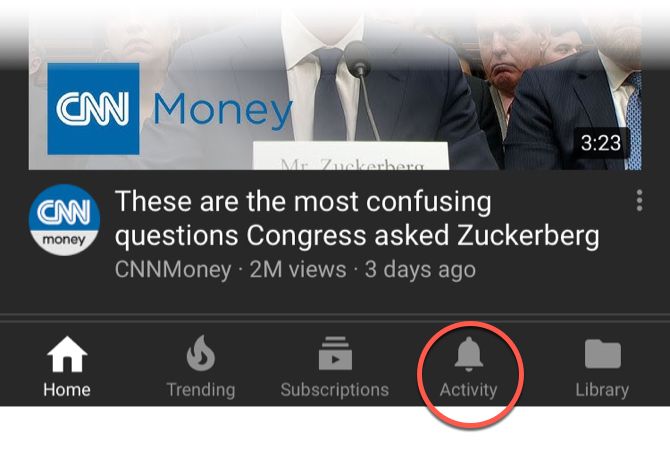
  3. After sharing the video, tap the Activity icon. Then, open the Shared tab to display a list of all your shared videos.
    YouTube Activity Tab
  4. Open a shared video. You can start a chat by typing a response in the text field. Click the blue Send icon.
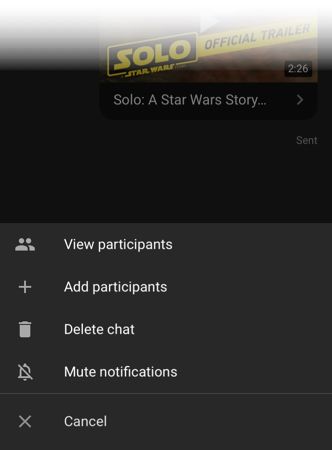
  5. Additional options are under the overflow menu button (with three dots) or the “+” button next to the chat box. These include:
    Overflow Menu in YouTube
  • View participants: See the members who are part of the shared video group.
  • Add participants: You can add a new member to the chat anytime.
  • Delete chat: If you created a chat, you must delete the chat to leave it. This will delete the chat for all participants.
  • Mute notifications: Stop receiving notifications without leaving the chat.

You don’t have to head to WhatsApp or Facebook now. Your chats are private (as much can be expected from Google) and you can turn it into a group chat with as many as 30 participants. Of course, you can express yourself with emojis too.


Read Full Article

How to Move Tabs Between Android and PC


If you’re reading something on your computer and want to switch your phone, or need to easily go from your phone to your computer, Apple offers a handy feature called Handoff. But did you know that Android users can do something similar with Chrome? Here’s what to do to set it up.

Log Into Chrome on Your Phone and PC

You’re going to need to make sure you’ve logged into your Google account in Chrome on your phone and on your computer.

Log into Chrome on your desktop:

  1. Click the user icon in the top right-hand corner of the browser.
  2. Click Sign in to Chrome.
  3. When prompted enter your email address and password.
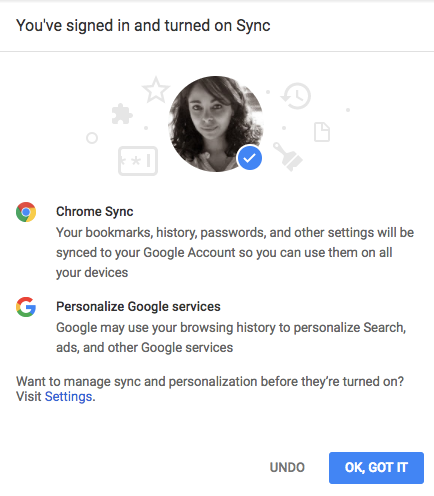
  4. You’ll see a screen letting you know you’re turning Chrome Sync on. Click OK got it.

Next, log in on your phone:

  1. Tap the menu (three dots) button.
  2. Tap Settings.
  3. You should see the Google account you’ve logged into to set up your Android phone. Tap Continue as [Name].
  4. You’ll see a screen letting you know you’re turning Chrome Sync on. Click OK Got it.

You can disable syncing by going back to Settings > Sync and toggle the feature off.

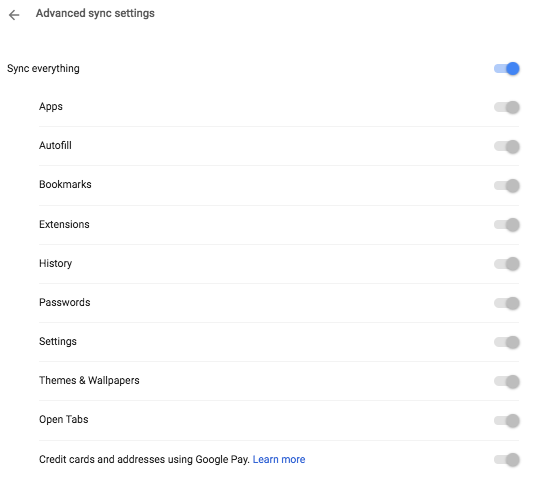
You can also be selective about what will be synced: Autofill, Bookmarks, History, Passwords, Open Tabs, Settings, and more. If you want to continue using this feature, don’t disable History or Open Tabs.

Moving Chrome Tabs From PC to Phone

So now that you’re logged in on both devices, you can start reading something on your computer and pick up where you left off on your phone.

  1. Open Chrome on your phone.
  2. Tap the menu (three dots) button.
  3. Tap Recent tabs.
  4. You’ll see a list of the recent tabs you’ve opened in Chrome, with the last one at the bottom of the list.

Moving Chrome Tabs From Phone to PC

If you’re reading something on your phone, but you’d rather continue on your computer, do the following:

  1. Open Chrome on your computer.
  2. Click History > Recently Visited.
  3. You should see the site you were visiting on your phone listed on your computer.

This feature should work with any computer running Chrome. If you’re not a fan of Chrome, Windows users can also get continuity features with their phone, whether on iOS or Android.


Read Full Article

13 Kodi Repos You Need to Uninstall and Why


In mid-2017, several long-standing Kodi repos vanished forever.

The problems all began with the attack on TVAddons; the company is the subject of two separate lawsuits in two different countries. As a result of the lawsuits, several other repo operators and add-on developers stopped working on their own projects for fear of prosecution.

So many repos were abandoned in such a short space of time that it was impossible for all but the most dedicated users to stay abreast of what was working and what wasn’t. And as any long-term Kodi user knows, keeping abandoned repos on your app is a recipe for a security meltdown.

One of two security nightmares could unfold:

  1. A hacker might purchase the domain of the depreciated repo and use the existing installations to inject malicious code onto a machine.
  2. A copyright holder could initiate a “honeypot” sting whereby a repo appears to offer premium content for free, while in practice, a tracker records your IP address and passes it on to the legitimate rights holders.

Which Kodi Repos to Uninstall and Avoid

So, in light of the current Kodi climate, which repos do you need to delete off your setup? There are too many out there to list them all, but here are some of the former most popular repos which can no longer be considered safe:

  • Noobs And Nerds
  • Looking Glass
  • Colossus Repository
  • Smash Repository
  • DandyMedia Repo
  • SpinzTV
  • Ares Wizard
  • Alpha Repository
  • UK Turk’s Playlists Repo
  • Mucky Duck Repo
  • Soulless Repository
  • Origin Repository
  • Pulse Build / Wizard

Note: Just because some of these still work, it does not mean you should use them.

And before you ask, no, we’re not going to recommend alternative repos that will let you find content for free. Yes, they exist, but using them could land you in significant trouble with the law. If you’d like more information, check out our introductory guide to using Kodi without breaking the law.


Read Full Article

How to Stop Apps From Disappearing on Your iPhone or iPad

Udacity tackles cybersecurity with its latest nanodegree


Responding to the talent shortage and increasing demand facing the cybersecurity industry, Udacity said that it is now developing a new nanodegree focused on security.

Launched at the security industry’s RSA Conference, details about the new program (including potential partners) are still sketchy (there’s little available on the information page on the Udacity’s website about the program).

The announcement at RSA actually included an active call for partners for the security program.

To the leaders in this field, we are extending the opportunity to join us. Your organization, together with Udacity, can help shape the future of Cybersecurity training, and nurture the world’s most advanced pipeline of highly-qualified Cybersecurity talent.

Through our partnership, your organization will have early access to this incredible talent pipeline, and the opportunity to hire those experts who have trained on the curriculum you helped to build. 

As we consider the technological landscape of the future, we continually seek opportunities to apply the world’s most transformative technologies to the world’s most pressing challenges, and to educate, develop, and nurture the talent that will solve these challenges. We see this kind of opportunity in the field of Cybersecurity, and we look forward to building this program in partnership with the world’s leading Cybersecurity experts.

Your expertise and experience will inform the development of our curriculum. Your subject matter experts will provide vital leadership and deliver valuable knowledge to our students. Through the establishment of scholarships, you will help ensure maximum opportunity for the most deserving and qualified students across the globe.

Announcing the new program on the company’s blog, Udacity cited reports from the Department of Labor indicating that job opportunities for “information security analysts is projected to grow 28 percent from 2016 to 2026.”

Udacity’s security sales pitch is that it has already trained 10,000 artificial intelligence engineers (no word on how many the company has successfully placed in companies), and has thousands of students actively enrolled in its artificial intelligence and data analysis classes.

Through its paid and free classes Udacity claims some 8 million students and 30,000 graduates of the company’s nanodegree programs.

Udacity has made its reputation by offering classes in some of technology’s most sought after fields including autonomous vehicle systems, artificial intelligence and big data.

Founded by Sebastian Thrun, the godfather of the autonomous vehicle industry and the current chief executive of the flying vehicle startup Kittyhawk Corp., Udacity initially launched into the world of massive open online courses. Now the company’s market is more focused on credentialed skill development in conjunction with industry partners like Google, Amazon, IBM, NVIDIA, Mercedez-Benz, and others.


Read Full Article

Why Automation is a Necessary Evil for your Enterprises!


One of the focus areas of CXOs today is speedy adoption of new technologies (RPA, AI, Machine Learning, intelligent automation etc.). On one side, they have to Invest in these technologies, and at the same time, they have to focus upon cost-reduction. Adding to the challenge is that few software vendors can truly promise that AI will give them X% benefits within the first quarter of deployment. In many cases, they do not have either the processes or the systems in place to quickly demand  (ROI)returns from their investments in these fields. Hence, comes the element of RISK appetite for the people in the leadership.
Why is Automation Necessary?
Creating Competitive Workforce
There is a lot of mundane, repetitive work in enterprises, which is currently carried out by humans. For e.g. cleaning of disks space, eye-ball monitoring of screens for issues, installing common software in desktops/laptops etc. These activities do not require any intelligence & personally, I feel that doing this work is a very restricted use of the education, which these people have received. In addition, I find that, after interaction with some of my friends in such situation, they mostly talk about switching company because of no career progression.
Therefore, in this case, automating such processes, which are typically L0/L1, is only going to benefit every stakeholder. For e.g. now my “correctly” complaining friends can use their time in learning new skills and controlling their career progression.
With the acquisition of new skills-set, now, they can at least think of rising quickly in the hierarchy (than their earlier case). So now, we have a workforce, which is skilled, solves challenging problems and mentally satisfied (finally they are utilizing their time). Many people will not be able to align themselves with this idea and will find themselves redundant and irrelevant. These people form the basis for my third point.
Improving Efficiency of Processes
I think we all agree on this point. Intelligent software do not sleep, do not question-follow rules, do not take break, give consistent resolution, are faster etc. If we have to compare the performance of machines and humans for the same process, ceteris paribus, the efficiency of intelligent software is better. The soft benefits are of using intelligent software is immense.
Cost Optimization
In my opinion, employees should be given freedom to experiment with ideas & concepts & encouraged to suggest & design new ways to solve problems in order for the enterprises to grow in today’s VUCA world. This necessitates providing continuous learning opportunities to employees by the enterprises. The more the employees are able to up-skills themselves, the better it is for the whole enterprise.
However, the sad truth is that, many organizations are still conservative in their approach towards adopting new things. Employees are skeptical on taking risks and bringing change in their day-to-day approach to tackle problems. They still find the one way, which worked once, to be the golden rule to make that thing work repeatedly. Hence, enterprise stubbornness becomes norm & professional growth starts to stagnate.
This brings me back to my first point. In my opinion, it is better to let go of people who are not adding value to the enterprise, than to bleed by taking care of them.
Additional benefits, from a vendor or a service provider stand point, of letting go of these people is that the operating margins starts increasing. The logic for this is simple. Vendors are still getting paid for the outsourced activities they were carrying (with human employees), but now, instead of humans, they have intelligent software doing it. So, all the salary which was to be paid, gets added to the bottom line of the vendor.
Answering the Ethical question
This is where automation becomes a Necessary Evil. Given the pros, any CXOs, who fall in the innovators group, will be willing to adopt automation (thereby downsizing) to cut costs. However, the cos is that the very people who worked hard for the enterprise to grow, who stood with the enterprise during recession and during other market uncertain situations, may be shown the pink slips. Hence, it is important to give the employees chance to either up-skill or cross-skill so that they continue to add value to the enterprise.
Employees should remember that there are No Free Lunches, but, at the same time, enterprises should remember that, the employees who helped it to reach today’s heights are its Biggest Assets.


Google confirms some of its own services are now getting blocked in Russia over the Telegram ban


A shower of paper airplanes darted through the skies of Moscow and other towns in Russia today, as users answered the call of entrepreneur Pavel Durov to send the blank missives out of their windows at a pre-appointed time in support of Telegram, a messaging app he founded that was blocked last week by Russian regulator Roskomnadzor (RKN) that uses a paper airplane icon. RKN believes the service is violating national laws by failing to provide it with encryption keys to access messages on the service (Telegram has refused to comply).

The paper plane send-off was a small, flashmob turn in a “Digital Resistance” — Durov’s preferred term — that has otherwise largely been played out online: currently, nearly 18 million IP addresses are knocked out. And in the latest development, Google has now confirmed to us that its own services are now also being impacted.

From what we understand, Google Search, Gmail and push notifications for Android apps are among the products being affected.

“We are aware of reports that some users in Russia are unable to access some Google products, and are investigating those reports,” said a Google spokesperson in an emailed response. We’ve been trying to contact Google all week about the Telegram blockade, and this is the first time that the company has both replied and acknowledged something related to it.

(Amazon has acknowledged our messages but has yet to reply to them.)

Google’s comments come on the heels of RKN itself also announcing today that it had expanded its IP blocks to Google’s services. At its peak, RKN had blocked nearly 19 million IP addresses, with dozens of third-party services that also use Google Cloud and Amazon’s AWS, such as Twitch and Spotify, also getting caught in the crossfire,

Russia is among the countries in the world that has enforced a kind of digital firewall, blocking periodically or permanently certain online content. Some turn to VPNs to access that content anyway, but it turns out that Telegram hasn’t needed to rely on that workaround to get used.

“RKN is embarrassingly bad at blocking Telegram, so most people keep using it without any intermediaries,” said Ilya Andreev, COO and co-founder of Vee Security, which has been providing a proxy service to bypass the ban. Currently, it is supporting up to 2 million users simultaneously, although this is a relatively small proportion considering Telegram has around 14 million users in the country (and, likely, more considering all the free publicity it’s been getting).

As we described earlier this week, the reason so many IP addresses are getting blocked is because Telegram has been using a technique that allows it to “hop” to a new IP address when the one that it’s using is blocked from getting accessed by RKN. It’s a technique that a much smaller app, Zello, had also resorted to using for nearly a year when the RKN announced its own ban.

Zello ceased its activities when RKN got wise to Zello’s ways and chose to start blocking entire subnetworks of IP addresses to avoid so many hops, and Amazon’s AWS and Google Cloud kindly asked Zello to stop as other services also started to get blocked. So, when Telegram started the same kind of hopping, RKN, in effect, knew just what to do to turn the screws.

So far Telegram’s cloud partners have held strong and have not taken the same route, although getting its own services blocked could see Google’s resolve tested at a new level.

Some believe that one outcome could be the regulator playing out an elaborate game of chicken with Telegram and the rest of the internet companies that are in some way aiding and abetting it, spurred in part by Russia’s larger profile and how such blocks would appear to international audiences.

“Russia can’t keep blocking random things on the Internet,” Andreev said. “Russia is working hard to make its image more alluring to foreigners in preparation for the World Cup,” which is taking place this June and July. “They can’t have tourists coming and realising Google doesn’t work in Russia.”


We’ll update this post and continue to write on further developments as we learn more.


Read Full Article
Google confirms some of its own services are now getting blocked in Russia over the Telegram ban


A shower of paper airplanes darted through the skies of Moscow and other towns in Russia today, as users answered the call of entrepreneur Pavel Durov to send the blank missives out of their windows at a pre-appointed time in support of Telegram, a messaging app he founded that was blocked last week by Russian regulator Roskomnadzor (RKN) that uses a paper airplane icon. RKN believes the service is violating national laws by failing to provide it with encryption keys to access messages on the service (Telegram has refused to comply).

The paper plane send-off was a small, flashmob turn in a “Digital Resistance” — Durov’s preferred term — that has otherwise largely been played out online: currently, nearly 18 million IP addresses are knocked out. And in the latest development, Google has now confirmed to us that its own services are now also being impacted.

From what we understand, Google Search, Gmail and push notifications for Android apps are among the products being affected.

“We are aware of reports that some users in Russia are unable to access some Google products, and are investigating those reports,” said a Google spokesperson in an emailed response. We’ve been trying to contact Google all week about the Telegram blockade, and this is the first time that the company has both replied and acknowledged something related to it.

(Amazon has acknowledged our messages but has yet to reply to them.)

Google’s comments come on the heels of RKN itself also announcing today that it had expanded its IP blocks to Google’s services. At its peak, RKN had blocked nearly 19 million IP addresses, with dozens of third-party services that also use Google Cloud and Amazon’s AWS, such as Twitch and Spotify, also getting caught in the crossfire,

Russia is among the countries in the world that has enforced a kind of digital firewall, blocking periodically or permanently certain online content. Some turn to VPNs to access that content anyway, but it turns out that Telegram hasn’t needed to rely on that workaround to get used.

“RKN is embarrassingly bad at blocking Telegram, so most people keep using it without any intermediaries,” said Ilya Andreev, COO and co-founder of Vee Security, which has been providing a proxy service to bypass the ban. Currently, it is supporting up to 2 million users simultaneously, although this is a relatively small proportion considering Telegram has around 14 million users in the country (and, likely, more considering all the free publicity it’s been getting).

As we described earlier this week, the reason so many IP addresses are getting blocked is because Telegram has been using a technique that allows it to “hop” to a new IP address when the one that it’s using is blocked from getting accessed by RKN. It’s a technique that a much smaller app, Zello, had also resorted to using for nearly a year when the RKN announced its own ban.

Zello ceased its activities when RKN got wise to Zello’s ways and chose to start blocking entire subnetworks of IP addresses to avoid so many hops, and Amazon’s AWS and Google Cloud kindly asked Zello to stop as other services also started to get blocked. So, when Telegram started the same kind of hopping, RKN, in effect, knew just what to do to turn the screws.

So far Telegram’s cloud partners have held strong and have not taken the same route, although getting its own services blocked could see Google’s resolve tested at a new level.

Some believe that one outcome could be the regulator playing out an elaborate game of chicken with Telegram and the rest of the internet companies that are in some way aiding and abetting it, spurred in part by Russia’s larger profile and how such blocks would appear to international audiences.

“Russia can’t keep blocking random things on the Internet,” Andreev said. “Russia is working hard to make its image more alluring to foreigners in preparation for the World Cup,” which is taking place this June and July. “They can’t have tourists coming and realising Google doesn’t work in Russia.”


We’ll update this post and continue to write on further developments as we learn more.


Read Full Article