14 March 2018

How to Install Windows Software on Raspberry Pi Using Wine


Want to run Windows software on your Raspberry Pi? It’s an ambitious proposition, but now possible for a small number of apps. To find out how easy this is, I set up Eltechs ExaGear software onto a Raspberry Pi 3.

Why Windows Software on Raspberry Pi?

With so many excellent Linux applications and utilities, why would you want, or need, to run Windows software on the Raspberry Pi?

Well, let’s take the practical benefits first: if you use your Pi as a desktop (e.g. for low-level office tasks), you might wish to install a Windows application that you use on your main computer.

There’s also the entertainment advantage. We know the Raspberry Pi can play retro video games. We also know that certain open-source videogames have been ported to the Pi.

What if you wanted to play a game that hasn’t been ported? Although modern videogames will almost certainly not run, older titles have a better chance on the Pi.

This is all made possible thanks to the ExaGear x86 environment, and Wine, the popular Windows application layer for Linux.

On desktop Linux PCs, Wine makes it possible to run Windows software. But Wine cannot run on its own on the Raspberry Pi, because the Raspberry Pi doesn’t use the x86 (32-bit) architecture. Rather, it is based on the ARM architecture, which is completely different.

All you need is to optimize the Wine application layer software for the ARM processor of the Raspberry Pi. Does ExaGear Desktop Software do the job?

What Is the ExaGear Desktop Software?

Eltechs ExaGear Desktop is a powerful virtual machine that creates an x86 environment on a Raspberry Pi. This means that software intended for Windows and Linux desktops can run within the ExaGear environment.

Example applications you can run on a Raspberry Pi include Skype, Dropbox, Plex, and uTorrent. Because ExaGear runs within the Raspbian OS, you don’t need to make any changes to your existing Raspberry Pi set up.

As far as the Pi goes, the best results will be attained using a Raspberry Pi 3. However, other ARM devices, such as the ODROID, Cubieboard, PINE64 and Banana Pi can also run ExaGear.

The result is that you can use older x86 software on the Raspberry Pi. This might be an application, or a video game.

While there are other ways to create a virtualized environment, ExaGear simplifies the process. Although a trial version is available, ExaGear is not free software.

Head to the ExaGear page at eltechs.com to find out more. Note that versions for Chromebook and Android are also available.

Getting Started: Download ExaGear Desktop

Before you install ExaGear, ensure your Raspberry Pi 3 is ready. The minimum size for ExaGear to run is 1500MB (1.5GB), so you’ll need to make sure it has enough space to run. Begin by resizing the Raspbian file system.

This can be done in Menu > Preferences > Raspberry Pi Configuration, where you should choose System > Expand filesystem. Alternatively, run:

sudo raspi-config

From here, open Advanced Options > Expand Filesystem, and click OK.

Several versions of ExaGear for the Raspberry Pi are available.

You can download your preferred version to your PC and copy the data across via FTP. Or you could simply download ExaGear directly on your Raspberry Pi.

The recommended steps are to save the license key (which you’ll get when you buy the software) to the Downloads directory on your Pi. To the same directory, download ExaGear using wget in the command line:

wget http://downloads.eltechs.com/exagear-desktop-v-2-2/exagear-desktop-rpi3.tar.gz

How long this takes will depend on your internet speed; the download is about 280MB.

Installing ExaGear Desktop on Raspberry Pi

install windows software on raspberry pi

When you’re ready, unpack the downloaded TAR.GZ file.

tar -xvzpf exagear-desktop-rpi3.tar.gz

You can then install and activate ExaGear Desktop by running install-exagear.sh script in the directory with the extracted packages and the license key you downloaded earlier.

sudo ./install-exagear.sh

This script installs the guest environment, where x86 software can be run. However, you’ll also need to install Wine. Without this, you won’t be able to run Windows software, although 32-bit Linux software will install and run.

Whichever you plan to do, the next step is to enter the simple command:

exagear

This will run the x86 environment, a “guest” running atop the “host” (Raspbian).

Installing Wine to Run Windows Software

Before you start installing Windows software (we’ll take a look at some examples later) you’ll need to configure ExaGear. This is done by installing Wine while within the ExaGear environment.

install windows software on raspberry pi

Begin with an update:

sudo apt update

Once your repositories have updated, you’ll be ready to install Wine.

sudo apt install wine

With Wine installed, your Raspberry Pi can now run Windows software. Note that this isn’t possible without ExaGear (or some other x86 virtualized environment). You may be able to find a version of Wine for ARM devices, but it won’t run Windows software without the correct environment.

How to Install Windows Software on Raspberry Pi

So, you’re now running a 32-bit guest environment on your Raspberry Pi, within the operating system. You’ve installed Wine, which is used on Linux desktops to run Windows software.

You’re now ready to install video games or other software on the Raspberry Pi.

But what will you install? ExaGear developers Eltechs provides a regularly updated list. Among the Windows apps (Linux x86 apps such as Skype and Dropbox are included) listed are Word Viewer, Mono, and .NET Framework 4.5. A nice selection of Windows games are also cited as running on a Raspberry Pi with ExaGear and Wine, such as Counter Strike, Fallout, and Sid Meier’s Alpha Centauri.

I’m a big fan of the Civilization series, and Alpha Centauri is one of my all-time favorite games. This makes it an ideal candidate for installation.

Whichever game you plan to install, find a source. This might be the original media, or a download from a site like GOG.com. As long as you’ve bought the game, you’ll be able to download it to your computer.

install windows software on raspberry pi

In the command line, within the ExaGear environment, navigate to the download folder, and enter:

wine setup_sid_meiers_alpha_centauri_2.0.2.23.exe

Substitute the name of the executable with whatever compatible game you’re running. The command line will scroll a few lines of text, and the Windows installation wizard will open.

install windows software on raspberry pi

Proceed through this to complete installation. Before running the installed game, ensure Wine is correctly configured. You can do this using the command:

winecfg

This lets you specify (among other things) Windows compatibility by version. For Sid Meier’s Alpha Centauri, you need to set this to Windows XP. You should find this option on the Applications tab.

install windows software on raspberry pi

This is perhaps the most important part of installing and running Windows software. If the wrong version is selected, the application or game may not run, due to the same compatibility issues found on Windows itself.

Once you’ve installed your Windows software, you’ll find it via the main menu, under Wine > Programs.

install windows software on raspberry pi

It’s that simple! Given the spec of the Raspberry Pi, running 32-bit software on an ARM board is an impressive achievement.

Getting 3D Graphics on Raspberry Pi

Note that if you plan to install PC games with 3D graphics, you need to configure your Raspberry Pi. Several graphics modes are available, and you’ll need to select the right one.

Begin by opening a new terminal emulator (Ctrl + Alt + T) and enter:

sudo raspi-config

In the configuration tool, begin by selecting Update this tool to the latest version. Wait for the update, then open Advanced Options and choose GL Driver > GL (Full KMS) OpenGL desktop driver with full KMS.

install windows software on raspberry pi

Select OK then Finish to confirm, and reboot when prompted. When your Raspberry Pi reboots, remember to run the exagear command again to continue.

When you’re done with the ExaGear environment, use the exit command to end it. Repeat the command to end the terminal session and close the command line.

Want to know more about running Windows software on Linux? Check our nifty guide to Wine on Linux.


Read Full Article

Security researchers find flaws in AMD chips but raise eyebrows with rushed disclosure


 A newly discovered set of vulnerabilities in AMD chips is making waves not because of the scale of the flaws, but rather the rushed, market-ready way they were disclosed by the researchers. When was the last time a bug had its own professionally shot video and PR rep, yet the company was only alerted 24 hours ahead of time? The flaws may be real, but the precedent set here is an unsavory one. Read More

Read Full Article

The Truth Behind Vero’s Privacy Claims and Strange Success


New social network Vero takes its name from the Latin for “truth” and has positioned itself as a privacy-focused social network.

But press releases and marketing show us only what the company wants us to see. We were curious: what’s really behind the hype?

Vero’s Privacy Policy

In February 2018, the social media “upstart” Vero saw a surprise and very sudden untick in new users. In the crowded world of social networking, Vero hopes to stand out by offering an ad-free social network for everyone.

Like many prior social media upstarts, they aim to build a “true social” platform with heavy emphasis on the “social”.

A company’s Privacy Policy and Terms of Service are the two most important documents you need to read. They inform you how the company operates, collects and uses data, and what you can do about it. They are long, jargon-laced documents—likely intentional—but are essential reading before handing over your personal data.

online privacy

Vero’s Privacy Policy offers no surprises. They use cookies, store your data in multiple countries, and will share your data internally and with their service providers. In keeping with their ad-free stance, there is no mention of data sharing arrangements with advertisers.

While all of this seems reasonable on the surface, in late February 2018, the company came under criticism for the way it phrased certain segments of its Terms of Service. The terms appeared to imply that Vero would own any content you posted to their app. They quickly verified that this wasn’t the case and amended the wording. However, Vero isn’t the first company to have fallen into this trap.

In 2012, Instagram upset many users when they updated their Terms of Service and implied they owned your content. As it happens, both services currently have the same approach to user content: you own your content, but the company is able to license it.

The Russians Are Coming

There seems to be nothing these days that isn’t in some way touched by allegations of Russian meddling. The Russians have been implicated in everything from Brexit, to the 2018 Winter Olympics, and the 2016 US Presidential Election.

Unfortunately Vero doesn’t seem to have evaded allegations of Russian influence either. As noted by Pasquale De’Silva on Twitter, most of Vero’s development team appear to be Russian:

While this has been spun as yet another example of Vladimir Putin’s attempt to undermine the Western world, it could simply be that they were talented developers suitable for the job. There have also been claims that Vero’s CEO Ayman Hariri—or more specifically his brother (and Prime Minister of Lebanon), Saad Hariri—has ties to Putin.

The allegations revolve around a meeting between Saad Hariri and Putin in late 2017. It could be part of a large Russian conspiracy… or it could just be evidence of two world leaders meeting as world leaders tend to do.

Courting Controversy

Not long after Vero exploded into the mainstream, its CEO was linked to unethical behavior at his former company.

Ayman Hariri was previously the CEO of the construction company Saudi Oger. In 2015, Saudi Oger found itself in financial difficulty, which resulted in the company’s migrant workers stranded in Saudi, homeless, unpaid, and without food.

Vero found itself at the sharp end of a backlash after it was uncovered that Hariri had served as the company’s CEO.

However, in documents disclosed to Mashable, Vero proved that Hariri divested himself in 2014, before the company found itself in financial trouble. The complication is that, as late as 2016, Vero still referred to Hariri as the CEO of Saudi Oger in press releases.

It’s unclear why they chose to do this, aside from Hariri’s claim that he was proud of the company that his father set up. Whether you view this as a deal breaker for Vero will be down to your personal beliefs. However, it does somewhat taint the company as it positions itself in the moral highground.

Behind Vero’s Success and Future

Despite the sudden interest in Vero, the fledgling social network has been around since 2015. There’s no clear reason for the explosive curiosity in Vero, but dissatisfaction with current market leaders may have something to do with it.

Despite that, it is unusual for an app to see such rapid growth after three years on the market. Vero spent its first few years courting celebrities and creators. This was a diverse group of people including Grammy-nominated music producer StarRo, GQ magazine, and, bizarrely, British political commentator Andrew Neil.

According to Forbes, Vero’s CEO Ayman Hariri was worth $1.3 billion as of February 2018. While many people may find the idea of a “startup” created by a billionaire hard to stomach, it may be this mighty financial backing that has allowed Vero to get off the ground.

Unlike almost the entire internet, Vero is not ad-supported. Instead, the company aims to make money from subscriptions.

Initially Vero offered a lifetime subscription free to the first million users. However, at the time of writing, this offer has been extended indefinitely. Unsurprisingly this has lead to doubts over how likely the business model is to succeed.

Out With the Old, In With More of the Same

Although it seems Vero is already on the turn from their status as social media saviors, there’s a lot to be said for their approach.

From the allegations against Vero’s CEO to the backlash against their Terms of Service, Vero has swiftly felt a knock to its reputation. It may not be the grassroots upstart you think it is, but Vero is focused on user-privacy.

The subscription model does away with the need for intensive data collection—a trait that has been the hallmark of social media for over a decade. Currently, Vero stands as an impressive challenger to the dominance of the old social networks. If it can avoid any further scandals, then it may realise its potential as a “true social” network.


Read Full Article

Legal tech is opening the system to those who need legal representation the most


 Jane (whose name changed for privacy purposes) had been living with her elderly mother for more than 20 years in a rent-stabilized apartment in the Bedford-Stuyvesant neighborhood of Brooklyn. But three years ago, Jane’s landlord began filing frivolous lawsuits against her and her mother in an effort to evict them from their home. While Jane was delinquent with rent, her apartment was in… Read More
Read Full Article

The Most Frequently Asked Questions About Python Programming


So you’ve decided to learn a new programming language, you’ve done a bit of research, and you’re wondering whether Python is right for you? Or maybe you’ve determined to learn Python but aren’t really sure how to get started?

Rest assured, you’ve come to the right place! In this article, we’ll walk you through everything you need to know about Python, including what it is, why it’s useful, how to start coding in Python, and where to go from here.

What Is Python?

Python is a programming language that’s both compiled and interpreted. Python source files (.py) are run through a compiler and turned into bytecode files (.pyc), which are then executed in real-time by an interpreter.

This makes Python a high-level language, which means, in practical terms, you don’t have to write as much code to get as much done when compared to lower-level languages, and most Python code can be run on most platforms.

The benefits of this include greater code readability, more compact syntax, lots of flexibility in structuring your code, and faster development cycles. The trade-off is slower execution speed and less access to system-level calls.

Why Learn Python?

The best reason to learn Python is that its commitment to simplicity makes it one of the easiest programming languages to learn. One of the design principles behind Python is a commitment to making the act of programming as enjoyable as possible.

In short, Python is fun. For what other languages can you really say the same?

According to the TIOBE Programming Community Index, Python ranked as the fourth most popular programming language in early 2018—ahead of other beginner-friendly languages like JavaScript and Ruby.

Of the many reasons to learn Python, standout ones include the vast number of tutorials available online, the fact that it enables rapid development, and the great demand for Python coders in the programming job market.

What Is Python Used For?

So much can be done with Python. Not only is it a fun language, it’s an intensely practical one that’s useful for creating all kinds of scripts and software.

We have several tutorials and resources you may find useful:

Overall, Python is used in web development, data analysis, microcontrollers, machine learning, game development, utility scripts, and rapid prototyping of software that will eventually be implemented in other languages.

Is Python Free?

Yes, Python is completely free and open source.

One of the best aspects of Python is its community-driven development, which is mainly done through GitHub (for checking out the language’s source code and submitting patches) and IRC (where users can discuss bugs, features, and other Python-related topics).

If you’re interested in contributing, check out the Python Developer’s Guide.

How Long Does It Take to Learn Python?

As with any programming language, it depends. The more experience you have and the more serious you are about learning, the faster it’ll be. But relatively speaking, it’ll take you less time to learn Python than most other languages.

On average, assuming daily practice, I’d expect 1-2 months for a beginner to start grasping the fundamental concepts of Python and 8-12 months to become proficient. An experienced programmer could probably pick up Python and be comfortably fluent within 3 months.

To speed up the process, we recommend checking out these essential Python concepts, our tutorial on properly using Python dictionaries, as well as these helpful online courses for Python beginners.

What’s the Difference Between Python 2.x and 3.x?

When Python 2.0 first came out in 2000, the language wasn’t too popular yet. As more developers started picking it up and using it seriously, flaws in the language became more apparent, but they couldn’t be fixed without major changes.

When Python 3.0 first came out in 2008, those major changes were introduced which led to several new features and improvements, but the language became incompatible with Python 2.x. This meant developers needed to refactor their code to take advantage of Python 3.0, and many of them weren’t willing to do that—including the developers of many popular third-party libraries and frameworks.

As a result, Python essentially split into two supported versions: the 2.x “legacy” branch and the 3.x “present” branch. The 3.x branch is the focus of active development, whereas the 2.x branch only receives bug fixes and security updates.

Nowadays, most of the community has moved on to Python 3.x, and that’s the version I recommend using. The only reason to use Python 2.x today is if your project relies on a library or framework that still doesn’t support Python 3.x.

How to Install Python on Windows

programming, python

Installing Python on Windows is as simple as running the official installer:

  1. Download Python 3.x and run the installer.
  2. When prompted, make sure you tick the “Add Python 3.x to PATH” checkbox before clicking Install Now. I also recommend keeping the “Install launcher for all users” checkbox ticked.
  3. When prompted, click Yes for UAC permissions.
  4. Wait for installation to finish.
  5. At the end, click Disable path length limit, then click Yes for UAC permissions, then click Close to complete installation.

How to Install Python on Mac

Most Mac systems already come with Python installed, but it’s usually an outdated version that you shouldn’t use, especially if you’re planning on doing serious development (as opposed to just fiddling around for a hobby).

I recommend installing the latest version of Python 3.x using a tool called Homebrew, which is a Mac package management that lets you install software using Terminal.

  1. Open Terminal.app (using Spotlight is quickest).
  2. Visit the Homebrew site, copy the installation command, paste it into Terminal, and hit Enter. Follow the prompt to complete installation.
  3. Install Python with this command:
    brew install python
    
  4. If you experience any issues with Python, you may need to re-link it using this simple command:
    brew unlink python && brew link python
    

That’s it! If you’re interested, learn more about installing software with Homebrew.

How to Install Python on Linux

Not all Linux distributions come with Python included, but many of them do. For the ones that don’t, Python is often available in the distribution’s package manager, and installation is as simple as running one or two simple commands.

On Ubuntu 16.10 and later:

sudo apt update
sudo apt install python3

On older versions of Ubuntu, I recommend this third-party PPA:

sudo apt-get install software-properties-common
sudo add-apt-repository ppa:deadsnakes/ppa

Once added, update, then install Python.

sudo apt-get update
sudo apt-get install python3.7

We covered Ubuntu because it’s the most common Linux distribution for desktop users. Unfortunately we can’t cover every other distribution out there, but a simple Google search will reveal that it’s just as easy on them too. This is one of the main reasons why Linux is the preferred OS for programmers.

How to Check Python Version

If you aren’t sure if Python is already installed, or if you know it is but aren’t sure which version you have right now, just run this command in your operating system’s relevant command-line terminal:

python --version

Some operating systems may need this command instead:

python3 --version

What Are the Best Python IDEs?

When working with Python, or any kind of programming in general, a solid code editor can make the difference between an enjoyable coding experience or weeks of hair-pulling frustration. To me, a good Python editor can either be a text editor with extensions or a dedicated Python IDE.

If you don’t know the difference, see our article on the difference between text editors and IDEs for programmers. I recommend going with an IDE.

Python IDEs

programming, python

There’s only one Python IDE worth mentioning, and that’s PyCharm. It’s available in a free Community version as well as a paid Professional version, which costs $9/mo (with discounts for yearly subscriptions).

The free Community version is more than enough for solo developers, equipped with features like smart syntax highlighting, code navigation, code refactoring, code inspections, graphical debugging, and integration with version control.

The paid Professional version adds advanced support for business-oriented web development, including code profiling, integration with web frameworks, remote development, and support for databases.

Python Text Editors

programming, python

Text editors for coding are plentiful, with Sublime Text, Atom, and Geany being common picks. But my recommendation goes to Visual Studio Code (not Visual Studio).

VS Code is an open-source and cross-platform text editor by Microsoft that’s built for both performance and productivity. Out of the box, it supports features like syntax highlighting, code debugging, code refactoring, code navigation, integration with version control, and more.

But its real power comes from third-party extensions like:

Sounds good? Start with these essential productivity tips for Visual Studio Code.

Python Online Shells

programming, python

If you’ve come this far and still aren’t sure if Python is the right language for you, don’t go through the hassle of installing a bunch of software that you may not end up using. Instead, you’d be better off playing with Python in an online interactive shell.

An online interactive shell is basically just a website that lets you write Python code, execute it, and see what it does in real-time.

Note that interactive shells are nowhere near as full-featured as proper text editors or IDEs. I don’t recommend them for long-term projects—these are strictly for testing code and playing around. That said, here are a few nifty Python shells to try.

Learn Python and Take Things Even Further

Despite being one of the easier programming languages, Python isn’t easy. In addition to checking out these Python tutorial websites, you may want to try this 30-day Python challenge that’ll teach you the basics in no time at all.

If you’re more of a hands-on learner, I highly recommend Codewars, which is home to thousands of Python coding challenges for sharpening your skills.


Read Full Article

13 March 2018

The Raspberry Pi FAQ and Answers You’ve Been Waiting For

Netflix Is Testing Collectible Patches for Kids


Netflix is testing out a new feature that would reward children for watching more content. In the experiment, which is only available to a select group of users, kids are being given collectible patches for watching episodes of certain shows.

This is called gamification, and it’s pretty common across the technology sector. Your Snapchat score and Xbox Achievements are both examples of gamification. However, while it isn’t uncommon, this Netflix experiment isn’t going down well with parents.

Watch Shows, Earn Patches

Netflix’s collectible patches are a simple idea. Each show has a number of patches assigned to it, and when kids watch episodes of that show they get awarded the patches on offer. And they’ll keep earning more patches the longer they carry on watching netflix.

Right now, the patches don’t actually do anything. They don’t unlock new content, and they can’t be cashed in for something more useful. However, should the experiment prove to be a success Netflix could change the way this reward structure works.

Netflix’s testing of collectible patches was first noted on Twitter in February. Variety then reported on the experiment, and opinions started coming in thick and fast. Leading to Netflix issuing a statement explaining the logic behind this little experiment.

“We are testing a new feature on select kids titles that introduces collectible items for a more interactive experience, adding an element of fun and providing kids something to talk about and share around the titles they love. We learn by testing and this feature may or may not become part of the Netflix experience.”

A Binge-Watching Bonanza

Parents and child advocacy groups, which have already complained about Messenger Kids, have expressed concerns. The main issue being that this could lead to children binge-watching Netflix even more than they do already. Which isn’t exactly healthy.

Given the extreme reactions I seriously doubt that Netflix will introduce collectible patches for kids. But just in case it may be worth parents reading up on how gamification is changing your life and why gamification is not a magic bullet.

Image Credit: Sarah Joy via Flickr


Read Full Article

Ecobee’s new voice-powered light switch moves closer to whole-home Alexa


 Alexa is already everywhere in a lot of homes, thanks to the affordability and ease of installation/setup of the Echo Dot. But Alexa could become even more seamlessly integrated into your home, if you think about it. And Canadian smart home tech maker ecobee did think about it, which is how they came up with the ecobee Switch+. Ecobee is probably most known for their connected thermostats,… Read More

Read Full Article

Behind the Motion Photos Technology in Pixel 2


One of the most compelling things about smartphones today is the ability to capture a moment on the fly. With motion photos, a new camera feature available on the Pixel 2 and Pixel 2 XL phones, you no longer have to choose between a photo and a video so every photo you take captures more of the moment. When you take a photo with motion enabled, your phone also records and trims up to 3 seconds of video. Using advanced stabilization built upon technology we pioneered in Motion Stills for Android, these pictures come to life in Google Photos. Let’s take a look behind the technology that makes this possible!
Motion photos on the Pixel 2 in Google Photos. With the camera frozen in place the focus is put directly on the subjects. For more examples, check out this Google Photos album.
Camera Motion Estimation by Combining Hardware and Software
The image and video pair that is captured every time you hit the shutter button is a full resolution JPEG with an embedded 3 second video clip. On the Pixel 2, the video portion also contains motion metadata that is derived from the gyroscope and optical image stabilization (OIS) sensors to aid the trimming and stabilization of the motion photo. By combining software based visual tracking with the motion metadata from the hardware sensors, we built a new hybrid motion estimation for motion photos on the Pixel 2.

Our approach aligns the background more precisely than the technique used in Motion Stills or the purely hardware sensor based approach. Based on Fused Video Stabilization technology, it reduces the artifacts from the visual analysis due to a complex scene with many depth layers or when a foreground object occupies a large portion of the field of view. It also improves the hardware sensor based approach by refining the motion estimation to be more accurate, especially at close distances.
Motion photo as captured (left) and after freezing the camera by combining hardware and software For more comparisons, check out this Google Photos album.
The purely software-based technique we introduced in Motion Stills uses the visual data from the video frames, detecting and tracking features over consecutive frames yielding motion vectors. It then classifies the motion vectors into foreground and background using motion models such as an affine transformation or a homography. However, this classification is not perfect and can be misled, e.g. by a complex scene or dominant foreground.
Feature classification into background (green) and foreground (orange) by using the motion metadata from the hardware sensors of the Pixel 2. Notice how the new approach not only labels the skateboarder accurately as foreground but also the half-pipe that is at roughly the same depth.
For motion photos on Pixel 2 we improved this classification by using the motion metadata derived from the gyroscope and the OIS. This accurately captures the camera motion with respect to the scene at infinity, which one can think of as the background in the distance. However, for pictures taken at closer range, parallax is introduced for scene elements at different depth layers, which is not accounted for by the gyroscope and OIS. Specifically, we mark motion vectors that deviate too much from the motion metadata as foreground. This results in a significantly more accurate classification of foreground and background, which also enables us to use a more complex motion model known as mixture homographies that can account for rolling shutter and undo the distortions it causes.
Background motion estimation in motion photos. By using the motion metadata from Gyro and OIS we are able to accurately classify features from the visual analysis into foreground and background.
Motion Photo Stabilization and Playback
Once we have accurately estimated the background motion for the video, we determine an optimally stable camera path to align the background using linear programming techniques outlined in our earlier posts. Further, we automatically trim the video to remove any accidental motion caused by putting the phone away. All of this processing happens on your phone and produces a small amount of metadata per frame that is used to render the stabilized video in real-time using a GPU shader when you tap the Motion button in Google Photos. In addition, we play the video starting at the exact timestamp as the HDR+ photo, producing a seamless transition from still image to video.
Motion photos stabilize even complex scenes with large foreground motions.
Motion Photo Sharing
Using Google Photos, you can share motion photos with your friends and as videos and GIFs, watch them on the web, or view them on any phone. This is another example of combining hardware, software and Machine Learning to create new features for Pixel 2.

Acknowledgements
Motion photos is a result of a collaboration across several Google Research teams, Google Pixel and Google Photos. We especially want to acknowledge the work of Karthik Raveendran, Suril Shah, Marius Renn, Alex Hong, Radford Juang, Fares Alhassen, Emily Chang, Isaac Reynolds, and Dave Loxton.

7 Lightweight Android Go Apps to Save Storage Space and Memory


Android Oreo (Go edition) is Google’s attempt at improving the Android user experience on entry-level smartphones. The Go edition comes with all the fancy features of Android 8 Oreo, along with pared-down versions of the core Google apps.

These lightweight copies of Google apps are lighter and less resource-intensive, which means they should run flawlessly on lower-end smartphones. Google primarily aims this program at users from developing nations, but any performance-conscious Android user around the globe can download and use apps made for the Android Go platform.

Android Go Apps: The Benefits

The entry-level Android smartphones Android Go targets often come with limited RAM and storage space. Thus, Android Go apps are built to run smoothly on devices with as little as 512MB to 1GB of RAM. These apps are also up to 50 percent lighter than their regular versions.

Your high-end Android smartphone can get bloated over time too. Worse yet, your Android phone can run slow even with top-notch specs. So it’s definitely a great idea to take advantage of these optimizations, even if you rock a flagship Android phone.

Now that you know the advantages of Android Go apps, here are the Android Go apps you can try out right now. We’ll also cover the differences between these lightweight apps and their regular counterparts.

Note: All the Android Go apps are available in the Google Play Store. However, if the app is incompatible with your device or unavailable in your country, you can download and sideload the APK from the APKMirror links given below each app.

1. Gmail Go

Gmail Go

Gmail Go is a slimmed-down version of the regular Gmail app. It comes with almost all the features of its regular counterpart, including support for multiple accounts, launcher shortcuts, swipe gestures, new mail notifications, and more.

Its features are so close to identical compared to the regular version that we wonder why the standard app is larger in size. The Gmail Go app seems to have occasional hiccups while scrolling, though. Hopefully, this is something that Google can fix with a software update in the near future.

As of writing, Gmail Go is not available as an open beta, so you need to install the APK from APKMirror and sideload it on your device.

Download: Gmail Go (Free)
Download: APKMirror

2. Maps Go

Maps Go

Maps Go is a lightweight version of Google Maps. It retains most of the features of the regular Maps app such as real-time traffic updates, directions, public transport, and information about local businesses.

Being honest, though: Maps Go’s implementation doesn’t feel up to the mark right now.

For one, Maps Go is simply a Progressive Web App (PWA). So you need to have Chrome installed for it to work. Second, it’s definitely lighter and probably uses less data than the regular Maps Go app, but it doesn’t come with an offline mode. Offline usage is essential for users, especially in developing countries, where internet connectivity might be limited.

Some other features that aren’t supported in Maps Go:

  • Turn-by-turn GPS navigation
  • Sharing real-time location
  • Setting home and work addresses

If you still want to test Maps Go, make sure to join the beta testing group, then hit the below link to download it from the Play Store.

Download: Maps Go (Free)
Download: APKMirror

3. Assistant Go

Assistant Go

The lightweight version of Google Assistant lets you ask various questions with your voice, just like the regular version.

It seems fairly limited in other aspects, though. For instance, it currently supports English only. It’s likely that Google will add new languages soon.

Another major limitation is that you cannot control smart home devices with Google Assistant Go. It also doesn’t support Google Assistant Actions.

This means that you cannot interact with third-party apps using the lightweight version of Google Assistant. Also, you cannot use your keyboard to type instructions for Google Assistant Go, so you’ll have to resort to speaking to it.

Download: Google Assistant Go (Free)
Download: APKMirror

4. Gboard Go

Gboard Go

Gboard Go retains the core features of the regular Gboard, such as gesture typing and integrated Google search. It also supports themes, which is surprising.

On the other hand, Gboard Go axes certain fancy features like GIF search, stickers, and one-handed mode. If you’ve wanted to use Gboard without these frills, Gboard Go is the perfect Android keyboard you’re looking for.

However, Gboard requires the latest Android 8.1 Oreo. This means that, depending on your manufacturer, it might take several months before you can give it a shot. Also, it’s not available on the Play Store right now, but you can download it from the APKMirror link below.

Download: APKMirror

5. YouTube Go

YouTube Go

Launched in 2016, YouTube Go was one of the first Android Go apps. This data-friendly version of YouTube is designed in a way to keep data consumed to a minimum.

The video previews feature gives you a sneak peek of what’s inside the video. YouTube Go also allows you to download videos for offline viewing. The regular YouTube app lets you save videos offline too, but the Go variant offers more control. For instance, it lets you choose the desired resolution and displays the estimated file size before downloading a video.

Video sharing is another exclusive YouTube Go feature that lets you share videos with nearby friends using Bluetooth.

Earlier this year, YouTube Go started rolling out to over 130 countries. It still doesn’t work in the US, but you can install it using the APK below.

Download: YouTube Go (Free)
Download: APKMirror

6. Files Go

Files Go

Files Go is Google’s first attempt at building a standalone file manager, so it doesn’t have a full-featured counterpart.

It comes with a slew of storage management features such as the ability to clear app cache, uninstall unused apps, find and remove duplicates, etc. It also ships with a Share Files feature that lets you transfer files wirelessly to nearby devices.

Files Go doesn’t support features such as file sharing network protocols like FTP, WebDAV, and SFTP. So, if you’re looking for such advanced features, we recommended to check out other our list of powerful third-party file managers for Android.

Download: Files Go (Free)

7. Google Go

Google Go

Launched in early 2017 as Google Search Lite, the app was rebranded to Google Go late last year. It brings over many features of the main Google Search app: you can search Google, find and share images, search with your voice, and everything else you’d expect.

It’s almost identical to the regular Google Search, but offers a greater control over the interface. For instance, you can easily enable or disable access to features such as sports scores, movies, news, etc. Also, the web pages open substantially quicker, thanks to the Light Mode.

Overall, it offers the best of the Google Search app, while managing to keep the app size and data usage down.

Download: Google Go (Free)
Download: APKMirror

Android Go Apps: Small in Size, Not in Features

Overall, I really like the concept of Android Go apps. Considering the fact that these lightweight apps sport most of the features of the regular ones, I’d choose most of them over the full-featured ones any day.

If you own an Android Go smartphone, the Google Play Store will highlight several other lightweight versions of regular apps. Google has also partnered with other third-party companies to provide a stripped-down version of their apps.


Read Full Article

Waymo shows off what it’s like to ride in a truly driverless self-driving car


 Just a few weeks back, Waymo got the thumbs up to start testing its self driving cars in Arizona without the need for a human “safety net” behind the wheel. Wonder what it’s like to ride in one? This morning at SXSW, the company released a video showing off the experience had by the first few riders. The folks in the video up above are part of Waymo’s “Early… Read More
Read Full Article

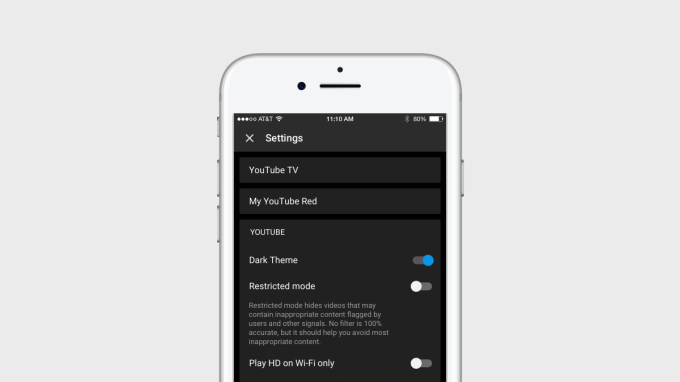
YouTube’s mobile app gets a dark mode


 YouTube’s mobile app is getting a dark mode. The company announced this morning its dark theme first introduced on its desktop site last year, is launching today on the YouTube iOS app and arriving soon after on Android. With the setting enabled, YouTube’s background turns from white to black throughout the YouTube experience as you navigate, search and browse its app. The setting… Read More

Read Full Article

Did You Know Amazon Owns These Famous Websites?


Try typing “list of Amazon subsidiaries” in Google Search. Watch the carousel of Amazon companies that you may not have heard about at the top of the page. The Amazon Empire may be more interesting than you first thought…

…because Amazon is the Walmart of the future. All of the technologies pioneered by Amazon affect our daily life. Think of how drone deliveries or internet-connected doorbells and security cameras will change our lives. It’s both fantastic and scary. Here are nine popular websites owned by Amazon.

1. IMDb

When you search for a movie review, IMDb will pop up first on Google. The Internet Movie Database is an information hose of television shows, movies, and actors. Amazon bought the site to support its online video sales. Since then both have mushroomed and you will probably head to IMDb first before you go to Amazon.

All Amazon Prime subscribers can keep the Amazon Originals page bookmarked. Or keep watching the IMDb Show when you don’t want to read. Amazon Prime’s X-Ray feature, which gives you an inside peek into a movie is also powered by IMDb.

There is also subscription service called IMDbPro which allows subscribers to network with entertainment professionals.

An IMDb tip you can use: The Coming Soon page is a definitive resource to stay updated on movies coming out soon and near you!

2. Goodreads

Goodreads

If IMDb is the best site for movie reviews, then Goodreads is the town square for hardcore book lovers. Search for your favorite book or even the next book you want to read. The online book club gives you reader opinions from the couch. When Amazon bought Goodreads, it was met with a howl of protests by book lovers. But you can only embrace the benefits.

Goodreads is the best tool to organize your book collection and create a reading list for the future. Find the best-reviewed books and buy them from Amazon. Goodreads on Kindle helps you follow friends and see what they are reading. You can share and rate books right from your Kindle.

A Goodreads tip you can use: The book site has a Giveaway program that can net you free books.

3. AbeBooks

Abebooks

AbeBooks is another online marketplace for books. But so is Amazon. What makes AbeBooks different? The experience!

On AbeBooks, booksellers around the world offer brand new books, used books, rare books, first-editions, textbooks, and out-of-print books for sale. It is a destination for the book lover who is looking for that rare book in the haystack.

AbeBooks is the curio shop while Amazon is the mall. Apart from books offered by independent bookstores, the site also has a Fine Art & Collectibles section. Find old maps, vintage manuscripts, and even photographs. The selections are a collector’s dream.

An AbeBooks tip you can use: Their blog called AbeBooks’ Reading Copy is a hidden gem which you should definitely bookmark.

4. Comixology

Comixology

Comixology is the premier destination for comic book buys and Amazon owns it too. In fact, Comixology Unlimited (for $5.99 per month) can be paired with your Amazon account.

Also, any comic book you buy on Amazon or here can be read with the Comixology apps for Android, iOS, and Kindle Fire. Do note that Comixology Unlimited is only available in the US.

A Comixology tip you can use: Prices of comic books may differ between Amazon and Comixology as the former offers discounts in order to attract Comixology Unlimited signups.

5. Audible

Audible

Amazon knows that not everyone has the time to read. But anyone can take a “listening break”. This is where Audible comes in with its range of audiobook titles. Audible is also a part of Kindle so that you can read on the couch and start listening from the exact point when you decide to take a walk. Amazon calls it Whispersync.

Audible also has audio versions of newspapers and magazines as well as radio programs. Check out these Audible tips to get the most out of your subscription.

An Audible tip you can use: The Great Listen Guarantee allows you to return an audiobook for another title up to one year after a purchase!

6. Zappos

Zappos

Zappos is one of those companies that took a very personal experience and disrupted it. The online shoe store grabbed popularity for its top-notch customer service and its fantastic 365-day return policy.

Amazon coughed up $1.2 billion to purchase the company. And kept its wacky work culture intact which still makes it one of the most fun places to work.

Zappos is about customer delight. Amazon is about warehouse to doorstep delivery anywhere in the world. As a shoe lover, you get to enjoy the best of both worlds as Zappos plans to expand worldwide.

A Zappos tip you can use: Zappos has a dedicated online shop for sneakers called The_ONES.

7. Shopbop

Shopbop

You may not think Amazon has much to do with high fashion for women, but it has that niche covered with Shopbop. It started its life in 1999 as a brick-and-mortar fashion store for women in Wisconsin and was an early adopter of online shopping. Until Amazon bought it.

Shopbop has gone through a visual makeover even as it drives Amazon Fashion. If you are into Salvatore Ferragamo’s and Donna Karan, then ShopBop is a bona fide destination. Log in with your Amazon account. All purchases on Shopbop are eligible for Amazon Prime’s free two-day shipping.

A Shopbop tip you can use: Want inspiration? Check out Shopbop’s Instagram feed for some online window shopping.

8. Twitch

Twitch

Twitch is the live video-game streaming platform that is owned by Amazon. The “YouTube for video games” has had a big impact on video game culture. And it has helped Amazon connect with the teen demographic. Access to Twitch (Twitch Prime) is free with Amazon Prime membership, so that nearly makes Amazon Prime a complete entertainment package.

Twitch Prime is included with Amazon Prime in the US, Mexico, Canada, Italy, France, Germany, Belgium, Austria, Spain, Japan, Singapore, Netherlands, and the United Kingdom. Twitch Prime is included with Prime Video in over 200 other countries and territories.

A Twitch tip you can use: Did you know that the NBA G League is on Twitch? And you can even co-stream any game on your own channel!

9. CreateSpace

Self-publishing is mainstream now. CreateSpace gives you the complete toolset to help you self-publish anything. You can distribute your books and video downloads on-demand on Amazon.com and other channels. Creativity is yours. The audience is Amazon’s.

Thanks to the free publishing tools on CreateSpace, you just need to start with an idea. It’s a profitable place to channel all your side-hustle ideas if you are a writer, musician or a filmmaker.

Just look into the differences between CreateSpace and Kindle Direct Publishing. Here’s what Amazon has to say about the differences between the two platforms.

A CreateSpace tip you can use: The CreateSpace forum has several communities which are valuable writing and marketing tips.

Are Your Surprised by Any Site on This List?

The list of Amazon subsidiaries can continue to scroll like the Star Wars credits. The mind boggles at all of the companies and amazing technologies spawned by Amazon.

Other notable Amazon-owned brands include Alexa.com, DPReview, Box Office Mojo, Double Helix Games, Brilliance Audio, Shelfari, and even a subsidiary called Beijing Century Joyo Courier Services. Are there any other notable ones we missed?


Read Full Article

Don’t Be Fooled: How to Spot a Russian Bot on Social Media


How sure are you that the person you’re passionately “debating” with online is a real, breathing person? How do you know whether they’re just another impassioned supporter of whatever topic and not someone with government (or other) backing?

Spotting Russian bots or paid-for shills is no easy task. It is, however, becoming increasingly important as accusations of nation-states meddling in other’s affairs continue to swirl. Can you spot them? Here’s what you need to know.

Bots vs. Shills

Let’s start by differentiating bots and shills.

Bot: A bot is a fake social media account under the control of an organization or government seeking to influence the online community. For instance, a Twitter bot set to retweet certain hashtags and phrases in such volumes that it amplifies the specific topic. Another example is Reddit bots downvoting views disagreeing with the bot controller opinion (while upvoting those that do agree). Bots require volume for success on certain platforms, while at other times only a few can begin to shape the direction of a conversation.

Shill: A shill is different. Shills are real people actively engaging in the shaping of online (in this instance) discussion and opinion—while receiving payment in exchange for their presence. Shills promote companies, governments, public figures, and much more, for personal profit, essentially engaging in propaganda.

Depending on the organization or government, shills can work in conjunction with large bot networks to create intense vocal online movements. And while the combined efforts of shills and bots shape online opinion, these efforts are increasingly affecting more than just social media users.

The practice is also known as astroturfing, whereby organizations and governments curate the conversation through “regular” members of the public.

Russian Bots and Shills

Russian bots and shills dominated talk in the run up to the 2016 US presidential election. Commentators and critics dedicated a huge amount of airtime and column inches discussing the role of Russian-backed bots and shills in influencing the discussion around certain topics.

In fact, Robert Mueller, the special counsel who’s investigating interference in the presidential election, recently indicted 13 US-based Russians as part of the suspected Russian-backed propaganda machine, Internet Research Agency (IRA).

The allegations of influence are far-reaching. They range from simply creating American sounding identities online, to stealing the identities of US citizens, to baiting minority activists and so-called “social justice warriors,” to creating Instagram groups such as “Woke Blacks” to influence minority voting efforts. And there are numerous other examples, too.

Social media networks are one the primary tools of influence. The platforms know there is a problem, too. In January 2018, Twitter said it was emailing 677,775 people in the US who tweeted IRA content. At the same time as the apology, Twitter is purging bot accounts, prompting the #twitterlockout hashtag to trend amongst predominantly conservative-leaning Twitter users.

And for all the cries of foul play and unfair targeting, there is evidence that “conservatives retweeted Russian trolls about 31 times more often than liberals and produced 36x more Tweets.”

Furthermore, Twitter maintains their bot purge is “apolitical” and that they enforce sitewide rules “without political bias.”

That’s not to say bots, shills, and astroturfing is the sole remit of conservative figures.

As far back as 2007, campaign staffers for Clinton were anonymously boosting pro-Hilary sites, while during the 2016 presidential debates, the Clinton campaign was the subject of hundreds of thousands of automated bot tweets (though significantly fewer than Donald Trump).

Not All Bots

Twitter and other social media platforms aren’t plagued by bots, as some publications would have you believe. We can break down Twitter bot hashtag interaction to understand how their backers seek to influence conversation.

The Computational Propaganda Project (CCP), sponsored by Oxford University, closely examines these interactions. The table below illustrates [PDF] the difference in automation between interactions with pro-Trump or pro-Hilary hashtags, as well as the overall percentage of non-automated tweets, between November 1 and November 9, 2016:

Russian bots?

CCP define high automation as “accounts that post at least 50 times a day” using at least one of the election specific hashtags. The study considers anything below that threshold low automation—in other words, a real person. The table shows a much higher percentage of low level automation, indicating much higher numbers of regular users are interacting.

The study does note that some human users are inevitably swept into the high automation bracket. It also notes that accounts demonstrating high automation also very rarely use terms from the Mixed Hashtag Cluster bracket (bar Trump-Clinton combinations due to sheer retweet volume).

We will never truly know the full picture of how many bots are working on any given social media platform. Recent research estimates [PDF] that automated bots make up nearly 15 percent of all Twitter users, putting the total well over 40 million individual bot accounts.

Da’wah Center Protest

A prime example of direct Russian influence is the 2016 Houston Da’wah Center protest.

Facebook group “Heart of Texas” posted an advert looking for sympathizers to attend a protest “to stop the Islamification of Texas.” The protest was set for midday on May 21, meeting at the Da’wah Center. At the same time, another group—the so-called “United Muslims of America”—were organizing a counter-protest at the same time and place.

The two groups met at the center and, predictably, “interactions between the two groups eventually escalated into confrontation and verbal attacks.”

At the time, neither set of protesters realized their respective group wasn’t real. That is to say; the groups were the construct of a Russian-backed “troll farm” that exists solely to manipulate political, racial, and religious tension in the US.

How to Spot a Bot on Social Media

Recognizing bots and shills on social media isn’t always easy. Why? Because otherwise more people would realize what was going on.

Don’t get me wrong; we all interact with bots and shills, it is the very nature of social media in 2018. Operatives receive thousands of dollars a month to subtly (and sometimes more brazenly) influence conversation.

There are, however, some bot-spotting tips to bear in mind:

  1. The account only reposts/retweets, never making posts of its own, sending the same response to other people.
  2. Accounts that only repost/retweet comments made by multiple other similar accounts (some of whom are also likely bots).
  3. Some accounts rapidly (likely automatically) post in response to “trigger” topics faster than humanly possible.
  4. Human cycles. Real people tend to post in bursts, covering different topics, as well as have recognizable downtime for day/night cycles.
  5. Default profile pictures. For instance, a Facebook profile with the image of a man or woman, or a Twitter profile with the default egg picture.
  6. Profiles that are prolific around major events—elections, scandals, terrorist attacks—but remain dormant at other times. The upcoming 2018 mid-term elections will see swathes of bot accounts reactivating.

Other things to look out for are automatic systemic downvotes on sites like Reddit. Bots pick up on the title of a submission and immediately begin downvoting comments that disagree with their programming. (Downvoting hides comments as well as their responses from other users, and is an easy way of obstructing dissenting views.)

How to Spot a Shill on Social Media

Spotting paid-shills is more difficult as the onus is on the account maintaining the appearance of a regular social media user. Posts promoting a certain topic or shaping the online conversation might come among regular mundane discussion points to not create suspicion.

Some common tactics include:

  • Changing the narrative of a hot topic toward something that promotes the agenda of whoever paid for the shill
  • Consistently attacking something that wasn’t part of the initial conversation (sometimes called “whataboutism,” where a shill argues using terms such as “but what about when X did Y”)

Another spotting tactic is the human cycle. Regular people have to sleep, eat, drink, and so on. If a single account is managing to post on a single agenda continuously for 24-hour periods, something is likely afoot.

But “really good” shills work hard. Instead of merely attacking and contradicting opinion and attempting to shape the discussion, they’ll slowly befriend and infiltrate a group before setting to work.

Can You Stop the Russian Bots?

Unfortunately, other than reporting suspicious accounts, there is little direct action to take against shill or bot accounts. As they say, don’t feed the trolls.

The 2018 mid-term elections are firmly on the horizon now (check the political bias of any site in the run up). While the impact of shill and bot accounts is perhaps larger than ever, you now know more about how to spot certain types of behavior.

Image Credit: raptorcaptor/Depositphotos


Read Full Article

What Are Android Go and Android One? Everything You Need to Know

Google partners with Ubisoft to launch Agones, an open source game server hosting system


When you think of cloud computing, chances are you are thinking about massive server farms that let you edit documents in the cloud and update your CRM system, but thankfully, there’s a playful side to the cloud as well. All of those multiplayer games, after all, have to run somewhere, too. Often, gaming companies write their own systems for running these servers, but Google and… Read More
Read Full Article

The Best Smart Locks for Your Front Door