Google, Microsoft, IBM and Amazon have made it easier for developers to add human cognitive capabilities (also known as artificial intelligence) within their own applications. You need not be a machine learning expert to build a computer program that can recognize objects in photographs, or one that transforms human speech to text or even a chatbot that converses with people in natural language.
The Google Photos app leverages machine learning to identify landmarks and faces in your photos. You can even build and train your own machine learning models by installing Google’s TensorFlow library on your own computer. IBM’s PowerAI lets enterprises deploy TensorFlow like frameworks in the cloud on power systems for training custom machine learning models of any size.
The IBM Code Patterns microsite hosts hundreds of ready-to-use examples around artificial intelligence. For instance, here’s an open source repo that explains how to recognize images of houses that have swimming pools. Another example on Github shows how you can easily build a system that can detect and count products on store shelves using the PowerAI platform.
Train your own Machine Learning Model
If you would like to build your own image recognition engine without the complexity of servers and TensorFlow, try this online demo of the Watson Visual Recognition engine hosted the IBM Cloud (formerly Bluemix) website.

You can create your own classifier and upload a set of images to train the classifier. It is also essential to upload a set of negative images that may look similar but are different. Train the model and, in about a minute or so, your model is ready. Upload any image and the classifier will be able to tell if it matches any of your trained bundles.
IBM Watson + Google Docs for Natural Language Understanding
The Natural Language Processing (NLP) service of IBM Watson uses machine learning to extract entities, person names, places, and understand the overall sentiment and emotion of text. Amazon Comprehend and Google Natural Language are other competing platforms that offer powerful text analysis in the cloud.

Getting started with Watson NLP is easy and all you need is an IBM Cloud account to get started. The lite plan is free (no credit card required), it never expires and the quota resets every month automatically.
I’ve built a sample Google Apps Script based app that uses Watson NLP to analyze the text in your Google Document. Here’s how you can get started:
- Copy this Google Document to your Google Drive
- Select the text in the document, go to the IBM Watson menu and choose the Analyze text menu.
- Grant the necessary authorization and you’ll see get a pop-up with the list of entities found in the selected text.
The Google Apps Script is open-source and you can find a copy of the source code inside Tools > Script Editor. If you ever run into quota limits, remember to replace the credentials in the source code with your own Bluemix account.

Disclaimer: The writer attended IBM Code Day in Bangalore at the invitation of IBM. The travel and accommodation were arranged and paid for by IBM.


 Technology companies like Facebook and Google are scrambling to catch up to the fact that the kids have joined a web originally built for adults, and are using it the way adults do – by liking and commenting, sharing, clicking through on personalized recommendations, and viewing ads. But the technology underpinning apps and sites built for kids can’t operate the same way as it does…
 Facebook’s global director of policy programs says it will start sending postcards by snail mail to verify buyers of ads related to U.S. elections. Katie Harbath, who described the plan at a conference held by the National Association of Secretaries of State, didn’t reveal when the program will start, but told Reuters it would be before the congressional midterm elections in November.


 Another blow for Facebook in Europe: Judges in Belgium have once again ruled the company broke privacy laws by deploying technology such as cookies and social plug-ins to track Internet users across the web.


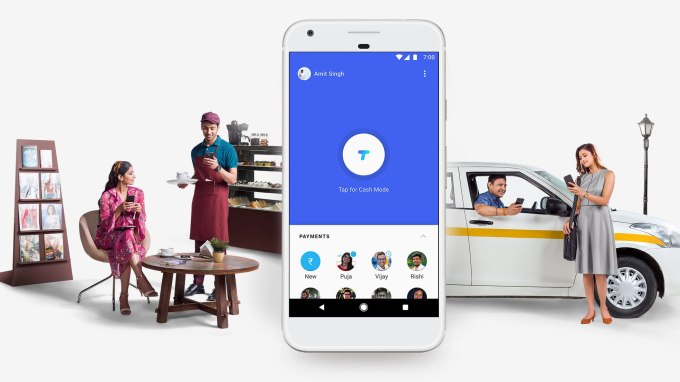 Google’s Tez payment service in India has got a major update that allows users to pay their utilities and other bills via the app. The service was launched last September for iOS and Android and it initially allowed for payments between bank accounts using India’s UPI (Unified Payments Interface) protocol. Now the app has gotten support to pay for bills from more than 80…


 In this edition of Innovate 2018, Andrew Keen finds himself in the hot seat. Keen, whose new book, “How to Fix the Future”, was published earlier this month, discusses a moment when it has suddenly become fashionable for tech luminaries to abandon utopianism in favor of its opposite. The first generation of IPO winners have now become some of tech’s most vocal…
 Every gun outrage in America is now routinely followed by a flood of Russian-linked Twitter bot activity. Exacerbating social division is the name of this game. And it’s playing out all over social media continually, not just around elections.

 You’d be forgiven for missing Donald Trump’s multiple retweets of Facebook executive Rob Goldman over the weekend. Perhaps you were spending time with family, watching Black Panther or just attempting to forget politics for a moment by ignoring the manic flurry of social media updates from the leader of the free world. But in amongst a deluge of tweets that blamed Democrats for…