21 August 2013

Try the New Google Search Interface in Chrome 29


If you enable "Instant Extended API" in the recently released Chrome 29, you also get a new Google Search interface that hides the search box, has a new navigation menu and a new share button. This also enables the updated new tab page which is actually a simplified Google homepage.


To try the experimental new tab page and the new Google interface, paste this in Chrome's address bar: chrome://flags/, use Ctrl+F to search for "Enable Instant Extended API" and click "Enabled" in the drop-down below "Enable Instant Extended API". Then click "Relaunch now" at the bottom of the page to restart Chrome. To disable this feature, use the same instructions, but click "Disabled" instead of "Enabled".

How To Set Windows Media Player As Default In Windows 8.1


CLICK HERE TO SEE FULL POST


Both Windows 8 and Windows 8.1 ship with a bunch of Modern UI apps and some of them are pretty good. The Music app that ships with Windows 8 and Windows 8.1 is the default software to open audio files. While the Music app in Windows 8 is pretty good and it has been revamped […]

How To Disable Aero Glass For Windows 8’s Demo Version Message


CLICK HERE TO SEE FULL POST


Those of you have upgraded to Windows 8 or Windows 8.1 would know that the eye-candy Aero isn’t part of Windows 8 and Windows 8.1 default. Ever since Windows 8 Preview was released about two years ago, Windows enthusiasts and developers have been trying to add Aero back to Windows 8 but Aero Glass for […]

YouTube's Cat Easter Egg


YouTube's app for iOS has also been updated and added many of the features from the Android app. You can watch a video while searching for the next one, just like picture-in-picture, search for playlists and use the "play all" button.


There's something that only works in the iOS app: an Easter Egg. I've only tested this on an iPad, so I don't know if it works on an iPhone. Open the YouTube app (make sure you have the latest version - 2.0), keep a finger on the left sidebar and use another finger to swipe right until the list of videos because almost empty. You'll see a funny cat with a play button.


{ Thanks, Jonah and Max. }

YouTube 5.0 for Android


YouTube 5.0 for Android brings a lot of new features. The player has fewer buttons:


You can search YouTube, check your subscriptions or the video history, while watching a video. It's quite clever: the video is minimized when you tap the arrow from the top-left corner and it continues to play. You can go back to the video by tapping the small player. Unfortunately, this only works in the YouTube, so don't expect to see the minimized player when you close the app.


There's a new interface in the landscape mode, but only for tablets. Until now, the video played in full-screen when you switched to landscape, but now the YouTube app shows suggested videos, comments and more. You can tap the full-screen button in both the portrait and landscape mode.


Other changes: a new app icon, no more +1 button, HD and CC toggles when you tap the overflow button (a strange decision), playlist search, a new slide-out navigation and more.


The new version is gradually rolled out, but you can manually download the APK file from here.

YouTube Tests Sticky Header


Google tests an oversized sticky header. It's a lot bigger than the existing header and it has a fixed position, so you can quickly use the search box, upload videos or open a playlist even when you scroll down.


Unfortunately, it's way too big:


YouTube also experiments with relocating the share button next to the like/dislike buttons and adding sharing buttons for Facebook, Twitter and Google+.


How to enable these experiments? If you use Chrome, Firefox, Opera, Safari or Internet Explorer 8+:


1. open youtube.com in a new tab


2. load your browser's developer console:


* Chrome or Opera 15+ - press Ctrl+Shift+J for Windows/Linux/ChromeOS or Command-Option-J for Mac


* Firefox - press Ctrl+Shift+K for Windows/Linux or Command-Option-K for Mac


* Opera 12 - press Ctrl+Shift+I for Windows/Linux or Command-Option-I for Mac, then click "Console"


* Safari - check this article


* Internet Explorer - press F12 and select the "Console" tab.


3. paste the following code which changes a YouTube cookie:


document.cookie="VISITOR_INFO1_LIVE=JX5TVkqGL3I; path=/; domain=.youtube.com";window.location.reload();


4. press Enter and close the console.


To go back to the regular interface, use the same instructions, but replace the code from step 3 with this one:


document.cookie="VISITOR_INFO1_LIVE=; path=/; domain=.youtube.com";window.location.reload();


In other related news, the channel cards seem to be publicly available.


{ via Techno-Net }

Full-Featured vs. Basic Linux Code Editor: Eclipse and Geany Compared


coding

If you’re someone who writes code regularly, it’s highly important that you use a code editor that you’re comfortable with. Under Linux, there is a large selection of editors to choose from, each one aimed at different types of programmers. Choosing just two editors to compare is really hard, but I chose my two favorites: Eclipse and Geany. These two editors are fantastic at what they’re aimed to accomplish, but they’re still vastly different from one another. To take a closer look, I compared these two by the interface, amount of features, overall ease of use, and other characteristics such...


Read the full article: Full-Featured vs. Basic Linux Code Editor: Eclipse and Geany Compared


Google Maps for Mobile Adds Waze Incident Reports


The latest major update of the Google Maps app for Android and iOS added incident reports and many people wondered if the data was obtained from Waze, a service acquired by Google in June. Google used other providers, but it now also uses Waze data.


"Users of Google Maps for Mobile will now benefit from real time incident reports from Waze users. This means when Wazers report accidents, construction, road closures and more on Waze, the updates will also appear on the Google Maps app for Android and iOS in Argentina, Brazil, Chile, Colombia, Ecuador, France, Germany, Mexico, Panama, Peru, Switzerland, UK and the US," informs Google LatLong.


Google Maps only shows this message next to the traffic incident: "reported via Waze app".


Waze added some Google features: local search results powered by Google Maps, Google Street View and Google satellite imagery in Waze Map Editor.


"Waze users report millions of blockages and accidents per month. 'I think it will have a pretty big impact,' said Brian McClendon, VP of Google Maps. 'A big fraction of GMM users will see these.' As McClendon described it in an interview Monday, Waze will continue to be focused on two core things: its community, and helping people who commute. As for Google Maps' perceived strengths? Those are search, exploring, finding businesses around you, and offering more imagery, according to McClendon," reports AllThingsD.


Will Waze continue to exist as a standalone app? That's obvious. Google could have easily added a "report incident" feature to Google Maps, but not many people would have used it. It takes a lot of time to foster a community of people that manually add data. Google usually obtains data automatically. For example, the Google Maps traffic feature uses aggregated data from users. "Your phone sends anonymous bits of data back to Google describing how fast you're moving. When we combine your speed with the speed of other phones on the road, across thousands of phones moving around a city at any given time, we can get a pretty good picture of live traffic conditions".


Panoramio is a similar service acquired by Google and it still exists after so many years. Panoramio's high-quality photos are added to Google Earth and Google Maps.

Translate Google+ Posts and Comments


Google+ added translation links for posts and comments written in languages you may not understand. Click "Translate" and Google+ will translate the post and the comments. This only works for public posts and the feature is only available on the desktop Google+ site.


Here's what happens after clicking "Translate":


This feature is not that useful if you use Chrome, since the browser has a built-in translation feature that works in Google+ just like it works for any other site.


"The Google Translate team is always working to make information more accessible to individuals around the world. In Google+ this means bringing people together regardless of their written language, and breaking down language barriers that can limit the exchange of ideas," informs the Google Translate blog.

20 August 2013

Missing Shark Week? Enter The Amazing Animal World On The Smithsonian Channel


smithsonian-channel

Shark Week seems to be a pretty big deal to a lot of people, at least here in in the United States. The Discovery Channel is awesome, and the shark is one of the most feared and interesting animals in the world. We tend to be attracted to things that we’re afraid of, and there’s no more magnetic predator than the king of the seas. The Discovery Channel decided to kick off the 2013 edition of Shark Week with a “documentary” that attempted to prove the current existence of a shark that lived around millions of years ago during the...


Read the full article: Missing Shark Week? Enter The Amazing Animal World On The Smithsonian Channel


19 August 2013

Key Differences Between Google Adword Tool And The Keyword Planner


dropchart

If you’ve logged into your Google Adwords account lately and attempted to use the Adwords keyword research tool, then you’ve probably seen the recent alert message at the top of your account notifying you that the Keyword Tool will no longer be available within the next few months. Instead, it’s being replaced with what Google has deemed the “Keyword Planner”. The warning message seems a bit ominous, and reactions across the Internet are a bit mixed. Some folks have erroneously claimed that local traffic data has “disappeared”, while others say that the new interface makes the search process much more...


Read the full article: Key Differences Between Google Adword Tool And The Keyword Planner


Must-have Extensions for Google Chrome


A comprehensive list of the best Chrome extensions and apps that will help you do more and also enhance your web browsing experience in Chrome.


This story, Must-have Extensions for Google Chrome, was originally published at Digital Inspiration on 19/08/2013 under Google Chrome, Software

How To Enable Two Finger Tap For Right Click In Windows


CLICK HERE TO SEE FULL POST


The context menu, the menu that appears when you right-click on a file/folder or anywhere on desktop or Windows Explorer (File Explorer) is one of the most used features of Windows. The context menu is usually accessed by clicking the right button on a mouse or by clicking the bottom-right area of a trackpad (some […]

Access FTP Servers Using Your Native File Browser


ftp-finder-explorer

FTP, short for File Transfer Protocol, is one of the most common protocols for transferring files. You’ll use HTTP while browsing the web, but FTP while communicating with a file server. Normally, you’d use an FTP client for this. Especially when you work over FTP a lot (e.g. web developers), it pays off to use a specialised client that supports favourites, synchronisation and improved batch transfers. We’ve listed some of these at our top Mac and Linux software pages. While there are a huge number of good FTP clients out there, sometimes you can get by without installing any third-party...


Read the full article: Access FTP Servers Using Your Native File Browser


Access FTP Servers Using Your Native File Browser


ftp-finder-explorer

FTP, short for File Transfer Protocol, is one of the most common protocols for transferring files. You’ll use HTTP while browsing the web, but FTP while communicating with a file server. Normally, you’d use an FTP client for this. Especially when you work over FTP a lot (e.g. web developers), it pays off to use a specialised client that supports favourites, synchronisation and improved batch transfers. We’ve listed some of these at our top Mac and Linux software pages. While there are a huge number of good FTP clients out there, sometimes you can get by without installing any third-party...


Read the full article: Access FTP Servers Using Your Native File Browser


A Tool To Remove SkyDrive Folder From Windows 8.1 Explorer Navigation Pane


CLICK HERE TO SEE FULL POST


The SkyDrive service has been deeply integrated into the newest version of Windows operating system. Windows 8.1 lets you use SkyDrive as your default location to save documents, provides offline access to SkyDrive files, and allows you automatically upload photos and videos from your camera roll folder to SkyDrive account. To help users quickly access […]

How To Organize Your Research With The Power Of Google Drive


There are certain advantages to using Google Drive for your research work. It's free and available from everywhere of course. Everyone with a Google account has it by default. Tied to your Google account, it gives you a range of collaboration options. It only gets better from here as you can use the Research tool to power all your probes and quests.

Read the full article: How To Organize Your Research With The Power Of Google Drive


Find the Number of Files From a Google Drive Folder


Google Drive lacks many basic features. For example, it's not easy to tell how many files are in a folder. Here's a way to do that:


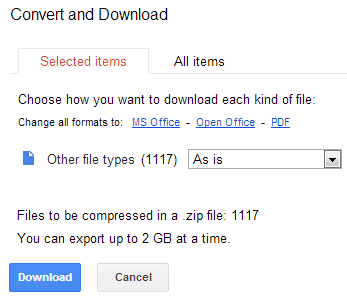
Method #1: convert and download


1. right-click a folder

2. click "Download"

3. you'll find the number of files after waiting a few seconds. Sometimes, Google doesn't show the number of files and you should try again

4. click "Cancel".


If Google doesn't show the number of files, there's another way:


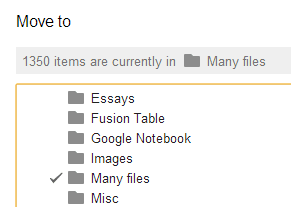
Method #2: move to


1. open the folder

2. repeatedly scroll down until you reach the end the folder. You can use the End key

3. select all the files using Shift+A

4. click "More" and "Move to"

5. click "Cancel".


"Move to" doesn't count the files from subfolders.


There's another option for folders with less than 500 files:


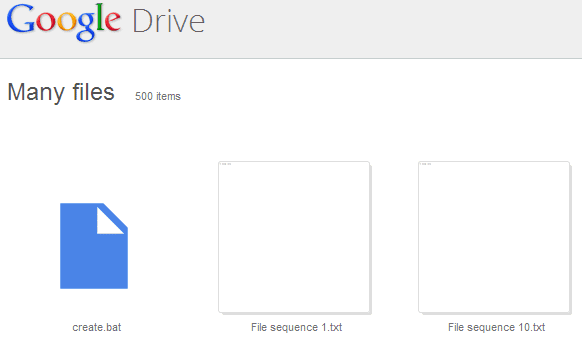
Method #3: folder view


1. open the parent folder

2. ctrl+click the target folder in the main view

3. you'll see the number of files in the page that opens in a new tab. This only shows the number of files if the folder has 500 files or less. If the folder has more than 500 files, you'll still see "500 items". That's a limitation of the folder sharing feature, which only includes the first 500 files from a folder.


Method #4: the Drive app


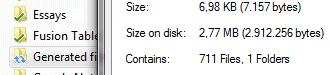
Probably the best option is to install the Google Drive app and quickly find the number of files of each Google Drive folder. If you use Windows Explorer, right-click the folder and select "Properties".


{ Thanks, Sushubh. }

How To Uninstall HP Quick Start (Start Menu)


CLICK HERE TO SEE FULL POST


Ever since the first glimpses of Windows 8 were shown back in June 2011, PC users have been complaining about Microsoft’s decision to drop the Start menu and replace the same with Modern UI-style Start screen. While Microsoft has restored the Start button in Windows 8.1, it helps you switch to the Start screen and […]

Result Details - a Google Search Experiment


There's a new Google experiment that annotates search results with information about the sites. Most of the information is obtained from Wikipedia articles, but there are a few exceptions.


Here are some examples. Click "Wired (magazine)" next to the search result URL and you'll read an excerpt from the Wikipedia article about Wired. Google also shows if the site is a Webby Award winner.


If you click the similar link placed next to the Google Voice blog, you can read some old information about GrandCentral, which was acquired by Google in 2007. The information is not obtained from a Wikipedia article.


The panels that show result details are quite useful and help you find more information about a site before visiting it. Unfortunately, the site needs to have a Wikipedia article, but that will probably change if the experiment becomes a standard feature.


Google's algorithms that associate pages with entities and Wikipedia articles are not perfect. The result details for google.ca are really funny:


To try this experiment, install a cookie manager extension like "Edit This Cookie" for Chrome, go to google.com and change the value of the NID cookie to:


67=p2QqiMkeBvGpTUoMlME_QMwGVE9LaS3h9FlO1p0kyVOCg9NVW8uNwAKALJalAfhHJweQdt7KDWjpv6P_1vsE-EGlABKpxK8PRUbwwQm2QBm9rZ3rARFBz6lCKcp2KF_x


If you use "Edit This Cookie", don't forget to click "Submit changes". Delete the NID cookie to opt-out from the experiment.


{ via Techno-Net }