23 June 2013

Google Mine – New Google+ Service


According to some online rumors, Google is preparing to launch a new service called Google Mine, that will be integrated into Google+ and help to keep track of the things you have, and the things you want and share them with Google+ friends.


As per Google mine authorization box screenshot, “Google Mine lets you share your belongings with your friends and keep up to date with what your friends are sharing. It enables you to control which of your Google+ Circles you share an item with. It also lets you rate and review the items, upload photos of them and share updates on the Google+ Stream where your friends get to see and comment on them.”


google_mine_app


According to Google System, the service allows you to organize the things you own, use, wish for, had in past, and more: gadgets, clothing, electronics, cars, bikes or anything, review them and send requests to borrow from Google+ circles.


You can post videos about the object, write reviews, add it to a wishlist and maybe others can buy it using Google Shopping. You can also check popular items and the items others have shared.


Google Mine is currently available in the Google internal marketplace, Bazaar.


The post Google Mine – New Google+ Service appeared first on Hack Illusion.


More Than Search: 5 Things Google Has Done For The World


Google

Google has come a long way since starting up as a rinky-dink search engine that played second fiddle to what Yahoo! had to offer. If you’re the average person, you’re probably using Google in some way every single day. It may sound dramatic, but Google is a huge part of our lives. It’s good to know that the company isn’t necessarily evil, either.

Continue reading the article


Read full article: More Than Search: 5 Things Google Has Done For The World


Google's Tilde Operator No Longer Works


Google had an advanced search operator that allowed you get results for different variations of your query. "Normally, synonyms might replace some words in your original query. Add a tilde sign (~) immediately in front of a word to search for that word as well as even more synonyms. For example, [~food facts] includes results for 'nutrition facts'," explained Google.


Now the tilde operator is missing from Google's help center article and it no longer works. A search for [~food facts] returns the same results you can find when you search for [food facts]. One workaround is to search for [food OR nutrition facts].


I'm sure that very few people used this obscure operator, but it's just another power user feature that Google removes. Most likely, many others will follow.


Here's one of the many book pages that's now obsolete:


{ Thanks, Enrico Altavilla. }


Finding Synonyms Using Google Search


Just the other day, I was trying to find a synonym for [ubiquitous] and searched Google for [ubiquitous synonym]. Google returned a regular list of search results and I was surprised to see that Google doesn't offer an instant answer for a basic query like this.


Then I realized that the dictionary OneBox includes a list of synonyms, so a search for [ubiquitous definition], [define ubiquitous] or even just [ubiquitous] returns a great synonym: omnipresent.


Sometimes Google has a lot of information, but doesn't make it accessible.


The Feed Reading Playground Is Now Open


Google used this many times last year: "the playground is open". That's one of the most important things about Android: it's open source and any company can use it. One of the definitions of "open" is "accessible to all, unrestricted as to participants".


The playground for feed readers is now open. Google Reader's demise levels the playing field in the feed reading world. Now there are more competitors, there's more innovation, there are new platforms for distributing feeds, new interfaces. Suddenly, feed readers are a hot topic. Until now, Google Reader was the dominant service and platform, but Google didn't know what to do with it. Google Reader stopped adding new features back in 2010 and it was in maintenance mode ever since then. Few dared to challenge its position and most new feed readers were only Google Reader clients.


Google Reader's disappearance is Google's best idea for saving RSS. From stagnant to vibrant in 3 months - Google Reader's demise helped RSS more than the last 3 years of silence. The playground is now open.


What You Need To Know About Watching Blu-Ray On Linux


linux_bluray_intro

If you've been using Linux back since DVDs first came out, you might remember just how long it took before DVDs were somewhat supported. Heck, even now, if you want to play an encrypted DVD, you’ll need to add an extra repository and install a few extra packages just to be able to replay them with barely acceptable quality. Once Blu-Rays came out, it wasn't a surprise that it was going to be a while before they would also be supported under Linux.

Continue reading the article


Read full article: What You Need To Know About Watching Blu-Ray On Linux


22 June 2013

YouTube's Smarter Video Player


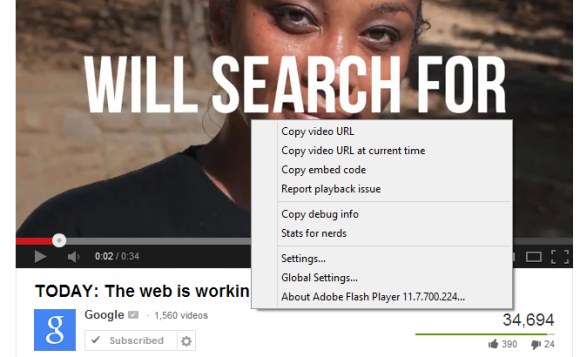
YouTube had a feature that allowed you to stop buffering a video. You right-clicked a video, selected "stop download" and YouTube no longer downloaded the video. This was especially useful for paused videos and long videos.


The feature is no longer available. I've tried both the Flash player and the HTML5 player.


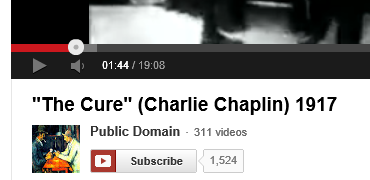
The truth is that this feature is no longer needed because buffering stops when you pause a video. Try this: open a random YouTube video, wait a few seconds and then pause the video. Even after 5 minutes, YouTube's progress bar will look the same.


YouTube has a smarter way to download videos that uses adaptive streaming and only downloads what's needed. That's only the case for the Flash player: the HTML5 player works just like before.


YouTube Collections


Here's a very cool YouTube feature you should try: collections. It's a simple way to group multiple subscriptions, so you can quickly check the latest videos related to a topic. Let's say you subscribe to the Google channel, the Chrome channel and the Nexus channel. You can create a Google collection that includes all these channels.


"To make a brand new collection or edit an existing one, visit the Subscription Manager, which you can navigate to by clicking Manage subscriptions from the left side of your YouTube page. Click the 'Create new collection button'. Name your collection and select the channels you'd like to include in your collection," explains YouTube. Use the search feature to find the right channels.


Collections are placed at the top of the subscriptions list in the YouTube sidebar, so it's easy to find them. They have a small arrow button that lets you expand the collection and see each subscription. If a subscription is added to collection, you'll no longer see that subscription in the sidebar without expanding collections. It's a great way to organize your subscriptions.


Gmail's Quick Action Button for YouTube Messages


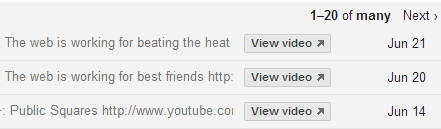
A few weeks ago, Gmail started to show a small button next to some email messages from YouTube. Click the "view video" button and you can watch the video without even reading the message. This is one of the first built-in Gmail actions.


This only works for notifications received when a YouTube channel uploads a new video. If you visit this page when you're signed in, you can check "Email me about new uploads" next to your favorite channels.


{ Thanks, Yu-Hsuan Lin. }


Connect with Digital Inspiration Around the Web


These are the various social media channels where you can follow Digital Inspiration. Get tips and tutorials as soon as they are published on the blog.


Tweet this Share on Facebook


Digital Inspiration @labnol This story, Connect with Digital Inspiration Around the Web, was originally published at Digital Inspiration on 22/06/2013 under Offbeat.


Modern New Tab Page: Transform Google Chrome’s New Tab Into Something More Useful


MetroTwit for Windows

Modern New Tab Page is a free to use browser extension compatible with the Google Chrome web browser. The function of this extension is to transform your browser’s new tab into something that has a sleek interface and is far more useful than the native controls provided. After installing the extension, when you open the [...]

Continue reading the article


Read full post: Modern New Tab Page: Transform Google Chrome’s New Tab Into Something More Useful


Right Inbox for Gmail: Schedules Emails In Gmail While Using Google Chrome


PC-Advisor

Right Inbox for Gmail is a free to use tool that comes as a browser extension for the Google Chrome web browser. The primary purpose of the extension is to let you schedule the emails that you send out via Gmail. But in addition to this feature, it offers various other features that help you [...]

Continue reading the article


Read full post: Right Inbox for Gmail: Schedules Emails In Gmail While Using Google Chrome


Fruumo: Get a Highly Useful New Tab Page On Google Chrome


app3_image2

Fruumo is a free to use browser extension compatible with Google Chrome. The function of the application is to provide you with a New Tab page that is far more useful than the native one offered by Google Chrome. Features: A user friendly browser extension. Compatible with Google Chrome. Provides you with a very useful [...]

Continue reading the article


Read full post: Fruumo: Get a Highly Useful New Tab Page On Google Chrome


Mark As Read: Mark Webpages As Unread, Read, Or Read Later [Chrome]


goodfood.jpg

Mark As Read is a free to use browser extension compatible with the Google Chrome web browser. The function of the tool is to let you mark webpages as read or unread. Basically you get a new document icon in the address bar of your web browser after you have installed the extension. When you [...]

Continue reading the article


Read full post: Mark As Read: Mark Webpages As Unread, Read, Or Read Later [Chrome]


Favourite Tabs: Store Open Tabs In Categories To Revisit At a Later Time [Chrome]


image.png

Favourite Tabs is a free to use browser tool that comes as an extension for the Google Chrome web browser. The function of this extension is to help you save your tabs in a specific category and then open them all up together with the single mouse click. You start by installing the extension in [...]

Continue reading the article


Read full post: Favourite Tabs: Store Open Tabs In Categories To Revisit At a Later Time [Chrome]


Reptyr for Linux: A Command-Line Tool For “Re-PTYing” Running Processes


motivational

If your job or hobby involves the Linux command line, you’ll probably be pretty adept at command-line computing. You probably already know what Reptyr does from the phrase “re-PTY-ing”, and you’ll probably be familiar with the annoyance of having to interrupt a running command line process. Reptyr is designed to be the cure for this, [...]

Continue reading the article


Read full post: Reptyr for Linux: A Command-Line Tool For “Re-PTYing” Running Processes


JuffEd: A Text Editor For Programmers Using Windows Or Linux


If you are a developer, then you probably already make use of a text editor to write or edit your code. If you work with multiple languages, then you need an editor that supports multiple languages. If you work on either a Windows or Linux computer, you should check out an app called JuffEd. JuffEd [...]

Continue reading the article


Read full post: JuffEd: A Text Editor For Programmers Using Windows Or Linux


Cool Websites and Tools [June 21st 2013]


cwt logo static

Check out some of the latest MakeUseOf discoveries. Most of the listed websites are FREE or come with a decent free account option. If you want to have similar cool websites round-ups delivered to your email daily email subscribe here....

Continue reading the article


Read full post: Cool Websites and Tools [June 21st 2013]